Page 327 of 681
The disc packages or jackets should
have one of these marks.
To load or play a disc, the ignition
switch must be in the ACCESSORY
(I) or ON (II) position.
The disc player can play these disc
f ormats:
If a f ile on WMA or AAC disc is
protected by digital rights
management (DRM), the audio
system skips to the next f ile.
Video CDs and DVD discs will not
work in this unit.
Some CD-DA and CD-ROM mixed
discs are not playable.
CD (CD-DA, CD-TEXT)
CD-R/RW
MP3/WMA The disc player can also play CD-Rs
andCD-RWscompressedinMP3,
WMA or AAC formats.
Playing a Disc (Models with navigation syst em)
320
NOTE:
Main MenuTable of Contents
Page 328 of 681
You cannot load and play 3-inch
(8-cm) discs in this system. Insert a disc about half way into thedisc slot. The drive will pull the disc
intherestof thewaytoplayit.You
operate the disc player with the
same controls used f or the radio.
The number of the current track is
showninthedisplay.Whenplayinga
disc in MP3, WMA or AAC, the
numbers of the current f older and
f ile are shown. The system will
continuously play a disc until you
change modes. For inf ormation on how to handle
and protect compact discs, see page
.
332
To Load a Disc
Playing a Disc (Models with navigation syst em)
Features
321
Do not use discs with adhesive labels.
The label can curl up and cause the
disc to jam in the unit.
Main MenuTable of Contents
Page 329 of 681

Select the disc player by pressing the
CD button. The system will begin
playing the last selected track in the
disc. You will see the current track
position highlighted.Each time you press the TITLE
button, the center display changes
f rom artist name to album name, to
track name and then to normal
display that shows the track number
and the elapsed time. When playing
a disc in MP3/WMA/AAC, the
displaymodechangesfromfolder
name,tofilename,toartisttag,to
album tag, to track tag, and then to
normal display.
Title inf ormation will be displayed in
a list when the inf ormation is f ound
in the Gracenote
Album Inf o
(Gracenote
Media Database) on the
built-inharddiskdrive.Whenyou
play a CD recorded with text data,
you will see the genre, artist name,
album and track name on the screen.
When you play MP3/WMA/AAC
discs, you will see the f older name,
artist name, album name and track
name on the screen. If the disc was
not recorded with this inf ormation, it
will not be displayed.
To Play a Disc
Playing a Disc (Models with navigation syst em)
322
Main MenuTable of Contents
Page 331 of 681
Turn the interface dial to select the
track random icon, and press
ENTER on the interf ace selector.
This f eature plays the tracks within a
disc in random order. When playing
MP3, WMA or AAC f ormat discs, all
the tracks within the disc are played
in random order, regardless of the
conf iguration of the f older.
Push the interf ace selector down
while playing a disc. Turn the
interf ace dial to select Random on
the AUDIO MENU, and press
ENTER on the interf ace selector.
To turn this feature off, turn the
interf ace dial to select the OFF icon,
andpressENTERontheinterface
selector.
To turn this feature off, turn the
interf ace dial to select the OFF icon,
andpressENTERontheinterface
selector.
Random Play
Playing a Disc (Models with navigation syst em)
324
TRACK RANDOM INDICATOR
TRACK RANDOM ICON
Main MenuTable of Contents
Page 332 of 681

The scan f unction samples all tracks
on the disc in the order they are
recordedonthedisc.
To activate scan, press the SCAN
button, or push the interf ace selector
down while playing a disc. Turn the
interf ace dial to select Scan on the
AUDIO MENU, and press ENTER
on the interf ace selector.Turn the interface dial to select the
Scan icon, and press ENTER on the
interf ace selector. You will hear a 10-
second sampling of each track on the
disc. When you return to disc mode,
the disc will begin playing f rom
where it lef t of f .
To turn this feature off, press the
SCAN button again, or turn the
interf ace dial to select the OFF icon,
andpressENTERontheinterface
selector. The system begins to play
the last track sampled.
To take the system out of the disc
mode, press one of the other source
buttons than the CD button.
You can also press the MODE
buttononthesteeringwheelto
change modes.
If you turn the system of f while a
disc is playing, either with the
power/volume knob or the ignition
switch, play will continue at the same
point when you turn it back on.
Track Scan
To Stop Playing a Disc
Playing a Disc (Models with navigation syst em)
Features
325
SCAN ICON
Main MenuTable of Contents
Page 334 of 681

Changing and Selecting the Folders/Files
Using the interf ace selector, you can
see the list of all the f olders within a
disc. While playing an MP3/WMA/
AAC disc, push the interf ace selector
up. The f older list in the currently
playing disc will appear on the screen.
If the root f older has some additional
f olders in the lower layer, they will
belistedonthescreen. Select a desired f older by turning the
interf ace dial, then press ENTER.
The screen will change to the f ile list.
Select a desired f ile and press
ENTER. The selected f ile begins to
play.
To change a f ile, turn the interf ace
dial to select a desired f ile, then
press ENTER. This f eature, when activated, replays
all f iles on the selected f older in the
order they are compressed. To
activate f older repeat play, push the
interf ace selector down while playing
a disc. Turn the interf ace dial to
select Repeat on the AUDIO MENU,
andpressENTERontheinterface
selector. Turn the interf ace dial to
select the f older repeat icon, and
press ENTER on the interf ace
selector.
CONT INUED
Folder Repeat
Playing a Disc (Models with navigation syst em)
Features
327
FOLDER LIST FOLDER REPEAT INDICATOR
FOLDER REPEAT ICON
REPEAT OFF ICON
FILE LIST
Main MenuTable of Contents
Page 335 of 681
To turn this feature off, turn the
interf ace dial to select the OFF icon,
andpressENTERontheinterface
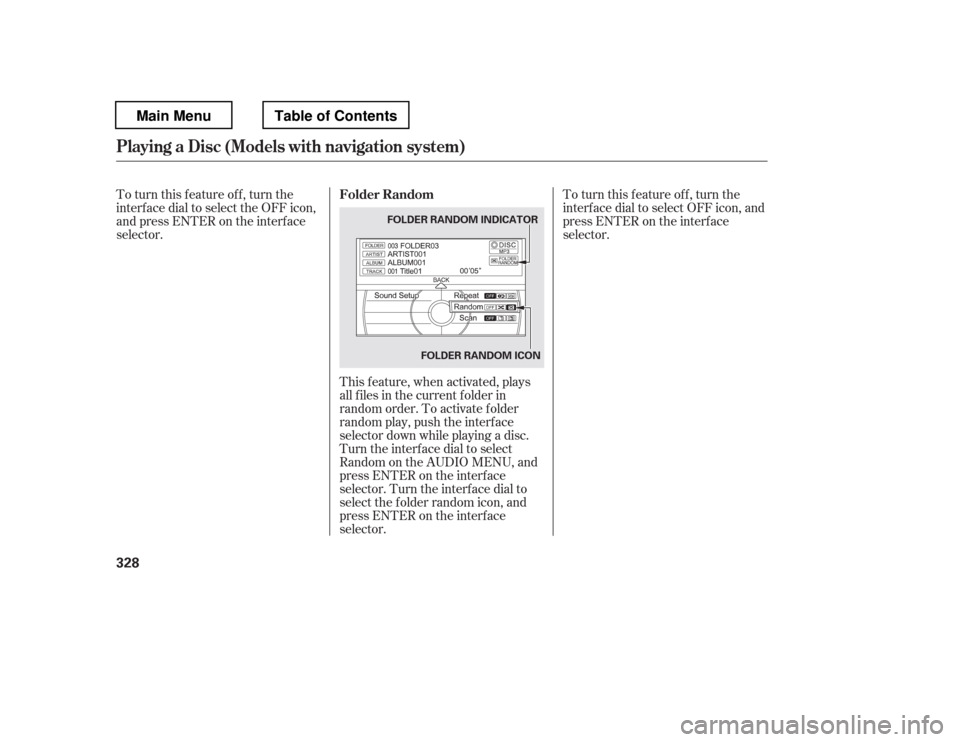
selector.This f eature, when activated, plays
all f iles in the current f older in
random order. To activate f older
random play, push the interf ace
selector down while playing a disc.
Turn the interf ace dial to select
Random on the AUDIO MENU, and
press ENTER on the interf ace
selector. Turn the interf ace dial to
select the f older random icon, and
press ENTER on the interf ace
selector. To turn this feature off, turn the
interf ace dial to select OFF icon, and
press ENTER on the interf ace
selector.
Folder Random
Playing a Disc (Models with navigation syst em)
328
FOLDER RANDOM INDICATOR
FOLDER RANDOM ICON
Main MenuTable of Contents
Page 336 of 681

This feature samples all files in the
selectedfolderintheordertheyare
stored. To activate this f eature, press
the SCAN button. You can also
select the SCAN icon with the
interf ace dial. Push the selector
down, turn the dial to select Scan on
the AUDIO MENU, then press
ENTER. Turn the dial to select the
scan icon, then press ENTER. The
system begins to play a f ile f or about
10 seconds, and continues to samplethe remaining f iles.
To turn this feature off, press and
hold the SCAN button for more than
2 seconds, or turn the interf ace dial
to select the OFF icon, and press
ENTER on the interf ace selector.
This feature, when activated,
samples the f irst f ile of each f older
f or 10 seconds. To scan a f older,
press the SCAN button repeatedly.
Or, push the interf ace selector down
while playing a disc. Turn the
interf ace dial to select Scan on the
AUDIO MENU, and press ENTER
on the interf ace selector. Turn the
interf ace dial to select the f older
scan icon, and press ENTER on the
interf ace selector.
CONT INUED
Folder Scan
File Scan
Playing a Disc (Models with navigation syst em)
Features
329
SCAN OFF ICON
FOLDER SCAN ICON
FILE SCAN ICON
Main MenuTable of Contents