Page 406 of 681
To operate the rear entertainment
system f rom the f ront panel, press
the REAR SOURCE button. You will
hear two beeps and the indicator in
the button comes on to show that the
control panel is enabled.
When REAR SOURCE is selected,
the f ront entertainment system
audio controls can also be used to
operate the rear entertainment
system in all modes.To play the radio, the buttons for the
f ront entertainment system have the
same f unctions.
The media that the rear passengers
are listening to will then be heard
f rom the f ront speakers.
If you do not operate the rear
entertainment system f rom the f ront
panel within 20 seconds, the
indicator in the REAR SOURCE
button will go of f and the display will
return to the front entertainment
system automatically. If an audio CD is loaded into the
upper slot, select the CD/CDL or
CD button. If a DVD or CD is loaded
into the lower slot, select the DVD
button.
The DVD player in your rear
entertainment system can play DVD
video discs, audio CDs, MP3/WMA
discs and DTS CDs.
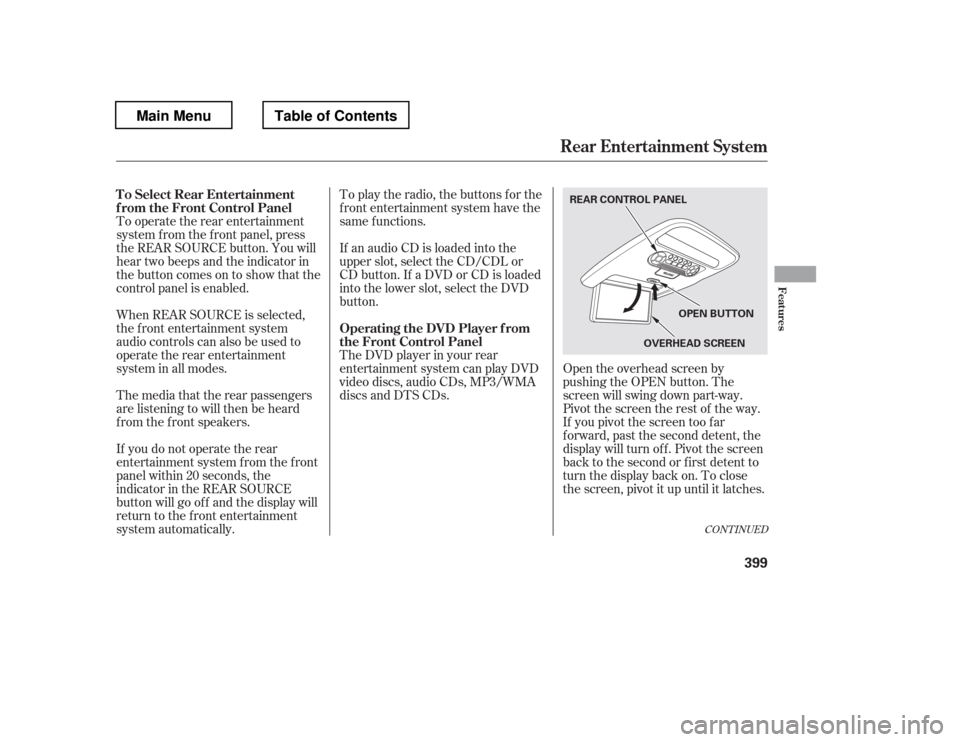
Open the overhead screen by
pushing the OPEN button. The
screen will swing down part-way.
Pivot the screen the rest of the way.
If you pivot the screen too f ar
f orward, past the second detent, the
display will turn of f . Pivot the screen
back to the second or first detent to
turn the display back on. To close
the screen, pivot it up until it latches.
CONT INUED
To Select Rear Entertainment
f rom the Front Control Panel
Operating the DVD Player f rom
the Front Control Panel
Rear Entertainment System
Features
399
REAR CONTROL PANEL
OVERHEADSCREEN
OPEN BUTTON
Main MenuTable of Contents
Page 413 of 681

Press the FM/AM button to listen to
the radio.Press the XM button to listen to the
XM Radio. You can press either side(or) of th e TU N E/S K IP
bar to scroll up/down and select
channels within a category (in
CATEGORY mode), or to scroll up/
down and select f rom among all
available channels (in CH mode). Press the MENU button to display
theaudiomenuontheoverhead
screen. You can enter the
highlighted f unction by pressing the
ENTER button. These f unctions
have the same features as those of
the f ront audio system.
Pressing and holding the TITLE/
SCROLL button f or 5 seconds
enables you to switch between
search modes.
U
se th e,,, or
button to highlight SEEK,
TUNE, AUTO SELECT, SCAN, or
one of the preset radio stations on
the overhead screen. You can enter
the highlighted f unction by pressing
the ENT button. These f unctions
have the same features as those of
the f ront audio system. You can also
use the or buttons to seek
up/down and or to tune
up/down.
To Play the Radio f rom the Rear
Control Panel
To Play the XM Radio f rom the
Rear Control Panel
Rear Entertainment System
406
OVERHEADSCREEN REAR CONTROL PANEL
OPEN BUTTON
REAR CONTROL PANEL
On vehicles without navigation system
On vehicles with navigation system
Main MenuTable of Contents
Page 440 of 681

The compass may need to be
manually calibrated af ter exposure to
a strong magnetic field. If the
compassseemstobecontinually
showing the wrong direction and is
not self -calibrating, or the compass
display is blinking with the CAL
indicator on, do the f ollowing
procedure.Do this procedure in an open
area, away f rom buildings, power
lines, and other vehicles.
Turn the ignition switch to the ON
(II) position.
Press and hold the SETUP button
f or about 5 seconds. The display
shows you the compass setting
menu items.
When you turn the ignition switch to
the ON (II) position, the compass is
self-calibrating, then the compass
display is shown in the display.
Compass operation can be af f ected
by driving near power lines or
stations, across bridges, through
tunnels, over railroad crossings, past
large vehicles, or driving near large
objects that can cause a magnetic
disturbance. It can also be af f ected
by accessories such as antennas and
roof racks that are mounted by
magnets.
1. 2.
CONT INUED
On EX, EX-L, and Canadian LX modelswithout navigation systemCompass Calibration
Compass Operation
Compass
Features
433
NOTE:
EX-L and Canadian EX models EX-L and Canadian EX models
U.S. EX and Canadian LX models U.S. EX and Canadian LX models
Main MenuTable of Contents
Page 442 of 681
Once the correct zone is displayed,
press the selector knob. The
display then returns to normal.
Find the zone f or your area on the
map (see page ). If the correct
zone is not shown, turn the
selector knob to cycle the zone
lists up or down.
In most areas, there is a variation
between magnetic north and true
north. Zone selection is required so
the compass can compensate f or this
variation. To check and select the
zone, do this:
Turn the ignition switch to the ON
(II) position.
If necessary, press the RETURN
button to return to the previous
display. Pressing the SETUP
button will cancel the compass
setting mode.
Press and hold the SETUP button
f or about 5 seconds. The display
shows you the compass setting
menu items.
Turn the selector knob to select
‘‘ZONE
Page 452 of 681
CONT INUED
BluetoothHandsFreeL ink(Models without navigation syst em)
Features
445
Add New PhoneConnect
Disconnect Delete
Bluetooth PIN
Store Voice Tag Delete
Speed Dial Store
Speed Dial
Delete Voice Tag Disconnect a paired phone from the system.
Delete a previously paired phone.
Delete a previously stored speed dial number.
Delete a voice tag for a speed dial number.
Phone Connection
Phone Setup
Create a voice tag for a speed dial number.
Edit
Speed Dial Select a number from the Call History, Phonebook, or manual
entry to store as a speed dial number.
Pair a new phone to the system.
Connect a previously paired phone to the system.
Create a Bluetooth PIN (or pairing code on some models)
number for a paired phone.
Main MenuTable of Contents
Page 502 of 681

Your vehicle is designed to operate
on unleaded gasoline with a pump
octane number of 87 or higher. Use
of a lower octane gasoline can cause
a persistent, heavy, metallic rapping
noise that can lead to engine damage.
Premium f uel is recommended when
towing in certain conditions (see
page ).
Some gasoline today is blended with
oxygenates such as ethanol. Your
vehicle is designed to operate on
oxygenated gasoline containing up to
10% ethanol by volume. Do not use
gasoline containing methanol. If you
notice any undesirable operating
symptoms, try another service
station or switch to another brand of
gasoline.In addition, in order to maintain good
perf ormance, f uel economy, and
emissions control, we strongly
recommend the use of gasoline that
does NOT contain harmf ul
manganese-based f uel additives such
as MMT, if such gasoline is available.
Use of gasoline with these additives
may adversely af f ect perf ormance,
and cause the Malfunction Indicator
Lamp on your instrument panel to
come on. If this happens, contact
your dealer f or service.
549
CONT INUED
Fuel Recommendation
Fuel Recommendation
Bef ore Driving
495
If a non-FFV is inadvertently
ref ueled once with E85 f uel, have
the f uel tank drained at a dealer.
If this occurs over a prolonged
period, damage may occur.
Do not use E85 f uel in a non-Flex Fuel
Vehicle (FFV).
Non-FFV models are not designed to
run on E85 f uel. Using E85 f uel can
damage the f uel system components.
T o help prevent harmf ul f uel system
and engine deposits, use high quality
f uel containing detergent and additives.
Main MenuTable of Contents
Page 521 of 681
If this message is on, the ignition
switchhastobeheldinthe
START (III) position manually
until the engine starts. The
ignitionswitchcanbeheldinthat
position up to 15 seconds.
Even though you may be able to
start the engine manually without
the auto control mode of the starter
system, have your dealer inspect
your vehicle.
If there is a problem with the starter
system, you will see a ‘‘CHECK
STARTER SYSTEM
Page 527 of 681

The vehicle must be stopped with
the engine running.do
any of the f ollowing: Press the VTM-4 LOCK button.
Move the shift lever to D or D .
Move the shift lever to first (1),
second (2), or reverse (R) gear.
Turn the ignition switch to the
LOCK (0) position.
Press the VTM-4 LOCK button.
The indicator in the button comes on.
The VTM-4 Lock will temporarily
disengage when the vehicle speed
exceeds 18 mph (30 km/h). The
indicator in the button will remain on.
To get unstuck, apply light pressure
to the accelerator pedal. Do not spin
the f ront tires f or more than a f ew
seconds. Because of the amount of
torque applied to the rear tires, they
should not spin. This is normal. If
you are not able to move the vehicle,
stop and reverse direction.
If more traction is needed when your
vehicle is stuck, or is likely to
become stuck, you can use the
VTM-4 LOCK button to increase
torque to the rear wheels.
The variable torque management
4WD (VTM-4) system automatically
transf ers varying amounts of engine
torque to the rear wheels under
lower traction conditions.
1. 2.3.
3
4WD models onlyTo Engage the VTM-4 Lock To Disengage the VTM-4 Lock,
VTM-4System
520 Do not continuously spin the f ront tires
of your vehicle. Continuously spinning
the f ront tires can cause transmission
or rear dif f erential damage.
Do not use the VTM-4 LOCK button on
dry, paved roads. Driving on dry,
paved roads with VTM-4 Lock ON may
damage the rear dif f erential when
making a turn. Strange noise and
vibration can also result.
Main MenuTable of Contents


