Page 92 of 681

�Û�Ý�Û�Ý
�Û�Ý
To change the display, press the
INFO( / )buttononthesteering
wheel repeatedly until the main
menu appears (see page ).With the ignition switch in the ON
(II) position, the multi-inf ormation
display changes as shown on the
next page each time you press the
INFO ( / ) button or the SEL/
RESET button.
When you turn the ignition switch to
the ON (II) position, your last
selection is displayed.
In the multi-information display, the
system message is also displayed
(see page ) and you can
customize your vehicle control
settings (see page ).
The multi-inf ormation display in the
instrument panel displays various
inf ormation and messages when the
ignition switch is in the ON (II)
position. Some of the messages help
you operate your vehicle more
comf ortably. Others help to keep
you aware of the periodic
maintenance your vehicle needs f or
continued trouble-f ree driving.
You can also change the display by
pressing the select/reset knob in the
instrument panel.
When you open the driver
Page 129 of 681
�Î
�Î
�Î
�Î �Î
�Î
�Î �Î
�Î
�Î
�Î
�Î
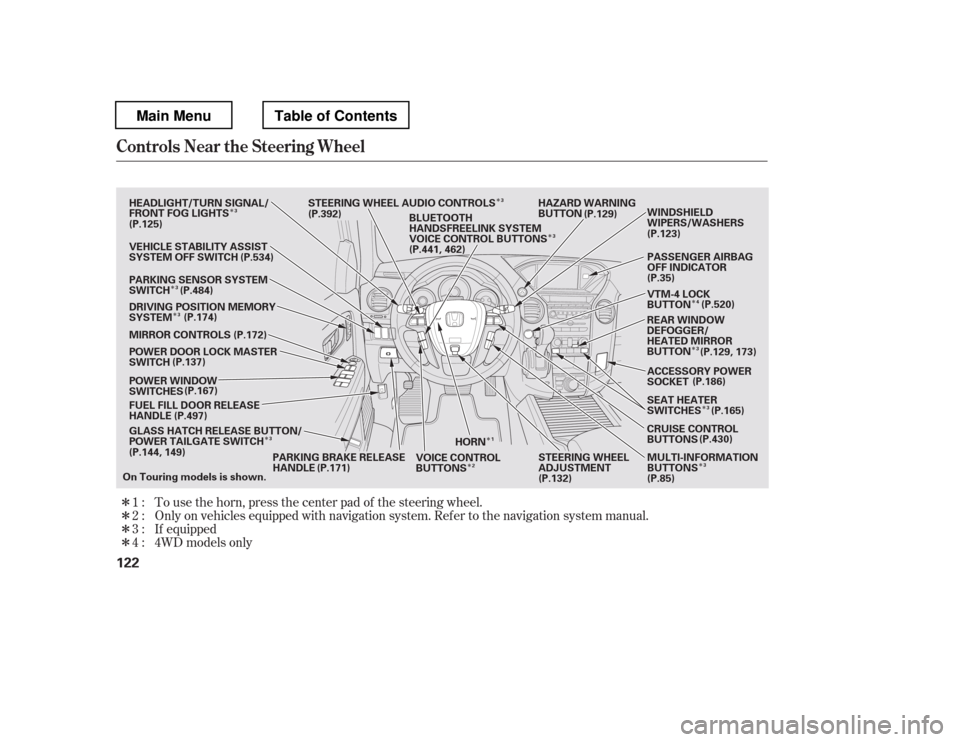
�Î �Î�Î�ÎTo use the horn, press the center pad of the steering wheel.
Only on vehicles equipped with navigation system. Ref er to the navigati
on system manual.
If equipped
1:2: 3:
4 : 4WD models only
Controls Near the Steering Wheel
122
HORN HAZARD WARNING
BUTTON
GLASS HATCH RELEASE BUTTON/
POWER TAILGATE SWITCH
FUEL FILL DOOR RELEASE
HANDLE
POWER WINDOW
SWITCHES
POWER DOOR LOCK MASTER
SWITCH
MIRROR CONTROLS
DRIVING POSITION MEMORY
SYSTEM
VEHICLE STABILITY ASSIST
SYSTEM OFF SWITCH
PARKING SENSOR SYSTEM
SWITCH
HEADLIGHT/TURN SIGNAL/
FRONT FOG LIGHTS
STEERING WHEEL AUDIO CONTROLS
PARKING BRAKE RELEASE
HANDLE STEERING WHEEL
ADJUSTMENT
VOICE CONTROL
BUTTONS PASSENGER AIRBAG
OFF INDICATOR
VTM-4 LOCK
BUTTON
ACCESSORY POWER
SOCKET
SEAT HEATER
SWITCHES
CRUISE CONTROL
BUTTONS MULTI-INFORMATION
BUTTONS (P.186)
BLUETOOTH
HANDSFREELINK SYSTEM
VOICE CONTROL BUTTONS
REAR WINDOW
DEFOGGER/
HEATED MIRROR
BUTTONWINDSHIELD
WIPERS/WASHERS
On Touring models is shown. (P.125)
(P.137)
(P.144, 149) (P.129)
(P.123)
(P.35)
(P.85)
(P.132)
(P.534)
(P.484) (P.174) (P.172)
(P.167)
(P.497)
(P.171) (P.430)
(P.165)
(P.129, 173)
(P.520)
(P.392)
(P.441, 462)
1
3
3
3 3
3
2 4
3
3
3
3
Main MenuTable of Contents
Page 139 of 681
Make any steering wheel adjustment
bef ore you start driving.Push the lever under the steering
column all the way down.Push the lever up to lock the
steering wheel in position.
Make sure you have securely
locked the steering wheel in place
by trying to move it up, down, in,
and out.
Move the steering wheel up or
down, and in or out, so it points
toward your chest, not toward
your f ace. Make sure you can see
the instrument panel gauges and
indicators. 3. 4.
1.2.
Steering Wheel A djustment
132
Adjusting the steering wheel
position while driving may
cause you to lose control of the
vehicle and be seriously injured
inacrash.
Adjust the steering wheel only
when the vehicle is stopped.
Main MenuTable of Contents
Page 143 of 681
�µ�µ
�µ
�µ
The ignition switch has f our
positions: LOCK (0), ACCESSORY
(I), ON (II), and START (III).
You can insert or
remove the key only in this position.
To turn the key to the LOCK (0)
position, the shif t lever must be in
Park, and you must push the key in
slightly. If the f ront wheels are turned, the
anti-theft lock may make it difficult
to turn the key. Firmly turn the
steering wheel to the lef t or right as
you turn the key.
You can
operate the audio system and the
accessory power sockets in this
position.
This is the normal key
position when driving. Several of the
indicators on the instrument panel
come on as a test when you turn the
ignition switch f rom the
ACCESSORY (I) to the ON (II)
position.
Use this position
only to start the engine. The switch
returns to the ON (II) position when
you let go of the key. You will hear a reminder beeper if
you leave the key in the ignition
switch in the LOCK (0) or the
ACCESSORY (I) position and open
the driver
Page 215 of 681
Theclimatecontrolsystemhastwo
sensors: a sunlight sensor on top of
the dashboard, and a temperature
and humidity sensor next to the
steering column. Do not cover the
sensors or spill any liquid on them.
Sunlight and T emperature
Sensors
Climate Control System
208
TEMPERATURE/HUMIDITY SENSOR
SUNLIGHT SENSOR
Main MenuTable of Contents
Page 332 of 681

The scan f unction samples all tracks
on the disc in the order they are
recordedonthedisc.
To activate scan, press the SCAN
button, or push the interf ace selector
down while playing a disc. Turn the
interf ace dial to select Scan on the
AUDIO MENU, and press ENTER
on the interf ace selector.Turn the interface dial to select the
Scan icon, and press ENTER on the
interf ace selector. You will hear a 10-
second sampling of each track on the
disc. When you return to disc mode,
the disc will begin playing f rom
where it lef t of f .
To turn this feature off, press the
SCAN button again, or turn the
interf ace dial to select the OFF icon,
andpressENTERontheinterface
selector. The system begins to play
the last track sampled.
To take the system out of the disc
mode, press one of the other source
buttons than the CD button.
You can also press the MODE
buttononthesteeringwheelto
change modes.
If you turn the system of f while a
disc is playing, either with the
power/volume knob or the ignition
switch, play will continue at the same
point when you turn it back on.
Track Scan
To Stop Playing a Disc
Playing a Disc (Models with navigation syst em)
Features
325
SCAN ICON
Main MenuTable of Contents
Page 377 of 681
�Î�Î
The displayed message may
vary on models or versions. On
some models, there is no
message to disconnect.
To take the system out of the iPod
mode, press one of the other source
buttons than the USB/AUX button.
When a compatible audio unit is
connected to the auxiliary input jack,
press the USB/AUX button to select
it. When you disconnect the iPod while
it is playing, the audio screen (if
selected) shows NO DATA.
If you reconnect the same iPod, the
system may begin playing where it
lef t of f , depending on what mode the
iPod is in when it is reconnected.
You can also press the MODE
buttononthesteeringwheelto
change modes.
You can disconnect the iPod at any
time when you see the ‘‘OK to
disconnect
Page 395 of 681

Turn the dial to select a sound setup
mode, then press ENTER to set your
selection. See page f or more
sound setting inf ormation.
If you receive a call when the
Audio is playing, press the
PICK-UPbuttononthesteering
wheel. The screen and the center
displayswitchtotheHFLmode(see
page ).
Af ter ending the call, press the
HANG-UP button to go back to the
Audio mode. To take the system out of the
Audio mode, press one of
the other source buttons than the
USB/AUX button. When a
compatible audio unit is connected to
the auxiliary input jack, press the
USB/AUX button to select it.
Switching to another mode pauses
the music playing f rom your phone.
309
463
As required by the FCC: This device complies with Part 15 of theFCC rules. Operation is subject to the
f ollowing two conditions: (1) This device may not cause harmf ul interf erence, and(2) this device must accept any
interf erence received, includinginterf erence that may cause undesiredoperation.
Changes or modif ications not expresslyapproved by the party responsible f or
compliance could void the user


