Page 145 of 441
144
uuOperating the Switches Around the Steering WheeluFog Lights
*
Controls
Fog Lights
*
When the low beam headlights are on, turn
the fog light switch on to use the fog lights.
Daytime Running LightsThe high beam headlights come on slightly dimmer than normal when the following
conditions have been met:
•The ignition switch is in ON
(w
.
•The headlight switch is off.
•The parking brake is released.
The lights remain on even if you set the parking brake. Turning off the ignition
switch will turn off the daytime running lights.
The high beam headlights return to the original brightness once the headlight
switch is turned on.
1Fog Lights
When the fog lights are on, the indicator in the
instrument panel will be on.
2Fog Light Indicator
* P. 80
Fog Light Switch
* Not available on all models
Page 151 of 441

uuOperating the Switches Around the Steering WheeluDriving Position Memory System
*
150Controls
1.Adjust the driver’s seat and the outside
mirrors to the desired position, and turn the
ignition switch to ON
(w
.
2.Press the SET button.
uYou will hear the beeper, and the
memory button indicator light will blink.
3.Press and hold memory button
(1
or
(2
within five seconds of pressing the SET
button.
uOnce the seat and the outside mirrors
position has been memorized, the
indicator light on the button you pressed
stays on.
1.Move the shift lever to
(P
.
2.Apply the parking brake.
3.Press a memory button ((1
or
(2
).
uYou will hear the beeper, and the
indicator light will blink.
The seat and the outside mirrors will
automatically move to the memorized
position. When it has finished moving, you
will hear the beeper, and the indicator light
stays on.
■
Storing a Position in Memory
1Storing a Position in Memory
After you press the SET button, the storing operation
will be canceled when: •You do not press the memory button within five
seconds.•You readjust the seat position before the double-
beep.•You readjust the outside mirrors.•You turn the ignition switch to any position except
ON
(w
.
Memory
Button 1Memory
Button 2SET Button■
Recalling the Stored Position
1Recalling the Stored Position
The seat and the outside mirrors will stop moving if
you: •Press the SET button, or a memory button (
(1
or
(2
).
•Adjust the seat position.•Adjust the outside mirrors.•Shift into any position except
(P
.
Memory
Button 1Memory
Button 2SET Button
Page 286 of 441

285
Driving
This chapter discusses driving, refueling, and information on items such as accessories.
Before Driving
Driving Preparation .......................... 286
Maximum Load Limit........................ 289
Towing a Trailer
Towing Preparation .......................... 291
Driving Safely with a Trailer .............. 295
Towing Your Vehicle ........................ 296
When Driving
Starting the Engine .......................... 297
Precautions While Driving................. 299
Automatic Transmission ................... 300
Shifting ............................................ 301Cruise Control ................................. 303
VSA
® (Vehicle Stability Assist), aka ESC
(Electronic Stability Control), System ...... 306
TPMS (Tire Pressure Monitoring System) ... 308
Tire Pressure Monitoring System (TPMS) -
Required Federal Explanation ......... 309BSI (Blind Spot Information) System
*.... 312
Braking
Brake System ................................... 314
ABS (Anti-lock Brake System) ........... 316
Brake Assist System.......................... 317
Parking Your Vehicle
When Stopped................................. 318Parking ............................................ 318
Parking Sensor System
*................... 319
Rearview Camera
*............................ 323
Rearview Display Image ................... 324
Refueling
Fuel Information .............................. 325
How to Refuel ................................. 326
Fuel Economy.................................... 328
Improving Fuel Economy .................. 328
Accessories and Modifications
Accessories ...................................... 329
Modifications................................... 329
* Not available on all models
Page 296 of 441

295
uuTowing a TraileruDriving Safely with a Trailer
Continued
Driving
Driving Safely with a Trailer•Have the trailer properly serviced and keep it in good condition.
•Make sure that all the weights and load in the vehicle and trailer are within limits.
2Towing Load Limits P. 291
•Securely attach the hitch, safety chains, and other necessary parts to the trailer.
•Securely store all the items in and on the trailer so that they do not shift while
driving.
•Check if the lights and brakes on the trailer are working properly.
•Check the pressure of the trailer tires, including the spare.
•Drive slower than normal.
•Obey posted speed limits for vehicles with trailer.
•Use the
(D
when towing a trailer on level roads.
•Turn more slowly and with a wider turning arc than normal.
•Allow more time and distance for braking.
•Do not brake or turn suddenly.
■
Things You Need To Know Before Towing a Trailer
■
Towing Speeds and Gears
■
Turning and Braking
1Driving Safely with a Trailer
Parking
In addition to the normal precautions, place wheel
chocks at each of the trailer’s tires.
When towing a trailer, we recommend that you carry
a full-size spare wheel and tire for your vehicle and
trailer. If you use the compact spare tire that came
with your vehicle, it could adversely affect vehicle
handling.
2Specifications P. 421
2Changing a Flat Tire P. 391
Remember to unhitch the trailer before changing a
flat tire. Ask the trailer sales or rental agency where
and how to store the trailer’s spare tire.
Page 298 of 441
297
Continued
Driving
When DrivingStarting the Engine
1.Make sure the parking brake is applied.
2.Check that the shift lever is in
(P
, then
depress the brake pedal.
uAlthough it is possible to start the vehicle
in
(N
, it is safer to start it in
(P
.
1Starting the Engine
Keep your foot firmly on the brake pedal when
starting the engine.
The engine is harder to start in cold weather and in
thinner air found at altitudes above 8,000 feet (2,400
meters).
When starting the engine in cold weather, turn off all
electrical accessories such as the lights, heating and
cooling system
*/climate control system
*, and rear
defogger in order to reduce battery drain.
If the exhaust system sounds abnormal or you can
smell exhaust gas inside the vehicle, have your vehicle
checked by a dealer. There may be a problem with
the engine or exhaust system.
Brake Pedal
* Not available on all models
Page 299 of 441

uuWhen DrivinguStarting the Engine
298Driving
3.Turn the ignition switch to START
(e
without depressing the accelerator pedal.
1.Keeping your right foot on the brake pedal, release the parking brake. Check that
the brake system indicator has gone off.
2Parking Brake P. 314
2.Put the shift lever in
(D
. Select
(R
when reversing.
3.Gradually release the brake pedal and gently depress the accelerator pedal to pull
away.
1Starting the Engine
Do not hold the key in START
(e
for more than 15
seconds.
•If the engine does not start right away, wait for at
least 10 seconds before trying again.•If the engine starts, but then immediately stops,
wait at least 10 seconds before repeating step 3
while gently depressing the accelerator pedal.
Release the accelerator pedal once the engine
starts.
The immobilizer system protects your vehicle from
theft. If an improperly coded key (or other device) is
used, the engine's fuel system is disabled.
2Immobilizer System P. 134
■
Starting to Drive
Page 302 of 441
301
uuWhen DrivinguShifting
Continued
Driving
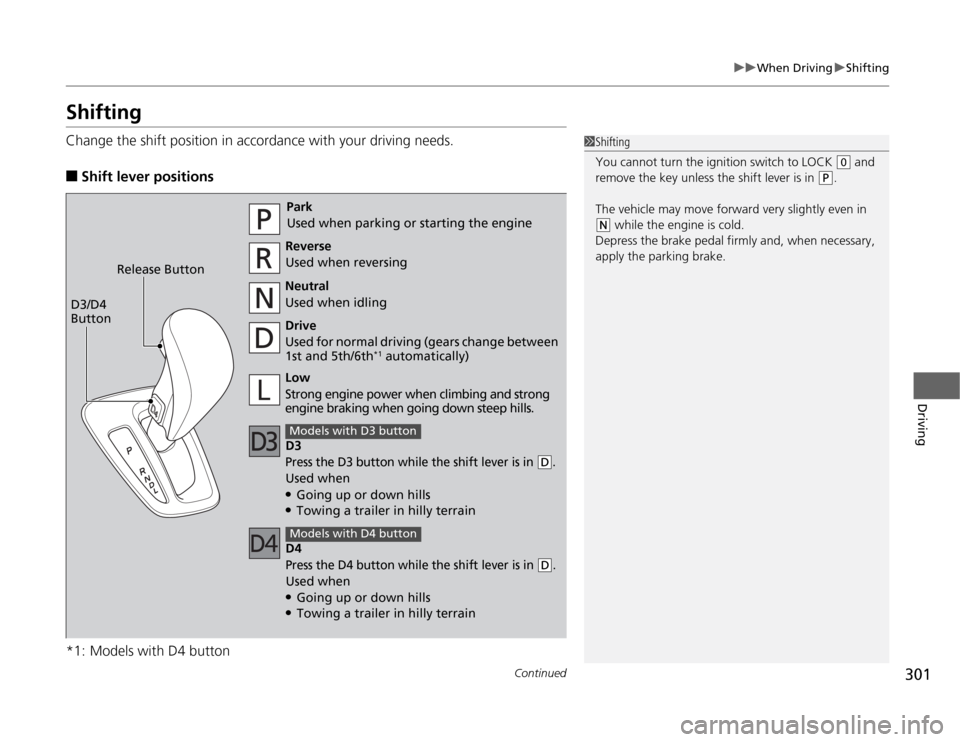
ShiftingChange the shift position in accordance with your driving needs.■
Shift lever positions
*1: Models with D4 button
1Shifting
You cannot turn the ignition switch to LOCK
(0
and
remove the key unless the shift lever is in
(P
.
The vehicle may move forward very slightly even in
(N
while the engine is cold.
Depress the brake pedal firmly and, when necessary,
apply the parking brake.
Park
Used when parking or starting the engine
Reverse
Used when reversing
Neutral
Used when idling
Drive
Used for normal driving (gears change between
1st and 5th/6th
*1 automatically)
D3
Press the D3 button while the shift lever is in
(D
.
Used when●Going up or down hills●Towing a trailer in hilly terrainModels with D3 buttonLow
Strong engine power when climbing and strong
engine braking when going down steep hills. Release Button
D3/D4
Button
D4Press the D4 button while the shift lever is in
(D
.
Used when●Going up or down hills●Towing a trailer in hilly terrainModels with D4 button
Page 315 of 441
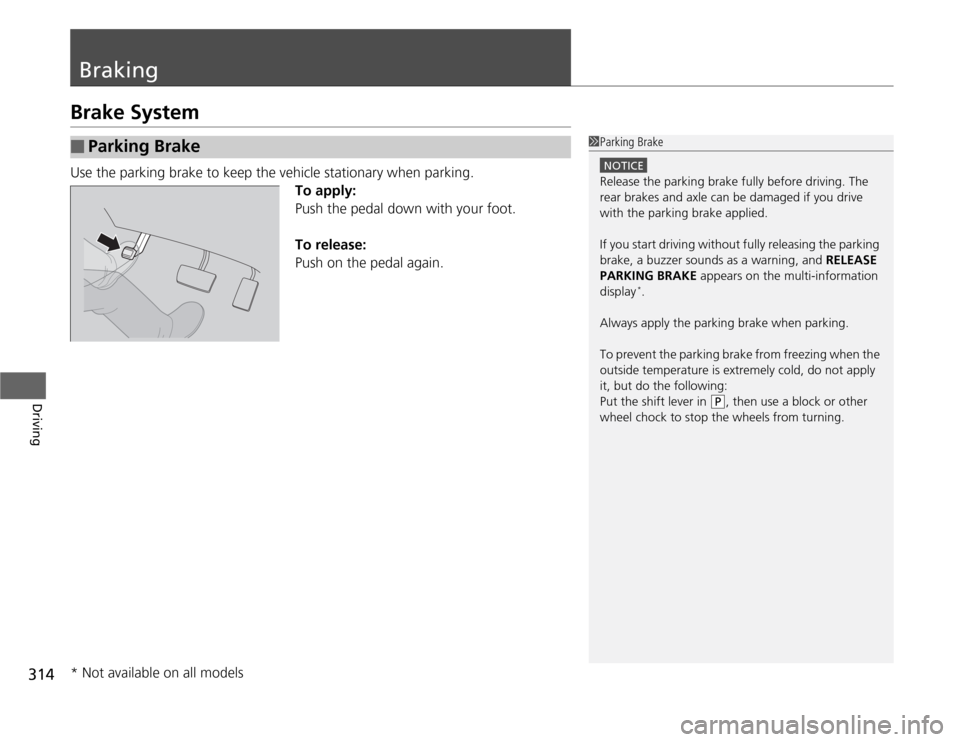
314Driving
BrakingBrake SystemUse the parking brake to keep the vehicle stationary when parking.
To apply:
Push the pedal down with your foot.
To release:
Push on the pedal again.■
Parking Brake
1Parking Brake
NOTICERelease the parking brake fully before driving. The
rear brakes and axle can be damaged if you drive
with the parking brake applied.
If you start driving without fully releasing the parking
brake, a buzzer sounds as a warning, and RELEASE
PARKING BRAKE appears on the multi-information
display
*.
Always apply the parking brake when parking.
To prevent the parking brake from freezing when the
outside temperature is extremely cold, do not apply
it, but do the following:
Put the shift lever in
(P
, then use a block or other
wheel chock to stop the wheels from turning.
* Not available on all models