Page 85 of 441
84
uuIndicatorsuMulti-Information Display Warning and Information Messages
*
Instrument Panel
Multi-Information Display Warning and Information Messages
*
The following messages appear only on the multi-information display. Press the / (information) button to see the message again
with the system message indicator on.
Message
Condition
Explanation
●
Appears when the fuel fill cap is loose or is not
installed.
2Check/Tighten Fuel Cap Message P. 407
●
Appears when the scheduled maintenance is due
soon.
●
Consequently, SERVICE DUE NOW and SERVICE
PAST DUE follow.
2Maintenance Minder Messages on the Multi-
Information Display P. 340
●
Appears when the ignition key is turned to
ACCESSORY
(q
from ON
(w
. (The driver’s door is
closed.)
—
●
Appears when you open the driver's door while the
ignition key is in LOCK
(0
.
●
Remove the key from the ignition switch.
●
Appears when the engine coolant temperature gets
abnormally high.
2Overheating P. 404
* Not available on all models
Page 88 of 441
87
uuGauges and DisplaysuInformation Display
*
Continued
Instrument Panel
Information Display
*
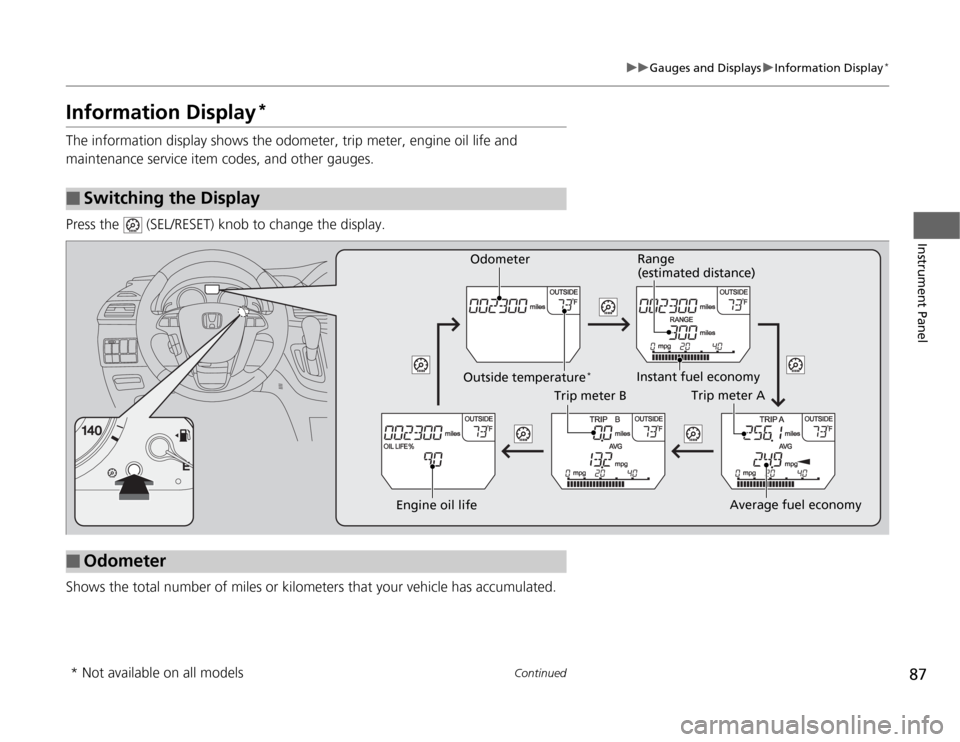
The information display shows the odometer, trip meter, engine oil life and
maintenance service item codes, and other gauges.
Press the (SEL/RESET) knob to change the display.
Shows the total number of miles or kilometers that your vehicle has accumulated.■
Switching the Display
■
Odometer
Engine oil life
Trip meter B
Average fuel economy
Trip meter A
Instant fuel economyRange
(estimated distance)
Outside temperature
*
Odometer
* Not available on all models
Page 89 of 441
uuGauges and DisplaysuInformation Display
*
88Instrument Panel
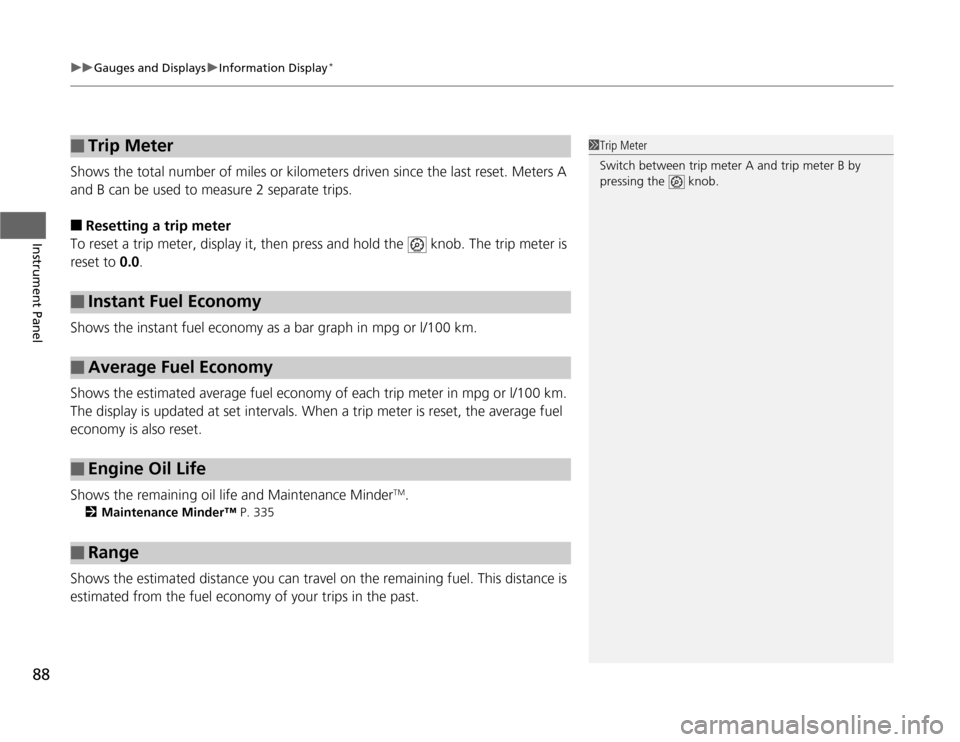
Shows the total number of miles or kilometers driven since the last reset. Meters A
and B can be used to measure 2 separate trips.■
Resetting a trip meter
To reset a trip meter, display it, then press and hold the knob. The trip meter is
reset to 0.0.
Shows the instant fuel economy as a bar graph in mpg or l/100 km.
Shows the estimated average fuel economy of each trip meter in mpg or l/100 km.
The display is updated at set intervals. When a trip meter is reset, the average fuel
economy is also reset.
Shows the remaining oil life and Maintenance Minder
TM.
2Maintenance Minder™ P. 335
Shows the estimated distance you can travel on the remaining fuel. This distance is
estimated from the fuel economy of your trips in the past.■
Trip Meter
■
Instant Fuel Economy
■
Average Fuel Economy
■
Engine Oil Life
■
Range
1Trip Meter
Switch between trip meter A and trip meter B by
pressing the knob.
Page 101 of 441
uuGauges and DisplaysuMulti-Information Display
*
100Instrument Panel
Shows the average speed in mph or km/h since the last time Trip A or Trip B was
reset.
Shows the remaining oil life and Maintenance Minder
TM.
2Maintenance Minder™ P. 335
Shows the outside temperature in Fahrenheit (U.S.) or Celsius (Canada).■
Adjusting the outside temperature display
Adjust the temperature reading up to ±5°F or ±3°C if the temperature reading
seems incorrect.
■
Average Speed
■
Engine Oil Life
■
Outside Temperature
1Outside Temperature
The temperature sensor is in the front bumper.
Road heat and exhaust from another vehicle can
affect the temperature reading when your vehicle
speed is less than 19 mph (30 km/h).
It may take several minutes for the display to be
updated after the temperature reading has stabilized.
Use the multi-information display's customized
features to correct the temperature.
2Customized Features P. 101
Page 311 of 441

310
uuWhen DrivinguTire Pressure Monitoring System (TPMS) - Required Federal Explanation
Driving
Please note that the TPMS is not a substitute for proper tire
maintenance, and it is the driver's responsibility to maintain
correct tire pressure, even if under-inflation has not reached the
level to trigger illumination of the TPMS low tire pressure telltale.
Your vehicle has also been equipped with a TPMS malfunction
indicator to indicate when the system is not operating properly.
The TPMS malfunction indicator is provided by a separate telltale,
which displays the symbol “TPMS” when illuminated.
When the malfunction indicator is illuminated,
the system may not be able to detect or signal low tire pressure as
intended.
TPMS malfunctions may occur for a variety of reasons, including
the installation of replacement or alternate tires or wheels on the
vehicle that prevent the TPMS from functioning properly.
Always check the TPMS malfunction telltale after replacing one or
more tires or wheels on your vehicle to ensure that the
replacement or alternate tires and wheels allow the TPMS to
continue to function properly.Models with information display
Page 329 of 441

328Driving
Fuel EconomyImproving Fuel EconomyFuel economy depends on several conditions, including driving conditions, your
driving habits, the condition of your vehicle, and loading. Depending on these and
other conditions, you may or may not achieve the rated fuel economy of this vehicle.
You can optimize your fuel economy with proper maintenance of your vehicle.
Always maintain your vehicle in accordance with the messages displayed on the
information display
*/multi-information display
*.
•Use the recommended viscosity engine oil, displaying the API Certification Seal.
•Maintain the specified tire pressure.
•Do not load the vehicle with excess cargo.
•Keep your vehicle clean. A buildup of snow or mud on your vehicle's underside
adds weight and increases wind resistance.
■
Maintenance and Fuel Economy
1Improving Fuel Economy
Direct calculation is the recommended method to
determine actual fuel consumed while driving.
In Canada, posted fuel economy numbers are
established following a simulated test. For more
information on how this test is performed, please visit
http://oee.nrcan.gc.ca/
Miles drivenGallons of
fuelMiles per
Gallon
100L per 100 km Liters of
fuelKilometers
driven
* Not available on all models
Page 332 of 441

331
Maintenance
This chapter discusses basic maintenance.
Before Performing Maintenance
Inspection and Maintenance ............ 332
Safety When Performing Maintenance..... 333Parts and Fluids Used in Maintenance
Service ........................................... 334
Maintenance Minder™.................... 335
Maintenance Under the HoodMaintenance Items Under the Hood ..... 343Opening the Hood ........................... 344
Recommended Engine Oil ................ 345
Oil Check ......................................... 346
Adding Engine Oil ............................ 347Changing the Engine Oil and Oil Filter ..... 348
Engine Coolant ................................ 350
Transmission Fluid ............................ 352
Brake Fluid ....................................... 353
Power Steering Fluid Check.............. 354
Refilling Window Washer Fluid......... 354
Replacing Light Bulbs....................... 355
Checking and Maintaining Wiper Blades
.... 366
Checking and Maintaining Tires
Checking Tires ................................. 370
Tire and Loading Information Label ...... 371Tire Labeling .................................... 371DOT Tire Quality Grading (U.S. Vehicles)....... 373Wear Indicators................................ 375Tire Service Life ................................ 375
Tire and Wheel Replacement ........... 376
Tire Rotation .................................... 377
Winter Tires ..................................... 378
Battery............................................... 379
Remote Transmitter Care................. 380
Remote Control and Wireless
Headphone Care
*........................... 382
Heating and Cooling System
*/Climate
Control System
* Maintenance....... 384
Cleaning
Interior Care .................................... 385
Exterior Care.................................... 387
* Not available on all models
Page 333 of 441

332Maintenance
Before Performing MaintenanceInspection and MaintenanceFor your safety, perform all listed inspections and maintenance to keep your vehicle
in good condition. If you become aware of any abnormality (noise, smell, insufficient
brake fluid, oil residue on the ground, etc.), have your vehicle inspected by a dealer.
(Note, however, that service at a dealer is not mandatory to keep your warranties in
effect.) Refer to the separate maintenance booklet for detailed maintenance and
inspection information.■
Daily inspections
Perform inspections before long distance trips, when washing the vehicle, or when
refueling.
■
Periodic inspections
•Check the automatic transmission fluid level monthly.
2Automatic Transmission Fluid P. 352
•Check the brake fluid level monthly.
2Brake Fluid P. 353
•Check the tire pressure monthly. Examine the tread for wear and foreign objects.
2Checking and Maintaining Tires P. 370
•Check the operation of the exterior lights monthly.
2Replacing Light Bulbs P. 355
•Check the condition of the wiper blades at least every six months.
2Checking and Maintaining Wiper Blades P. 366
■
Types of Inspection and Maintenance
1Inspection and Maintenance
Maintenance, replacement, or repair of
emissions control devices and systems may be
done by any automotive repair establishment or
individuals using parts that are "certified" to
EPA standards.
According to state and federal regulations, failure to
perform maintenance on the maintenance main
items marked with # will not void your emissions
warranties. However, all maintenance services should
be performed in accordance with the intervals
indicated by the information display
*/multi-
information display
*.
2Maintenance Service Items P. 337, 341
If you want to perform complex maintenance tasks
that require more skills and tools, you can purchase a
subscription to the Service Express website at
www.techinfo.honda.com.
2Authorized Manuals P. 429
If you want to perform maintenance yourself, make
sure that you have the necessary tools and skills first.
After performing maintenance, update the records in
the separate maintenance booklet.
U.S. models
* Not available on all models