Continued
173
uuInterior Lights/Interior Convenience ItemsuInterior Convenience Items
Controls
Press the button to open the center pocket.
■
Using the center pocket as a cool box
*
While the air conditioner is in use, you can
store items in the center pocket to keep them
cool.
Press the COOL BOX button to cool inside the
center pocket (indicator on).
■
Center PocketButton
1Using the center pocket as a cool box
NOTICEDo not put opened cans, or loose ice and containers.
Spilled liquids can damage the upholstery and
electrical components in and around the cool box.
The cool box is not a refrigerator. It only keep chilled
beverage cool.
The climate control system continues to cool the cool
box when the heater is turned on.
Pressing the COOL BOX button automatically turns
on the air conditioning system.
The cool box automatically turns off if:•The air conditioning system is turned off•You turn the ignition switch to LOCK
(0
* Not available on all models
uuClimate Control System
*uUsing Automatic Climate Control
188Controls
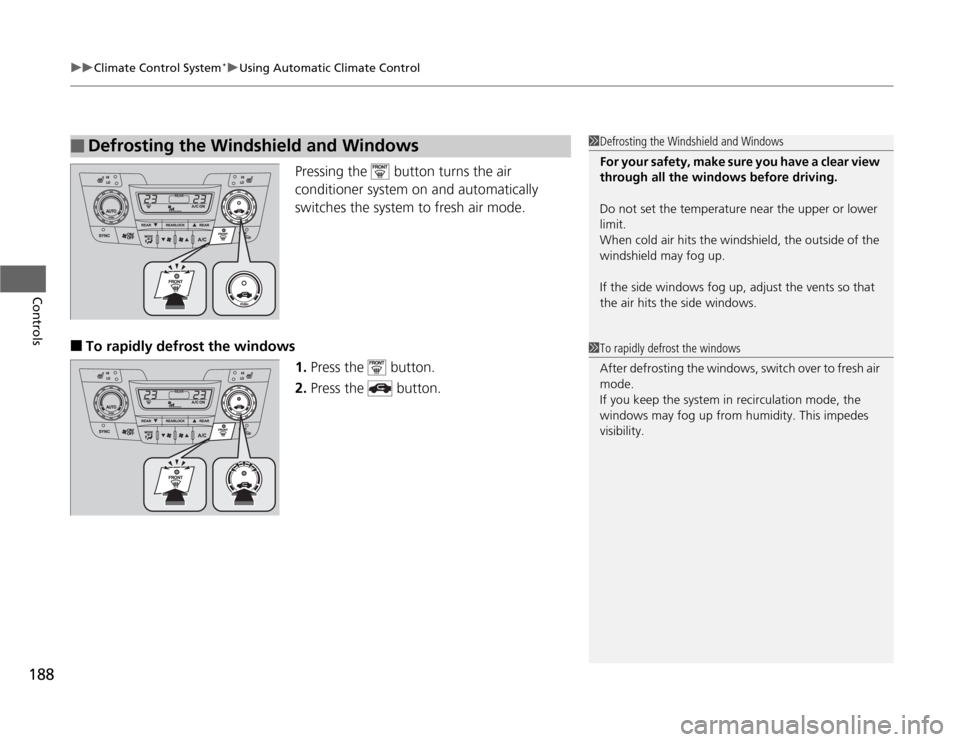
Pressing the button turns the air
conditioner system on and automatically
switches the system to fresh air mode.
■
To rapidly defrost the windows
1.Press the button.
2.Press the button.
■
Defrosting the Windshield and Windows
1Defrosting the Windshield and Windows
For your safety, make sure you have a clear view
through all the windows before driving.
Do not set the temperature near the upper or lower
limit.
When cold air hits the windshield, the outside of the
windshield may fog up.
If the side windows fog up, adjust the vents so that
the air hits the side windows.1To rapidly defrost the windows
After defrosting the windows, switch over to fresh air
mode.
If you keep the system in recirculation mode, the
windows may fog up from humidity. This impedes
visibility.