Page 112 of 198
111
Audio
This section describes how to operate the audio system. You can play
music from a wide array of media s ources, and control the audio system
using the audio buttons, the touch screen, or voice control.
Audio System ........................................ 112
About Your Audio System .................... 112
Auxiliary Input Jack .............................. 112
System Theft Protection ....................... 113
Playing FM/AM Radio ...........................114
Selecting FM/AM Mode........................ 114
Audio Screen Control ........................... 115
Audio Menu ........................................ 116
Radio Data System (RDS) ...................... 117
Playing a Disc ........................................ 119
Selecting Disc Mode ............................. 119
Audio Screen Control ........................... 120
Playing MP3/WMA/AAC Discs .............. 121
Recommended Discs ............................ 122Playing
an iPod® ................................... 123
Selecting iPod® Mode .......................... 124
Audio Screen Control............................ 125
Searching for Music .............................. 126
Playing a USB Flash Drive .....................127
Selecting USB Mode.............................. 128
Audio Screen Control............................ 129
Playing Tracks in Folders ........................ 130
Playing Bluetooth ® Audio.................... 131
Selecting Bluetooth ® Audio Mode........ 131
Switching to HFL Mode ......................... 132
Audio Screen Control............................ 133Adjusting the Sound
............................. 134
Audio Remote Controls........................ 135
Steering Wheel Controls ...................... 135
FIT_KA-31TK6830.book 111 ページ 2011年7月4日 月曜日 午後2時45分
QRG
Index
Home
2012 Fit Navigation
Page 113 of 198
112
Audio
Audio System
About Your Audio System
The audio system features FM/AM radio. It can also play audio discs, WMA/MP3/
AAC tracks, iPods®, USB flash drives, and Bluetooth® devices.
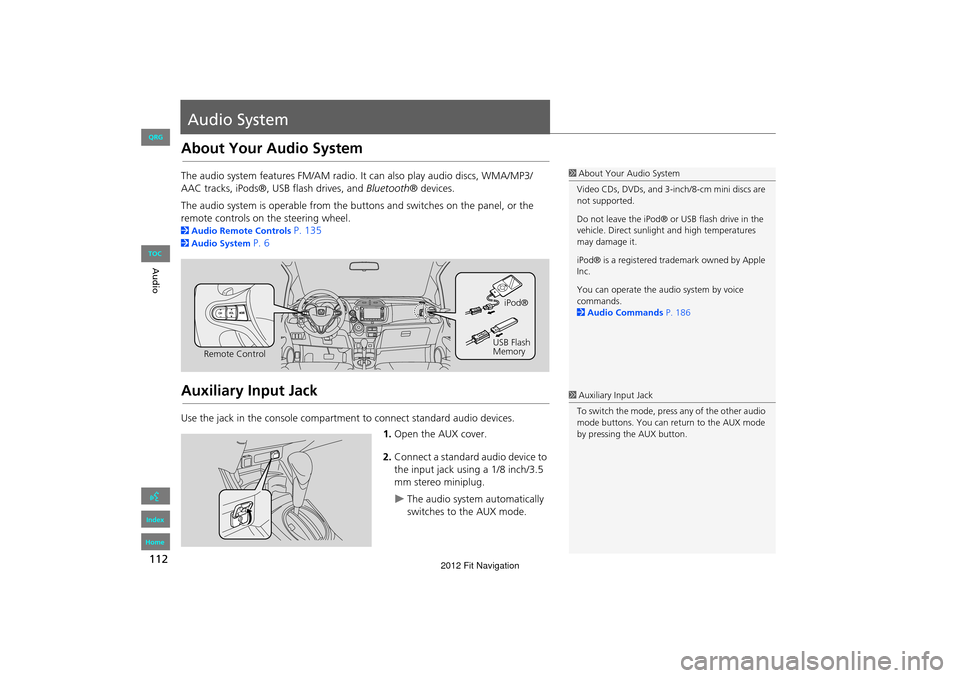
The audio system is operable from the buttons and switches on the panel, or the
remote controls on the steering wheel.
2 Audio Remote Controls P. 135
2Audio System P. 6
Auxiliary Input Jack
Use the jack in the console compartment to connect standard audio devices.
1.Open the AUX cover.
2. Connect a standard audio device to
the input jack using a 1/8 inch/3.5
mm stereo miniplug.
The audio system automatically
switches to the AUX mode.
1About Your Audio System
Video CDs, DVDs, and 3-inch/8-cm mini discs are
not supported.
Do not leave the iPod® or USB flash drive in the
vehicle. Direct sunlight and high temperatures
may damage it.
iPod® is a registered tra demark owned by Apple
Inc.
You can operate the audio system by voice
commands.
2 Audio Commands P. 186
Remote Control iPod®
USB Flash
Memory
1 Auxiliary Input Jack
To switch the mode, press any of the other audio
mode buttons. You can return to the AUX mode
by pressing the AUX button.
FIT_KA-31TK6830.book 112 ページ 2011年7月4日 月曜日 午後2時45分
QRG
Index
Home
TOC
2012 Fit Navigation
Page 189 of 198

188
Voice CommandsCellular Phone Commands
Voice Commands
iPod play
iPod play track # (#: 1 to 30)
iPod skip forward
iPod skip back
iPod track shuffle*
iPod album shuffle*
iPod track repeat *
iPod normal play (cancels repeat or
shuffle play mode, resumes normal play
mode)
■ iPod® Commands
Bluetooth audio play
Bluetooth audio skip forward
Bluetooth audio skip back
Bluetooth audio pause
Bluetooth audio resume
NOTE:
Bluetooth® Audio commands may not
work on some phones or Bluetooth®
audio devices.
AUX play (or Auxiliary play)
■Bluetooth ® Audio Commands
■AUX Commands
Cellular Phone Commands
The system accepts these commands only
on the PHONE screen.
Redial
Call History
Phonebook
Dial
Phone Setup
Phone Menu
Speed Dial 1
Speed Dial 2
More Speed Dial Lists
These commands can be made from any
screen. Dial/call by number
Dial/call by voice tag
FIT_KA-31TK6830.book 188 ページ 2011年7月4日 月曜日 午後2時45分
QRG
Index
Home so the command may not match your intended action.
These commands toggle the function on and off,
*
2012 Fit Navigation