Page 152 of 435

There may be other geographic
situations that could af f ect XM Radio
reception.After you’ve registered with XM
Radio, keep your audio system in the
XM Radio mode while you wait f or
activation. This should take about
If your XM Radio service has expired
or you purchased your vehicle f rom
a previous owner, you can listen to a
sampling of the broadcasts available
on XM Radio. With the ignition
switch in the ACCESSORY (I) or the
ON (II) position, press the
button. A variety of music
types and styles will play. While waiting f or activation, make
sure your vehicle remains in an open
area with good reception. Once your
audio system is activated,
‘‘CATEGORY’’ or ‘‘CHANNEL’’ will
appear in the display, and you’ll be
able to listen to XM Radio broadcasts.
XM Radio will continue to send an
activation signal to your vehicle f or
at least 12 hours from the activation
request. If the service has not been
activated after 36 hours, contact
XM
Radio. In Canada, contact
.
If you decide to purchase XM radio
service, contact XM Radio at
,orat
1-800-852-9696. In Canada, contact
XM CANADA
at , or
at 1-877-209-0079. You will need to
give them your radio I.D. number
and your credit card number. To get
your radio I.D. number, press the button, then turn the
selector knob until ‘‘CH 000’’ appears
in the display. Your I.D. will appear
in the display.
As required by the FCC:
Changes or modif ications not expresslyapproved by the party responsible f orcompliance could void the user’sauthority to operate the equipment.
www.siriusxm.comwww.xmradio.ca
This Category II radiocommunication
device complies with Industry CanadaStandard RSS-310.Operation is subject to the f ollowing twoconditions: (1) this device may not causeinterf erence, and (2) this device mustaccept any interf erence, includinginterf erence that may cause undesiredoperation of the device.
Receiving XM Radio Service
Playing the XMRadio (Models without navigation system)
148
Features
XM CANADA
30 minutes.
2012 Crosstour
Page 200 of 435

Driving on a road beside a vertical
wall, steep clif f , or hill to the south
of you.After you’ve registered with XM
Radio, keep your audio system in the
XM Radio mode while you wait f or
activation. This should take about 30
minutes.
If your XM Radio service has expired
or you purchased your vehicle f rom
a previous owner, you can listen to a
sampling of the broadcasts available
on XM Radio. With the ignition
switch in the ACCESSORY (I) or the
ON (II) position, press the
button. A variety of music
types and styles will play.
If you decide to purchase XM radio
service, contact XM Radio at ,orat
1-800-852-9696. In Canada, contact
XM CANADA
at , or
at 1-877-209-0079. You will need to
give them your radio I.D. number
and your credit card number. To get
your radio I.D. number, press the side of the TUNE bar until ‘‘0’’
appears in the display. Your I.D. will
appear in the display. While waiting f or activation, make
sure your vehicle remains in an open
area with good reception. Once your
audio system is activated, CAT
(category) or CH (channel) will
appear in the center display, and
you’ll be able to listen to XM Radio
broadcasts. XM Radio will continue
to send an activation signal to your
vehicle for at least 12 hours from the
activation request. If the service has
not been activated after 36 hours,
contact XM
Radio. In Canada,
contact XM CANADA
.
Driving on the lower level of a
multi-tiered road.
Driving on a single lane road
alongside dense trees taller than
50 ft. (15 m) to the south of you.
There may be other geographic
situations that could af f ect XM Radio
reception.
www.siriusxm.com
www.xmradio.ca
As required by the FCC:
Changes or modif ications not expresslyapproved by the party responsible f orcompliance could void the user’sauthority to operate the equipment.This Category II radiocommunicationdevice complies with Industry CanadaStandard RSS-310.Operation is subject to the f ollowing twoconditions: (1) this device may not causeinterf erence, and (2) this device mustaccept any interf erence, includinginterf erence that may cause undesiredoperation of the device.
Receiving XM Radio Service
Playing the XMRadio (Models with navigation system)
196
Features
2012 Crosstour
Page 204 of 435

When you play CD-TEXT, you will
see the track name, artist name, and
album name on the screen. When
you play MP3/WMA discs, you will
see the track name and folder name
on the screen. If the disc was not
recorded with this inf ormation, it will
not be displayed. The player can play CD-TEXT, MP3,
and WMA formats.
Select the changer by pressing the
CD button. The system will begin
playing the last selected disc in the
disc changer. You will see the
current disc position highlighted.
To select a dif f erent disc, press the
corresponding number on the preset
buttons, or turn the interf ace knob to
highlight the desired disc number,
then press ENTER on the interf ace
selector. Each time you press and release the
side of the skip bar or push the
interface selector to the right, the
player skips f orward to the
beginning of the next track. Press
and release the side of the skip
barorpushtheinterfaceselectorto
thelefttoskipbackwardtothe
beginning of the current track. Press
the side or push the interf ace
selector to the left again to skip to
the previous track. To move rapidly
within a track, press and hold either
side of the skip bar.
To Play a Disc
To Change Tracks
Playing Discs(Models with navigation system)
200
CURRENT DISC
Features
2012 Crosstour
Page 211 of 435

You can also eject discs when the
ignition switch is of f :
To eject one disc, press and release
the eject button.
To remove a different disc from the
changer,firstselectitbypressing
the corresponding number on the
preset button or turning the
interf ace knob, and pressing ENTER
on the interf ace selector. When that
disc begins playing, press the eject
button.
When you press the eject button
while listening to the radio, or with
the audio system turned of f , the disc
that was last selected is ejected.
Af ter that disc is ejected, pressing
the eject button again will eject the
next disc in numerical order. By
doing this six times, you can remove
all the discs f rom the changer.
To remove the disc that is currently
playing, press the eject button. You
will see ‘‘EJECT’’ in the center
display. When you remove the disc
from the slot, the system
automatically enters the previous
modeAM,FM1,FM2,orXMRadio.
The system also begins the load
sequence so you can load another
disc. If you do not load another disc,
the load sequence is canceled, and
the system continues playing in the
previous mode.
If you do not remove the disc f rom
the slot, the system will reload the
disc af ter 10 seconds. To begin
playing the disc, press the CD button. To eject all discs, press and hold the
eject button until the f irst disc begins
to eject.
Removing Discs
f rom the Changer
Playing Discs
(Models with navigation system)
207
Features
2012 Crosstour
Page 234 of 435
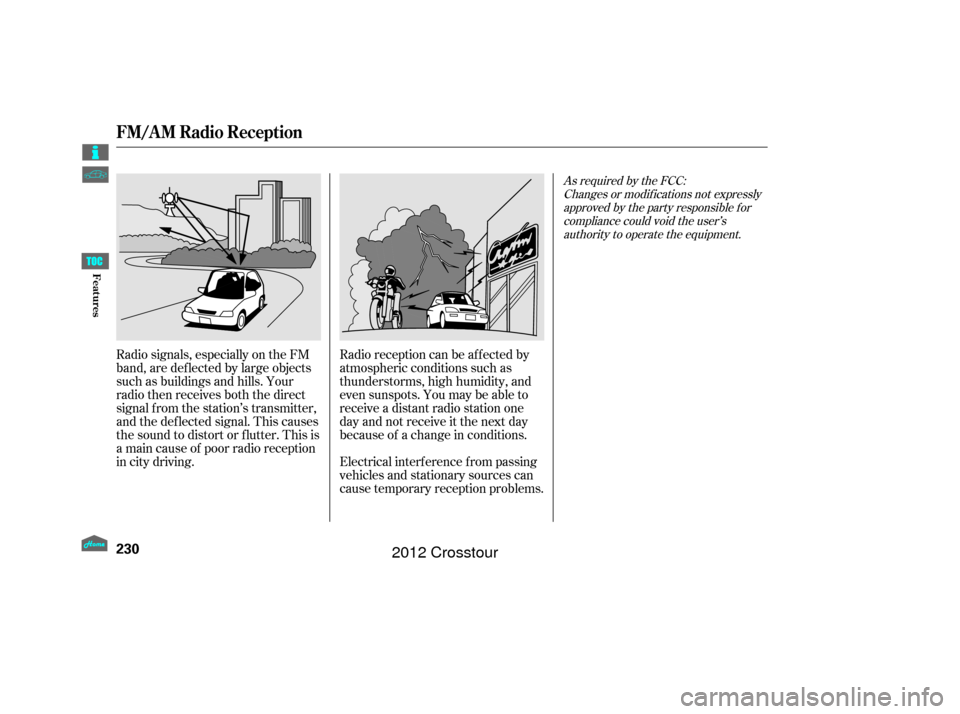
Radio signals, especially on the FM
band, are def lected by large objects
such as buildings and hills. Your
radio then receives both the direct
signal f rom the station’s transmitter,
and the def lected signal. This causes
the sound to distort or flutter. This is
a main cause of poor radio reception
in city driving.Radio reception can be af f ected by
atmospheric conditions such as
thunderstorms, high humidity, and
even sunspots. You may be able to
receive a distant radio station one
day and not receive it the next day
because of a change in conditions.
Electrical interf erence f rom passing
vehicles and stationary sources can
cause temporary reception problems.
As required by the FCC:
Changes or modif ications not expresslyapproved by the party responsible f orcompliance could void the user’sauthority to operate the equipment.
FM/A M Radio Reception
230
Features
2012 Crosstour
Page 252 of 435
You can cancel cruise control in any
of these ways:Push the CANCEL button on the
steering wheel.
Push the CRUISE button on the
steering wheel.
Even with the cruise control turned
on, you can still use the accelerator
pedal to speed up f or passing. Af ter
completing the pass, take your foot
of f the accelerator pedal. The vehicle
will return to the set cruising speed.
Resting your f oot on the brake pedal
causes cruise control to cancel.
Tap the brake pedal.
When you push the CANCEL button
or tap the brake pedal, the system
remembers the previously set speed.
To return to that speed, accelerate to
above25mph(40km/h),thenpress
and release the RES/ACCEL button.
The CRUISE CONTROL indicator
comes on. The vehicle accelerates to
thesamespeedasbefore.
Pressing the CRUISE button turns
the system completely of f and erases
the previous cruising speed. Resuming the Set Speed
Canceling Cruise Control
Cruise Control
248
Features
2012 Crosstour
Page 256 of 435
HomeLinkis a registered
trademark of Johnson Controls, Inc.As required by the FCC:
This device complies with Part 15 of theFCC rules. Operation is subject to thef ollowing two conditions: (1) This devicemay not cause harmf ul interf erence, and(2) this device must accept anyinterf erence received, includinginterf erence that may cause undesiredoperation.
Changes or modif ications not expresslyapproved by the party responsible f orcompliance could void the user’sauthority to operate the equipment.
This device complies with IndustryCanada Standard RSS-210.Operation is subject to the f ollowing twoconditions: (1) this device may not causeinterf erence, and (2) this device mustaccept any interf erence that may causeundesired operation of the device.
HomeL inkUniversal Transceiver
252
Features
2012 Crosstour
Page 281 of 435

Thename and logos are
registered trademarks owned by
Bluetooth SIG, Inc. and any use of
such marks by Honda Motor Co.,
Ltd. is under license. Other
trademarks and trade names are
those of their respective owners. Refer to the navigation system
manual f or operation of the rearview
camera.Bluetooth
As required by the FCC:
This device complies with Part 15 of theFCC rules. Operation is subject to thef ollowing two conditions: (1) This devicemay not cause harmf ul interf erence, and(2) this device must accept anyinterf erence received, includinginterf erence that may cause undesiredoperation.
Changes or modif ications not expresslyapproved by the party responsible f orcompliance could void the user’sauthority to operate the equipment. On models with navigation system
This device complies with Industry Canada Standard RSS-210.Operation is subject to the f ollowing twoconditions: (1) this device may not causeinterf erence, and (2) this device mustaccept any interf erence that may causeundesired operation of the device.
Bluet oot h
Wireless Technology
Rearview Camera and Monitor
BluetoothHandsFreeL ink, Rearview Camera and Monitor
277
Features
2012 Crosstour