Page 74 of 345

73
uuIndicatorsu
Continued
Instrument Panel
IndicatorNameOn/BlinkingExplanationMessage*
Turn Signal
Indicators
●
The turn signal indicators blink when
you operate the turn signal lever.
● If you press the hazard warning
button, both indicators and all turn
signals blink at the same time.● Does not blink or blinks rapidly - A
turn signal light bulb has blown.
Change the bulb immediately. 2Replacing Light Bulbs
P. 273, 275
—
High-Beam
Indicator●
Comes on when the high beam
headlights are on.
——
Lights On
Indicator
●Comes on whenever the light switch
is on, or in AUTO *
when the exterior
lights are on.● If you remove the key from the ignition
switch while the exterior lights are on, a
chime sounds when the driver's door is
opened.
—
Fog Light
Indicator *●
Comes on when the fog lights are
on.
——
Side Airbag Off
Indicator
●
Comes on for a few seconds when
you turn the ignition switch to ON
(w , then goes off.
● Comes on when the passenger side
airbag system is automatically shut
off.
● It does not mean there is a problem
with your side airbags.
● Comes on when nobody is sitting in
the passenger seat - Have the vehicle
checked by a dealer.
● Comes on when someone is sitting
in the seat - Have the passenger sit
properly.U.S.
Canada
* Not available on all models
Page 75 of 345

74
uuIndicatorsu
Instrument Panel
IndicatorNameOn/BlinkingExplanationMessage*
Immobilizer
System Indicator
●
Comes on briefly when you turn the
ignition switch to ON
(w , then goes
off.
● Comes on if the immobilizer system
cannot recognize the key
information.
●Blinks - You cannot start the engine.
Turn the ignition switch to LOCK
(0 ,
pull the key out, and then insert the key
and turn it to ON
(w again.
● Repeatedly blinks - The system may
be malfunctioning. Have the vehicle
checked by a dealer.
● Do not attempt to alter this system or
add other devices to it. Electrical
problems can occur.
—
Security System
Alarm Indicator *
●
Blinks when the Security System
Alarm has been set.
2 Security System Alarm P. 112—
Low Temperature
Indicator
●
Comes on for a few seconds when
you turn the ignition switch to ON
(w .
● Comes on when the engine coolant
temperature is low.
●If the indicator stays on after the engine
has reached normal operating
temperature, there may be problem
with the temperature sensors. Have the
vehicle inspected by a dealer.
—
Indicator
* Not available on all models
Page 76 of 345

75
uuIndicatorsu
Instrument Panel
IndicatorNameOn/BlinkingExplanationMessage*
ECON Mode
Indicator
*
●
Comes on when you turn the
ignition switch to ON
(w , and goes
off when the engine starts.
● Comes on when you press the ECON
button.
2 ECON Button P. 123
CRUISE MAIN
Indicator*●
Comes on when you press the
CRUISE button.
2 Cruise Control P. 220—
CRUISE CONTROL
Indicator*●
Comes on if you have set a speed for
cruise control.
2 Cruise Control P. 220—
Washer Level
Indicator*●
Comes on when washer fluid gets
low.● Refill washer fluid.
2Refilling Window Washer Fluid
P. 267
—
Maintenance
Minder Indicator *●
Comes on when the scheduled
maintenance is due soon.2 Maintenance Minder™ P. 243—
i-VTEC Indicator*
●
Comes on when the i-VTEC system
switches the low RPM cams to the
high RPM cams.● When the i-VTEC indicator comes on,
the REV indicator begins to come on
simultaneously.
2i-VTEC indicator P. 79
—
REV Indicators*
●
Come on when the tachometer
reading approaches the red zone.
2 REV indicators P. 79—
Indicator
Indicator
* Not available on all models
Page 78 of 345
77
uuIndicatorsuMulti-Information Display Warning and Information Messages*
Instrument Panel
MessageConditionExplanation
●
Appears when the scheduled maintenance is due soon.
● Consequently, "SERVICE DUE NOW" and "SERVICE PAST DUE" follow.2 Maintenance Minder Messages on the Multi-
Information Display P. 248
●
Appears when you open the driver's door while the ignition key is in ACCESSORY
(q .
●
Turn the ignition switch to LOCK (0 , then remove the
key.
● Appears when you open the driver's door while the
ignition key is in LOCK
(0 .
●
Remove the key from the ignition switch.
Page 79 of 345
78
Instrument Panel
Gauges and Displays
Gauges
Gauges include the speedometer, tachometer, fuel gauge, and related indicators.
They are displayed when the ignition switch is in ON
(w.
Displays your driving speed in mph or km/h.
Shows the number of engine revolutions per minute.
Displays the amount of fuel left in the fuel tank.
Shows the instant fuel economy as a bar graph in mpg or l/100km.
■Speedometer
■Tachometer
■Fuel Gauge
■Instant Fuel Economy Gauge *
1Gauges
Press and hold the km/mile change knob until you
hear a beep. The speedometer reading and the
displayed measurements switch between mph and
km/h.
1Fuel Gauge
NOTICE
You should refuel when the reading approaches .
Running out of fuel can cause the engine to misfire,
damaging the catalytic converter.
The actual amount of remaining fuel may differ from
the fuel gauge reading.E
1Instant Fuel Economy Gauge
Press and hold the km/mile change knob to switch
the measurement.
* Not available on all models
Page 87 of 345
uuGauges and DisplaysuMulti-Information Display*
86
Instrument Panel
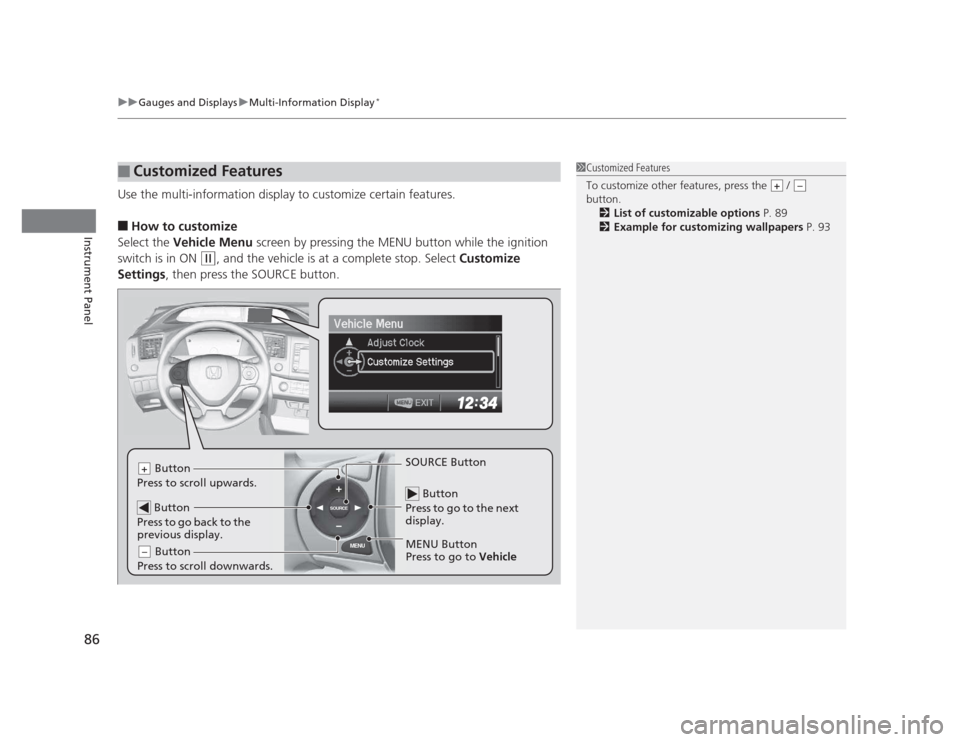
Use the multi-information display to customize certain features. ■ How to customize
Select the Vehicle Menu screen by pressing the MENU button while the ignition
switch is in ON
(w , and the vehicle is at a complete stop. Select Customize
Settings , then press the SOURCE button.
■Customized Features1Customized Features
To customize other features, press the /
button.
2 List of customizable options P. 89
2 Example for customizing wallpapers P. 93
+–
MENU
SOURCE
Button
Press to go to the next
display.
SOURCE Button
MENU Button
Press to go to Vehicle
Button
Press to scroll upwards.+
Button
Press to go back to the
previous display.
Button
Press to scroll downwards.–
Page 91 of 345

90
uuGauges and DisplaysuMulti-Information Display*
Instrument Panel
*1: Not available on all models
*2: Default Setting
*3: Default Setting for 1.8 ℓ engine models
*4: Default Setting for 2.4 ℓ engine models
*5: Refer to the navigation system manual for complete details.Setup Group Customizable Features Description Selectable settings
Customize Settings Display SetupSelect
Wallpaper
Select the full-size analogue clock or the wallpaper. Clock
*2
/Image 1/Image 2/
Image 3
Import
Wallpaper Import an image file for a new wallpaper. Three images can be stored.
2Importing Wallpapers
from USB P. 93
Delete
Wallpaper Delete an image file for a wallpaper. Image 1/Image 2/Image 3
Trip Meter
Item to
Display Select an item to be displayed along with average
fuel economy.
Range
*2
/Elapsed time/
Average speed
Select an item to be displayed along with the instant
fuel economy. Average Fuel
*2
/Range/
Elapsed time/Average speed
Welcome Screen Select whether the welcome screen comes on or not
when you turn the ignition switch to ON
(w
. On
*2
/Off
Color Theme Changes the color of the screen. Blue *3
/Red *4
/Amber/Gray
Turn by Turn Display *1, *5 Select whether the turn-by-turn display comes on or
not during the route guidance.
On
*2
/Off
Language
Selection Changes the displayed language. English
*2
/French/Spanish
1.8 � engine models
2.4 � engine models
Page 93 of 345

92
uuGauges and DisplaysuMulti-Information Display*
Instrument Panel
*1:Default Setting
*2:Default Setting for automatic transmission
*3:Default Setting for manual transmissionSetup Group Customizable Features Description Selectable settings
Customize Settings Door SetupAuto Door
Lock
Changes the setting for the automatic locking feature. Off/With Vehicle Speed
*1
/
Shift from
(P
Door Lock
Mode Sets up either the driver’s door or all doors to unlock
on the first operation of the remote or ignition key.
Driver Door
*1
/All Doors
Auto Door
Unlock Changes the setting for when the doors unlock
automatically. Off/
Driver Door with Shift to
(P
*2
/
All Doors with Shift to
(P /
Driver Door with IGN Off *3
/
All Doors with IGN Off
Keyless Lock
AcknowledgmentLOCK/UNLOCK- The exterior lights flash.
LOCK (2nd push)- The beeper sounds. On
*1
/Off
Security
Relock Timer Changes the time it takes for the doors to relock and
the security system to set after you unlock the
vehicle without opening any door.
90sec/60sec/30sec
*1
Default All Cancels/Resets all the customized settings as default. Cancel Reset All Defaults