2012 GMC SIERRA 1500 towing
[x] Cancel search: towingPage 2 of 556
Black plate (2,1)GMC Sierra Owner Manual - 2012 - CRC - 11/15/11
2012 GMC Sierra Owner ManualM
Ride Control Systems . . . . . . . . 9-55
Cruise Control . . . . . . . . . . . . . . . . 9-58
Object Detection Systems . . . . 9-61
Fuel . . . . . . . . . . . . . . . . . . . . . . . . . . 9-68
Towing . . . . . . . . . . . . . . . . . . . . . . . 9-74
Conversions and
Add-Ons . . . . . . . . . . . . . . . . . . . 9-105
Vehicle Care . . . . . . . . . . . . . . . . . 10-1
General Information . . . . . . . . . . 10-2
Vehicle Checks . . . . . . . . . . . . . . . 10-4
Headlamp Aiming . . . . . . . . . . . 10-37
Bulb Replacement . . . . . . . . . . 10-39
Electrical System . . . . . . . . . . . . 10-43
Wheels and Tires . . . . . . . . . . . 10-50
Jump Starting . . . . . . . . . . . . . . . 10-88
Towing . . . . . . . . . . . . . . . . . . . . . . 10-93
Appearance Care . . . . . . . . . . . 10-98 Service and Maintenance
. . . 11-1
General Information . . . . . . . . . . 11-1
Maintenance Schedule . . . . . . . 11-3
Special Application
Services . . . . . . . . . . . . . . . . . . . . 11-8
Additional Maintenance and Care . . . . . . . . . . . . . . . . . . . . 11-9
Recommended Fluids,
Lubricants, and Parts . . . . . . 11-12
Maintenance Records . . . . . . . 11-16
Technical Data . . . . . . . . . . . . . . . 12-1
Vehicle Identification . . . . . . . . . 12-1
Vehicle Data . . . . . . . . . . . . . . . . . . 12-2 Customer Information
. . . . . . . 13-1
Customer Information . . . . . . . . 13-1
Reporting Safety Defects . . . . 13-17
Vehicle Data Recording and
Privacy . . . . . . . . . . . . . . . . . . . . 13-19
OnStar . . . . . . . . . . . . . . . . . . . . . . . 14-1
OnStar Overview . . . . . . . . . . . . . 14-1
OnStar Services . . . . . . . . . . . . . . 14-2
OnStar Additional
Information . . . . . . . . . . . . . . . . . . 14-5
Index . . . . . . . . . . . . . . . . . . . . . i-1
Page 9 of 556
Black plate (3,1)GMC Sierra Owner Manual - 2012 - CRC - 11/15/11
In Brief 1-3
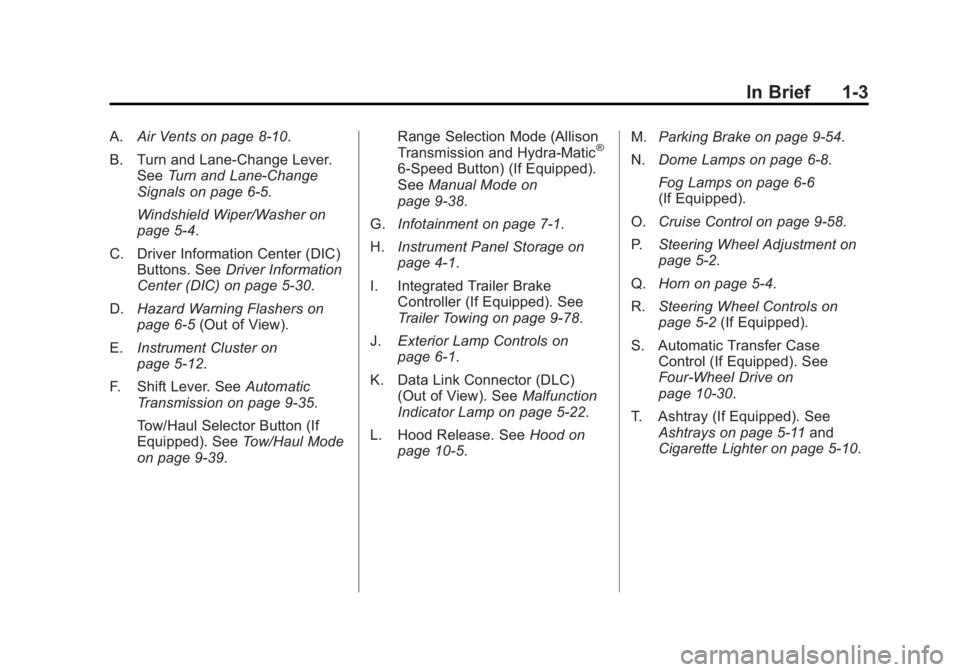
A.Air Vents on page 8‑10.
B. Turn and Lane‐Change Lever. See Turn and Lane-Change
Signals on page 6‑5.
Windshield Wiper/Washer on
page 5‑4.
C. Driver Information Center (DIC) Buttons. See Driver Information
Center (DIC) on page 5‑30.
D. Hazard Warning Flashers on
page 6‑5 (Out of View).
E. Instrument Cluster on
page 5‑12.
F. Shift Lever. See Automatic
Transmission on page 9‑35.
Tow/Haul Selector Button (If
Equipped). See Tow/Haul Mode
on page 9‑39. Range Selection Mode (Allison
Transmission and Hydra-Matic®
6‐Speed Button) (If Equipped).
See
Manual Mode on
page 9‑38.
G. Infotainment on page 7‑1.
H. Instrument Panel Storage on
page 4‑1.
I. Integrated Trailer Brake Controller (If Equipped). See
Trailer Towing on page 9‑78.
J. Exterior Lamp Controls on
page 6‑1.
K. Data Link Connector (DLC) (Out of View). See Malfunction
Indicator Lamp on page 5‑22.
L. Hood Release. See Hood on
page 10‑5. M.
Parking Brake on page 9‑54.
N. Dome Lamps on page 6‑8.
Fog Lamps on page 6‑6
(If Equipped).
O. Cruise Control on page 9‑58.
P. Steering Wheel Adjustment on
page 5‑2.
Q. Horn on page 5‑4.
R. Steering Wheel Controls on
page 5‑2 (If Equipped).
S. Automatic Transfer Case Control (If Equipped). See
Four-Wheel Drive on
page 10‑30.
T. Ashtray (If Equipped). See Ashtrays on page 5‑11 and
Cigarette Lighter on page 5‑10.
Page 13 of 556
Black plate (7,1)GMC Sierra Owner Manual - 2012 - CRC - 11/15/11
In Brief 1-7
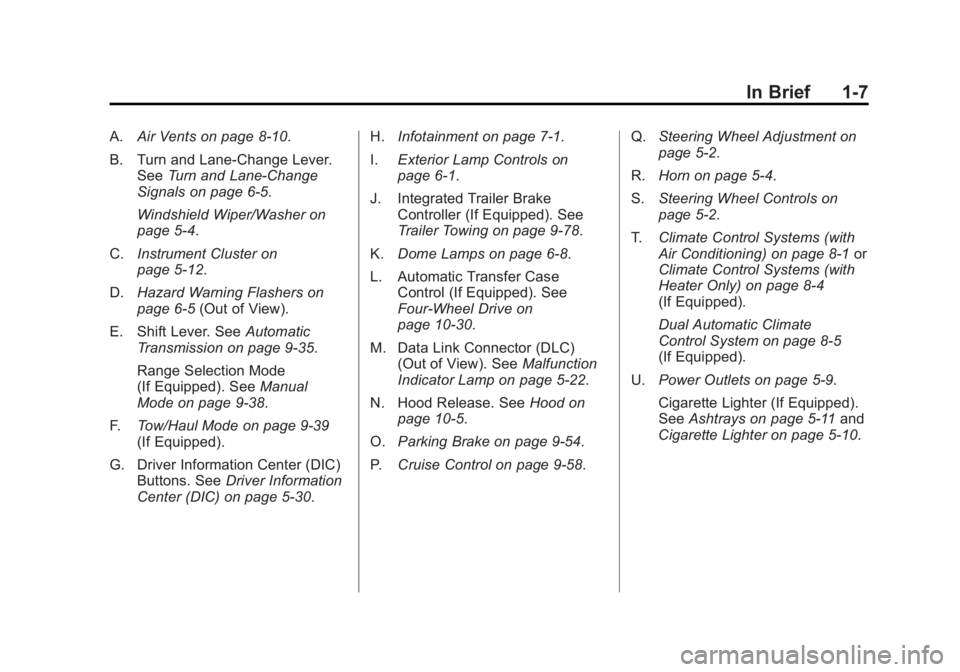
A.Air Vents on page 8‑10.
B. Turn and Lane‐Change Lever. See Turn and Lane-Change
Signals on page 6‑5.
Windshield Wiper/Washer on
page 5‑4.
C. Instrument Cluster on
page 5‑12.
D. Hazard Warning Flashers on
page 6‑5 (Out of View).
E. Shift Lever. See Automatic
Transmission on page 9‑35.
Range Selection Mode
(If Equipped). See Manual
Mode on page 9‑38.
F. Tow/Haul Mode on page 9‑39
(If Equipped).
G. Driver Information Center (DIC) Buttons. See Driver Information
Center (DIC) on page 5‑30. H.
Infotainment on page 7‑1.
I. Exterior Lamp Controls on
page 6‑1.
J. Integrated Trailer Brake Controller (If Equipped). See
Trailer Towing on page 9‑78.
K. Dome Lamps on page 6‑8.
L. Automatic Transfer Case Control (If Equipped). See
Four-Wheel Drive on
page 10‑30.
M. Data Link Connector (DLC) (Out of View). See Malfunction
Indicator Lamp on page 5‑22.
N. Hood Release. See Hood on
page 10‑5.
O. Parking Brake on page 9‑54.
P. Cruise Control on page 9‑58. Q.
Steering Wheel Adjustment on
page 5‑2.
R. Horn on page 5‑4.
S. Steering Wheel Controls on
page 5‑2.
T. Climate Control Systems (with
Air Conditioning) on page 8‑1 or
Climate Control Systems (with
Heater Only) on page 8‑4
(If Equipped).
Dual Automatic Climate
Control System on page 8‑5
(If Equipped).
U. Power Outlets on page 5‑9.
Cigarette Lighter (If Equipped).
See Ashtrays on page 5‑11 and
Cigarette Lighter on page 5‑10.
Page 24 of 556
Black plate (18,1)GMC Sierra Owner Manual - 2012 - CRC - 11/15/11
1-18 In Brief
SeePower Mirrors on page 2‑15.
Keep the selector switch in the
center position when not adjusting
either outside mirror.
Manual Mirrors
If the vehicle has manual mirrors,
they can be adjusted by moving the
mirror up and down or left to right to
see a little of the side of the vehicle,
and have a clear view behind the
vehicle.
Manual Folding Mirrors
If the vehicle has manual folding
mirrors, push the mirror toward the
vehicle. Push the mirror outward, to
return to its original position.
Manually fold the mirrors inward
to prevent damage when going
through an automatic car wash.
See Folding Mirrors on page 2‑16. Trailer-Tow Mirrors
If the vehicle has towing mirrors,
they can be adjusted for a clearer
view of the objects behind you.
Manually pull out the mirror head to
extend it for better visibility when
towing a trailer. See
Trailer-Tow
Mirrors on page 2‑15.
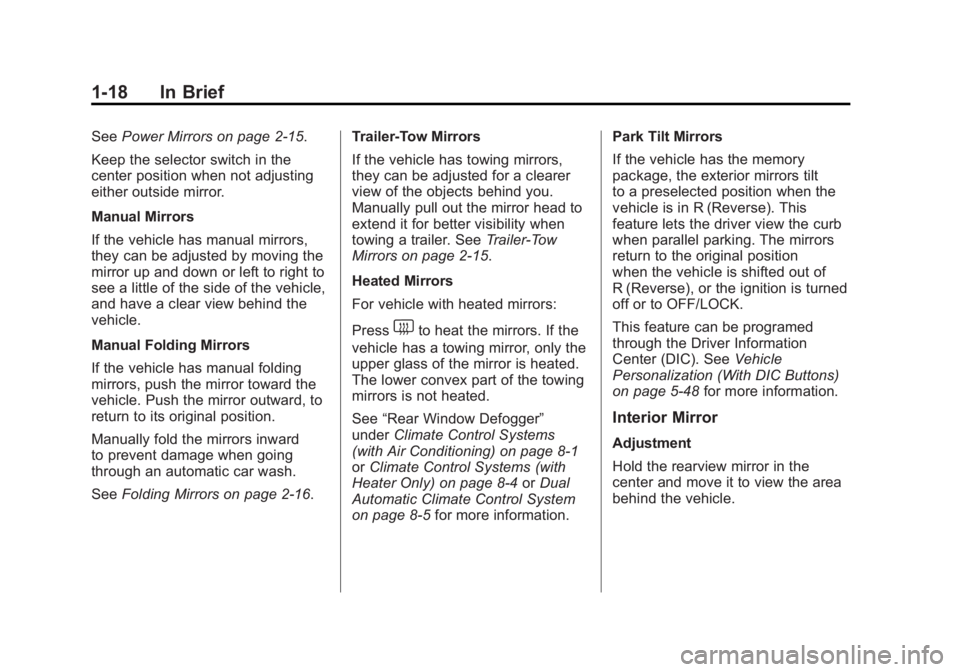
Heated Mirrors
For vehicle with heated mirrors:
Press
1to heat the mirrors. If the
vehicle has a towing mirror, only the
upper glass of the mirror is heated.
The lower convex part of the towing
mirrors is not heated.
See “Rear Window Defogger”
under Climate Control Systems
(with Air Conditioning) on page 8‑1
or Climate Control Systems (with
Heater Only) on page 8‑4 orDual
Automatic Climate Control System
on page 8‑5 for more information. Park Tilt Mirrors
If the vehicle has the memory
package, the exterior mirrors tilt
to a preselected position when the
vehicle is in R (Reverse). This
feature lets the driver view the curb
when parallel parking. The mirrors
return to the original position
when the vehicle is shifted out of
R (Reverse), or the ignition is turned
off or to OFF/LOCK.
This feature can be programed
through the Driver Information
Center (DIC). See
Vehicle
Personalization (With DIC Buttons)
on page 5‑48 for more information.
Interior Mirror
Adjustment
Hold the rearview mirror in the
center and move it to view the area
behind the vehicle.
Page 32 of 556
Black plate (26,1)GMC Sierra Owner Manual - 2012 - CRC - 11/15/11
1-26 In Brief
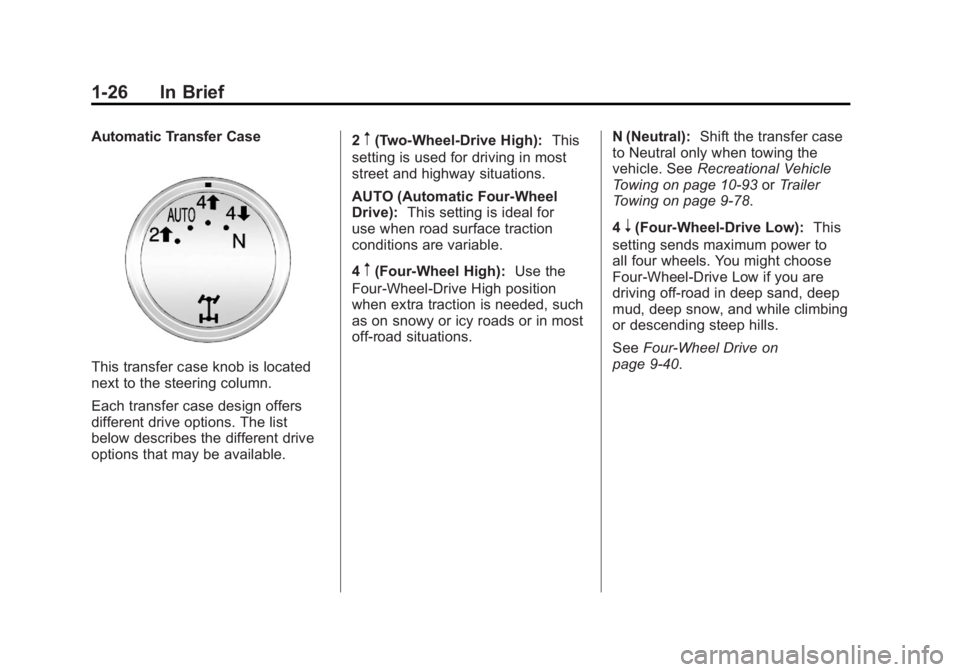
Automatic Transfer Case
This transfer case knob is located
next to the steering column.
Each transfer case design offers
different drive options. The list
below describes the different drive
options that may be available.2
m(Two-Wheel-Drive High):
This
setting is used for driving in most
street and highway situations.
AUTO (Automatic Four-Wheel
Drive): This setting is ideal for
use when road surface traction
conditions are variable.
4
m(Four-Wheel High): Use the
Four-Wheel-Drive High position
when extra traction is needed, such
as on snowy or icy roads or in most
off-road situations. N (Neutral):
Shift the transfer case
to Neutral only when towing the
vehicle. See Recreational Vehicle
Towing on page 10‑93 orTrailer
Towing on page 9‑78.
4
n(Four-Wheel-Drive Low): This
setting sends maximum power to
all four wheels. You might choose
Four-Wheel-Drive Low if you are
driving off-road in deep sand, deep
mud, deep snow, and while climbing
or descending steep hills.
See Four-Wheel Drive on
page 9‑40.
Page 59 of 556
Black plate (15,1)GMC Sierra Owner Manual - 2012 - CRC - 11/15/11
Keys, Doors, and Windows 2-15
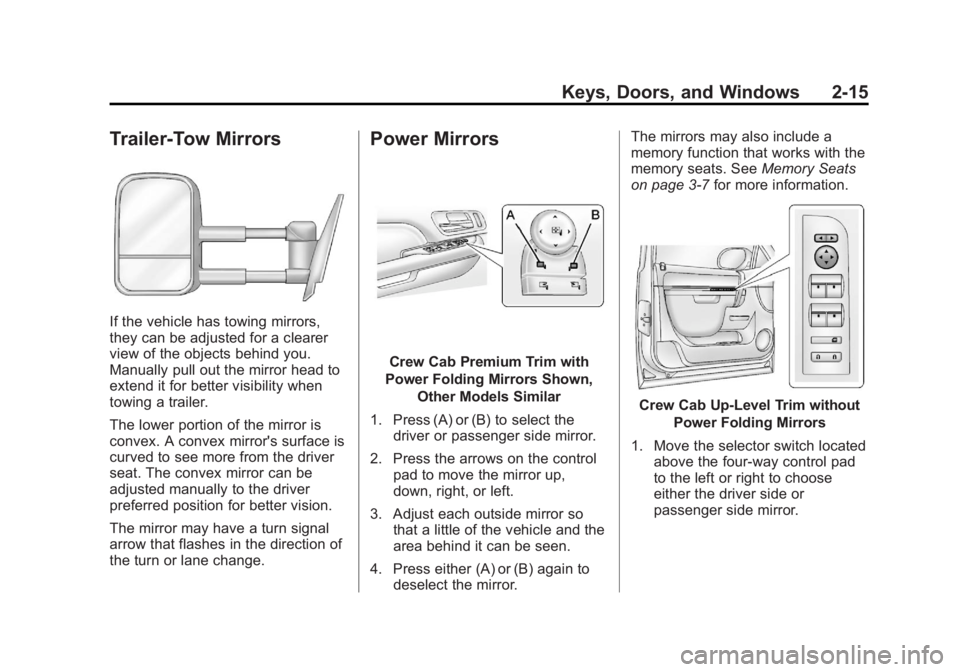
Trailer-Tow Mirrors
If the vehicle has towing mirrors,
they can be adjusted for a clearer
view of the objects behind you.
Manually pull out the mirror head to
extend it for better visibility when
towing a trailer.
The lower portion of the mirror is
convex. A convex mirror's surface is
curved to see more from the driver
seat. The convex mirror can be
adjusted manually to the driver
preferred position for better vision.
The mirror may have a turn signal
arrow that flashes in the direction of
the turn or lane change.
Power Mirrors
Crew Cab Premium Trim with
Power Folding Mirrors Shown, Other Models Similar
1. Press (A) or (B) to select the driver or passenger side mirror.
2. Press the arrows on the control pad to move the mirror up,
down, right, or left.
3. Adjust each outside mirror so that a little of the vehicle and the
area behind it can be seen.
4. Press either (A) or (B) again to deselect the mirror. The mirrors may also include a
memory function that works with the
memory seats. See
Memory Seats
on page 3‑7 for more information.
Crew Cab Up‐Level Trim without
Power Folding Mirrors
1. Move the selector switch located above the four-way control pad
to the left or right to choose
either the driver side or
passenger side mirror.
Page 61 of 556
Black plate (17,1)GMC Sierra Owner Manual - 2012 - CRC - 11/15/11
Keys, Doors, and Windows 2-17
Manual Folding
If equipped with manual folding
mirrors, push the mirror toward the
vehicle. Push the mirror outward, to
return to its original position.
Manually fold the mirrors inward to
prevent damage when going
through an automatic car wash.
Automatic Dimming
If equipped with an automatic
dimming mirror, the driver outside
mirror automatically dimes for the
glare of the headlamps from behind.
This feature is controlled by the on
and off setting on the inside
rearview mirror.
SeeAutomatic Dimming Rearview
Mirror on page 2‑18.
Turn Signal Indicator
The vehicle may also have a turn
signal indicator on the mirror. An
arrow on the mirror flashes in the
direction of the turn or lane change.
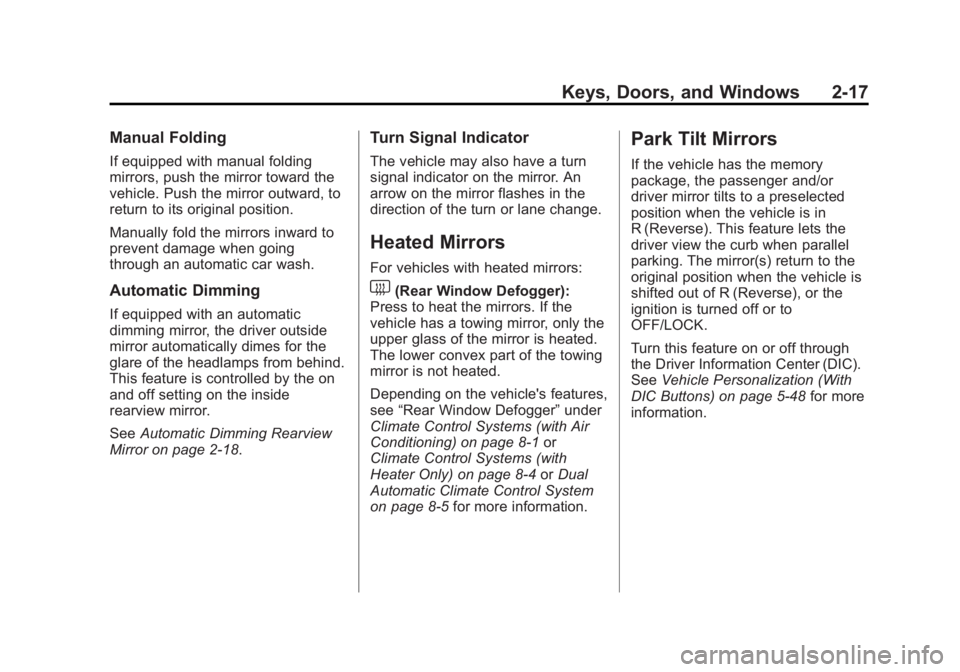
Heated Mirrors
For vehicles with heated mirrors:
1(Rear Window Defogger):
Press to heat the mirrors. If the
vehicle has a towing mirror, only the
upper glass of the mirror is heated.
The lower convex part of the towing
mirror is not heated.
Depending on the vehicle's features,
see “Rear Window Defogger” under
Climate Control Systems (with Air
Conditioning) on page 8‑1 or
Climate Control Systems (with
Heater Only) on page 8‑4 orDual
Automatic Climate Control System
on page 8‑5 for more information.
Park Tilt Mirrors
If the vehicle has the memory
package, the passenger and/or
driver mirror tilts to a preselected
position when the vehicle is in
R (Reverse). This feature lets the
driver view the curb when parallel
parking. The mirror(s) return to the
original position when the vehicle is
shifted out of R (Reverse), or the
ignition is turned off or to
OFF/LOCK.
Turn this feature on or off through
the Driver Information Center (DIC).
SeeVehicle Personalization (With
DIC Buttons) on page 5‑48 for more
information.
Page 104 of 556

Black plate (36,1)GMC Sierra Owner Manual - 2012 - CRC - 11/15/11
3-36 Seats and Restraints
Additional Factors Affecting
System Operation
Safety belts help keep the
passenger in position on the
seat during vehicle maneuvers
and braking, which helps the
passenger sensing system maintain
the passenger airbag status.
See“Safety Belts” and“Child
Restraints” in the Index for
additional information about the
importance of proper restraint use.
If the shoulder portion of the belt is
pulled out all the way, the child
restraint locking feature will be
engaged. This may unintentionally
cause the passenger sensing
system to turn the airbag off for
some adult size occupants. If this
happens, let the belt go back all the
way and start again.
A thick layer of additional material,
such as a blanket or cushion,
or aftermarket equipment such as
seat covers, seat heaters, and seat
massagers can affect how well the
passenger sensing system operates. We recommend that
you not use seat covers or other
aftermarket equipment except when
approved by GM for your specific
vehicle. See
Adding Equipment to
the Airbag-Equipped Vehicle on
page 3‑37 for more information
about modifications that can affect
how the system operates.
The on indicator may be lit if an
object, such as a briefcase,
handbag, grocery bag, laptop or
other electronic device, is put on an
unoccupied seat. If this is not
desired, remove the object from
the seat.
{WARNING
Stowing of articles under the
passenger seat or between the
passenger seat cushion and
seatback may interfere with the
proper operation of the passenger
sensing system.
Servicing the
Airbag-Equipped Vehicle
Airbags affect how the vehicle
should be serviced. There are parts
of the airbag system in several
places around the vehicle. Your
dealer and the service manual have
information about servicing the
vehicle and the airbag system. To
purchase a service manual, see
Service Publications Ordering
Information on page 13‑16.
{WARNING
For up to 10 seconds after the
vehicle is turned off and the
battery is disconnected, an airbag
can still inflate during improper
service. You can be injured if you
are close to an airbag when it
inflates. Avoid yellow connectors.
They are probably part of the
airbag system. Be sure to follow
(Continued)