2012 GMC SIERRA 1500 ECU
[x] Cancel search: ECUPage 482 of 556
Black plate (96,1)GMC Sierra Owner Manual - 2012 - CRC - 11/15/11
10-96 Vehicle Care
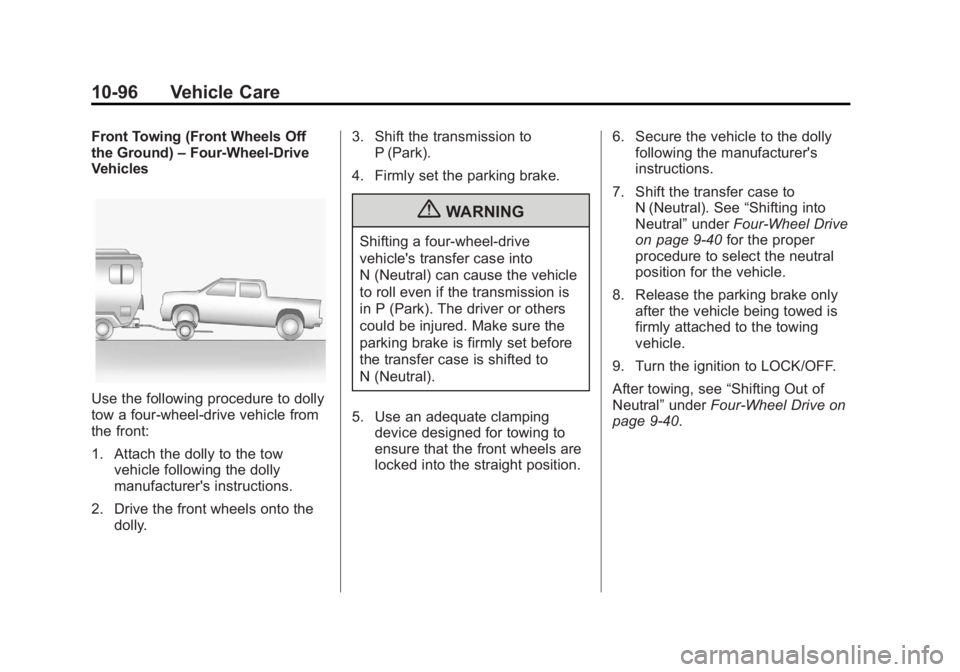
Front Towing (Front Wheels Off
the Ground)–Four-Wheel-Drive
Vehicles
Use the following procedure to dolly
tow a four-wheel-drive vehicle from
the front:
1. Attach the dolly to the tow
vehicle following the dolly
manufacturer's instructions.
2. Drive the front wheels onto the dolly. 3. Shift the transmission to
P (Park).
4. Firmly set the parking brake.
{WARNING
Shifting a four-wheel-drive
vehicle's transfer case into
N (Neutral) can cause the vehicle
to roll even if the transmission is
in P (Park). The driver or others
could be injured. Make sure the
parking brake is firmly set before
the transfer case is shifted to
N (Neutral).
5. Use an adequate clamping device designed for towing to
ensure that the front wheels are
locked into the straight position. 6. Secure the vehicle to the dolly
following the manufacturer's
instructions.
7. Shift the transfer case to N (Neutral). See “Shifting into
Neutral” underFour-Wheel Drive
on page 9‑40 for the proper
procedure to select the neutral
position for the vehicle.
8. Release the parking brake only after the vehicle being towed is
firmly attached to the towing
vehicle.
9. Turn the ignition to LOCK/OFF.
After towing, see “Shifting Out of
Neutral” underFour-Wheel Drive on
page 9‑40.
Page 483 of 556
Black plate (97,1)GMC Sierra Owner Manual - 2012 - CRC - 11/15/11
Vehicle Care 10-97
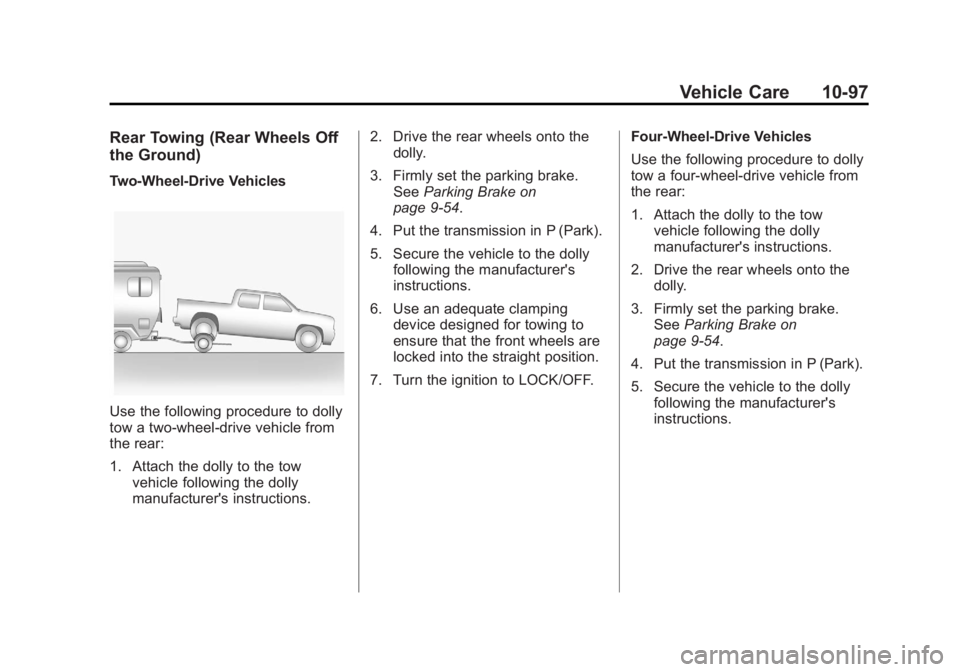
Rear Towing (Rear Wheels Off
the Ground)
Two‐Wheel‐Drive Vehicles
Use the following procedure to dolly
tow a two-wheel-drive vehicle from
the rear:
1. Attach the dolly to the towvehicle following the dolly
manufacturer's instructions. 2. Drive the rear wheels onto the
dolly.
3. Firmly set the parking brake. See Parking Brake on
page 9‑54.
4. Put the transmission in P (Park).
5. Secure the vehicle to the dolly following the manufacturer's
instructions.
6. Use an adequate clamping device designed for towing to
ensure that the front wheels are
locked into the straight position.
7. Turn the ignition to LOCK/OFF. Four‐Wheel‐Drive Vehicles
Use the following procedure to dolly
tow a four-wheel-drive vehicle from
the rear:
1. Attach the dolly to the tow
vehicle following the dolly
manufacturer's instructions.
2. Drive the rear wheels onto the dolly.
3. Firmly set the parking brake. See Parking Brake on
page 9‑54.
4. Put the transmission in P (Park).
5. Secure the vehicle to the dolly following the manufacturer's
instructions.
Page 522 of 556
Black plate (8,1)GMC Sierra Owner Manual - 2012 - CRC - 11/15/11
13-8 Customer Information
Roadside Assistance is not a part of
the New Vehicle Limited Warranty.
GMC and General Motors of
Canada Limited reserve the right to
make any changes or discontinue
the Roadside Assistance program at
any time without notification.
GMC and General Motors of
Canada Limited reserve the right to
limit services or payment to an
owner or driver if they decide the
claims are made too often, or the
same type of claim is made many
times.
Services Provided
.Emergency Fuel Delivery:
Delivery of enough fuel for the
vehicle to get to the nearest
service station.
.Lock‐Out Service:Service to
unlock the vehicle if you are
locked out. A remote unlock
may be available if you have
OnStar
®. For security reasons,
the driver must present
identification before this service
is given.
.Emergency Tow From a Public
Road or Highway: Tow to the
nearest GMC dealer for warranty
service, or if the vehicle was in
a crash and cannot be driven.
Assistance is also given when
the vehicle is stuck in the sand,
mud, or snow.
.Flat Tire Change: Service to
change a flat tire with the spare
tire. The spare tire, if equipped,
must be in good condition and
properly inflated. It is the owner's
responsibility for the repair or
replacement of the tire if it is not
covered by the warranty.
.Battery Jump Start: Service to
jump start a dead battery.
.Trip Routing Service: Detailed
maps of North America when
requested either with the
most direct route or the most
scenic route. Additional travel
information is also available.
Allow three weeks for delivery.
.Trip Interruption Benefits and
Assistance: If your trip is
interrupted due to a warranty
failure, incidental expenses
may be reimbursed during the
5 years/(160 000 km) 100,000 mi
Powertrain warranty period.
Items considered are hotel,
meals, and rental car.
Services Not Included in
Roadside Assistance
.Impound towing caused by
violation of any laws.
.Legal fines.
.Mounting, dismounting,
or changing of snow tires,
chains, or other traction devices.
.Towing or services for vehicles
driven on a non-public road or
highway.
Page 534 of 556
Black plate (20,1)GMC Sierra Owner Manual - 2012 - CRC - 11/15/11
13-20 Customer Information
GM will not access this data or
share it with others except: with the
consent of the vehicle owner or,
if the vehicle is leased, with the
consent of the lessee; in response
to an official request by police or
similar government office; as part of
GM's defense of litigation through
the discovery process; or, as
required by law. Data that GM
collects or receives may also be
used for GM research needs or may
be made available to others for
research purposes, where a need is
shown and the data is not tied to a
specific vehicle or vehicle owner.
OnStar®
If the vehicle is equipped with an
active OnStar system, that system
may also record data in crash or
near crash-like situations. The
OnStar Terms and Conditions
provides information on data
collection and use and is available
at www.onstar.com (U.S.) orwww.onstar.ca (Canada), or by
pressing the
Qbutton and
speaking to an advisor. See OnStar
Overview on page 14‑1.
Navigation System
If the vehicle has a navigation
system, use of the system may
result in the storage of destinations,
addresses, telephone numbers, and
other trip information. Refer to the
navigation manual for information
on stored data and for deletion
instructions.
Radio Frequency
Identification (RFID)
RFID technology is used in some
vehicles for functions such as tire
pressure monitoring and ignition
system security, as well as in
connection with conveniences
such as key fobs for remote door
locking/unlocking and starting, and
in-vehicle transmitters for garage
door openers. RFID technology in GM vehicles does not use or record
personal information or link with
any other GM system containing
personal information.
Radio Frequency
Statement
This vehicle has systems that
operate on a radio frequency that
comply with Part 15 of the Federal
Communications Commission (FCC)
rules and with Industry Canada
Standards RSS‐GEN/210/220/310.
Operation is subject to the following
two conditions:
1. The device may not cause
harmful interference.
2. The device must accept any interference received, including
interference that may cause
undesired operation of the
device.
Changes or modifications to any of
these systems by other than an
authorized service facility could void
authorization to use this equipment.
Page 535 of 556
Black plate (1,1)GMC Sierra Owner Manual - 2012 - CRC - 11/15/11
OnStar 14-1
OnStar
OnStar Overview
OnStar Overview . . . . . . . . . . . . 14-1
OnStar Services
Emergency . . . . . . . . . . . . . . . . . . 14-2
Security . . . . . . . . . . . . . . . . . . . . . . 14-2
Navigation . . . . . . . . . . . . . . . . . . . 14-2
Connections . . . . . . . . . . . . . . . . . 14-4
Diagnostics . . . . . . . . . . . . . . . . . . 14-5
OnStar Additional Information
OnStar AdditionalInformation . . . . . . . . . . . . . . . . . 14-5
OnStar Overview
If equipped, this vehicle has a
comprehensive, in-vehicle system
that can connect to a live Advisor
for Emergency, Security, Navigation,
Connection, and Diagnostic
Services.
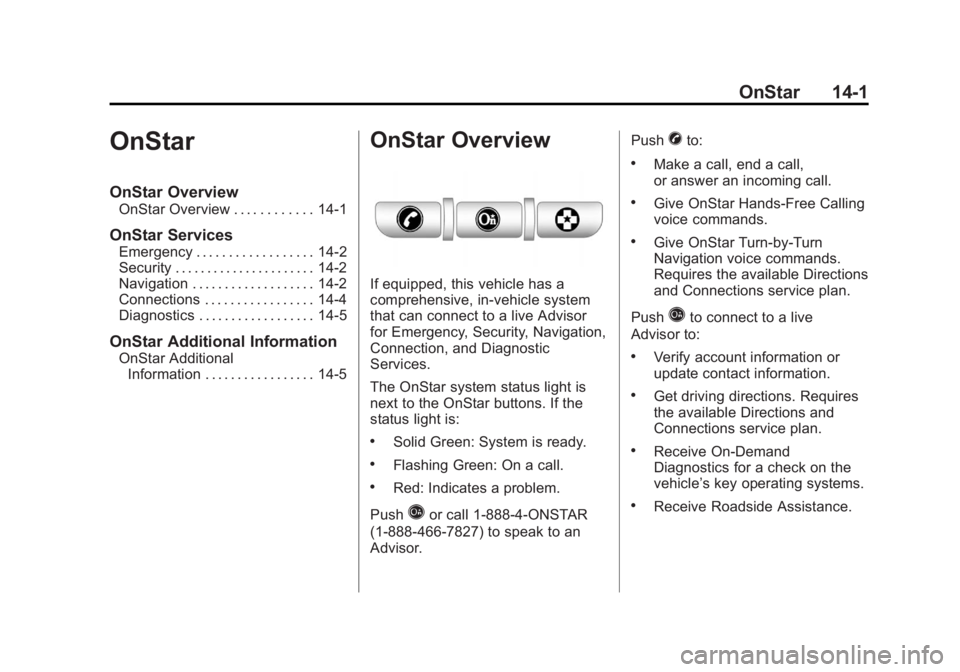
The OnStar system status light is
next to the OnStar buttons. If the
status light is:
.Solid Green: System is ready.
.Flashing Green: On a call.
.Red: Indicates a problem.
Push
Qor call 1‐888‐4‐ONSTAR
(1‐888‐466‐7827) to speak to an
Advisor. Push
Xto:
.Make a call, end a call,
or answer an incoming call.
.Give OnStar Hands-Free Calling
voice commands.
.Give OnStar Turn-by-Turn
Navigation voice commands.
Requires the available Directions
and Connections service plan.
Push
Qto connect to a live
Advisor to:
.Verify account information or
update contact information.
.Get driving directions. Requires
the available Directions and
Connections service plan.
.Receive On-Demand
Diagnostics for a check on the
vehicle’s key operating systems.
.Receive Roadside Assistance.
Page 536 of 556
![GMC SIERRA 1500 2012 Owners Manual Black plate (2,1)GMC Sierra Owner Manual - 2012 - CRC - 11/15/11
14-2 OnStar
Push]to get a priority connection
to an Emergency Advisor available
24/7 to:
.Get help for an emergency.
.Be a Good Samarit](/manual-img/44/57869/w960_57869-535.png "GMC SIERRA 1500 2012 Owners Manual Black plate (2,1)GMC Sierra Owner Manual - 2012 - CRC - 11/15/11
14-2 OnStar
Push]to get a priority connection
to an Emergency Advisor available
24/7 to:
.Get help for an emergency.
.Be a Good Samarit")
Black plate (2,1)GMC Sierra Owner Manual - 2012 - CRC - 11/15/11
14-2 OnStar
Push]to get a priority connection
to an Emergency Advisor available
24/7 to:
.Get help for an emergency.
.Be a Good Samaritan or
respond to an AMBER Alert.
.Get crisis assistance and
evacuation routes.
OnStar Services
Emergency
With Automatic Crash Response,
the built-in system can automatically
connect to help in a crash even if
you cannot ask for it.
Push
]to connect to an
Emergency Advisor. GPS
technology is used to identify the
vehicle location and can provide
critical information to emergency
personnel. The Advisor is also
trained to offer critical assistance in
emergency situations.
Security
OnStar provides services like Stolen
Vehicle Assistance, Remote Ignition
Block, and Roadside Assistance,
if the vehicle is equipped with these
services. OnStar can unlock the
vehicle doors remotely, if it is
equipped with automatic door locks,
and can help police locate the
vehicle if it is stolen.
Navigation
OnStar navigation requires the
Directions and Connections
service plan.
Push
Qto receive directions or
have them sent to the vehicle
navigation screen. Destinations
can also be forwarded to the
vehicle from Google Maps™ or
MapQuest.com. The OnStar
mapping database is continuously
updated. Visit www.onstar.com for
coverage maps.
Turn-by-Turn Navigation
1. PushQto connect to a live
Advisor.
2. Request directions.
3. Directions are downloaded to the vehicle.
4. Follow the voice-guided commands.
Page 545 of 556
Black plate (3,1)GMC Sierra Owner Manual - 2012 - CRC - 11/15/11
INDEX i-3
Carbon MonoxideEngine Exhaust . . . . . . . . . . . . . . . 9-33
Tailgate . . . . . . . . . . . . . . . . . . . . . . . 2-10
Winter Driving . . . . . . . . . . . . . . . . 9-13
Cargo Lamp . . . . . . . . . . . . . . . . . . . . 6-8
Cautions, Danger, and Warnings . . . . . . . . . . . . . . . . . . . . . . . . iv
CD Player . . . . . . . . . . . . . . . . . . . . . 7-15
CD/DVD Player . . . . . . . . . . . . . . . . 7-21
Center Console Storage . . . . . . . . 4-2
Center High-Mounted Stoplamp (CHMSL) and
Cargo Lamp . . . . . . . . . . . . . . . . . 10-42
Center Seat . . . . . . . . . . . . . . . . . . . . 3-4
Chains, Tire . . . . . . . . . . . . . . . . . . 10-74
Charging System Light . . . . . . . . 5-22
Check Engine Light . . . . . . . . . . . . . . . . . . 5-22
IgnitionTransmission Lock . . . . . . . . 10-35 Child Restraints
Infants and Young
Children . . . . . . . . . . . . . . . . . . . . . 3-41
Lower Anchors and Tethers for Children . . . . . . . . . 3-47
Older Children . . . . . . . . . . . . . . . . 3-39
Securing . . . . . . . . . . . . . . . . 3-55, 3-58
Systems . . . . . . . . . . . . . . . . . . . . . . 3-44
Cigarette Lighter . . . . . . . . . . . . . . . 5-10
Circuit Breakers . . . . . . . . . . . . . . 10-44
Cleaning Exterior Care . . . . . . . . . . . . . . . 10-98
Interior Care . . . . . . . . . . . . . . . 10-101
Climate Control Systems . . . 8-1, 8-4 Air Conditioning . . . . . . . . . . 8-1, 8-4
Dual Automatic . . . . . . . . . . . . . . . . 8-5
Heating . . . . . . . . . . . . . . . . . . . 8-1, 8-4
Clock . . . . . . . . . . . . . . . . . . . . . . . . . . . 5-7
Cluster, Instrument . . . . . . . . . . . . 5-12
Collision Damage Repair . . . . . 13-14
Compass . . . . . . . . . . . . . . . . . . . . . . . 5-5
Connections, OnStar
®. . . . . . . . . 14-4 Control of a Vehicle . . . . . . . . . . . . . 9-4
Convex Mirrors . . . . . . . . . . . . . . . . 2-14
Coolant
Engine . . . . . . . . . . . . . . . . . . . . . . 10-19
Engine TemperatureGauge . . . . . . . . . . . . . . . . . . . . . . 5-16
Cooling System . . . . . . . . . . . . . . . 10-18
Engine Messages . . . . . . . . . . . . 5-41
Courtesy Transportation Program . . . . . . . . . . . . . . . . . . . . . 13-13
Cruise Control . . . . . . . . . . . . . . . . . 9-58
Light . . . . . . . . . . . . . . . . . . . . . . . . . . 5-30
Cupholders . . . . . . . . . . . . . . . . . . . . . 4-1
Customer Assistance . . . . . . . . . . 13-6 Offices . . . . . . . . . . . . . . . . . . 13-4, 13-5
Text Telephone (TTY)Users . . . . . . . . . . . . . . . . . . . . . . . 13-6
Customer Information Service PublicationsOrdering Information . . . . . . 13-16
Customer Satisfaction
Procedure . . . . . . . . . . . . . . 13-1, 13-3
Page 550 of 556
Black plate (8,1)GMC Sierra Owner Manual - 2012 - CRC - 11/15/11
i-8 INDEX
LightsAirbag On-Off . . . . . . . . . . . . . . . . . 5-19
Airbag Readiness . . . . . . . . . . . . . 5-18
Antilock Brake System
(ABS) Warning . . . . . . . . . . . . . . 5-26
Brake System Warning . . . . . . . 5-25
Charging System . . . . . . . . . . . . . 5-22
Cruise Control . . . . . . . . . . . . . . . . 5-30
Engine Oil Pressure . . . . . . . . . . 5-28
Flash-to-Pass . . . . . . . . . . . . . . . . . . 6-3
Four-Wheel-Drive . . . . . . . . . . . . . 5-26
Front Fog Lamp . . . . . . . . . . . . . . 5-29
High-Beam On . . . . . . . . . . . . . . . . 5-29
High/Low Beam Changer . . . . . . 6-3
Low Fuel Warning . . . . . . . . . . . . 5-28
Safety Belt Reminders . . . . . . . . 5-17
Security . . . . . . . . . . . . . . . . . . . . . . 5-29
StabiliTrak
®OFF . . . . . . . . . . . . . 5-27
Tire Pressure . . . . . . . . . . . . . . . . . 5-27
Tow/Haul Mode . . . . . . . . . . . . . . . 5-26
Traction Control System (TCS)/StabiliTrak
®. . . . . . . . . . 5-27
Locking Rear Axle . . . . . . . . . . . . . 9-58 Locks
Automatic Door . . . . . . . . . . . . . . . . 2-8
Delayed Locking . . . . . . . . . . . . . . . 2-8
Door . . . . . . . . . . . . . . . . . . . . . . . . . . . 2-7
Lockout Protection . . . . . . . . . . . . . 2-9
Power Door . . . . . . . . . . . . . . . . . . . . 2-8
Safety . . . . . . . . . . . . . . . . . . . . . . . . . 2-9
Loss of Control . . . . . . . . . . . . . . . . . 9-5
Low Fuel Warning Light . . . . . . . . 5-28
Lower Anchors and Tethers for Children (LATCH
System) . . . . . . . . . . . . . . . . . . . . . . 3-47
Lumbar Adjustment . . . . . . . . . . . . . 3-4 Front Seats . . . . . . . . . . . . . . . . . . . . 3-4
M
MaintenanceRecords . . . . . . . . . . . . . . . . . . . . .11-16
Maintenance Schedule Recommended Fluidsand Lubricants . . . . . . . . . . . . .11-12
Transfer Case . . . . . . . . . . . . . . . . 9-40
Malfunction Indicator Lamp . . . . 5-22
Manual Mirrors . . . . . . . . . . . . . . . . 2-14 Manual Mode . . . . . . . . . . . . . . . . . . 9-38
Manual Windows . . . . . . . . . . . . . . 2-19
Memory Features . . . . . . . . . . . . . . 1-14
Memory Seats . . . . . . . . . . . . . . . . . . 3-7
Messages
Airbag System . . . . . . . . . . . . . . . . 5-45
Anti-theft Alarm System . . . . . . . 5-45
Battery Voltage andCharging . . . . . . . . . . . . . . . . . . . . 5-39
Brake System . . . . . . . . . . . . . . . . 5-40
Door Ajar . . . . . . . . . . . . . . . . . . . . . 5-40
Engine Cooling System . . . . . . . 5-41
Engine Oil . . . . . . . . . . . . . . . . . . . . 5-42
Engine Power . . . . . . . . . . . . . . . . 5-42
Fuel System . . . . . . . . . . . . . . . . . . 5-43
Key and Lock . . . . . . . . . . . . . . . . . 5-43
Lamp . . . . . . . . . . . . . . . . . . . . . . . . . 5-43
Object Detection System . . . . . 5-43
Ride Control System . . . . . . . . . . 5-44
Starting the Vehicle . . . . . . . . . . . 5-45
Tire . . . . . . . . . . . . . . . . . . . . . . . . . . . 5-45
Transmission . . . . . . . . . . . . . . . . . 5-46
Vehicle . . . . . . . . . . . . . . . . . . . . . . . 5-39
Vehicle Reminder . . . . . . . . . . . . . 5-47
Washer Fluid . . . . . . . . . . . . . . . . . 5-48