2012 GMC SIERRA 1500 wheel
[x] Cancel search: wheelPage 310 of 556
Black plate (34,1)GMC Sierra Owner Manual - 2012 - CRC - 11/15/11
9-34 Driving and Operating
Running the Vehicle
While Parked
It is better not to park with the
engine running. But if you ever have
to, here are some things to know.
{WARNING
Idling a vehicle in an enclosed
area with poor ventilation is
dangerous. Engine exhaust may
enter the vehicle. Engine exhaust
contains carbon monoxide (CO)
which cannot be seen or smelled.
It can cause unconsciousness
and even death. Never run the
engine in an enclosed area that
has no fresh air ventilation. For
more information, seeEngine
Exhaust on page 9‑33.
{WARNING
It can be dangerous to get out
of the vehicle if the automatic
transmission shift lever is not fully
in P (Park) with the parking brake
firmly set. The vehicle can roll. Do
not leave the vehicle when the
engine is running unless you
have to. If you have left the
engine running, the vehicle can
move suddenly. You or others
could be injured. To be sure the
vehicle will not move, even when
you are on fairly level ground,
always set the parking brake and
move the shift lever to P (Park).
{WARNING
Four-wheel drive vehicles with
the transfer case in N (Neutral)
will allow the vehicle to roll, even
if the automatic transmission
shift lever is in P (Park). So, be
sure the transfer case is in a drive
gear —not in N (Neutral). Always
set the parking brake.
Follow the proper steps to be sure
the vehicle will not move. See
Shifting Into Park on page 9‑30.
If pulling a trailer, see Driving
Characteristics and Towing Tips on
page 9‑74.
Page 311 of 556
Black plate (35,1)GMC Sierra Owner Manual - 2012 - CRC - 11/15/11
Driving and Operating 9-35
Automatic
Transmission
If the vehicle is a hybrid, see the
hybrid supplement for more
information.
Vehicles with an automatic
transmission have an electronic
shift position indicator within the
instrument panel cluster. This
display comes on when the ignition
key is turned to the ON/RUN
position.
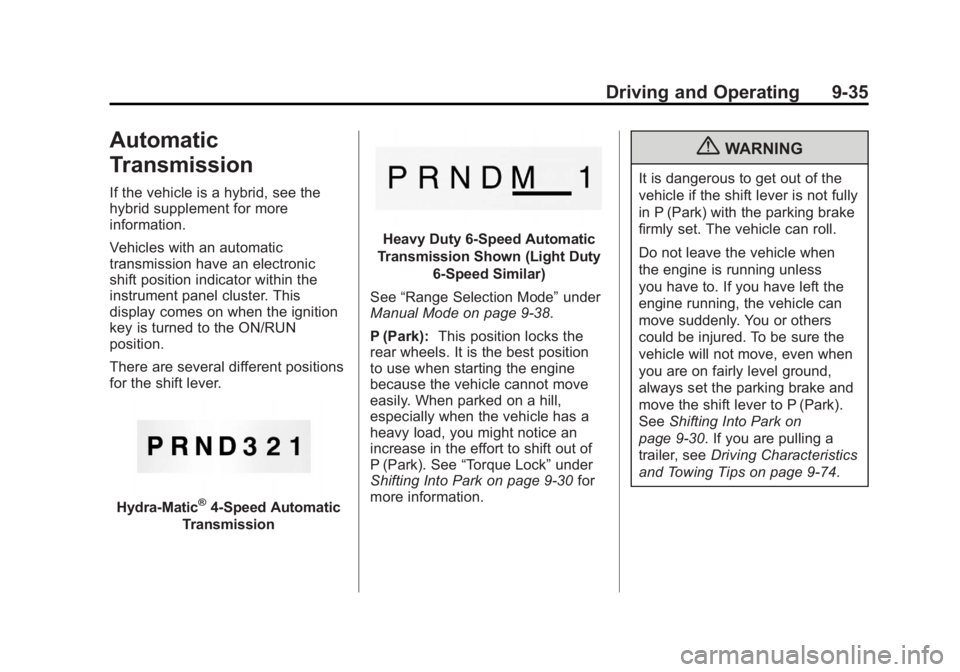
There are several different positions
for the shift lever.
Hydra-Matic®4-Speed Automatic
Transmission
Heavy Duty 6-Speed Automatic
Transmission Shown (Light Duty 6‐Speed Similar)
See “Range Selection Mode” under
Manual Mode on page 9‑38.
P (Park): This position locks the
rear wheels. It is the best position
to use when starting the engine
because the vehicle cannot move
easily. When parked on a hill,
especially when the vehicle has a
heavy load, you might notice an
increase in the effort to shift out of
P (Park). See “Torque Lock” under
Shifting Into Park on page 9‑30 for
more information.
{WARNING
It is dangerous to get out of the
vehicle if the shift lever is not fully
in P (Park) with the parking brake
firmly set. The vehicle can roll.
Do not leave the vehicle when
the engine is running unless
you have to. If you have left the
engine running, the vehicle can
move suddenly. You or others
could be injured. To be sure the
vehicle will not move, even when
you are on fairly level ground,
always set the parking brake and
move the shift lever to P (Park).
See Shifting Into Park on
page 9‑30. If you are pulling a
trailer, see Driving Characteristics
and Towing Tips on page 9‑74.
Page 312 of 556
Black plate (36,1)GMC Sierra Owner Manual - 2012 - CRC - 11/15/11
9-36 Driving and Operating
{WARNING
If you have Four-Wheel Drive, the
vehicle will be free to roll—even
if the shift lever is in P (Park) —if
the transfer case is in Neutral. So,
be sure the transfer case is in a
drive gear, Two-Wheel Drive High
or Four-Wheel Drive High or
Four-Wheel Drive Low —not in
Neutral. See Shifting Into Park on
page 9‑30.
R (Reverse): Use this gear to
back up.
Notice: Shifting to R (Reverse)
while the vehicle is moving
forward could damage the
transmission. The repairs would
not be covered by the vehicle
warranty. Shift to R (Reverse) only
after the vehicle is stopped.
To rock the vehicle back and forth to
get out of snow, ice, or sand without
damaging the transmission, see If
the Vehicle Is Stuck on page 9‑15. N (Neutral):
In this position, the
engine does not connect with the
wheels. To restart when you are
already moving, use N (Neutral)
only. Also, use N (Neutral) when the
vehicle is being towed.
{WARNING
Shifting into a drive gear while the
engine is running at high speed is
dangerous. Unless your foot is
firmly on the brake pedal, the
vehicle could move very rapidly.
You could lose control and hit
people or objects. Do not shift
into a drive gear while the engine
is running at high speed.
Notice: Shifting out of P (Park)
or N (Neutral) with the engine
running at high speed may
damage the transmission. The
repairs would not be covered by
the vehicle warranty. Be sure the
engine is not running at high
speed when shifting the vehicle. D (Drive):
This position is for
normal driving. It provides the best
fuel economy. If you need more
power for passing, and you are:
.Going less than about 55 km/h
(35 mph), push the accelerator
pedal about halfway down.
.Going about 55 km/h (35 mph) or
more, push the accelerator all
the way down.
By doing this, the vehicle shifts
down to the next gear and has
more power.
D (Drive) can be used when towing
a trailer, carrying a heavy load,
driving on steep hills, or for off-road
driving. You might want to shift
the transmission to a lower gear
selection if the transmission shifts
too often.
Downshifting the transmission in
slippery road conditions could result
in skidding. See “Skidding”under
Loss of Control on page 9‑5.
Page 313 of 556
Black plate (37,1)GMC Sierra Owner Manual - 2012 - CRC - 11/15/11
Driving and Operating 9-37
The vehicle has a shift stabilization
feature that adjusts the transmission
shifting to the current driving
conditions in order to reduce rapid
upshifts and downshifts. This shift
stabilization feature is designed
to determine, before making an
upshift, if the engine is able to
maintain vehicle speed by analyzing
things such as vehicle speed,
throttle position, and vehicle load.
If the shift stabilization feature
determines that a current vehicle
speed cannot be maintained, the
transmission does not upshift and
instead holds the current gear.
In some cases, this could appear to
be a delayed shift, however the
transmission is operating normally.
The transmission uses adaptive
shift controls. Adaptive shift controls
continually compares key shift
parameters to pre-programmed
ideal shifts stored in the
transmissions computer. The
transmission constantly makes
adjustments to improve vehicle
performance according to how thevehicle is being used, such as with
a heavy load or when temperature
changes. During this adaptive shift
control process, shifting might feel
different as the transmission
determines the best settings.
When temperatures are very cold,
the Allison Transmission and
Hydra-Matic 6-Speed transmission's
gear shifting could be delayed
providing more stable shifts until
the engine warms up. Shifts could
be more noticeable with a cold
transmission. This difference in
shifting is normal.
M (Manual Mode):
This position
is available on vehicles with
the Allison Transmission or
Hydra-Matic 6-Speed transmission.
It lets drivers select the range of
gears appropriate for current driving
conditions. If the vehicle has this
feature, see “Range Selection
Mode” underManual Mode on
page 9‑38. 3 (Third):
This position is also used
for normal driving. It reduces vehicle
speed more than D (Drive) without
using the brakes. You might choose
3 (Third) instead of D (Drive) when
driving on hilly, winding roads, when
towing a trailer, so there is less
shifting between gears and when
going down a steep hill.
2 (Second): This position reduces
vehicle speed even more than
3 (Third) without using the brakes.
You can use 2 (Second) on hills.
It can help control vehicle speed as
you go down steep mountain roads,
but then you would also want to use
the brakes off and on.
If you manually select 2 (Second) in
an automatic transmission, the
transmission will start in second
gear. You can use this feature for
reducing the speed of the rear
wheels when you are trying to start
the vehicle from a stop on slippery
road surfaces.
Page 315 of 556
Black plate (39,1)GMC Sierra Owner Manual - 2012 - CRC - 11/15/11
Driving and Operating 9-39
the plus/minus button located on the
steering column lever is used to
change to the gear.
Grade Braking is not available when
Range Selection Mode is active.
SeeTow/Haul Mode on page 9‑39.
While using Range Selection Mode,
Cruise Control and the Tow/Haul
Mode can be used.
If the vehicle has an exhaust
brake, it can also be used, but will
not automatically downshift the
transmission. See Exhaust Brake in
the Duramax Diesel supplement.
Notice: Spinning the tires
or holding the vehicle in one
place on a hill using only the
accelerator pedal may damage
the transmission. The repair will
not be covered by the vehicle
warranty. If you are stuck, do not
spin the tires. When stopping on
a hill, use the brakes to hold the
vehicle in place.Low Traction Mode
If your vehicle has the Allison
Transmission, or the Hydra-Matic
6-Speed Automatic Transmission, it
has a Low Traction Mode that can
assist in vehicle acceleration when
road conditions are slippery, such
as with ice or snow. While the
vehicle is at a stop, select the
second gear range using Range
Selection Mode. This will limit
torque to the wheels after it detects
wheel slip, preventing the tires from
spinning.
Tow/Haul Mode
4-Speed Automatic Transmission
6-Speed Automatic Transmission
Vehicles with an automatic
transmission have a Tow/Haul
Mode. The Tow/Haul Mode adjusts
the transmission shift pattern to
reduce shift cycling, providing
increased performance, vehicle
control, and transmission cooling
when driving down steep hills or
Mountain grades, towing, or hauling
heavy loads.
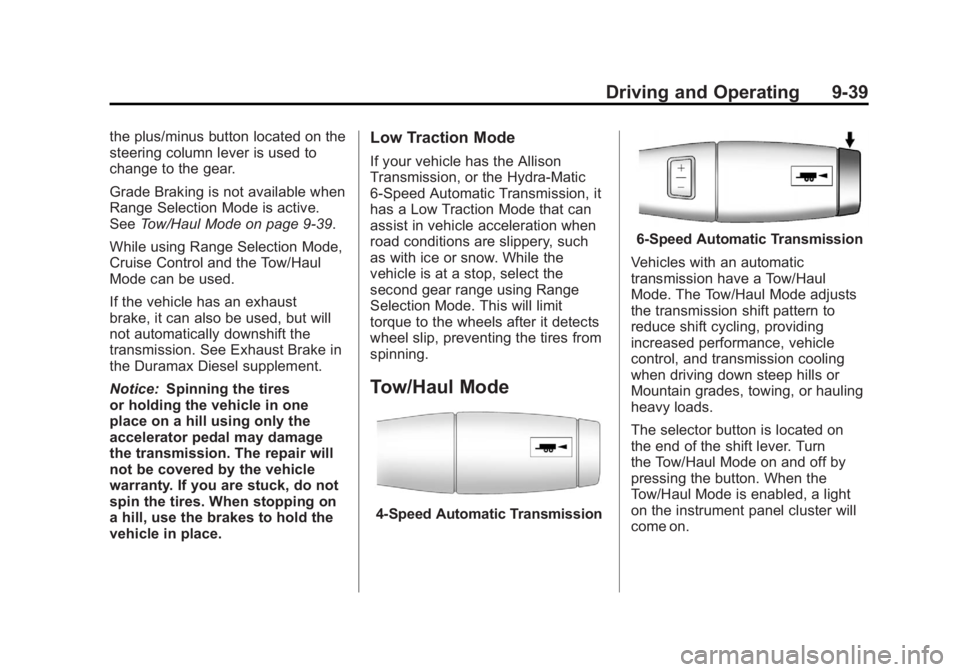
The selector button is located on
the end of the shift lever. Turn
the Tow/Haul Mode on and off by
pressing the button. When the
Tow/Haul Mode is enabled, a light
on the instrument panel cluster will
come on.
Page 316 of 556
Black plate (40,1)GMC Sierra Owner Manual - 2012 - CRC - 11/15/11
9-40 Driving and Operating
SeeTow/Haul Mode Light on
page 5‑26 andHill and Mountain
Roads on page 9‑12 for more
information.
Also see “Tow/Haul Mode” under
Towing Equipment on page 9‑94 for
more information.
Grade Braking (6-Speed
Automatic Transmission)
The Grade Braking shift modes can
be activated by pressing the button
on the end of the shift control lever.
While in Range Selection Mode,
Grade Braking is deactivated
allowing the driver to select a
desired range of gears.
Grade Braking is only active while
the Tow/Haul Mode is selected and
you are not in the Range Selection
Mode. See “Tow/Haul Mode” listed
previously and Manual Mode on
page 9‑38 for more information on the Range Selection Mode. Grade
Braking assists in maintaining
desired vehicle speeds when driving
on downhill grades by automatically
implementing a shift schedule that
utilizes the engine and transmission
to slow the vehicle. This reduces
wear on the braking system and
increases control of the vehicle.
Grade Braking monitors vehicle
speed, acceleration, engine torque
and brake pedal usage. Using this
information, it detects when the
truck is on a downhill grade and the
driver desires to slow the vehicle by
pressing the brake.
This feature is active when the
exhaust brake is enabled (if
equipped).
Also see
Towing Equipment on
page 9‑94 for more information.
Drive Systems
Four-Wheel Drive
If the vehicle has Four-Wheel Drive,
you can send the engine's driving
power to all four wheels for extra
traction. To get the most satisfaction
out of Four-Wheel Drive, you must
be familiar with its operation.
Read the following before using
Four-Wheel Drive. See the
appropriate text for the transfer
case in the vehicle.
Notice:Driving on clean, dry
pavement in Four-Wheel Drive
High or Four-Wheel Drive Low for
an extended period of time may
cause premature wear on the
vehicle's powertrain. Do not
drive on clean, dry pavement
in Four-Wheel Drive High or
Four-Wheel Drive Low for
extended periods of time.
Page 317 of 556
Black plate (41,1)GMC Sierra Owner Manual - 2012 - CRC - 11/15/11
Driving and Operating 9-41
While driving on clean dry pavement
and during tight turns, you may
experience vibration in the steering
system.
If the vehicle has StabiliTrak
®,
shifting into Four-Wheel Drive Low
will turn Traction Control and
StabiliTrak off. See StabiliTrak
®
System on page 9‑55.
Front Axle
The front axle engages and
disengages automatically when you
shift the transfer case. Some delay
for the axle to engage or disengage
is normal.
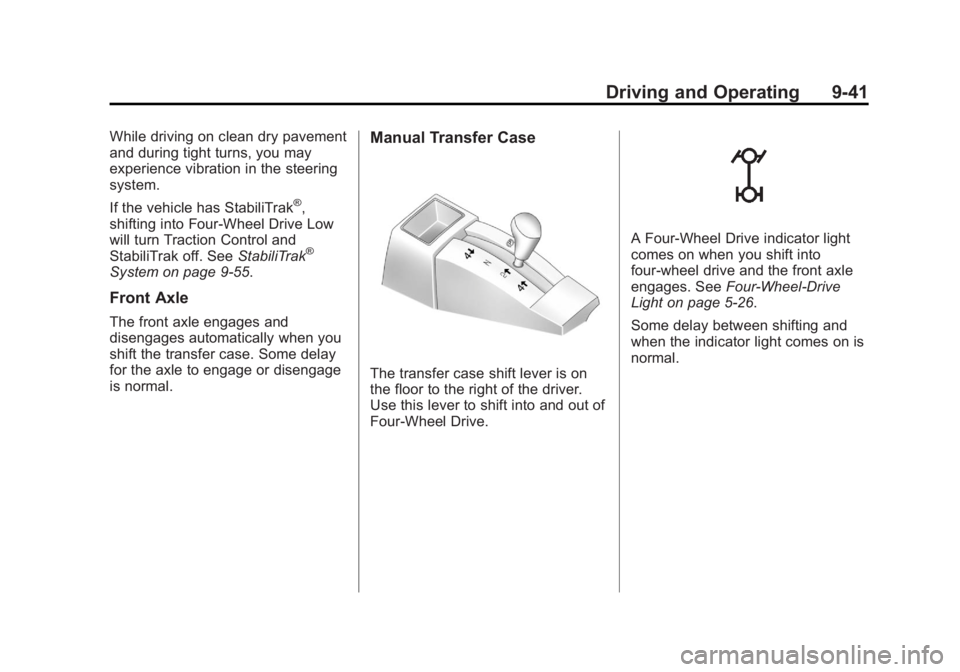
Manual Transfer Case
The transfer case shift lever is on
the floor to the right of the driver.
Use this lever to shift into and out of
Four-Wheel Drive.
A Four-Wheel Drive indicator light
comes on when you shift into
four-wheel drive and the front axle
engages. SeeFour-Wheel-Drive
Light on page 5‑26.
Some delay between shifting and
when the indicator light comes on is
normal.
Page 318 of 556
Black plate (42,1)GMC Sierra Owner Manual - 2012 - CRC - 11/15/11
9-42 Driving and Operating
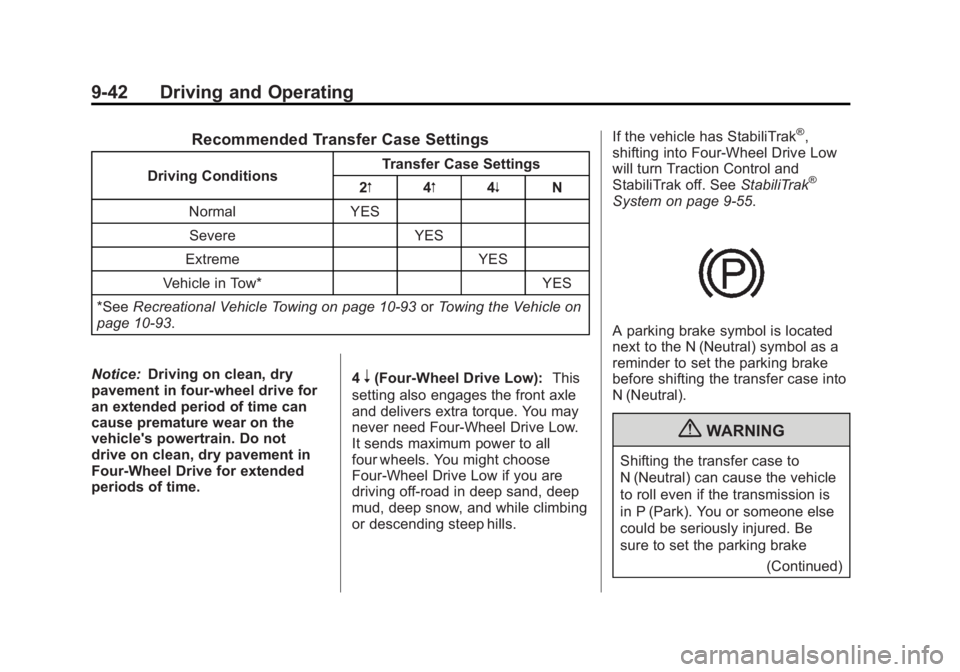
Recommended Transfer Case Settings
Driving ConditionsTransfer Case Settings
2m 4m4n N
Normal YES Severe YES
Extreme YES
Vehicle in Tow* YES
*See Recreational Vehicle Towing on page 10‑93 orTowing the Vehicle on
page 10‑93.
Notice: Driving on clean, dry
pavement in four-wheel drive for
an extended period of time can
cause premature wear on the
vehicle's powertrain. Do not
drive on clean, dry pavement in
Four-Wheel Drive for extended
periods of time. 4
n(Four-Wheel Drive Low):
This
setting also engages the front axle
and delivers extra torque. You may
never need Four-Wheel Drive Low.
It sends maximum power to all
four wheels. You might choose
Four-Wheel Drive Low if you are
driving off-road in deep sand, deep
mud, deep snow, and while climbing
or descending steep hills. If the vehicle has StabiliTrak
®,
shifting into Four-Wheel Drive Low
will turn Traction Control and
StabiliTrak off. See StabiliTrak
®
System on page 9‑55.
A parking brake symbol is located
next to the N (Neutral) symbol as a
reminder to set the parking brake
before shifting the transfer case into
N (Neutral).
{WARNING
Shifting the transfer case to
N (Neutral) can cause the vehicle
to roll even if the transmission is
in P (Park). You or someone else
could be seriously injured. Be
sure to set the parking brake
(Continued)