2012 GMC SIERRA 1500 cruise control
[x] Cancel search: cruise controlPage 331 of 556
Black plate (55,1)GMC Sierra Owner Manual - 2012 - CRC - 11/15/11
Driving and Operating 9-55
This feature is designed to prevent
the vehicle from rolling, either
forward or rearward, during vehicle
drive off. After the driver completely
stops and holds the vehicle in a
complete standstill on a grade, HSA
will be automatically activated.
During the transition period between
when the driver releases the brake
pedal and starts to accelerate to
drive off on a grade, HSA holds the
braking pressure for a maximum of
two seconds to ensure that there
is no rolling. The brakes will
automatically release when the
accelerator pedal is applied within
the two‐second window. If the
vehicle is equipped with the
Integrated Trailer Brake Control
(ITBC) system, HSA may also apply
the trailer brakes. It will not activate
if the vehicle is in a drive gear and
facing downhill or if the vehicle is
facing uphill and in R (Reverse).
There may be situations on minor
hills (less than 5% grade) with a
loaded vehicle or while pulling a
trailer where HSA will not activate.Ride Control Systems
StabiliTrak®System
The vehicle has a vehicle stability
enhancement system called
StabiliTrak. It is an advanced
computer-controlled system that
assists the driver with directional
control of the vehicle in difficult
driving conditions.
StabiliTrak activates when the
computer senses a discrepancy
between the intended path and the
direction the vehicle is actually
traveling. StabiliTrak selectively
applies braking pressure at any one
of the vehicle's brakes to assist the
driver with keeping the vehicle on
the intended path.
StabiliTrak is on automatically
whenever the vehicle is started. To
assist with directional control of the
vehicle, the system should always
be left on. Trailer Sway Control
(TSC) is also on automatically whenthe vehicle is started. See
Trailer
Sway Control (TSC) on page 9‑105
for more information.
When the vehicle is started and
begins to move, the system
performs several diagnostic checks
to insure there are no problems.
The system may be heard or felt
while it is working. This is normal
and does not mean there is a
problem with the vehicle. The
system should initialize before the
vehicle reaches 32 km/h (20 mph).
In some cases, it may take
approximately 3.2 km (2 mi) of
driving before the system initializes.
If cruise control is being used
when StabiliTrak activates, the
cruise control automatically
disengages. The cruise control
can be re-engaged when road
conditions allow. See Cruise Control
on page 9‑58.
If the system fails to turn on or
activate, the StabiliTrak light along
with a message will be displayed on
the Driver Information Center (DIC).
Page 333 of 556
Black plate (57,1)GMC Sierra Owner Manual - 2012 - CRC - 11/15/11
Driving and Operating 9-57
It is recommended to leave the
system on for normal driving
conditions, but it may be necessary
to turn the system off if the vehicle
is stuck in sand, mud, ice or snow,
and you want to“rock”the vehicle to
attempt to free it. It may also be
necessary to turn off the system
when driving in extreme off-road
conditions where high wheel spin is
required. See If the Vehicle Is Stuck
on page 9‑15.
When the transfer case is in 4LO,
the stability system is automatically
disabled, the StabiliTrak light comes
on, and the appropriate message
will appear on the DIC. Both
traction control and StabiliTrak
are automatically disabled in this
condition.
Traction Control Operation
The TCS is part of the StabiliTrak
system. Traction control limits wheel
spin by reducing engine power
to the wheels (engine speed
management) and by applying brakes to each individual wheel
(brake-traction control) as
necessary.
The TCS is enabled automatically
when the vehicle is started. It will
activate and the StabiliTrak light
will flash if it senses that any of the
wheels are spinning or beginning to
lose traction while driving. If traction
control is turned off, only the
brake-traction control portion of
traction control will work. The
engine speed management will be
disabled. In this mode, engine
power is not reduced automatically
and the driven wheels can spin
more freely. This can cause the
brake-traction control to activate
constantly.
Notice:
If the wheel(s) of one axle
is allowed to spin excessively
while the StabiliTrak
®, ABS, brake
warning lights, and any relevant
DIC messages are displayed, the
transfer case could be damaged.
The repairs would not be covered
by the vehicle warranty. Reduce
engine power and do not spin the wheel(s) excessively while these
lights and messages are
displayed.
The TCS may activate on dry or
rough roads or under conditions
such as heavy acceleration while
turning or abrupt upshifts/downshifts
of the transmission. When this
happens, a reduction in acceleration
may be noticed, or a noise or
vibration may be heard. This is
normal.
If cruise control is being used when
the system activates, the StabiliTrak
light will flash and cruise control will
automatically disengage. Cruise
control may be reengaged when
road conditions allow. See
Cruise
Control on page 9‑58.
StabiliTrak may also turn off
automatically if it determines that a
problem exists with the system.
If the problem does not clear itself
after restarting the vehicle, see your
dealer for service.
Page 334 of 556
Black plate (58,1)GMC Sierra Owner Manual - 2012 - CRC - 11/15/11
9-58 Driving and Operating
Non-hybrid vehicles with StabiliTrak
have a Trailer Sway Control (TSC)
feature. SeeTrailer Sway Control
(TSC) on page 9‑105.
Non-hybrid vehicles with StabiliTrak
have a Hill Start Assist (HSA)
feature. See Hill Start Assist (HSA)
on page 9‑54.
Adding non‐dealer accessories can
affect the vehicle's performance.
See Accessories and Modifications
on page 10‑3.
Locking Rear Axle
Vehicles with a locking rear axle can
give more traction on snow, mud,
ice, sand, or gravel. It works like a
standard axle most of the time, but
when traction is low, this feature will
allow the rear wheel with the most
traction to move the vehicle.
Cruise Control
{WARNING
Cruise control can be dangerous
where you cannot drive safely at
a steady speed. So, do not use
the cruise control on winding
roads or in heavy traffic.
Cruise control can be dangerous
on slippery roads. On such roads,
fast changes in tire traction can
cause excessive wheel slip, and
you could lose control. Do not use
cruise control on slippery roads.
For vehicles with cruise control, a
speed of about 40 km/h (25 mph)
or more can be maintained
without keeping your foot on the
accelerator. Cruise control does not
work at speeds below about 40 km/h
(25 mph). When the brakes are applied, cruise
control is turned off.
For vehicles with an Allison or
Hydra‐Matic 6‐speed automatic
transmission, see
“Grade Braking”
under Tow/Haul Mode on page 9‑39
for an explanation of how cruise
control interacts with the Range
Selection Mode, tow/haul and grade
braking systems.
For vehicles with the StabiliTrak
system that begins to limit wheel
spin while you are using cruise
control, the cruise control will
automatically disengage. See
StabiliTrak
®System on page 9‑55.
When road conditions allow the
cruise control to be safely used
again, it can be turned back on.
Page 335 of 556
Black plate (59,1)GMC Sierra Owner Manual - 2012 - CRC - 11/15/11
Driving and Operating 9-59
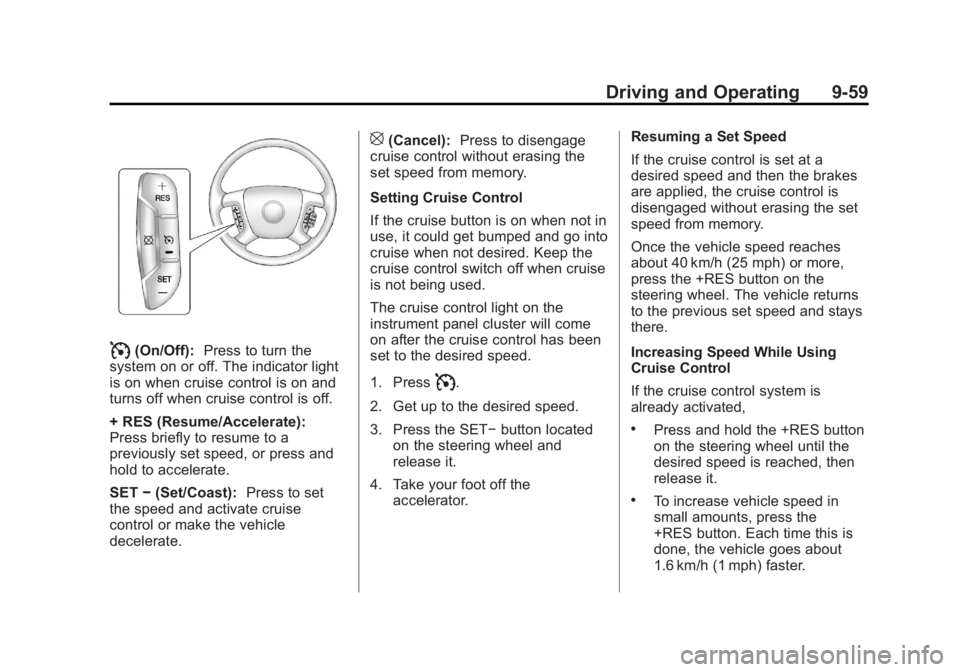
I(On/Off):Press to turn the
system on or off. The indicator light
is on when cruise control is on and
turns off when cruise control is off.
+ RES (Resume/Accelerate):
Press briefly to resume to a
previously set speed, or press and
hold to accelerate.
SET −(Set/Coast): Press to set
the speed and activate cruise
control or make the vehicle
decelerate.
[(Cancel): Press to disengage
cruise control without erasing the
set speed from memory.
Setting Cruise Control
If the cruise button is on when not in
use, it could get bumped and go into
cruise when not desired. Keep the
cruise control switch off when cruise
is not being used.
The cruise control light on the
instrument panel cluster will come
on after the cruise control has been
set to the desired speed.
1. Press
I.
2. Get up to the desired speed.
3. Press the SET− button located
on the steering wheel and
release it.
4. Take your foot off the accelerator. Resuming a Set Speed
If the cruise control is set at a
desired speed and then the brakes
are applied, the cruise control is
disengaged without erasing the set
speed from memory.
Once the vehicle speed reaches
about 40 km/h (25 mph) or more,
press the +RES button on the
steering wheel. The vehicle returns
to the previous set speed and stays
there.
Increasing Speed While Using
Cruise Control
If the cruise control system is
already activated,
.Press and hold the +RES button
on the steering wheel until the
desired speed is reached, then
release it.
.To increase vehicle speed in
small amounts, press the
+RES button. Each time this is
done, the vehicle goes about
1.6 km/h (1 mph) faster.
Page 336 of 556
Black plate (60,1)GMC Sierra Owner Manual - 2012 - CRC - 11/15/11
9-60 Driving and Operating
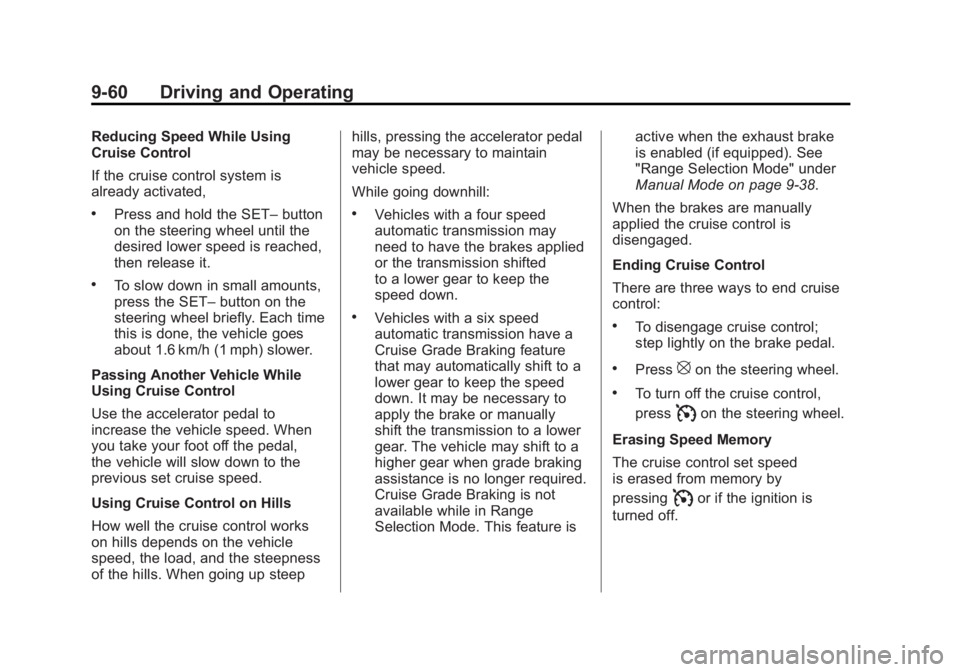
Reducing Speed While Using
Cruise Control
If the cruise control system is
already activated,
.Press and hold the SET–button
on the steering wheel until the
desired lower speed is reached,
then release it.
.To slow down in small amounts,
press the SET– button on the
steering wheel briefly. Each time
this is done, the vehicle goes
about 1.6 km/h (1 mph) slower.
Passing Another Vehicle While
Using Cruise Control
Use the accelerator pedal to
increase the vehicle speed. When
you take your foot off the pedal,
the vehicle will slow down to the
previous set cruise speed.
Using Cruise Control on Hills
How well the cruise control works
on hills depends on the vehicle
speed, the load, and the steepness
of the hills. When going up steep hills, pressing the accelerator pedal
may be necessary to maintain
vehicle speed.
While going downhill:
.Vehicles with a four speed
automatic transmission may
need to have the brakes applied
or the transmission shifted
to a lower gear to keep the
speed down.
.Vehicles with a six speed
automatic transmission have a
Cruise Grade Braking feature
that may automatically shift to a
lower gear to keep the speed
down. It may be necessary to
apply the brake or manually
shift the transmission to a lower
gear. The vehicle may shift to a
higher gear when grade braking
assistance is no longer required.
Cruise Grade Braking is not
available while in Range
Selection Mode. This feature is
active when the exhaust brake
is enabled (if equipped). See
"Range Selection Mode" under
Manual Mode on page 9‑38.
When the brakes are manually
applied the cruise control is
disengaged.
Ending Cruise Control
There are three ways to end cruise
control:.To disengage cruise control;
step lightly on the brake pedal.
.Press[on the steering wheel.
.To turn off the cruise control,
press
Ion the steering wheel.
Erasing Speed Memory
The cruise control set speed
is erased from memory by
pressing
Ior if the ignition is
turned off.
Page 432 of 556
Black plate (46,1)GMC Sierra Owner Manual - 2012 - CRC - 11/15/11
10-46 Vehicle Care
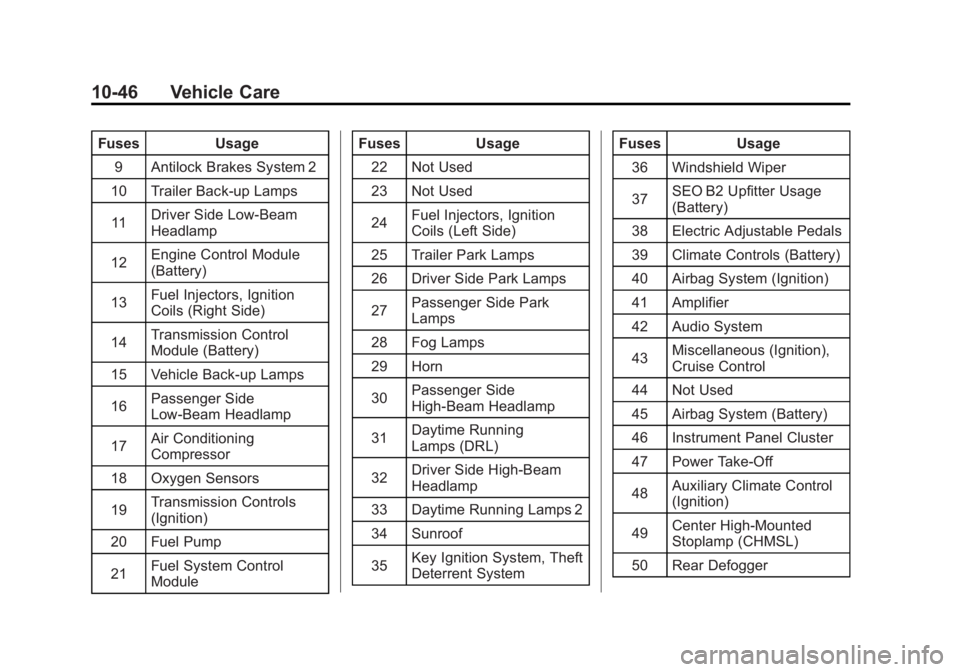
FusesUsage
9 Antilock Brakes System 2
10 Trailer Back-up Lamps
11 Driver Side Low-Beam
Headlamp
12 Engine Control Module
(Battery)
13 Fuel Injectors, Ignition
Coils (Right Side)
14 Transmission Control
Module (Battery)
15 Vehicle Back-up Lamps
16 Passenger Side
Low-Beam Headlamp
17 Air Conditioning
Compressor
18 Oxygen Sensors
19 Transmission Controls
(Ignition)
20 Fuel Pump
21 Fuel System Control
Module Fuses
Usage
22 Not Used
23 Not Used
24 Fuel Injectors, Ignition
Coils (Left Side)
25 Trailer Park Lamps
26 Driver Side Park Lamps
27 Passenger Side Park
Lamps
28 Fog Lamps
29 Horn
30 Passenger Side
High-Beam Headlamp
31 Daytime Running
Lamps (DRL)
32 Driver Side High-Beam
Headlamp
33 Daytime Running Lamps 2
34 Sunroof
35 Key Ignition System, Theft
Deterrent System Fuses
Usage
36 Windshield Wiper
37 SEO B2 Upfitter Usage
(Battery)
38 Electric Adjustable Pedals
39 Climate Controls (Battery)
40 Airbag System (Ignition)
41 Amplifier
42 Audio System
43 Miscellaneous (Ignition),
Cruise Control
44 Not Used
45 Airbag System (Battery)
46 Instrument Panel Cluster
47 Power Take-Off
48 Auxiliary Climate Control
(Ignition)
49 Center High-Mounted
Stoplamp (CHMSL)
50 Rear Defogger
Page 545 of 556
Black plate (3,1)GMC Sierra Owner Manual - 2012 - CRC - 11/15/11
INDEX i-3
Carbon MonoxideEngine Exhaust . . . . . . . . . . . . . . . 9-33
Tailgate . . . . . . . . . . . . . . . . . . . . . . . 2-10
Winter Driving . . . . . . . . . . . . . . . . 9-13
Cargo Lamp . . . . . . . . . . . . . . . . . . . . 6-8
Cautions, Danger, and Warnings . . . . . . . . . . . . . . . . . . . . . . . . iv
CD Player . . . . . . . . . . . . . . . . . . . . . 7-15
CD/DVD Player . . . . . . . . . . . . . . . . 7-21
Center Console Storage . . . . . . . . 4-2
Center High-Mounted Stoplamp (CHMSL) and
Cargo Lamp . . . . . . . . . . . . . . . . . 10-42
Center Seat . . . . . . . . . . . . . . . . . . . . 3-4
Chains, Tire . . . . . . . . . . . . . . . . . . 10-74
Charging System Light . . . . . . . . 5-22
Check Engine Light . . . . . . . . . . . . . . . . . . 5-22
IgnitionTransmission Lock . . . . . . . . 10-35 Child Restraints
Infants and Young
Children . . . . . . . . . . . . . . . . . . . . . 3-41
Lower Anchors and Tethers for Children . . . . . . . . . 3-47
Older Children . . . . . . . . . . . . . . . . 3-39
Securing . . . . . . . . . . . . . . . . 3-55, 3-58
Systems . . . . . . . . . . . . . . . . . . . . . . 3-44
Cigarette Lighter . . . . . . . . . . . . . . . 5-10
Circuit Breakers . . . . . . . . . . . . . . 10-44
Cleaning Exterior Care . . . . . . . . . . . . . . . 10-98
Interior Care . . . . . . . . . . . . . . . 10-101
Climate Control Systems . . . 8-1, 8-4 Air Conditioning . . . . . . . . . . 8-1, 8-4
Dual Automatic . . . . . . . . . . . . . . . . 8-5
Heating . . . . . . . . . . . . . . . . . . . 8-1, 8-4
Clock . . . . . . . . . . . . . . . . . . . . . . . . . . . 5-7
Cluster, Instrument . . . . . . . . . . . . 5-12
Collision Damage Repair . . . . . 13-14
Compass . . . . . . . . . . . . . . . . . . . . . . . 5-5
Connections, OnStar
®. . . . . . . . . 14-4 Control of a Vehicle . . . . . . . . . . . . . 9-4
Convex Mirrors . . . . . . . . . . . . . . . . 2-14
Coolant
Engine . . . . . . . . . . . . . . . . . . . . . . 10-19
Engine TemperatureGauge . . . . . . . . . . . . . . . . . . . . . . 5-16
Cooling System . . . . . . . . . . . . . . . 10-18
Engine Messages . . . . . . . . . . . . 5-41
Courtesy Transportation Program . . . . . . . . . . . . . . . . . . . . . 13-13
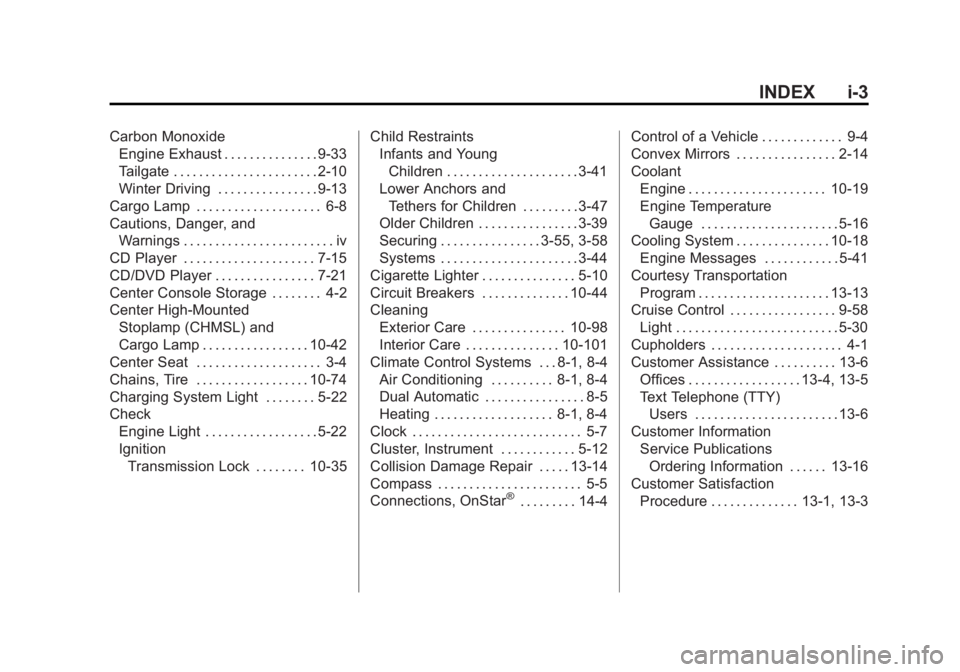
Cruise Control . . . . . . . . . . . . . . . . . 9-58
Light . . . . . . . . . . . . . . . . . . . . . . . . . . 5-30
Cupholders . . . . . . . . . . . . . . . . . . . . . 4-1
Customer Assistance . . . . . . . . . . 13-6 Offices . . . . . . . . . . . . . . . . . . 13-4, 13-5
Text Telephone (TTY)Users . . . . . . . . . . . . . . . . . . . . . . . 13-6
Customer Information Service PublicationsOrdering Information . . . . . . 13-16
Customer Satisfaction
Procedure . . . . . . . . . . . . . . 13-1, 13-3
Page 550 of 556
Black plate (8,1)GMC Sierra Owner Manual - 2012 - CRC - 11/15/11
i-8 INDEX
LightsAirbag On-Off . . . . . . . . . . . . . . . . . 5-19
Airbag Readiness . . . . . . . . . . . . . 5-18
Antilock Brake System
(ABS) Warning . . . . . . . . . . . . . . 5-26
Brake System Warning . . . . . . . 5-25
Charging System . . . . . . . . . . . . . 5-22
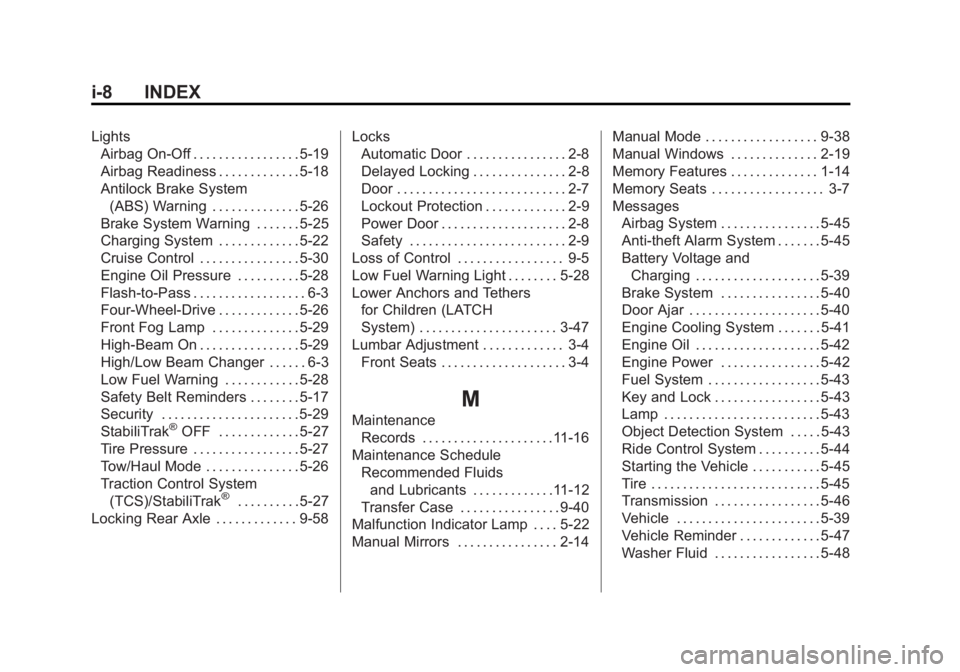
Cruise Control . . . . . . . . . . . . . . . . 5-30
Engine Oil Pressure . . . . . . . . . . 5-28
Flash-to-Pass . . . . . . . . . . . . . . . . . . 6-3
Four-Wheel-Drive . . . . . . . . . . . . . 5-26
Front Fog Lamp . . . . . . . . . . . . . . 5-29
High-Beam On . . . . . . . . . . . . . . . . 5-29
High/Low Beam Changer . . . . . . 6-3
Low Fuel Warning . . . . . . . . . . . . 5-28
Safety Belt Reminders . . . . . . . . 5-17
Security . . . . . . . . . . . . . . . . . . . . . . 5-29
StabiliTrak
®OFF . . . . . . . . . . . . . 5-27
Tire Pressure . . . . . . . . . . . . . . . . . 5-27
Tow/Haul Mode . . . . . . . . . . . . . . . 5-26
Traction Control System (TCS)/StabiliTrak
®. . . . . . . . . . 5-27
Locking Rear Axle . . . . . . . . . . . . . 9-58 Locks
Automatic Door . . . . . . . . . . . . . . . . 2-8
Delayed Locking . . . . . . . . . . . . . . . 2-8
Door . . . . . . . . . . . . . . . . . . . . . . . . . . . 2-7
Lockout Protection . . . . . . . . . . . . . 2-9
Power Door . . . . . . . . . . . . . . . . . . . . 2-8
Safety . . . . . . . . . . . . . . . . . . . . . . . . . 2-9
Loss of Control . . . . . . . . . . . . . . . . . 9-5
Low Fuel Warning Light . . . . . . . . 5-28
Lower Anchors and Tethers for Children (LATCH
System) . . . . . . . . . . . . . . . . . . . . . . 3-47
Lumbar Adjustment . . . . . . . . . . . . . 3-4 Front Seats . . . . . . . . . . . . . . . . . . . . 3-4
M
MaintenanceRecords . . . . . . . . . . . . . . . . . . . . .11-16
Maintenance Schedule Recommended Fluidsand Lubricants . . . . . . . . . . . . .11-12
Transfer Case . . . . . . . . . . . . . . . . 9-40
Malfunction Indicator Lamp . . . . 5-22
Manual Mirrors . . . . . . . . . . . . . . . . 2-14 Manual Mode . . . . . . . . . . . . . . . . . . 9-38
Manual Windows . . . . . . . . . . . . . . 2-19
Memory Features . . . . . . . . . . . . . . 1-14
Memory Seats . . . . . . . . . . . . . . . . . . 3-7
Messages
Airbag System . . . . . . . . . . . . . . . . 5-45
Anti-theft Alarm System . . . . . . . 5-45
Battery Voltage andCharging . . . . . . . . . . . . . . . . . . . . 5-39
Brake System . . . . . . . . . . . . . . . . 5-40
Door Ajar . . . . . . . . . . . . . . . . . . . . . 5-40
Engine Cooling System . . . . . . . 5-41
Engine Oil . . . . . . . . . . . . . . . . . . . . 5-42
Engine Power . . . . . . . . . . . . . . . . 5-42
Fuel System . . . . . . . . . . . . . . . . . . 5-43
Key and Lock . . . . . . . . . . . . . . . . . 5-43
Lamp . . . . . . . . . . . . . . . . . . . . . . . . . 5-43
Object Detection System . . . . . 5-43
Ride Control System . . . . . . . . . . 5-44
Starting the Vehicle . . . . . . . . . . . 5-45
Tire . . . . . . . . . . . . . . . . . . . . . . . . . . . 5-45
Transmission . . . . . . . . . . . . . . . . . 5-46
Vehicle . . . . . . . . . . . . . . . . . . . . . . . 5-39
Vehicle Reminder . . . . . . . . . . . . . 5-47
Washer Fluid . . . . . . . . . . . . . . . . . 5-48