2012 GMC SIERRA 1500 stop start
[x] Cancel search: stop startPage 170 of 556
Black plate (32,1)GMC Sierra Owner Manual - 2012 - CRC - 11/15/11
5-32 Instruments and Controls
The trip odometer can be reset to
zero by pressing the set/reset
button while the trip odometer is
displayed. You can also reset the
trip odometer while it is displayed by
pressing and holding the trip
odometer reset stem.
The trip odometer has a feature
called the retro-active reset. This
can be used to set the trip odometer
to the number of miles (kilometers)
driven since the ignition was last
turned on. This can be used if the
trip odometer is not reset at the
beginning of the trip.
To use the retro-active reset feature,
press and hold the set/reset button
for at least four seconds. The trip
odometer will display the number of
kilometers (km) or miles driven since
the ignition was last turned on and
the vehicle was moving. Once the
vehicle begins moving, the trip
odometer will accumulate mileage.
For example, if the vehicle was
driven 8 km (5 miles) before it is
started again, and then the
retro-active reset feature isactivated, the display will show 8 km
(5 miles). As the vehicle begins
moving, the display will then
increase to 8.2 km (5.1 miles),
8.4 km (5.2 miles), etc.
Fuel Range
Press the trip/fuel button until FUEL
RANGE displays. This display
shows the approximate number of
remaining kilometers (km) or miles
the vehicle can be driven without
refueling. The display will show
LOW if the fuel level is low.
The fuel range estimate is based on
an average of the vehicle's fuel
economy over recent driving history
and the amount of fuel remaining in
the fuel tank. This estimate will
change if driving conditions change.
For example, if driving in traffic and
making frequent stops, this display
may read one number, but if the
vehicle is driven on a freeway, the
number may change even though
the same amount of fuel is in the
fuel tank. This is because different
driving conditions produce different
fuel economies. Generally, freeway
driving produces better fuel
economy than city driving. Fuel
range cannot be reset.
Average Economy
Press the trip/fuel button until AVG
ECONOMY displays. This display
shows the approximate average
liters per 100 kilometers (L/100 km)
or miles per gallon (mpg). This
number is calculated based on the
number of L/100 km (mpg) recorded
since the last time this menu
item was reset. To reset AVG
ECONOMY, press and hold the set/
reset button.
Fuel Used
Press the trip/fuel button until
FUEL USED displays. This display
shows the number of liters (L) or
gallons (gal) of fuel used since the
last reset of this menu item. To reset
the fuel used information, press and
hold the set/reset button while FUEL
USED is displayed.
Page 171 of 556
Black plate (33,1)GMC Sierra Owner Manual - 2012 - CRC - 11/15/11
Instruments and Controls 5-33
Speedometer
The speedometer shows how fast
the vehicle is moving in either
kilometers per hour (km/h) or miles
per hour (mph). The speedometer
cannot be reset.
Timer
Press the trip/fuel button until
TIMER displays. This display can be
used as a timer.
To start the timer, press the
set/reset button while TIMER is
displayed. The display will show the
amount of time that has passed
since the timer was last reset, not
including time the ignition is off.
Time will continue to be counted as
long as the ignition is on, even if
another display is being shown on
the DIC. The timer will record
up to 99 hours, 59 minutes, and
59 seconds (99:59:59) after which
the display will return to zero.
To stop the timer, press the set/reset
button briefly while TIMER is
displayed.To reset the timer to zero, press
and hold the set/reset button while
TIMER is displayed.
Transmission Temperature
Press the trip/fuel button until
TRANS TEMP displays. This
display shows the temperature of
the automatic transmission fluid in
either degrees Celsius (°C) or
degrees Fahrenheit (°F).
Instantaneous Economy and
Active Fuel Management™
Indicator
If the vehicle has this display, press
the trip/fuel button until INST ECON
V8 displays. This display shows the
current fuel economy at a particular
moment and will change frequently
as driving conditions change. This
display shows the instantaneous
fuel economy in liters per
100 kilometers (L/100 km) or miles
per gallon (mpg). Unlike average
economy, this screen cannot be
reset.
An Active Fuel Management
indicator displays on the right side
of the DIC, while INST ECON
displays on the left side. Active Fuel
Management allows the engine to
operate on either four or eight
cylinders, depending on driving
demands. When Active Fuel
Management is active, V4 will
display on the DIC. When Active
Fuel Management is inactive,
V8 will display. See
Active Fuel
Management
®on page 9‑32 for
more information.
Blank Display
This display shows no information.
Page 178 of 556
Black plate (40,1)GMC Sierra Owner Manual - 2012 - CRC - 11/15/11
5-40 Instruments and Controls
SERVICE BATTERY
CHARGING SYSTEM
On some vehicles, this message
displays if there is a problem with
the battery charging system. Under
certain conditions, the charging
system light may also turn on in
the instrument panel cluster. See
Charging System Light on
page 5‑22. Driving with this problem
could drain the battery. Turn off all
unnecessary accessories. Have the
electrical system checked as soon
as possible. See your dealer.
Brake System Messages
SERVICE BRAKE SYSTEM
This message displays along with
the brake system warning light if
there is a problem with the brake
system. SeeBrake System Warning
Light on page 5‑25. If this message
appears, stop as soon as possible
and turn off the vehicle. Restart the
vehicle and check for the message
on the DIC display. If the message
is still displayed or appears again when you begin driving, the brake
system needs service as soon as
possible. See your dealer.
SERVICE BRAKES SOON
On some vehicles, this message
displays if there is a problem with
the brake system. If this message
appears, stop as soon as possible
and turn off the vehicle. Restart the
vehicle and check for the message
on the DIC display. If the message
is still displayed or appears again
when you begin driving, the brake
system needs service. See your
dealer.
SERVICE TRAILER BRAKE
SYSTEM
On vehicles with the Integrated
Trailer Brake Control (ITBC) system,
this message displays and a chime
may sound when there is a problem
with the ITBC system.
When this message displays, power
is no longer available to the trailer
brakes.
As soon as it is safe to do so,
carefully pull your vehicle over to
the side of the road and turn the
ignition off. Check the wiring
connection to the trailer and turn the
ignition back on. If this message still
displays, either your vehicle or the
trailer needs service. See your
dealer.
See
“Integrated Trailer Brake
Control System” underTowing
Equipment on page 9‑94 for more
information.
Door Ajar Messages
DRIVER DOOR OPEN
This message displays and a chime
may sound if the driver door is not
fully closed and the vehicle is
shifted out of P (Park). Stop and turn
off the vehicle, check the door for
obstructions, and close the door
again. Check to see if the message
still appears on the DIC.
Page 182 of 556
Black plate (44,1)GMC Sierra Owner Manual - 2012 - CRC - 11/15/11
5-44 Instruments and Controls
SERVICE PARK ASSIST
This message displays if there is a
problem with the Ultrasonic Rear
Parking Assist (URPA) system. Do
not use this system to help you
park. SeeUltrasonic Parking Assist
on page 9‑61 for more information.
See your dealer for service.
Ride Control System
Messages
SERVICE STABILITRAK
If the vehicle has StabiliTrak and
this message displays, it means
there may be a problem with the
StabiliTrak system. If you see this
message, try to reset the system.
Stop; turn off the engine for at least
15 seconds; then start the engine
again. If this message still comes
on, it means there is a problem. You
should see your dealer for service.
The vehicle is safe to drive;
however, you do not have the
benefit of StabiliTrak, so reduce
your speed and drive accordingly.
SERVICE TRACTION
CONTROL
If the vehicle has StabiliTrak, this
message displays when there is a
problem with the Traction Control
System (TCS). When this message
displays, the system will not limit
wheel spin. Adjust your driving
accordingly. See your dealer for
service. See StabiliTrak
®System on
page 9‑55 for more information.
STABILITRAK INITIALIZING
If the vehicle has StabiliTrak, this
message may come on if the
StabiliTrak system has not fully
initialized because of road
conditions or the incorrect tire size.
When the StabiliTrak system is fully
initialized, the message will turn
off. SeeStabiliTrak
®System on
page 9‑55 for more information.
If this message continues to be
displayed for multiple ignition cycles
and on different road surfaces, see
your dealer for service.
TRACTION XX
STABILITRAK XX
This message displays when the
traction control and/or StabiliTrak
systems have been turned on or off.
Adjust your driving accordingly.
To limit wheel spin and realize
the full benefits of the stability
enhancement system, you should
normally leave StabiliTrak on.
However, you should turn
StabiliTrak off if the vehicle gets
stuck in sand, mud, ice, or snow
and you want to rock the vehicle
to attempt to free it, or if you are
driving in extreme off-road
conditions and require more wheel
spin. See If the Vehicle Is Stuck on
page 9‑15. To turn the StabiliTrak
system on or off, see StabiliTrak
®
System on page 9‑55.
Page 184 of 556
Black plate (46,1)GMC Sierra Owner Manual - 2012 - CRC - 11/15/11
5-46 Instruments and Controls
Several conditions may cause this
message to appear. SeeTire
Pressure Monitor Operation on
page 10‑62 for more information.
If the warning comes on and stays
on, there may be a problem with the
TPMS. See your dealer.
TIRE LEARNING ACTIVE
If the vehicle has the Tire Pressure
Monitor System (TPMS), this
message displays when the system
is re-learning the tire positions on
your vehicle. The tire positions must
be re-learned after rotating the tires
or after replacing a tire or sensor.
See Tire Inspection on page 10‑65,
Tire Rotation on page 10‑65, Tire
Pressure Monitor System on
page 10‑60, and Tire Pressure on
page 10‑58 for more information.
TIRE LOW ADD AIR TO TIRE
If the vehicle has the Tire Pressure
Monitor System (TPMS), this
message displays when the
pressure in one or more of the
vehicle's tires is low. This message also displays LEFT FRT (left front),
RIGHT FRT (right front), LEFT RR
(left rear), or RIGHT RR (right rear)
to indicate the location of the low
tire. The low tire pressure warning
light will also come on. See
Tire
Pressure Light on page 5‑27. You
can receive more than one tire
pressure message at a time. To
read the other messages that may
have been sent at the same time,
press the set/reset button or the
trip odometer reset stem. If a tire
pressure message appears on the
DIC, stop as soon as you can. Have
the tire pressures checked and set
to those shown on the Tire Loading
Information label. See Tires on
page 10‑50, Vehicle Load Limits on
page 9‑16, and Tire Pressure on
page 10‑58. The DIC also shows
the tire pressure values. See Driver
Information Center (DIC) on
page 5‑30.
Transmission Messages
SERVICE 4 WHEEL DRIVE
If the vehicle has four-wheel
drive, this message may display
if a problem occurs with the
four-wheel-drive system. If this
message appears, stop as soon as
possible and turn off the vehicle.
Make sure the key is in the LOCK/
OFF position for at least one minute
and then restart the vehicle and
check for the message on the DIC
display. If the message is still
displayed or appears again
when you begin driving, the
four-wheel-drive system needs
service. See your dealer.
Page 194 of 556
Black plate (56,1)GMC Sierra Owner Manual - 2012 - CRC - 11/15/11
5-56 Instruments and Controls
Universal Remote
System
SeeRadio Frequency Statement on
page 13‑20 for information
regarding Part 15 of the Federal
Communications Commission (FCC)
rules and Industry Canada
Standards RSS-GEN/210/220/310.
Universal Remote System
Programming
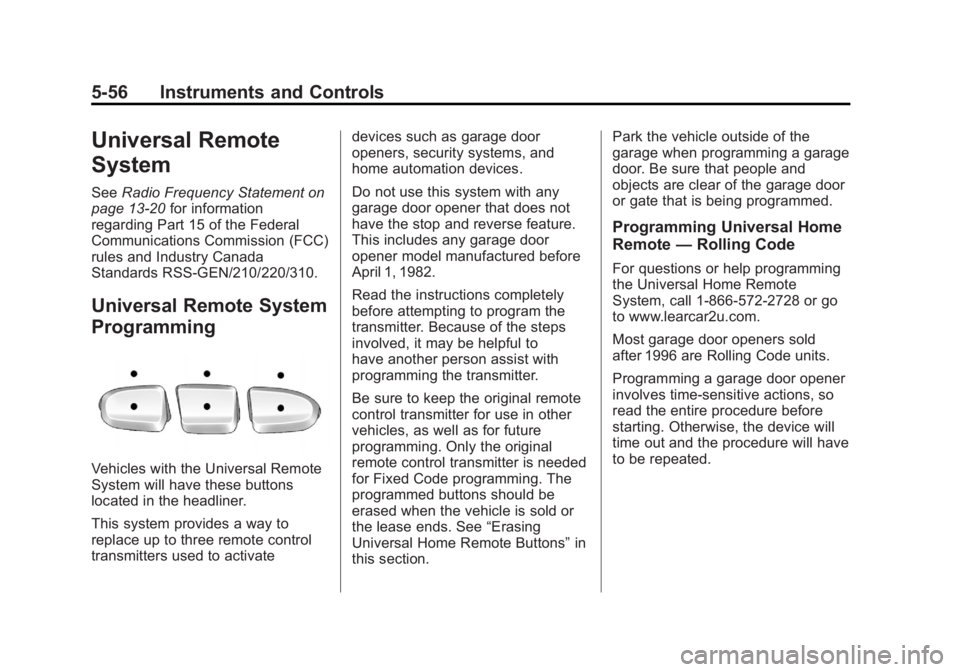
Vehicles with the Universal Remote
System will have these buttons
located in the headliner.
This system provides a way to
replace up to three remote control
transmitters used to activate devices such as garage door
openers, security systems, and
home automation devices.
Do not use this system with any
garage door opener that does not
have the stop and reverse feature.
This includes any garage door
opener model manufactured before
April 1, 1982.
Read the instructions completely
before attempting to program the
transmitter. Because of the steps
involved, it may be helpful to
have another person assist with
programming the transmitter.
Be sure to keep the original remote
control transmitter for use in other
vehicles, as well as for future
programming. Only the original
remote control transmitter is needed
for Fixed Code programming. The
programmed buttons should be
erased when the vehicle is sold or
the lease ends. See
“Erasing
Universal Home Remote Buttons” in
this section. Park the vehicle outside of the
garage when programming a garage
door. Be sure that people and
objects are clear of the garage door
or gate that is being programmed.
Programming Universal Home
Remote
—Rolling Code
For questions or help programming
the Universal Home Remote
System, call 1-866-572-2728 or go
to www.learcar2u.com.
Most garage door openers sold
after 1996 are Rolling Code units.
Programming a garage door opener
involves time-sensitive actions, so
read the entire procedure before
starting. Otherwise, the device will
time out and the procedure will have
to be repeated.
Page 226 of 556
Black plate (16,1)GMC Sierra Owner Manual - 2012 - CRC - 11/15/11
7-16 Infotainment System
If the surface of a CD is soiled,
clean it with a soft, lint‐free cloth or
dampen a clean, soft cloth in a mild,
neutral detergent solution mixed
with water. Make sure the wiping
process starts from the center to
the edge.
Inserting a CD (Single CD
Player)
Insert a CD partway into the slot,
label side up. The player pulls it in
and the CD should begin playing.
Inserting a CD(s) (Six-Disc CD
Player)
LOAD^:Press to load CDs into
the CD player. This CD player holds
up to six CDs.
To insert one CD:
1. Press and release the LOAD button.
2. Wait for the message to insert the disc. 3. Load a CD. Insert the CD
partway into the slot, label side
up. The player pulls the CD in.
To insert multiple CDs:
1. Press and hold the LOAD button for two seconds. A beep sounds
and Load All Discs displays.
2. Wait for the message on when to insert the discs. The CD player
takes up to six CDs.
3. Press the LOAD button again to cancel loading more CDs.
Ejecting a CD (Single CD
Player)
ZEJECT: Press and release to
eject the disc. Remove the CD
when Remove Disc displays. If the
disc is not removed, after several
seconds the disc is automatically
pulled back into the player.
Ejecting a CD (Six-Disc CD
Player)
ZEJECT: Press and release
to eject the disc that is currently
playing. Remove the CD when
Remove Disc displays. If the disc is
not removed, after several seconds
the disc is automatically pulled back
into the player.
To eject all CDs, press and
hold the
ZEJECT button for
two seconds.
Playing a CD
If the ignition or radio is turned off
with a CD in the player, it stays in
the player. When the ignition or
radio is turned on, the CD starts
playing where it stopped, if it was
the last selected audio source. The
CD is controlled by the buttons on
the radio faceplate or by the RSA
unit. See Rear Seat Audio (RSA)
System on page 7‑46 for more
information.
Page 233 of 556
Black plate (23,1)GMC Sierra Owner Manual - 2012 - CRC - 11/15/11
Infotainment System 7-23
In some vehicles, depending on
audio options, the rear speakers
can be muted when the RSA power
is turned on. SeeRear Seat Audio
(RSA) System on page 7‑46 for
more information.
Inserting a Disc
Insert a disc partway into either slot,
label side up. The player pulls it in
and the disc should begin playing.
(Loading a disc into the system,
depending on media type and
format, ranges from 5 to 20 seconds
for a CD, and up to 30 seconds for a
DVD to begin playing.)
Ejecting a Disc
ZCD (Eject): Press and release
to eject the disc that is currently
playing. The CD ejects from the
bottom slot. A beep sounds and
Ejecting Disc displays. Once the
disc is ejected, Remove Disc
displays. The disc can be removed.
If the disc is not removed, after several seconds the disc
automatically pulls back into the
player.
ZDVD (Eject):
Press and
release to eject the disc that is
currently playing in the top slot.
A beep sounds and Ejecting Disc
displays.
If loading and reading of a disc
cannot be completed, due to
unknown format, etc., and the disc
fails to eject, press and hold for
more than five seconds to force the
disc to eject.
Playing a CD (in Either the
DVD or CD Slot)
If the ignition or radio is turned off
with a CD in the player, it stays in
the player. When the ignition or
radio is turned on, the CD starts
playing where it stopped, if it was
the last selected audio source. The CD is controlled by the buttons
on the radio faceplate or by the RSA
unit. See
Rear Seat Audio (RSA)
System on page 7‑46 for more
information. The DVD/CD decks
(the upper slot is the DVD deck and
the lower slot is the CD deck) of the
radio are compatible with most
audio CDs, CD-Rs, CD-RWs,
and MP3s.
When a CD is inserted, the text tab
DVD or CD symbol displays on the
left side of the radio display. As
each new track starts to play, the
track number displays.
The CD player can play the smaller
8 cm (3 in) single CDs with an
adapter ring. Full-size CDs and the
smaller CDs are loaded in the same
manner.