2012 GMC ACADIA door lock
[x] Cancel search: door lockPage 269 of 468

Black plate (11,1)GMC Acadia/Acadia Denali Owner Manual - 2012
Driving and Operating 9-11
WARNING (Continued)
This can cause systems to
break and change the way the
vehicle handles. This could
cause loss of control and a
crash. Overloading can also
shorten the life of the vehicle.
Tire and Loading Information
Label
Example Label
A vehicle-specific Tire and
Loading Information label is
attached to the center pillar
(B-pillar) of your vehicle.
With the driver door open,
you will find the label attached
below the door lock post
(striker). The tire and loading
information label shows the
number of occupant seating
positions (A), and the maximum
vehicle capacity weight (B) in
kilograms and pounds.
The Tire and Loading
Information label also shows the
size of the original equipment
tires (C) and the recommended
cold tire inflation pressures (D).
For more information on tires
and inflation see Tires on
page 10‑37 andTire Pressure
on page 10‑44. There is also important loading
information on the vehicle
Certification/Tire label. It tells
you the Gross Vehicle Weight
Rating (GVWR) and the Gross
Axle Weight Rating (GAWR)
for the front and rear axle.
See
“Certification/Tire Label”
later in this section.
Steps for Determining Correct
Load Limit
1.
Locate the statement
“The combined weight of
occupants and cargo should
never exceed XXX kg or
XXX lbs” on your vehicle's
placard.
2.Determine the combined
weight of the driver and
passengers that will be
riding in your vehicle.
Page 278 of 468

Black plate (20,1)GMC Acadia/Acadia Denali Owner Manual - 2012
9-20 Driving and Operating
Retained Accessory
Power (RAP)
These vehicle accessories can be
used for up to 10 minutes after the
ignition key is turned off:
.Audio System
.Power Windows
.Sunroof (if equipped)
Power to the windows and sunroof
will work up to 10 minutes or until a
door is opened.
The radio continues to work for
10 minutes or until the driver door
is opened.
For an additional 10 minutes of
operation, close all the doors and
turn the key to ON/RUN and then
back to LOCK/OFF.
All these features will work when
the key is in the ON/RUN or
ACC/ACCESSORY positions.
Shifting Into Park
{WARNING
It can be dangerous to get out of
the vehicle if the shift lever is not
fully in P (Park) with the parking
brake firmly set. The vehicle can
roll. If you have left the engine
running, the vehicle can move
suddenly. You or others could be
injured. To be sure the vehicle will
not move, even when you are on
fairly level ground, use the steps
that follow. If you are pulling a
trailer, see Driving Characteristics
and Towing Tips on page 9‑45.
1. Hold the brake pedal down and set the parking brake.
See Parking Brake on page 9‑28
for more information.
2. Move the shift lever into P (Park) by holding in the button on the
shift lever and pushing the shift
lever all the way toward the front
of the vehicle. 3. Turn the ignition key to
LOCK/OFF.
4. Remove the key and take it with you. If you can leave the vehicle
with the ignition key in your
hand, the vehicle is in P (Park).
Leaving the Vehicle with the
Engine Running
{WARNING
It can be dangerous to leave the
vehicle with the engine running.
The vehicle could move suddenly
if the shift lever is not fully in
P (Park) with the parking brake
firmly set. And, if you leave the
vehicle with the engine running,
it could overheat and even catch
fire. You or others could be
injured. Do not leave the vehicle
with the engine running.
Page 300 of 468

Black plate (42,1)GMC Acadia/Acadia Denali Owner Manual - 2012
9-42 Driving and Operating
Notice:This vehicle was not
designed for fuel that contains
methanol. Do not use fuel
containing methanol. It can
corrode metal parts in the fuel
system and also damage plastic
and rubber parts. That damage
would not be covered under the
vehicle warranty.
Some gasolines that are
not reformulated for low
emissions can contain an
octane-enhancing additive called
methylcyclopentadienyl manganese
tricarbonyl (MMT); ask the attendant
where you buy gasoline whether the
fuel contains MMT. We recommend
against the use of such gasolines.
Fuels containing MMT can reduce
spark plug life and affect emission
control system performance.
The malfunction indicator lamp
might turn on. If this occurs, return
to your dealer for service.Filling the Tank
{WARNING
Fuel vapor burns violently and a
fuel fire can cause bad injuries.
To help avoid injuries to you and
others, read and follow all the
instructions on the fuel pump
island. Turn off the engine when
refueling. Do not smoke near fuel
or when refueling the vehicle.
Do not use cellular phones.
Keep sparks, flames, and
smoking materials away from fuel.
Do not leave the fuel pump
unattended when refueling the
vehicle. This is against the law in
some places. Do not re-enter the
vehicle while pumping fuel. Keep
children away from the fuel pump;
never let children pump fuel. The tethered fuel cap is located
behind a hinged fuel door on the
driver side of the vehicle.
To open the fuel door, push the
rearward center edge in and release
and it will open.
To remove the fuel cap, turn it
slowly counterclockwise. The fuel
cap has a spring in it; if the cap is
released too soon, it will spring back
to the right.
Page 301 of 468

Black plate (43,1)GMC Acadia/Acadia Denali Owner Manual - 2012
Driving and Operating 9-43
While refueling, hang the tethered
fuel cap from the hook on the
fuel door.
{WARNING
Fuel can spray out on you if
you open the fuel cap too
quickly. If you spill fuel and then
something ignites it, you could be
badly burned. This spray can
happen if the tank is nearly full,
and is more likely in hot weather.
Open the fuel cap slowly and
wait for any hiss noise to stop.
Then unscrew the cap all the way.Be careful not to spill fuel. Do not
top off or overfill the tank and wait a
few seconds after you have finished
pumping before removing the
nozzle. Clean fuel from painted
surfaces as soon as possible.
See
Exterior Care on page 10‑86.
When replacing the fuel cap,
turn it clockwise until it clicks.
Make sure the cap is fully installed.
The diagnostic system can
determine if the fuel cap has been
left off or improperly installed.
This would allow fuel to
evaporate into the atmosphere.
See Malfunction Indicator Lamp on
page 5‑18.
{WARNING
If a fire starts while you are
refueling, do not remove the
nozzle. Shut off the flow of fuel
by shutting off the pump or by
notifying the station attendant.
Leave the area immediately.
Notice: If a new fuel cap is
needed, be sure to get the right
type of cap from your dealer.
The wrong type of fuel cap might
not fit properly, might cause the
malfunction indicator lamp to
light, and could damage the fuel
tank and emissions system.
See Malfunction Indicator Lamp
on page 5‑18.
Page 347 of 468

Black plate (35,1)GMC Acadia/Acadia Denali Owner Manual - 2012
Vehicle Care 10-35
Fuse Side
The vehicle may not be equipped
with all of the fuses, relays, and
features shown. Fuses Usage
AIRBAG Airbag AMP Amplifier
BCK/UP/ STOP Back‐up Lamp/
Stoplamp
BCM Body Control
Module
CNSTR/ VENT Canister Vent
CTSY Courtesy Lamps
DR/LCK Door Locks
DRL Daytime Running
Lamps
DRL 2/
RR Fog GMC HID Only
(If Equipped)/
Rear Fog Lamps
(China Only)
DSPLY Display
FRT/WSW Front Windshield
Washer
HTD/COOL SEAT Heated/Cooling
Seats Fuses Usage
HVAC Heating,
Ventilation, and
Air Conditioning
INADV/
PWR/LED Inadvertent
Power LED
INFOTMNT Infotainment
LT/TRN/SIG Driver Side Turn
Signal
MSM Memory Seat
Module
PDM Power Mirrors,
Liftgate Release
PWR MODE Power Mode
PWR/MIR Power Mirrors RDO Radio
REAR WPR Rear Wiper
RT/TRN/SIG Passenger Side
Turn Signal
SPARE Spare
STR/WHL/ ILLUM Steering Wheel
Illumination
Page 375 of 468
Black plate (63,1)GMC Acadia/Acadia Denali Owner Manual - 2012
Vehicle Care 10-63
3. Place the kit on the ground.Make sure the tire valve stem is
positioned close to the ground
so the hose will reach it.
4. Remove the valve stem cap from the flat tire by turning it
counterclockwise.
5. Attach the sealant/air hose (F) onto the tire valve stem. Turn it
clockwise until it is tight.
6. Plug the power plug (H) into the accessory power outlet in the
vehicle. Unplug all items from
other accessory power outlets.
See Power Outlets on page 5‑9.
If the vehicle has an accessory
power outlet, do not use the
cigarette lighter.
If the vehicle only has a cigarette
lighter, use the cigarette lighter.
Do not pinch the power plug
cord in the door or window.
7. Start the vehicle. The vehicle must be running while using the
air compressor. 8. Turn the selector switch (A)
counterclockwise to the
Sealant + Air position.
9. Press the on/off button (B) to turn the tire sealant and
compressor kit on.
The compressor will inject
sealant and air into the tire.
The pressure gauge (C) will
initially show a high pressure
while the compressor pushes the
sealant into the tire. Once the
sealant is completely dispersed
into the tire, the pressure will
quickly drop and start to rise
again as the tire inflates with
air only.
10. Inflate the tire to the recommended inflation
pressure using the pressure
gauge (C). The recommended
inflation pressure can be
found on the Tire and Loading
Information label. See Tire
Pressure on page 10‑44. The pressure gauge (C) may
read higher than the actual tire
pressure while the compressor
is on. Turn the compressor off
to get an accurate pressure
reading. The compressor may
be turned on/off until the
correct pressure is reached.
Notice: If the recommended
pressure cannot be reached after
approximately 25 minutes, the
vehicle should not be driven
farther. The tire is too severely
damaged and the tire sealant and
compressor kit cannot inflate the
tire. Remove the power plug from
the accessory power outlet and
unscrew the inflating hose from
the tire valve. See Roadside
Assistance Program (U.S. and
Canada) on page 13‑8 or
Roadside Assistance Program
(Mexico) on page 13‑10.
Page 378 of 468
Black plate (66,1)GMC Acadia/Acadia Denali Owner Manual - 2012
10-66 Vehicle Care
If a tire goes flat, avoid further tire
and wheel damage by driving slowly
to a level place. Turn on the hazard
warning flashers. SeeHazard
Warning Flashers on page 6‑4.
See If a Tire Goes Flat on
page 10‑58 for other important
safety warnings.
1. Remove the tire sealant and compressor kit from its storage
location. See Storing the Tire
Sealant and Compressor Kit on
page 10‑68.
2. Unwrap the air only hose (G) and the power plug (H).
3. Place the kit on the ground. Make sure the tire valve stem is
positioned close to the ground
so the hose will reach it.
4. Remove the tire valve stem cap from the flat tire by turning it
counterclockwise.
5. Attach the air only hose (G) onto the tire valve stem by turning it
clockwise until it is tight. 6. Plug the power plug (H) into the
accessory power outlet in the
vehicle. Unplug all items from
other accessory power outlets.
See Power Outlets on page 5‑9.
If the vehicle has an accessory
power outlet, do not use the
cigarette lighter.
If the vehicle only has a cigarette
lighter, use the cigarette lighter.
Do not pinch the power plug
cord in the door or window.
7. Start the vehicle. The vehicle must be running while using the
air compressor.
8. Turn the selector switch (A) clockwise to the Air Only
position.
9. Press the on/off (B) button to turn the compressor on.
The compressor will inflate the
tire with air only. 10. Inflate the tire to the
recommended inflation
pressure using the pressure
gauge (C). The recommended
inflation pressure can be found
on the Tire and Loading
Information label. See Tire
Pressure on page 10‑44.
The pressure gauge (C) may
read higher than the actual tire
pressure while the compressor
is on. Turn the compressor off
to get an accurate reading.
The compressor may be turned
on/off until the correct pressure
is reached.
If you inflate the tire higher
than the recommended
pressure you can adjust the
excess pressure by pressing
the pressure deflation
button (D), if equipped, until the
proper pressure reading is
reached. This option is only
functional when using the air
only hose (G).
Page 381 of 468
Black plate (69,1)GMC Acadia/Acadia Denali Owner Manual - 2012
Vehicle Care 10-69
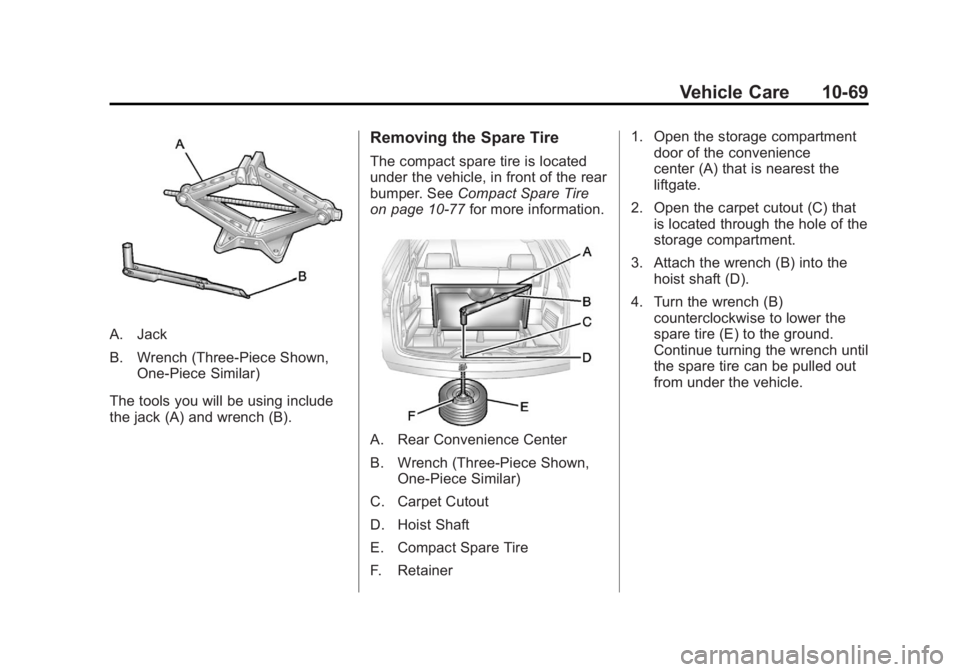
A. Jack
B. Wrench (Three-Piece Shown,One-Piece Similar)
The tools you will be using include
the jack (A) and wrench (B).
Removing the Spare Tire
The compact spare tire is located
under the vehicle, in front of the rear
bumper. See Compact Spare Tire
on page 10‑77 for more information.
A. Rear Convenience Center
B. Wrench (Three-Piece Shown,
One-Piece Similar)
C. Carpet Cutout
D. Hoist Shaft
E. Compact Spare Tire
F. Retainer 1. Open the storage compartment
door of the convenience
center (A) that is nearest the
liftgate.
2. Open the carpet cutout (C) that is located through the hole of the
storage compartment.
3. Attach the wrench (B) into the hoist shaft (D).
4. Turn the wrench (B) counterclockwise to lower the
spare tire (E) to the ground.
Continue turning the wrench until
the spare tire can be pulled out
from under the vehicle.