2012 GMC ACADIA lift gate
[x] Cancel search: lift gatePage 40 of 468

Black plate (8,1)GMC Acadia/Acadia Denali Owner Manual - 2012
2-8 Keys, Doors, and Windows
Power Door Locks
Base Model
Uplevel Model
K(Unlock):Press to unlock the
doors.
Q(Lock): Press to lock the doors.
Delayed Locking
When locking the doors with the
power lock switch and a door or the
liftgate is open, the doors will lock
five seconds after the last door is
closed. You will hear three chimes
to signal that the delayed locking
feature is in use.
Pressing the power lock switch
twice or the lock button on the RKE
transmitter twice will override the
delayed locking feature and
immediately lock all the doors.
This feature will not operate if the
key is in the ignition.
This feature can be programmed by
using the Driver Information Center
(DIC). See “DELAY DOOR LOCK”
under Vehicle Personalization
(With DIC Buttons) on page 5‑46.
Page 42 of 468

Black plate (10,1)GMC Acadia/Acadia Denali Owner Manual - 2012
2-10 Keys, Doors, and Windows
Doors
Liftgate
{WARNING
Exhaust gases can enter the
vehicle if it is driven with the
liftgate or trunk/hatch open,
or with any objects that pass
through the seal between the
body and the trunk/hatch or
liftgate. Engine exhaust contains
carbon monoxide (CO) which
cannot be seen or smelled. It can
cause unconsciousness and even
death.
If the vehicle must be driven with
the liftgate or trunk/hatch open:
.Close all of the windows.
.Fully open the air outlets on
or under the instrument
panel.(Continued)
WARNING (Continued)
.Adjust the climate control
system to a setting that
brings in only outside air and
set the fan speed to the
highest setting. See “Climate
Control Systems” in the
Index.
.If the vehicle is equipped with
a power liftgate, disable the
power liftgate function.
For more information about
carbon monoxide, see Engine
Exhaust on page 9‑22.
Notice: If you open the liftgate
without checking for overhead
obstructions such as a garage
door, you could damage the
liftgate or the liftgate glass.
Always check to make sure the
area above and behind the liftgate
is clear before opening it.
Manual Liftgate
To unlock the liftgate, press the
power door lock switch or
press
"on the Remote Keyless
Entry (RKE) transmitter twice.
See Remote Keyless Entry (RKE)
System Operation on page 2‑3.
To open the liftgate, press the touch
pad under the liftgate handle and lift
up. The vehicle must be in P (Park)
and the battery must be charged.
Use the pull handle to lower and
close the liftgate.
Always close the liftgate before
driving.
Page 43 of 468

Black plate (11,1)GMC Acadia/Acadia Denali Owner Manual - 2012
Keys, Doors, and Windows 2-11
Power Liftgate
On vehicles with a power liftgate,
the vehicle must be in P (Park) to
operate. The taillamps flash and a
chime sounds when the power
liftgate moves.
{WARNING
You or others could be injured if
caught in the path of the power
liftgate. Make sure there is no one
in the way of the liftgate as it is
opening and closing.
The power liftgate can be power
opened and closed in the
following ways:
.Press and hold8on the
RKE transmitter. See Remote
Keyless Entry (RKE) System
Operation on page 2‑3.
.PressO.
.Press the touch pad on the
outside liftgate handle.
Pressing the buttons or touch pad a
second time while the liftgate is
moving reverses the direction.
Power Liftgate Touch Pad
The liftgate can also be closed by
pressing
lnext to the liftgate
latch. Press
la second time
during the liftgate operation to
reverse the operation.
The power liftgate may be
temporarily disabled under extreme
temperatures or under low battery
conditions. If this occurs, the liftgate
can be operated manually.
If the vehicle is shifted out of
P (Park) while the liftgate power
function is in progress, it will
Page 44 of 468

Black plate (12,1)GMC Acadia/Acadia Denali Owner Manual - 2012
2-12 Keys, Doors, and Windows
continue to completion. If the
vehicle is shifted out of P (Park)
and accelerated before the power
liftgate latch closes, the liftgate
may reverse to the open position.
Cargo could fall out of the vehicle.
Always make sure the power liftgate
is closed and latched before
driving away.
If the power liftgate is used and the
liftgate support struts have lost
pressure, the taillamps will flash and
a chime will sound. The liftgate will
stay open temporarily, and then
slowly close. See a dealer for
service before using the liftgate if
this occurs.
Obstacle Detection Features
A warning chime will sound and the
liftgate will automatically reverse
direction to the full closed or
open position if an obstacle is
encountered during a power open or
close cycle. After removing the
obstacle the liftgate will resume
normal operation.If more obstacles are encountered
on the same power cycle, the power
function deactivates, and the liftgate
must be opened or closed manually.
A message displays on the Driver
Information Center (DIC) to indicate
that the liftgate is open. See
Driver
Information Center (DIC) (Without
DIC Buttons) on page 5‑30 or
Driver Information Center (DIC)
(With DIC Buttons) on page 5‑25.
After removing the obstacles,
manually open the liftgate fully or
close and latch the liftgate.
The liftgate will resume normal
power operation.
The vehicle has pinch sensors
located on the side edges of the
liftgate. If an object is caught
between the liftgate and the body of
the vehicle and presses against a
sensor, the liftgate will reverse
direction and open fully. The liftgate
will remain open until it is activated
again or closed manually. Do not
force the liftgate open or closed
during a power cycle.Manual Operation of Power
Liftgate
To change the liftgate to manual
operation, press OFF on the power
liftgate switch. A message displays
on the DIC indicating manual
operation mode. See Driver
Information Center (DIC) (Without
DIC Buttons) on page 5‑30 orDriver
Information Center (DIC) (With DIC
Buttons) on page 5‑25.
Page 45 of 468

Black plate (13,1)GMC Acadia/Acadia Denali Owner Manual - 2012
Keys, Doors, and Windows 2-13
With the liftgate in manual mode
and all of the doors unlocked, the
liftgate can be manually opened
and closed.
To open the liftgate, press the touch
pad on the outside of the liftgate
handle and lift up. Use the pull
handle to lower and close the
liftgate, the liftgate latch will power
close.
Always close the liftgate before
driving.
If
8on the RKE transmitter or the
lon the liftgate is pressed while
in manual operation mode, the
taillamps will flash three times, but
the liftgate will not move.
It is not recommended to drive with
the liftgate open. However, if the
vehicle must be driven with the
liftgate open, the liftgate should be
set to manual operation.
Vehicle Security
This vehicle has theft-deterrent
features; however, they do not make
it impossible to steal.
Anti-theft Alarm System
On vehicles with an anti-theft alarm
system, to activate the system:
.PressQon the Remote Keyless
Entry (RKE) transmitter or the
power door lock switch when
any door is open.
The security light flashes.
When the door is closed, the
security light stops flashing and
stays on solid for approximately
30 seconds. The content
theft-deterrent alarm is not
armed until the security light
goes off. If the delayed locking feature is
active, the alarm is not activated
until all doors are closed and the
security light goes off.
.PressQwhen the driver door
is closed. The security light
comes on solid for approximately
30 seconds and then goes off.
The content theft-deterrent alarm
is not armed until the security
light goes off.
The theft-deterrent system will not
activate if the doors are locked with
the vehicle's key or the manual
door lock.
If a locked door is opened
without using the RKE transmitter,
a 10-second pre-alarm occurs.
The horn chirps and the lights flash.
If the key is not placed in the
ignition and turned to START or
the door is not unlocked by
pressing
Qduring the 10-second
pre-alarm, the alarm goes off.
Page 119 of 468
Black plate (5,1)GMC Acadia/Acadia Denali Owner Manual - 2012
Storage 4-5
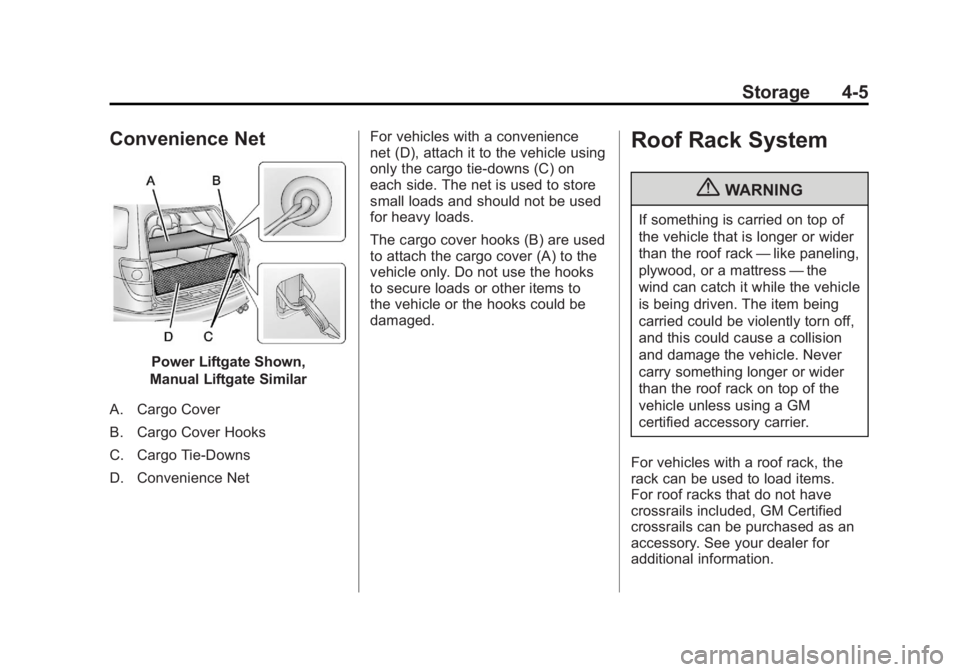
Convenience Net
Power Liftgate Shown,
Manual Liftgate Similar
A. Cargo Cover
B. Cargo Cover Hooks
C. Cargo Tie-Downs
D. Convenience Net For vehicles with a convenience
net (D), attach it to the vehicle using
only the cargo tie-downs (C) on
each side. The net is used to store
small loads and should not be used
for heavy loads.
The cargo cover hooks (B) are used
to attach the cargo cover (A) to the
vehicle only. Do not use the hooks
to secure loads or other items to
the vehicle or the hooks could be
damaged.
Roof Rack System
{WARNING
If something is carried on top of
the vehicle that is longer or wider
than the roof rack
—like paneling,
plywood, or a mattress —the
wind can catch it while the vehicle
is being driven. The item being
carried could be violently torn off,
and this could cause a collision
and damage the vehicle. Never
carry something longer or wider
than the roof rack on top of the
vehicle unless using a GM
certified accessory carrier.
For vehicles with a roof rack, the
rack can be used to load items.
For roof racks that do not have
crossrails included, GM Certified
crossrails can be purchased as an
accessory. See your dealer for
additional information.
Page 158 of 468

Black plate (38,1)GMC Acadia/Acadia Denali Owner Manual - 2012
5-38 Instruments and Controls
Brake System Messages
SERVICE BRAKE SYSTEM
This message displays along with
the brake system warning light if
there is a problem with the brake
system. SeeBrake System Warning
Light on page 5‑21. If this message
appears, stop as soon as possible
and turn off the vehicle. Restart the
vehicle and check for the message
on the DIC display. If the message
is still displayed or appears again
when you begin driving, the brake
system needs service as soon as
possible. See your dealer.
Cruise Control Messages
CRUISE SET TO XXX
This message displays whenever
the cruise control is set. See Cruise
Control on page 9‑32 for more
information.
Door Ajar Messages
DRIVER DOOR OPEN
This message displays and a chime
sounds if the driver door is not fully
closed and the vehicle is shifted out
of P (Park). Stop and turn off the
vehicle, check the door for
obstructions, and close the door
again. Check to see if the message
still appears on the DIC.
HOOD OPEN
On some models, this message
displays and a chime sounds if the
hood is not fully closed. Stop and
turn off the vehicle, check the hood
for obstructions, and close the hood
again. Check to see if the message
still appears on the DIC.
LEFT REAR DOOR OPEN
This message displays and a
chime sounds if the driver side rear
door is not fully closed and the
vehicle is shifted out of P (Park). Stop and turn off the vehicle, check
the door for obstructions, and close
the door again. Check to see if the
message still appears on the DIC.
LIFTGATE OPEN
This message displays and a chime
sounds if the liftgate is open while
the ignition is in ON/RUN. Turn off
the vehicle and check the liftgate.
Restart the vehicle and check for
the message on the DIC display.
PASSENGER DOOR OPEN
This message displays and a chime
sounds if the passenger door is
not fully closed and the vehicle is
shifted out of P (Park). Stop and turn
off the vehicle, check the door for
obstructions, and close the door
again. Check to see if the message
still appears on the DIC.
POWER LIFTGATE OFF
This message displays when the
power liftgate has been turned off
by pressing the power liftgate button
on the center console.
Page 169 of 468

Black plate (49,1)GMC Acadia/Acadia Denali Owner Manual - 2012
Instruments and Controls 5-49
Keyless Entry (RKE) System
Operation on page 2‑3for more
information.
Press the customization button
until REMOTE DOOR UNLOCK
appears on the DIC display.
Press the set/reset button once to
access the settings for this feature.
Then press the customization button
to scroll through the following
settings:
LIGHTS OFF: The exterior lamps
will not flash when you press
the unlock button on the RKE
transmitter.
LIGHTS ON (default): The exterior
lamps will flash when you press
the unlock button on the RKE
transmitter.
NO CHANGE: No change will be
made to this feature. The current
setting will remain.
To select a setting, press the
set/reset button while the desired
setting is displayed on the DIC. DELAY DOOR LOCK
This feature allows you to select
whether or not the locking of the
vehicle's doors and liftgate will be
delayed. When locking the doors
and liftgate with the power door lock
switch and a door or the liftgate is
open, this feature will delay locking
the doors and liftgate until
five seconds after the last door is
closed. You will hear three chimes
to signal that the delayed locking
feature is in use. The key must be
out of the ignition for this feature to
work. You can temporarily override
delayed locking by pressing the
power door lock switch twice or the
lock button on the RKE transmitter
twice. See
Delayed Locking on
page 2‑8 for more information.
Press the customization button
until DELAY DOOR LOCK appears
on the DIC display. Press the
set/reset button once to access
the settings for this feature. Then press the customization button
to scroll through the following
settings:
OFF:
There will be no delayed
locking of the vehicle's doors.
ON (default): The doors will not
lock until five seconds after the last
door or the liftgate is closed.
NO CHANGE: No change will be
made to this feature. The current
setting will remain.
To select a setting, press the
set/reset button while the desired
setting is displayed on the DIC.
EXIT LIGHTING
This feature allows you to select
the amount of time you want the
exterior lamps to remain on
when it is dark enough outside.
This happens after the key is turned
from ON/RUN to LOCK/OFF.