Page 186 of 405
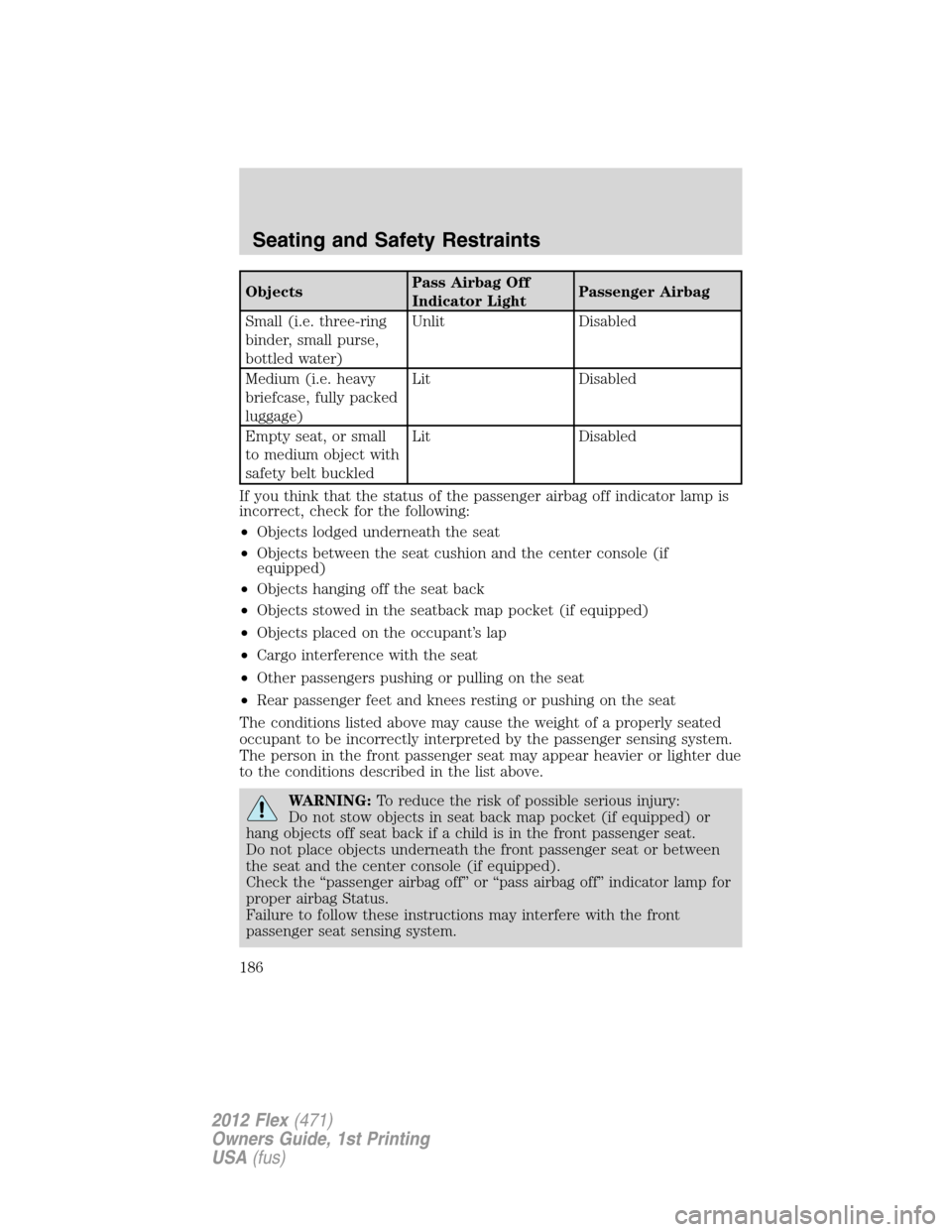
ObjectsPass Airbag Off
Indicator LightPassenger Airbag
Small (i.e. three-ring
binder, small purse,
bottled water)Unlit Disabled
Medium (i.e. heavy
briefcase, fully packed
luggage)Lit Disabled
Empty seat, or small
to medium object with
safety belt buckledLit Disabled
If you think that the status of the passenger airbag off indicator lamp is
incorrect, check for the following:
•Objects lodged underneath the seat
•Objects between the seat cushion and the center console (if
equipped)
•Objects hanging off the seat back
•Objects stowed in the seatback map pocket (if equipped)
•Objects placed on the occupant’s lap
•Cargo interference with the seat
•Other passengers pushing or pulling on the seat
•Rear passenger feet and knees resting or pushing on the seat
The conditions listed above may cause the weight of a properly seated
occupant to be incorrectly interpreted by the passenger sensing system.
The person in the front passenger seat may appear heavier or lighter due
to the conditions described in the list above.
WARNING:To reduce the risk of possible serious injury:
Do not stow objects in seat back map pocket (if equipped) or
hang objects off seat back if a child is in the front passenger seat.
Do not place objects underneath the front passenger seat or between
the seat and the center console (if equipped).
Check the “passenger airbag off” or “pass airbag off” indicator lamp for
proper airbag Status.
Failure to follow these instructions may interfere with the front
passenger seat sensing system.
Seating and Safety Restraints
186
2012 Flex(471)
Owners Guide, 1st Printing
USA(fus)
Page 255 of 405

ADVANCETRAC�WITH ROLL STABILITY CONTROL™ (RSC�)
STABILITY ENHANCEMENT SYSTEM
Your vehicle is equipped with the AdvanceTrac�with RSC�system. The
AdvanceTrac�with RSC�system provides the following stability
enhancement features for certain driving situation s:
•Traction Control System (TCS), which functions to help avoid
drive-wheel spin and loss of traction.
•Electronic Stability Control (ESC), which functions to help avoid skids
or lateral slides.
•Roll Stability Control™ (RSC�), which functions to help avoid a
vehicle roll-over.
WARNING:Vehicle modifications involving braking system,
aftermarket roof racks, suspension, steering system, tire
construction and/or wheel/tire size may change the handling
characteristics of the vehicle and may adversely affect the performance
of the AdvanceTrac�with RSC�system. In addition, installing any
stereo loudspeakers may interfere with and adversely affect the
AdvanceTrac�with RSC�system. Install any aftermarket stereo
loudspeaker as far as possible from the front center console, the
tunnel, and the front seats in order to minimize the risk of interfering
with the AdvanceTrac�with RSC�sensors. Reducing the effectiveness
of the AdvanceTrac�with RSC�system could lead to an increased risk
of loss of vehicle control, vehicle rollover, personal injury and death.
WARNING:Remember that even advanced technology cannot
defy the laws of physics. It’s always possible to lose control of a
vehicle due to inappropriate driver input for the conditions. Aggressive
driving on any road condition can cause you to lose control of your
vehicle increasing the risk of personal injury or property damage.
Activation of the AdvanceTrac�with RSC�system is an indication that
at least some of the tires have exceeded their ability to grip the road;
this could reduce the operator’s ability to control the vehicle,
potentially resulting in a loss of vehicle control, vehicle rollover,
personal injury and death. If your AdvanceTrac�with RSC�system
activates, SLOW DOWN.
Driving
255
2012 Flex(471)
Owners Guide, 1st Printing
USA(fus)
Page 274 of 405

Conditions in which the system may not work:
•Something passes between the front bumper and the space such as a
pedestrian or cyclist
•The edge of the neighboring parked vehicle is high from the ground
such as a bus, tow truck or flatbed truck
Automatic search for parking space
To start, press the APA control
switch (on the console in front of
the gearshift). The message center
will display ACTIVE PARK
SEARCHING. To designate what
side of the street to search on, use
the turn signal. The arrow symbols
>> and << in the message center
indicate on which side of the vehicle
APA will park. (If the turn signal is
not on, the system will automatically
search the passenger side.)
For best performance, the driver should drive the vehicle as parallel as
possible while passing a parking space. If driven too fast (above 18 mph
[30 km/h]) for the system to measure parking spaces, the message center
will display ACTIVE PARK REDUCE SPEED.
When the system has found a space, the message center will display
SPACE FOUND PULL FORWARD followed by a chime. Drive forward
until the message center displays SPACE FOUND STOP followed by a
chime. When you stop the vehicle in position to begin parking, the
message center displays REMOVE HANDS PUT IN REVERSE. The driver
should always come to a complete stop before changing gears.
Driving
274
2012 Flex(471)
Owners Guide, 1st Printing
USA(fus)
Page 400 of 405

in rear seat ..............................198
LATCH .....................................202
recommendations ...................196
tether anchorage hardware ...205
Child safety seats - booster
seats ...........................................208
Cleaning your vehicle
engine compartment ..............317
instrument panel ....................320
interior .....................................321
plastic parts ............................319
washing ....................................316
waxing .....................................316
wheels ......................................317
wiper blades ............................319
Climate control
(see Air conditioning or
Heating) ...........................67, 70, 73
Clock ......................................28, 93
Compass, electronic ....................93
calibration .................................94
set zone adjustment .................94
Console
overhead ....................................92
Controls
power seat ...............................147
steering column ......................105
Coolant
checking and adding ..............336
refill capacities ................339, 366
specifications ..........................366
Cooler ..........................................96
Cruise control
(see Speed control) ..................103
Customer Assistance ................285
Ford Extended Service
Plan ..................................377, 380Getting assistance outside the
U.S. and Canada .....................312
Getting roadside assistance ...285
Getting the service you
need .........................................308
Ordering additional owner’s
literature .................................314
Utilizing the
Mediation/Arbitration
Program ...................................312
D
Daytime running lamps
(see Lamps) ................................82
Defrost
rear window and rearview
mirrors .......................................73
windshield .................................73
Dipstick
automatic transmission
fluid ..........................................356
engine oil .................................330
Driving under special
conditions ..........................280, 282
sand .........................................281
snow and ice ...........................283
through water .................281, 284
DVD region coding .....................63
DVD system .................................46
E
Electronic message center .........18
Emergencies, roadside
jump-starting ..........................302
running out of fuel .........302, 348
Emission control system ..........352
Engine ........................................370
cleaning ...................................317
Index
400
2012 Flex(471)
Owners Guide, 1st Printing
USA(fus)