2012 FORD EXPEDITION fog light
[x] Cancel search: fog lightPage 10 of 400
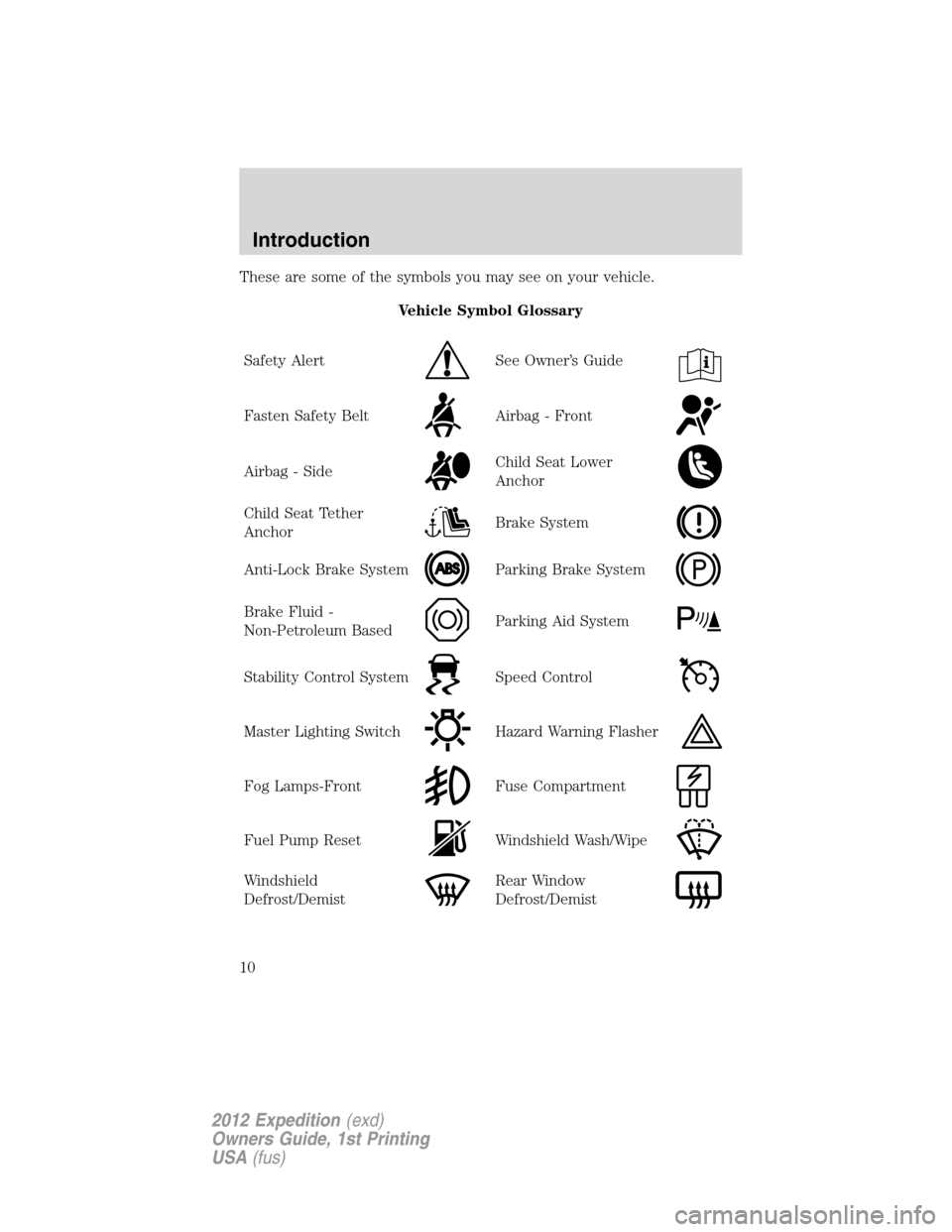
These are some of the symbols you may see on your vehicle.
Vehicle Symbol Glossary
Safety Alert
See Owner’s Guide
Fasten Safety BeltAirbag - Front
Airbag - SideChild Seat Lower
Anchor
Child Seat Tether
AnchorBrake System
Anti-Lock Brake SystemParking Brake System
Brake Fluid -
Non-Petroleum BasedParking Aid System
Stability Control SystemSpeed Control
Master Lighting SwitchHazard Warning Flasher
Fog Lamps-FrontFuse Compartment
Fuel Pump ResetWindshield Wash/Wipe
Windshield
Defrost/DemistRear Window
Defrost/Demist
Introduction
10
2012 Expedition(exd)
Owners Guide, 1st Printing
USA(fus)
Page 60 of 400

3.REAR:Press to enable the control located in the rear of the floor
console (if equipped), or to activate the auxiliary A/C system per the
settings on the front control. Press again to turn the auxiliary system off.
4.
REARRear temperature control:Press to enable the
auxiliary system and to set the desired rear cabin airflow temperature
with the front control. The rear cabin airflow temperature will match the
driver airflow temperature setting when only the center rear temperature
light (
REAR) is illuminated. The rear cabin airflow temperature
will be warmer or cooler than the driver airflow temperature setting
when more than one rear temperature light (
REAR)is
illuminated.
5.
RRear defroster:Press to activate/deactivate rear window
defroster. Refer toRear window defrosterlater in this chapter for more
information.
6.
Recirculated air:Press to activate/deactivate air recirculation
in the vehicle cabin. Recirculated air may reduce the amount of time to
cool down the interior of the vehicle and may also help reduce undesired
odors from reaching the interior of the vehicle. Recirculation engages
automatically with selection of MAX A/C or can be engaged manually in
any other airflow selection except
. Recirculation may turn off
automatically in all airflow selections except MAX A/C.
7.A/C:Press to activate/deactivate air conditioning. Use with
recirculated air to improve cooling performance and efficiency. Engages
automatically in MAX A/C,
(defrost) and(floor/defrost).
8.Fan speed adjustment:Controls the volume of air circulated in the
vehicle.
9.Temperature selection:Controls the temperature of the airflow to
the driver in the front of the vehicle.
Operating tips
•To reduce fog build-up on the windshield during humid weather, place
the air flow selector in the
position.
•To reduce humidity build-up inside the vehicle: do not drive with the
air flow selector in the O (off) or (in cold weather) MAX A/C position.
•Under normal weather conditions, do not leave the air flow selector in
MAX A/C or O (off) when the vehicle is parked. This allows the
vehicle to “breathe” using the outside air inlet vents.
Climate Controls
60
2012 Expedition(exd)
Owners Guide, 1st Printing
USA(fus)
Page 61 of 400
•To improve the A/C cool down, drive with the windows slightly open
for 2-3 minutes after start up or until the vehicle has been “aired out”.
•During extreme high ambient temperatures when idling stationary for
extended periods of time in gear, it is recommended to run the A/C in
the MAX A/C position, turn off the rear A/C unit, reduce blower fan
speed from the highest setting and put the vehicle’s transmission into
the P (Park) position to continue to receive cool air from your A/C
system.
•Do not put objects under the front seats that will interfere with the
airflow to the back seats.
•Remove any snow, ice or leaves from the air intake area at the base of
the windshield.
•A small amount of air may be felt from the floor vent regardless of the
air distribution setting that is selected.
To aid in side window defogging/demisting in cold weather:
1. Select
.
2. Select A/C.
3. Adjust the temperature control to maintain comfort.
4. Set the fan speed to the highest setting.
5. Direct the outer instrument panel vents towards the side windows.
To increase airflow to the outer instrument panel vents, close the vents
located in the middle of the instrument panel.
Climate Controls
61
2012 Expedition(exd)
Owners Guide, 1st Printing
USA(fus)
Page 67 of 400
•Remove any snow, ice or leaves from the air intake area at the base of
the windshield.
•To improve the A/C cool down, drive with the windows slightly open
for 2-3 minutes after start up or until the vehicle has been “aired out.”
•A small amount of air may be felt from the floor vent regardless of the
air distribution setting that is selected.
During extreme high ambient temperatures when idling stationary for
extended periods of time in gear, it is recommended to run the A/C with
recirculation mode.
selected, turn off the rear A/C unit, reduce blower
fan speed from the highest setting and put the vehicle’s transmission into
the P (Park) position to continue to receive cool air from your A/C
system.
For maximum cooling performance, (MAX A/C):
•In AUTO: Press AUTO control and set to desired temperature.
•In manual override: Press the
(panel), A/C, and recirculated
air
, set the temperature to 60°F (16°C) and the fan to the highest
blower setting.
To aid in side window defogging/demisting in cold weather:
1. Select
.
2. Select A/C.
3. Adjust the temperature control to maintain comfort.
4. Set the fan speed to the highest setting.
5. Direct the outer instrument panel vents towards the side windows.
To increase airflow to the outer instrument panel vents, close the vents
located in the middle of the instrument panel.
Climate Controls
67
2012 Expedition(exd)
Owners Guide, 1st Printing
USA(fus)
Page 68 of 400
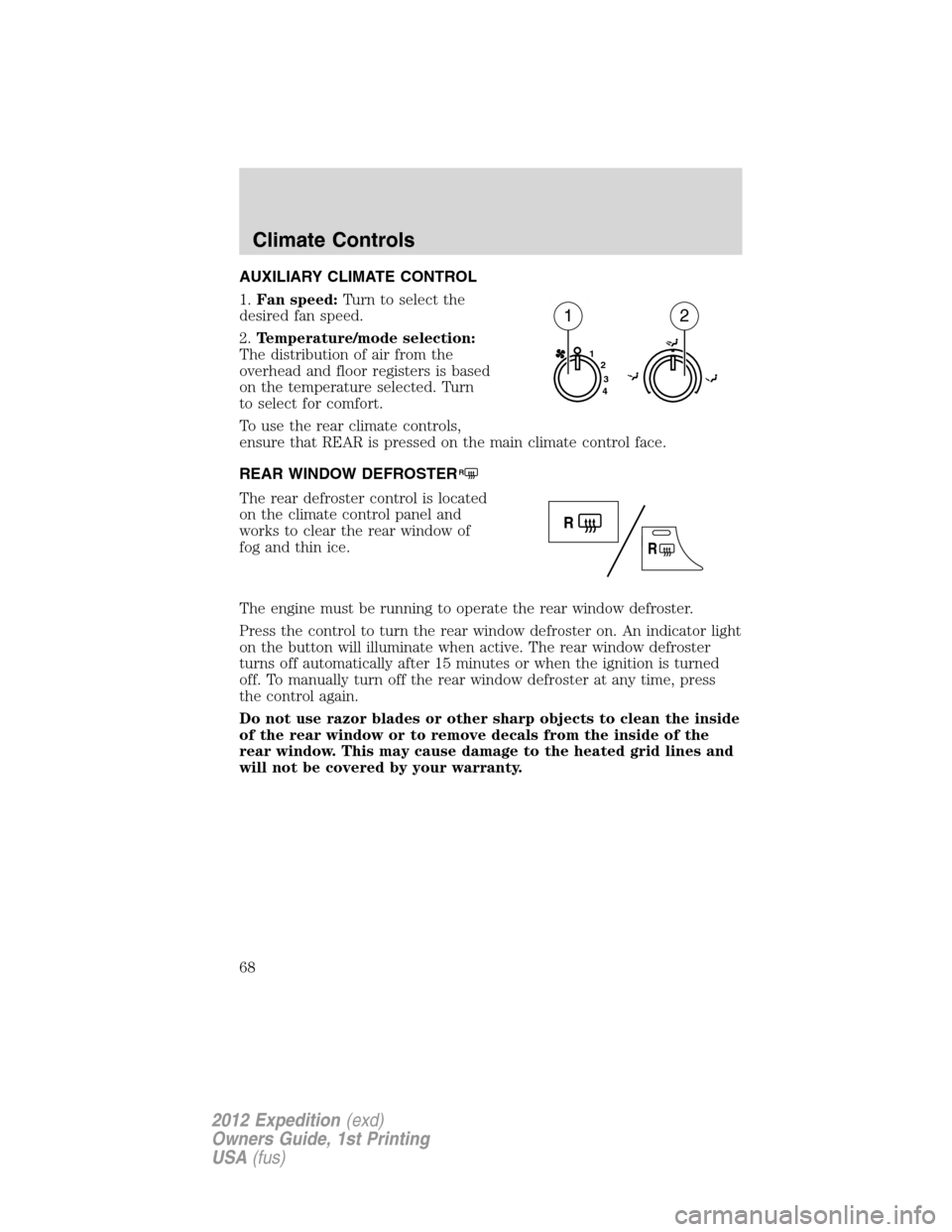
AUXILIARY CLIMATE CONTROL
1.Fan speed:Turn to select the
desired fan speed.
2.Temperature/mode selection:
The distribution of air from the
overhead and floor registers is based
on the temperature selected. Turn
to select for comfort.
To use the rear climate controls,
ensure that REAR is pressed on the main climate control face.
REAR WINDOW DEFROSTER
R
The rear defroster control is located
on the climate control panel and
works to clear the rear window of
fog and thin ice.
The engine must be running to operate the rear window defroster.
Press the control to turn the rear window defroster on. An indicator light
on the button will illuminate when active. The rear window defroster
turns off automatically after 15 minutes or when the ignition is turned
off. To manually turn off the rear window defroster at any time, press
the control again.
Do not use razor blades or other sharp objects to clean the inside
of the rear window or to remove decals from the inside of the
rear window. This may cause damage to the heated grid lines and
will not be covered by your warranty.
1
2
3
4
12
Climate Controls
68
2012 Expedition(exd)
Owners Guide, 1st Printing
USA(fus)
Page 69 of 400

HEADLAMP CONTROL
Rotate the headlamp control to the
first position
to turn on the
parking lamps.
Rotate to the second position
to
turn on the headlamps.
Rotate back to
to turn the
headlamps off.
Autolamp control
The autolamp system provides light
sensitive automatic on/off control of
the exterior lights normally
controlled by the headlamp control.
The autolamp system also keeps the
lights on for approximately
20 seconds or, if equipped with a
message center, you can select a
delay from 0–180 seconds after the
ignition switch is turned off. See
Message centerin theInstrument
Clusterchapter.
•To turn autolamps on, rotate the control counterclockwise.
•To turn autolamps off, rotate the control to the off position.
Fog lamp control (if equipped)
The headlamp control also operates
the fog lamps. The fog lamps can be
turned on when the headlamp
control is in the
,or
positions and the high beams are
not turned on.
Pull the headlamp control towards
you to turn the fog lamps on. The
fog lamp indicator light will
illuminate.
Lights
69
2012 Expedition(exd)
Owners Guide, 1st Printing
USA(fus)
Page 75 of 400

Using the right bulbs
Replacement bulbs are specified in the chart below. Headlamp bulbs
must be marked with an authorized “D.O.T.” for North America to ensure
lamp performance, light brightness and pattern and safe visibility. The
correct bulbs will not damage the lamp assembly or void the lamp
assembly warranty and will provide quality bulb burn time.
Function Number of bulbs Trade number
Headlamps (low and
high-beam)2 H13/9008
Front sidemarker 2 194
Front park/turn lamps 2 3157 A
Fog lamps 2 9145
Front row map lamps 2 W5W
Front row map/dome lamps 3 578
Rear cargo lamp 1 578
2nd row reading lamp 2 W5W
Turn/tail/brake/sidemarker
lamps2 3157K or 4157K
Backup lamp 2 921
Approach/mirror turn signal
lamps (if equipped)2 906
Mirror approach lamps – non
turn signal (if equipped)2 *See your dealer
License lamp 2 168
Visor vanity lamp - Slide on
rail system (SOR)2 A6224PF
High-mount brake lamp 5 W5W
All replacement bulbs are clear in color except where noted.
To replace all instrument panel lights - see your authorized dealer
* To obtain replacement approach lamp assembly bulbs, see your
authorized dealer and reference Ford part no. 2L1Z–13B374–BB for the
passenger side mirror and 2L1Z–13B375–BB for the driver side mirror.
Replacing interior bulbs
Check the operation of all bulbs frequently.
Lights
75
2012 Expedition(exd)
Owners Guide, 1st Printing
USA(fus)
Page 78 of 400
4. Rotate the bulb socket counterclockwise and remove from lamp
assembly.
5. Pull bulb straight out of socket and snap in the new bulb.
6. Install the bulb socket into the lamp assembly and rotate clockwise.
7. Carefully install the tail lamp assembly on the vehicle by securing the
lamp assembly with two torx screws.
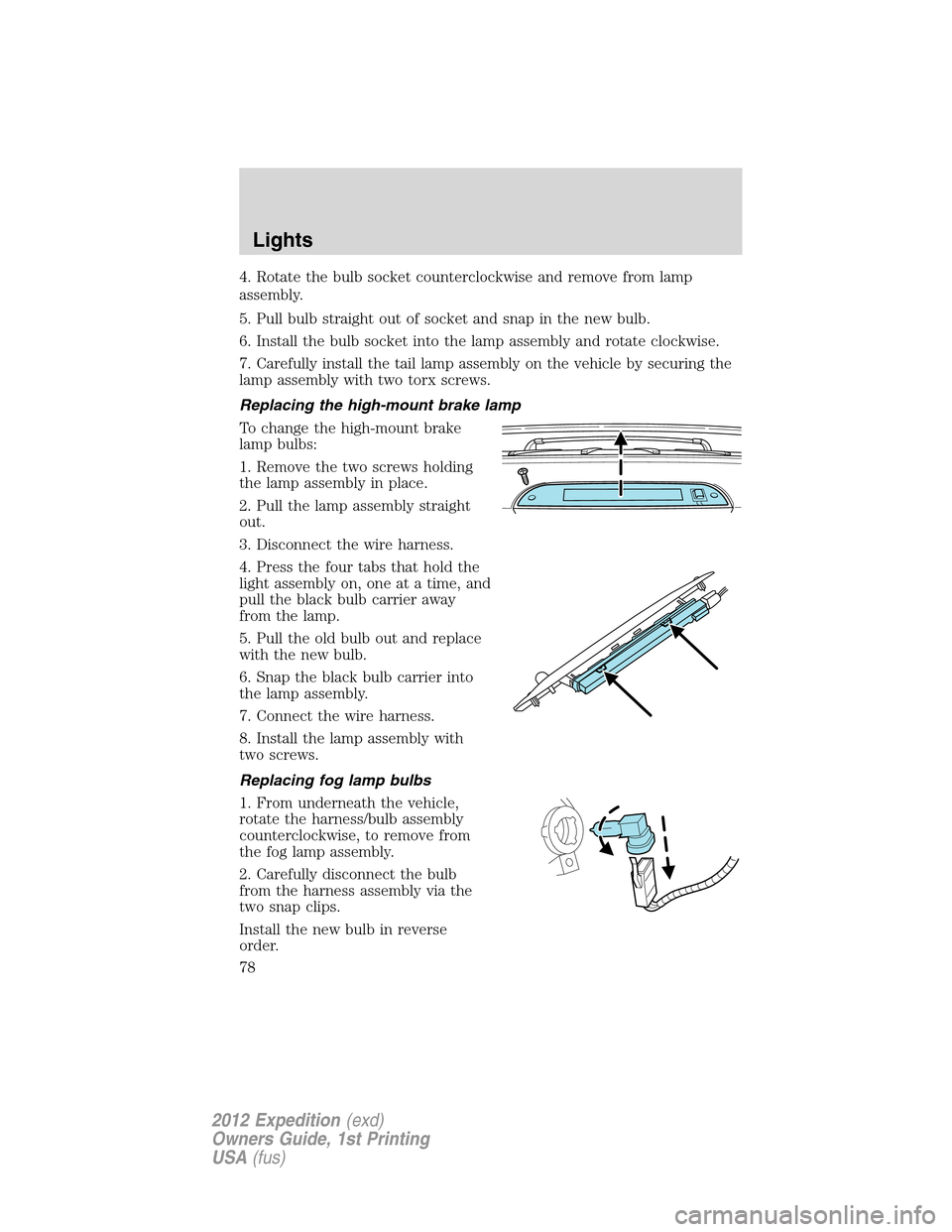
Replacing the high-mount brake lamp
To change the high-mount brake
lamp bulbs:
1. Remove the two screws holding
the lamp assembly in place.
2. Pull the lamp assembly straight
out.
3. Disconnect the wire harness.
4. Press the four tabs that hold the
light assembly on, one at a time, and
pull the black bulb carrier away
from the lamp.
5. Pull the old bulb out and replace
with the new bulb.
6. Snap the black bulb carrier into
the lamp assembly.
7. Connect the wire harness.
8. Install the lamp assembly with
two screws.
Replacing fog lamp bulbs
1. From underneath the vehicle,
rotate the harness/bulb assembly
counterclockwise, to remove from
the fog lamp assembly.
2. Carefully disconnect the bulb
from the harness assembly via the
two snap clips.
Install the new bulb in reverse
order.
Lights
78
2012 Expedition(exd)
Owners Guide, 1st Printing
USA(fus)