2012 FORD B MAX mirror
[x] Cancel search: mirrorPage 3 of 256

Downloaded from www.Manualslib.com manuals search engine Introduction
About This Manual...........................................5
Symbols Glossary.............................................5
Replacement PartsRecommendation.........................................7
Mobile CommunicationsEquipment.......................................................7
At a Glance
At a Glance..........................................................8
Child Safety
Installing Child Seats.....................................14
Child Seat Positioning...................................16
Child Safety Locks..........................................19
Seat Belts
Fastening the Seat Belts.............................20
Seat Belt Minder..............................................21
Supplementary RestraintsSystem
Principle of Operation...................................22
Driver Airbag.....................................................22
Passenger Airbag............................................22
Side Airbags.....................................................23
Knee Airbag......................................................24
Side Curtain Airbags.....................................24
Keys and Remote Controls
General Information on RadioFrequencies..................................................25
Remote Control...............................................25
Replacing a Lost Key or RemoteControl...........................................................28
Locks
Locking and Unlocking.................................29
Sliding Door......................................................30
Manual Liftgate................................................31
Keyless Entry....................................................32
Security
Passive Anti-Theft System.........................35
Anti-Theft Alarm............................................35
Steering Wheel
Adjusting the Steering Wheel...................38
Audio Control...................................................38
Voice Control...................................................39
Cruise Control..................................................39
Wipers and Washers
Windscreen Wipers.......................................40
Autowipers.......................................................40
Windscreen Washers.....................................41
Rear Window Wiper and Washers............41
Lighting
Lighting Control..............................................43
Autolamps........................................................43
Instrument Lighting Dimmer.....................44
Headlamp Exit Delay....................................44
Daytime Running Lamps.............................45
Front Fog Lamps............................................45
Rear Fog Lamps..............................................45
Headlamp Levelling......................................46
Direction Indicators........................................47
Interior Lamps..................................................47
Windows and Mirrors
Power Windows.............................................48
Exterior Mirrors................................................49
Interior Mirror...................................................50
Childminder Mirror.........................................50
Global Opening and Closing.......................51
Instrument Cluster
Gauges...............................................................53
1Table of Contents
Page 4 of 256

Downloaded from www.Manualslib.com manuals search engine Warning Lamps and Indicators.................53
Audible Warnings and Indicators.............56
Information Displays
General Information.....................................58
Clock....................................................................61
Trip Computer..................................................61
Personalised Settings..................................62
Information Messages..................................62
Climate Control
Principle of Operation..................................68
Air Vents............................................................68
Manual Climate Control..............................69
Automatic Climate Control........................70
Hints on Controlling the InteriorClimate...........................................................72
Heated Windows and Mirrors....................75
Seats
Sitting in the Correct Position....................76
Head Restraints..............................................76
Manual Seats...................................................78
Rear Seats.........................................................79
Heated Seats...................................................80
Front Seat Armrest.......................................80
Auxiliary Power Points
Auxiliary Power Points..................................81
Cigar Lighter......................................................81
Storage Compartments
Cup Holders......................................................82
Glasses Holder................................................82
Starting and Stopping theEngine
General Information......................................83
Ignition Switch................................................83
Keyless Starting..............................................83
Steering Wheel Lock.....................................85
Starting a Petrol Engine..............................85
Starting a Diesel Engine..............................86
Diesel Particulate Filter................................87
Switching Off the Engine............................88
Unique Driving Character-istics
Start-Stop........................................................89
Fuel and Refuelling
Safety Precautions.........................................91
Fuel Quality - Petrol......................................92
Fuel Quality - Diesel......................................92
Running Out of Fuel......................................92
Catalytic Converter........................................93
Refuelling..........................................................93
Fuel Consumption.........................................95
Technical Specifications.............................96
Transmission
Manual Transmission....................................97
Automatic Transmission.............................97
Hill Start Assist...............................................99
Brakes
General Information.....................................101
Hints on Driving With Anti-LockBrakes............................................................101
Parking Brake..................................................101
Stability Control
Principle of Operation.................................103
Using Stability Control...............................103
Parking Aids
Principle of Operation................................104
Parking Aid......................................................104
Rear View Camera.......................................106
2Table of Contents
Page 11 of 256
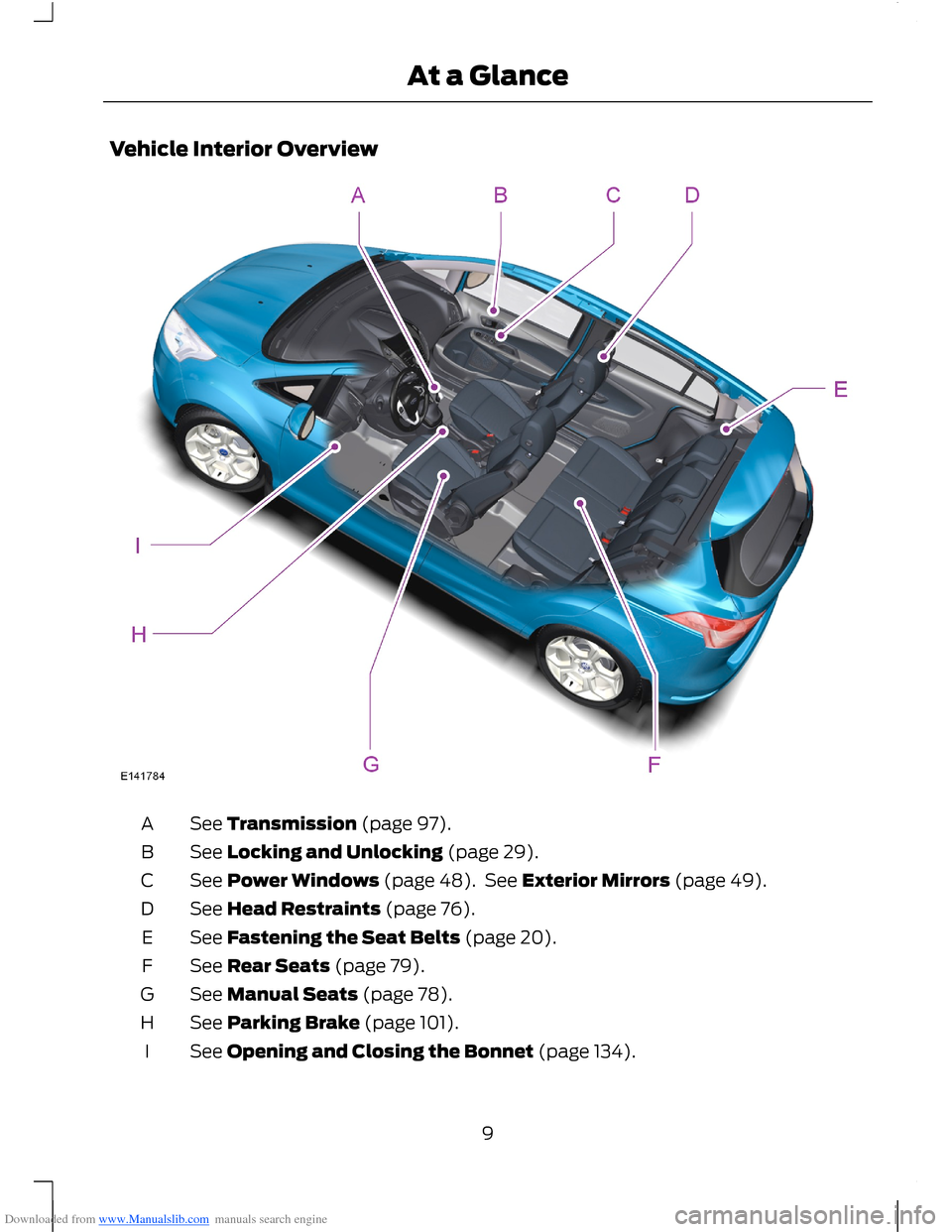
Downloaded from www.Manualslib.com manuals search engine Vehicle Interior Overview
See Transmission (page 97).A
See Locking and Unlocking (page 29).B
See Power Windows (page 48). See Exterior Mirrors (page 49).C
See Head Restraints (page 76).D
See Fastening the Seat Belts (page 20).E
See Rear Seats (page 79).F
See Manual Seats (page 78).G
See Parking Brake (page 101).H
See Opening and Closing the Bonnet (page 134).I
9At a Glance
Page 43 of 256

Downloaded from www.Manualslib.com manuals search engine To reduce smearing we recommend thefollowing:
•Lower the sensitivity of the autowipers.
•Switch to normal or high speed wipe.
•Switch the autowipers off.
High sensitivityA
OnB
Low sensitivityC
The wipers will function when moisture isdetected on the windscreen. The rainsensor will continue to monitor the amountof moisture on the windscreen and adjustthe speed of the wipers automatically.
Use the rotary control to adjust thesensitivity of the rain sensor. With lowsensitivity, the wipers will operate whenthe sensor detects a large amount ofmoisture on the windscreen. With highsensitivity, the wipers will operate whenthe sensor detects a small amount ofmoisture on the windscreen.
Keep the outside of the windscreen clean.Sensor performance will be affected if thearea around the interior mirror is dirty. Therain sensor is very sensitive and the wipersmay operate if dirt, mist or flies hit thewindscreen.
WINDSCREEN WASHERS
Note:Do not operate the washers whenthe washer reservoir is empty. This maycause the washer pump to overheat.
Push the button to operate the washers.They will operate for a maximum of 10seconds. When you release the button, thewipers will operate for a short time.
REAR WINDOW WIPER AND
WASHERS
Intermittent Wipe
Pull the lever toward you.
41Wipers and Washers
Page 50 of 256

Downloaded from www.Manualslib.com manuals search engine POWER WINDOWS
WARNINGS
Do not leave children unattended inthe vehicle and do not let them playwith the power windows. They mayseriously injure themselves.
When closing the power windows,you should verify they are free ofobstructions and make sure thatchildren and pets are not in the proximityof the window openings.
Note:You may hear a rumbling noise whenjust one of the windows are open. Lower theopposite window slightly to reduce thisnoise.
Press the switch to open the window.
Lift the switch to close the window.
One-Touch Down (If Equipped)
Press the switch fully and release it. Pressor lift it again to stop the window.
One-Touch Up (If Equipped)
Lift the switch fully and release it. Press orlift it again to stop the window.
Window Lock
Press the control to lock or unlock the rearwindow controls. It will illuminate whenthe rear window controls are locked.
Bounce-Back (If Equipped)
The window will stop automatically whileclosing. It will reverse some distance ifthere is an obstacle in the way.
Overriding the Bounce-Back Feature
Proceed as follows to override thisprotection feature when there is aresistance, e.g. in winter:
1.Close the window twice until it reachesthe point of resistance and let itreverse.
2.Close the window a third time to thepoint of resistance. The bounce-backfeature is now disabled and you canclose the window manually. Thewindow will go past the point ofresistance and you can close it fully.
Contact your authorised dealer as soon aspossible if the window does not close afterthe third attempt.
48Windows and Mirrors
Page 51 of 256

Downloaded from www.Manualslib.com manuals search engine Resetting the Bounce-Back Feature
WARNING
The bounce-back function remainsdeactivated until you have reset thememory.
If you have disconnected the battery, youmust reset the bounce-back memoryseparately for each window.
1.Lift and hold the switch until thewindow is fully closed.
2.Release the switch.
3.Lift the switch again for one moresecond.
4.Press and hold the switch until thewindow is fully open.
5.Release the switch.
6.Lift and hold the switch until thewindow is fully closed.
7.Open the window and then try to closeit automatically.
8.Reset and repeat the procedure if thewindow does not close automatically.
Accessory Delay (If Equipped)
You can use the window switches forseveral minutes after you have switchedthe ignition off or until either front door isopened.
EXTERIOR MIRRORS
Power Exterior Mirrors
WARNING
Do not adjust the mirrors when yourvehicle is moving.
Left-hand mirrorA
OffB
Right-hand mirrorC
Press the arrows to adjust the mirror.
Electric Folding Mirrors
Automatic Folding and Unfolding
Note:If the mirrors have been folded usingthe manual fold button they can only beunfolded using the manual fold button.
The mirrors will fold automatically whenyou lock your vehicle with the key, theremote control or a keyless entry systemrequest. The mirrors will unfold when youunlock your vehicle with the key, theremote control, a keyless entry systemrequest, the driver's interior door handle orstarting the engine.
Manual Folding and Unfolding
Note:You can only fold the mirrors whenthe mirror switch is set to position B off.
The electric folding mirrors operate withthe ignition on.
49Windows and Mirrors
Page 52 of 256

Downloaded from www.Manualslib.com manuals search engine Note:You can operate the mirrors (mirrortilting and folding) for several minutes afteryou switch the ignition off. If you open a dooryou can no longer operate the mirrors.
Press the downward arrow to fold orunfold the mirrors.
If you press the switch again while themirrors are moving, they will stop andreverse the direction of movement.
Note:When the mirrors are operated oftenduring a short period of time, the systemmay become inoperable for a period of timeto prevent damage due to overheating.
Fold-Away Exterior Mirrors
Push the mirror toward the door windowglass. Make sure that you fully engage themirror in its support when returning it to itsoriginal position.
INTERIOR MIRROR
WARNING
Do not adjust the mirror when yourvehicle is moving.
Note:Do not clean the housing or glass ofany mirror with harsh abrasives, fuel or otherpetroleum or ammonia-based cleaningproducts.
You can adjust the interior mirror to yourpreference. Some mirrors also have asecond pivot point. This lets you move themirror head up or down and from side toside.
Pull the tab below the mirror toward youto reduce glare at night.
Auto-Dimming Mirror (If Equipped)
Note:Do not block the sensors on the frontand back of the mirror. Mirror performancemay be affected. A rear centre passenger orraised rear centre head restraint may alsoblock light from reaching the sensor.
The mirror will dim automatically to reduceglare when bright lights are detected frombehind your vehicle. It will automaticallyreturn to normal reflection when you selectreverse gear to make sure you have a clearview when reversing.
CHILDMINDER MIRROR
50Windows and Mirrors
Page 53 of 256

Downloaded from www.Manualslib.com manuals search engine GLOBAL OPENING AND
CLOSING
You can also operate the power windowswith the ignition off using the globalopening and global closing function.
Note:Global opening will only operate fora short period of time after you haveunlocked your vehicle using the remotecontrol.
Note:Global closing will only operate if youhave set the memory correctly for eachwindow. See Power Windows (page 48).
Global Opening
To open all the windows:
1.Press and release the remote controlunlock button.
2.Press and hold the remote controlunlock button for at least threeseconds.
Press the lock or unlock button to stop theopening function.
Global Closing
Vehicles Without Keyless Entry
WARNING
Take care when using global closing.In an emergency, press the lock orunlock button immediately to stop.
To close all the windows, press and holdthe remote control lock button for at leastthree seconds. Press the lock or unlockbutton to stop the closing function. Thebounce-back function is also on duringglobal closing.
Vehicles With Keyless Entry
51Windows and Mirrors