2012 FORD B MAX ECU
[x] Cancel search: ECUPage 118 of 256

Downloaded from www.Manualslib.com manuals search engine TOWING A TRAILER
WARNINGS
Do not exceed 62 mph (100 km/h).
The rear tyre pressures must beincreased by 3 psi (0.2 bar) abovespecification. See TechnicalSpecifications (page 164).
Do not exceed the maximum grosstrain weight stated on your vehicleidentification plate. See VehicleIdentification Plate (page 167).
Do not exceed the maximumpermissible nose weight, i.e. verticalweight on the tow ball, of 110 pounds(50 kilogrammes).
The electrical system is not suitablefor towing trailers with more thanone rear fog lamp.
Note:Not all vehicles are suitable orapproved to have tow bars fitted. Checkwith your dealer first.
Place loads as low and central to theaxle(s) of the trailer as possible. If you aretowing with an unladen vehicle, the loadin the trailer should be placed toward thenose, within the maximum nose load, asthis gives the best stability.
The stability of your vehicle to trailercombination is very much dependant onthe quality of the trailer.
In high altitude regions above 3 281 feet (1000 metres), the stipulated maximumpermitted gross train weight must bereduced by 10% for every additional 3 281feet (1 000 metres).
Steep Gradients
WARNING
The anti-lock braking system doesnot control the overrun brake on thetrailer.
Change down a gear before you reach asteep downhill gradient.
TOW BALL
WARNINGS
When not in use, always transportthe tow ball arm securely fastenedin the luggage compartment.
Take special care when fitting thetow ball arm as the safety of yourvehicle and the trailer depends onthis.
Do not use any tools for mounting ordismounting the tow ball arm.
Do not modify the trailer coupling.
Do not disassemble or repair the towball arm.
A 13-pin trailer socket and the tow ball armseat are provided under the rear bumper.Turn the trailer socket down through 90degrees until it engages in the end position.
116Towing
Page 120 of 256

Downloaded from www.Manualslib.com manuals search engine Before starting your journey, make surethat the tow ball arm is correctly locked.Check that:
•the green marks are aligned
•the handwheel (A) is correctly fitted tothe tow ball arm
•you have removed the key (B)
•the tow ball arm is securely positioned.
Removing the Tow Ball Arm
Note:Unhitch the trailer.
1.Remove the protecting cap. Press thecap into the key bow. Insert the key andunlock.
2.Hold the tow ball arm. Pull thehandwheel out, turn it clockwiseagainst the stop.
3.Remove the tow ball arm.
4.Release the handwheel.
When unlocked in this way, the tow ballarm can be reinserted at any time.
Driving Without a Trailer
WARNING
Never unlock the tow ball arm withthe trailer attached.
Remove the tow ball arm. Insert the pluginto its seat (1).
118Towing
Page 123 of 256

Downloaded from www.Manualslib.com manuals search engine RUNNING-IN
Tyres
WARNING
New tyres need to be run-in forapproximately 300 miles (500kilometres). During this time, youmay experience different drivingcharacteristics.
Brakes and Clutch
WARNING
Avoid heavy use of the brakes andclutch if possible for the first 100miles (150 kilometres) in town andfor the first 1000 miles (1500 kilometres)on motorways.
Engine
WARNING
Avoid driving too fast during the first1000 miles (1500 kilometres). Varyyour speed frequently and changeup through the gears early. Do not labourthe engine.
COLD WEATHER
PRECAUTIONS
The functional operation of somecomponents and systems can be affectedat temperatures below -13°F (-25°C).
DRIVING THROUGH WATER
WARNINGS
Drive through water in an emergencyonly and not as part of normaldriving.
WARNINGS
Engine damage can occur if waterenters the air filter.
In an emergency, you can drive your vehiclethrough water to a maximum depth of 8inches (200 millimetres) and at amaximum speed of 6 mph (10 km/h). Youmust take extra care when driving throughflowing water.
When driving in water, maintain a lowspeed and do not stop your vehicle. Afterdriving through water and as soon as it issafe to do so:
•Depress the brake pedal lightly tocheck that the brakes are functioningcorrectly.
•Check that the horn works.
•Check that your vehicle's lamps arefully operational.
•Check the power assistanceof the steering system.
FLOOR MATS
WARNING
Make sure that the floor mat issecured properly using theappropriate fixings, and do notposition the floor mat so that it interfereswith the operation of the pedals.
121Driving Hints
Page 136 of 256

Downloaded from www.Manualslib.com manuals search engine GENERAL INFORMATION
Have your vehicle serviced regularly to helpmaintain its roadworthiness and resalevalue. There is a large network of Fordauthorised repairers that are there to helpyou with their professional servicingexpertise. Authorised repairers are bestqualified to service your vehicle properlyand expertly, with a wide range of highlyspecialised tools.
In addition to regular servicing, werecommend that you carry out thefollowing checks.
WARNINGS
Switch the ignition off beforetouching or attempting adjustmentof any kind.
Do not touch the electronic ignitionsystem parts after you have switchedthe ignition on or when the engine isrunning. The system operates at highvoltage.
Keep your hands and clothing clearof the engine cooling fan. Undercertain conditions, the fan maycontinue to run for several minutes afteryou have switched the engine off.
Make sure that you fit filler capssecurely after carrying outmaintenance checks.
Daily Checks
•Exterior lamps.
•Interior lamps.
•Warning lamps and indicators.
Check When Refuelling
•Engine oil level. See Engine Oil Check(page 139).
•Brake fluid level. See Brake andClutch Fluid Check (page 141).
•Washer fluid level. See Washer FluidCheck (page 141).
•Tyre pressures (when cold). SeeTechnical Specifications (page 164).
•Tyre condition. See Wheels and Tyres(page 155).
Monthly Checks
•Engine coolant level (engine cold). SeeEngine Coolant Check (page 140).
•Pipes, hoses and reservoirs for leaks.
•Air conditioning operation.
•Parking brake operation.
•Horn operation.
•Tightness of wheel nuts. SeeTechnical Specifications (page 164).
OPENING AND CLOSING THE
BONNET
Opening the Bonnet
1.Pull the bonnet release handle.
134Maintenance
Page 137 of 256

Downloaded from www.Manualslib.com manuals search engine 2.Move the catch to the left.3.Open the bonnet and support it withthe bonnet strut.
Closing the Bonnet
1.Remove the bonnet strut from thecatch and secure correctly after use.
2.Lower the bonnet and allow it to dropfrom under its own weight for the last8 - 11 inches (20 – 30 centimetres).
Note:Make sure that you have closed thebonnet correctly.
135Maintenance
Page 165 of 256
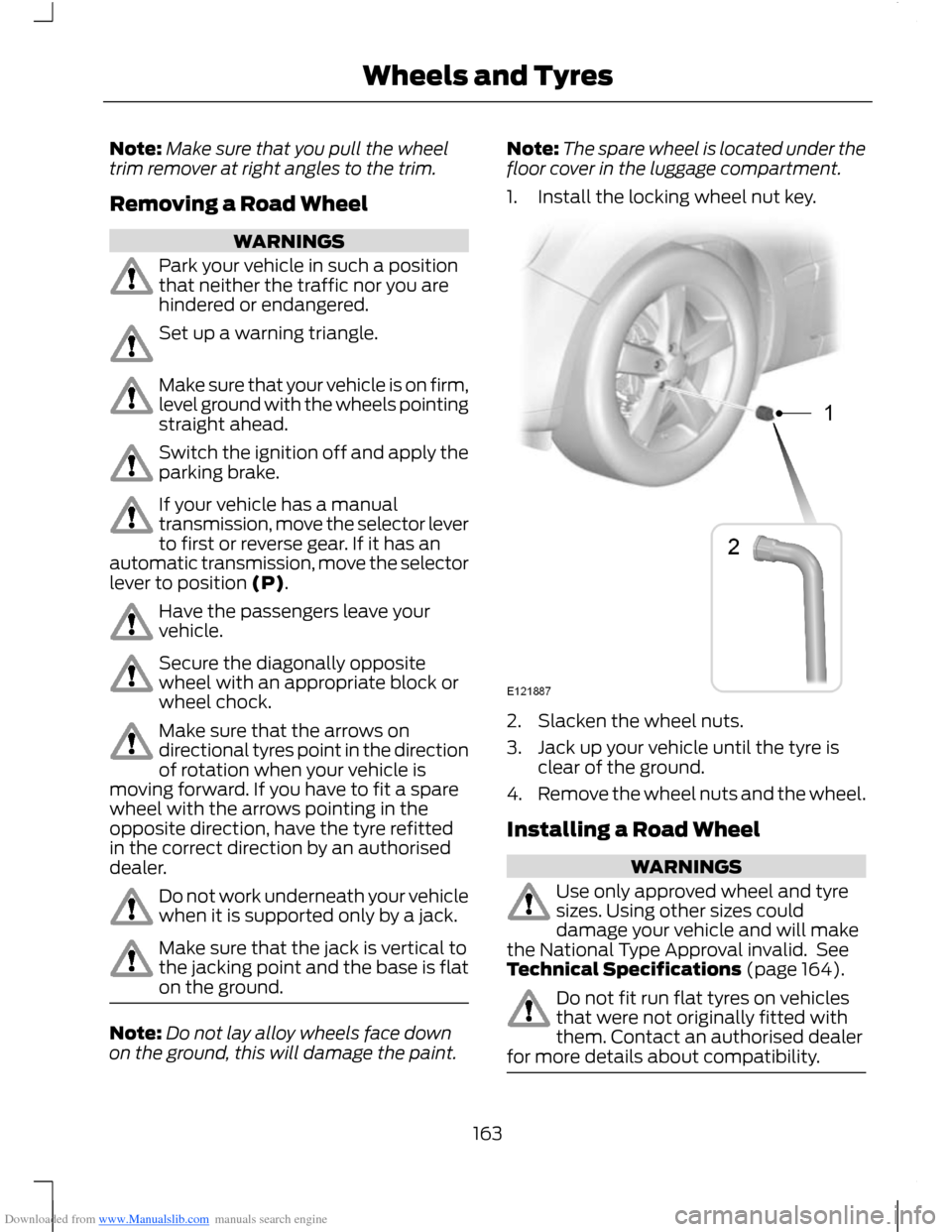
Downloaded from www.Manualslib.com manuals search engine Note:Make sure that you pull the wheeltrim remover at right angles to the trim.
Removing a Road Wheel
WARNINGS
Park your vehicle in such a positionthat neither the traffic nor you arehindered or endangered.
Set up a warning triangle.
Make sure that your vehicle is on firm,level ground with the wheels pointingstraight ahead.
Switch the ignition off and apply theparking brake.
If your vehicle has a manualtransmission, move the selector leverto first or reverse gear. If it has anautomatic transmission, move the selectorlever to position (P).
Have the passengers leave yourvehicle.
Secure the diagonally oppositewheel with an appropriate block orwheel chock.
Make sure that the arrows ondirectional tyres point in the directionof rotation when your vehicle ismoving forward. If you have to fit a sparewheel with the arrows pointing in theopposite direction, have the tyre refittedin the correct direction by an authoriseddealer.
Do not work underneath your vehiclewhen it is supported only by a jack.
Make sure that the jack is vertical tothe jacking point and the base is flaton the ground.
Note:Do not lay alloy wheels face downon the ground, this will damage the paint.
Note:The spare wheel is located under thefloor cover in the luggage compartment.
1.Install the locking wheel nut key.
2.Slacken the wheel nuts.
3.Jack up your vehicle until the tyre isclear of the ground.
4.Remove the wheel nuts and the wheel.
Installing a Road Wheel
WARNINGS
Use only approved wheel and tyresizes. Using other sizes coulddamage your vehicle and will makethe National Type Approval invalid. SeeTechnical Specifications (page 164).
Do not fit run flat tyres on vehiclesthat were not originally fitted withthem. Contact an authorised dealerfor more details about compatibility.
163Wheels and Tyres
Page 189 of 256

Downloaded from www.Manualslib.com manuals search engine When selected, AF will be shown in thedisplay.
1.Press the MENU button.
2.Select AUDIO or AUDIO SETTINGS.
3.Scroll to ALTERNAT FREQ. orALTERNATIVE FREQ. and turn on oroff with the OK button.
4.Press the MENU button to return.
Regional Mode
Regional mode controls the behaviour ofalternative frequencies switching betweenregionally related networks of a parentbroadcaster. A broadcaster may run a fairlylarge network across a large part of thecountry. At various times of the day thislarge network may be broken down into anumber of smaller regional networks,typically centred on major towns or cities.When the network is not split into regionalvariants, the whole network caries thesame programming.
Regional mode ON: This prevents randomalternative frequency switches whenneighbouring regional networks are notcarrying the same programming.
Regional mode OFF: This allows a largercoverage area if neighbouring regionalnetworks are carrying the sameprogramming, but can cause 'random'alternative frequency switches if they arenot.
1.Press the MENU button.
2.Select AUDIO or AUDIO SETTINGS.
3.Scroll to RDS REGIONAL and turn onor off with the OK button.
4.Press the MENU button to return.
AUDIO SYSTEM SECURITY
Each unit incorporates a unique code thatis linked to the vehicle identificationnumber. The system will automaticallycheck that the audio unit and vehiclematch before allowing operation.
If a security code message appears, see anauthorised dealer.
COMPACT DISC PLAYER -
VEHICLES WITH: AM/FM/CD
Compact Disc Playback
Note:During playback, the display indicatesthe disc, track and time that has elapsedsince the start of the track.
During radio reception, press the CD buttononce to start CD playback.
After a disc is loaded, playback will startimmediately.
Track Selection
•Press the seek down button once toreplay the current track. If pressedwithin two seconds of the start of atrack, the previous track will beselected.
•Press the up or down arrow buttons toselect the required track, then pressthe OK button.
Fast Forward and Reverse
Press and hold the seek down or upbuttons to search backward or forwardwithin the tracks on the disc.
Shuffle and Random
Random track playback, also known asshuffle, plays all tracks on the CD inrandom order.
187Audio System
Page 196 of 256

Downloaded from www.Manualslib.com manuals search engine AUXILIARY INPUT SOCKET
WARNINGS
Driving while distracted can result inloss of vehicle control, accident andinjury. We strongly recommend thatyou use extreme caution when using anydevice or feature that may take your focusoff the road. Your primary responsibility isthe safe operation of your vehicle. Werecommend against the use of anyhandheld device while driving andencourage the use of voice-operatedsystems when possible. Make sure you areaware of all applicable local laws that mayaffect the use of electronic devices whiledriving.
For safety reasons, do not connector adjust the settings on yourportable music player while yourvehicle is moving.
Store the portable music player in asecure location, such as the centreconsole or the glove box, when yourvehicle is in moving. Hard objects maybecome projectiles in a collision or suddenstop, which may increase the risk of seriousinjury. The audio extension cable must belong enough to allow the portable musicplayer to be safely stored while yourvehicle is moving.
The auxiliary input jack allows you toconnect and play music from your portablemusic player through your vehicle speakers.You can use any portable music playerdesigned for use with headphones. Youraudio extension cable must have maleone-eighth inch (three and one-halfmillimetre) connectors at each end.
1.Make sure your vehicle, radio andportable music player are turned offand move the transmission selectorlever to position P.
2.Plug the extension cable from theportable music player into the auxiliaryinput jack.
3.Switch the radio on. Select either atuned FM station or a CD.
4.Adjust the volume as desired.
5.Switch the portable music player onand adjust its volume to half itsmaximum level.
6.Press AUX until LINE or LINE INappears in the display. You should hearmusic from your device even if it is low.
7.Adjust the volume on your portablemusic player until it reaches the volumelevel of the FM station or CD. Do thisby switching back and forth betweenthe AUX and FM or CD controls.
194Audio System