Page 356 of 643
2. After the�Ready�prompt and the following beep, say
�Setup�, then �Select Audio Devices�.
3. Say the name of the audio device or ask the
Uconnect™ phone system to list audio devices.
Next Track
Use the SEEK UP button, or press the VR button on the
radio and say “Next Track” to jump to the next track
music on your cellular phone.
Previous Track
Use the SEEK DOWN button, or press the VR button on
the radio and say “Previous Track” to jump to the
previous track music on your cellular phone.
Browse
Browsing is not available on a BTSA device. Only the
current song that is playing will display info.
UCONNECT™ MULTIMEDIA VIDEO
ENTERTAINMENT SYSTEM (VES)™ — IF EQUIPPED
Getting Started
•
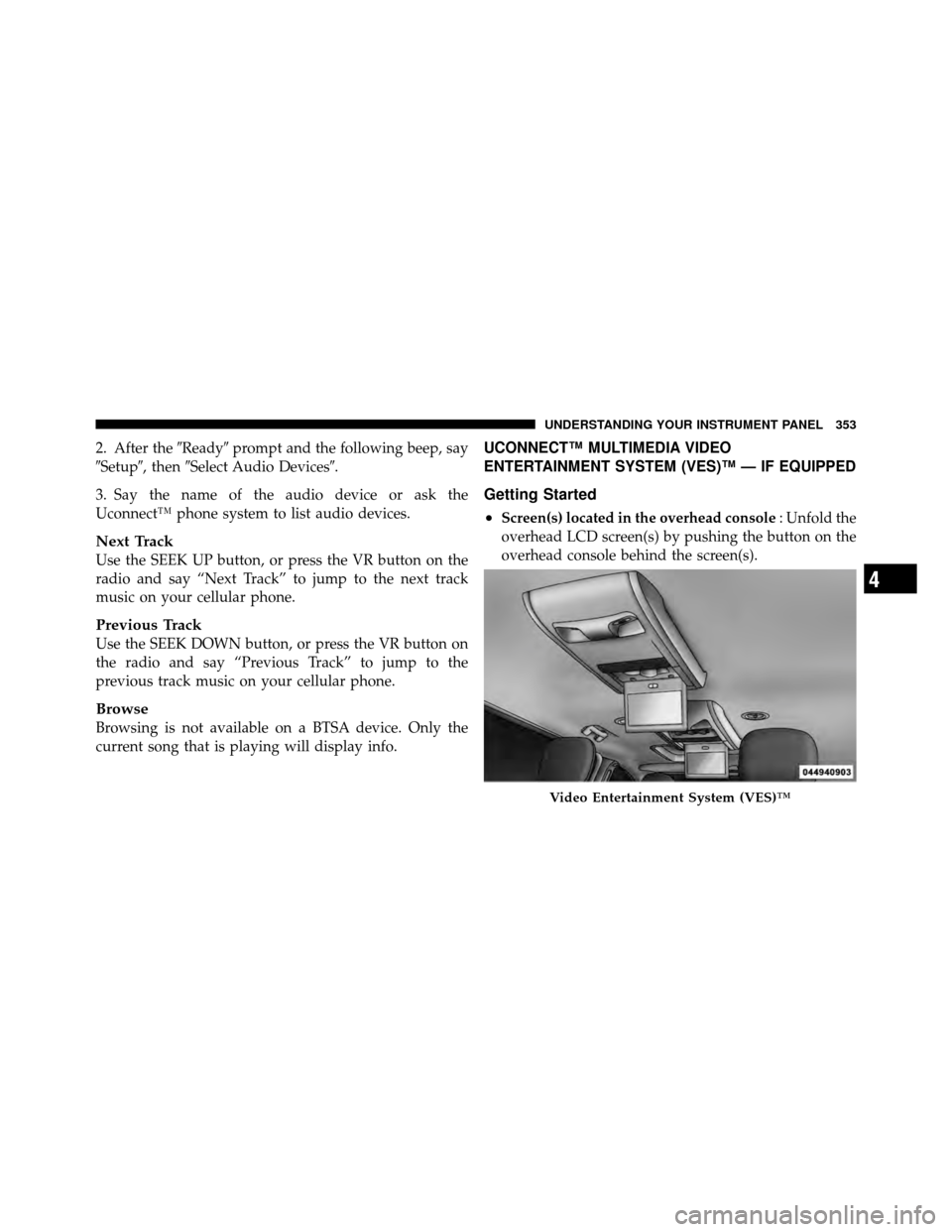
Screen(s) located in the overhead console : Unfold the
overhead LCD screen(s) by pushing the button on the
overhead console behind the screen(s).
Video Entertainment System (VES)™
4
UNDERSTANDING YOUR INSTRUMENT PANEL 353
Page 357 of 643
•Cycle the ignition to the ON or ACC position.
•Turn on the VES™ player (if equipped on Dual Screen
System) by pushing the Power button, located on the far
left, or by pressing the button on the Remote Control.
•When the Video Screen(s) are open and a DVD is
inserted into the VES™ player, the screen(s) turn(s) on
automatically, the headphone transmitters turn on and
playback begins.
•For Dual Video Screen System, Channel 1 on the
Remote Control and Headphones refers to Screen 1
(second row) and Channel 2 on the Remote Control
and Headphones refers to Screen 2 (third row). Refer
to the Dual Video Screen section for more information.
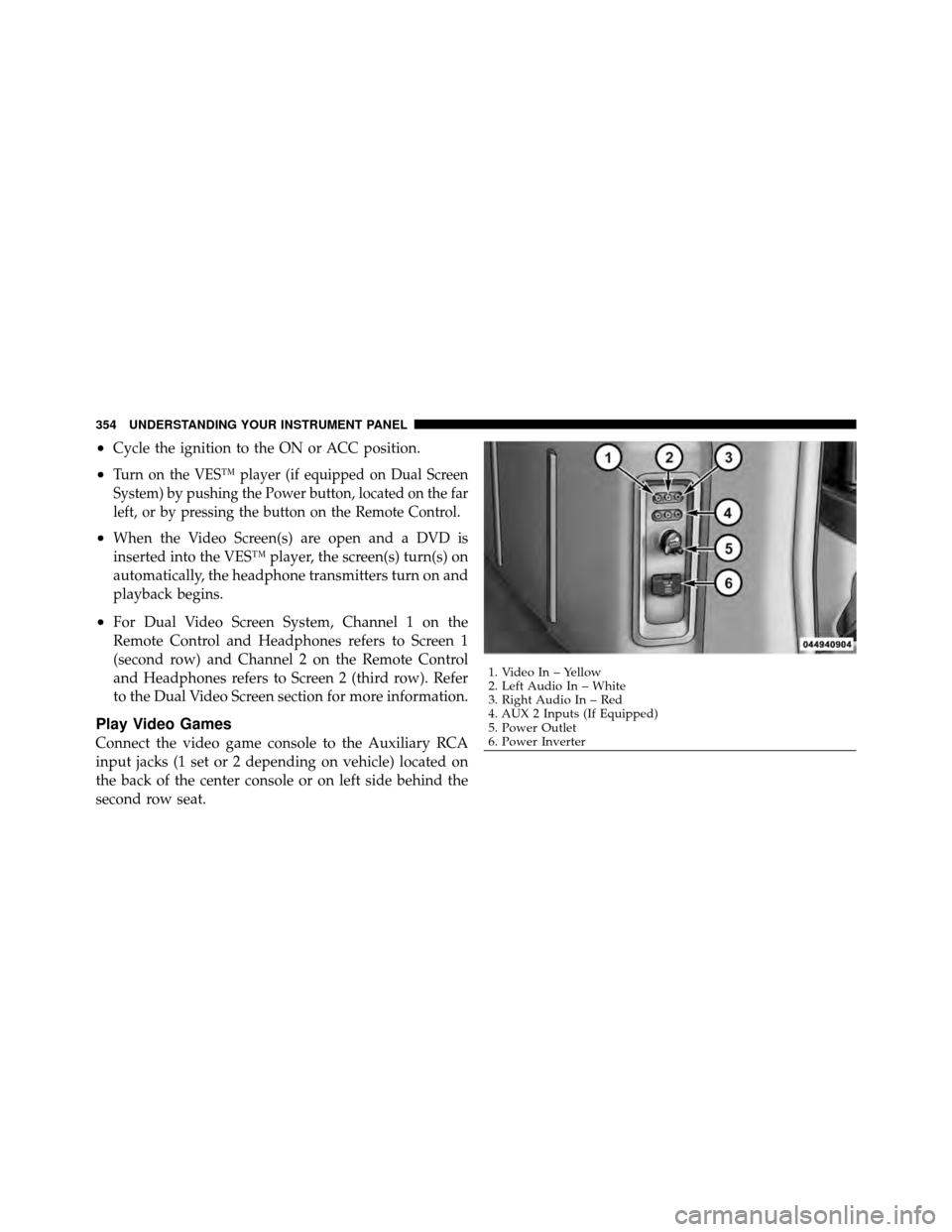
Play Video Games
Connect the video game console to the Auxiliary RCA
input jacks (1 set or 2 depending on vehicle) located on
the back of the center console or on left side behind the
second row seat.
1. Video In – Yellow
2. Left Audio In – White
3. Right Audio In – Red
4. AUX 2 Inputs (If Equipped)
5. Power Outlet
6. Power Inverter
354 UNDERSTANDING YOUR INSTRUMENT PANEL
Page 360 of 643
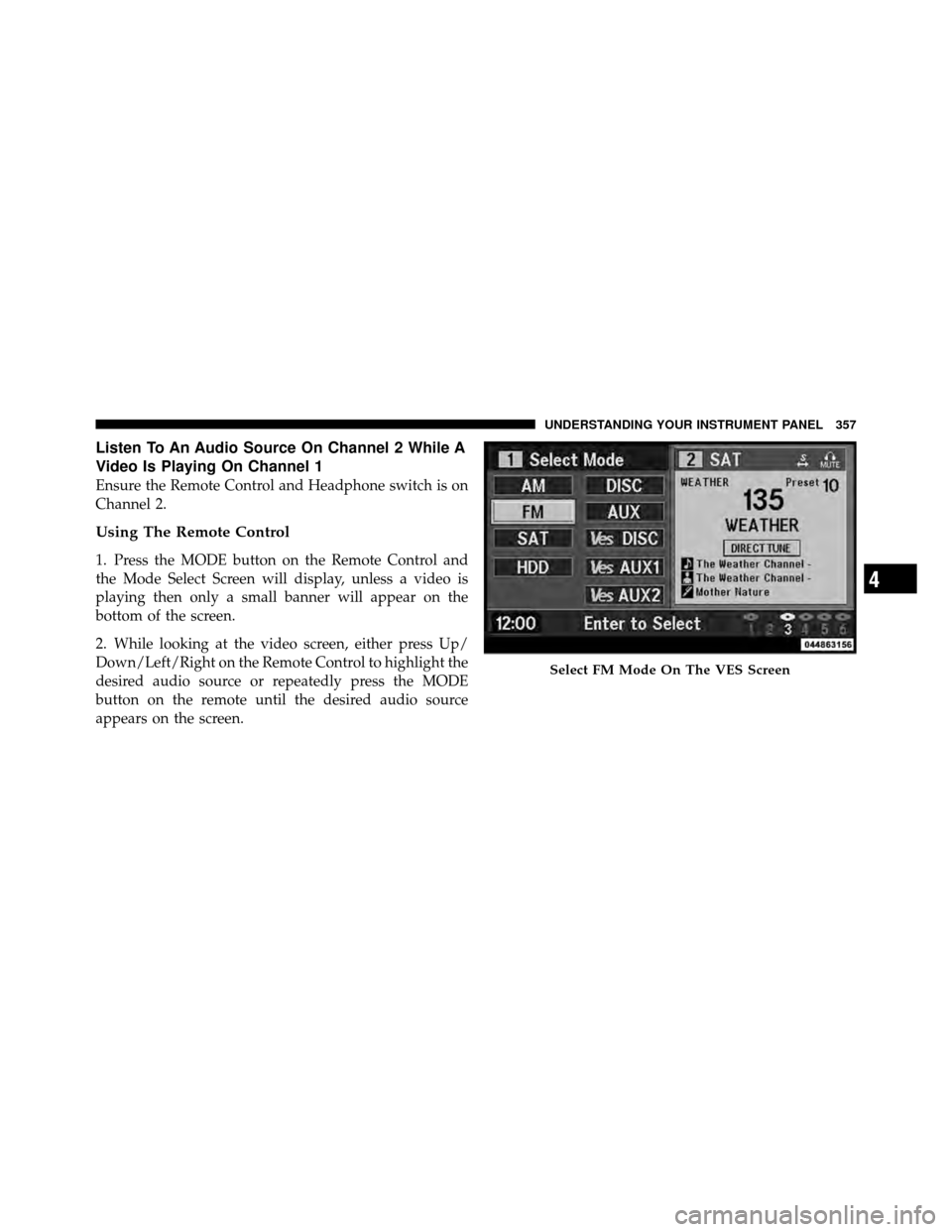
Listen To An Audio Source On Channel 2 While A
Video Is Playing On Channel 1
Ensure the Remote Control and Headphone switch is on
Channel 2.
Using The Remote Control
1. Press the MODE button on the Remote Control and
the Mode Select Screen will display, unless a video is
playing then only a small banner will appear on the
bottom of the screen.
2. While looking at the video screen, either press Up/
Down/Left/Right on the Remote Control to highlight the
desired audio source or repeatedly press the MODE
button on the remote until the desired audio source
appears on the screen.
Select FM Mode On The VES Screen
4
UNDERSTANDING YOUR INSTRUMENT PANEL 357
Page 361 of 643
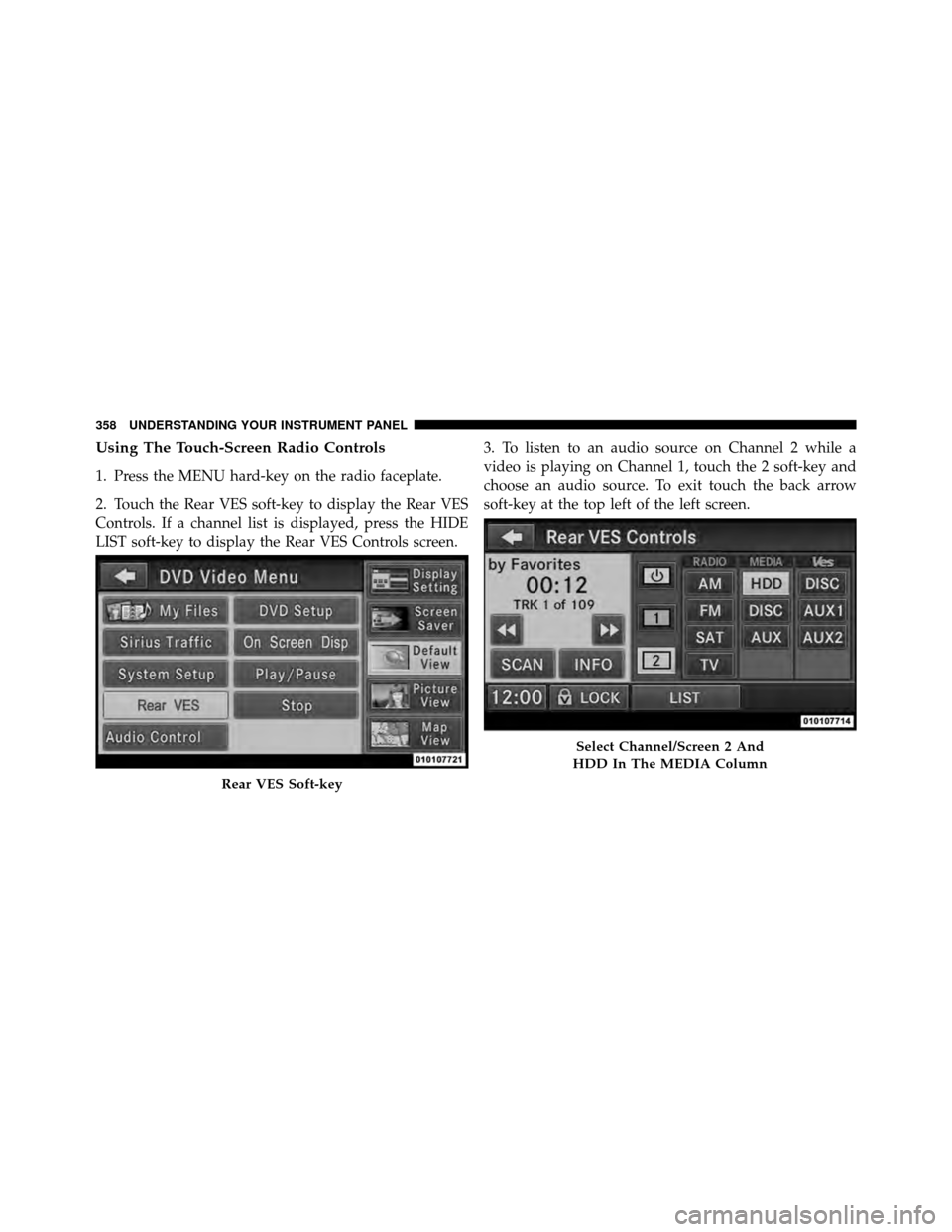
Using The Touch-Screen Radio Controls
1. Press the MENU hard-key on the radio faceplate.
2. Touch the Rear VES soft-key to display the Rear VES
Controls. If a channel list is displayed, press the HIDE
LIST soft-key to display the Rear VES Controls screen.3. To listen to an audio source on Channel 2 while a
video is playing on Channel 1, touch the 2 soft-key and
choose an audio source. To exit touch the back arrow
soft-key at the top left of the left screen.
Rear VES Soft-key
Select Channel/Screen 2 And
HDD In The MEDIA Column
358 UNDERSTANDING YOUR INSTRUMENT PANEL
Page 368 of 643
•Viewing a DVD on the Touch-Screen radio screen is
not available in all states/provinces, and the vehicle
must be stopped, and the shift lever must be in the
PARK position for vehicles with automatic transmis-
sion. In vehicles with manual transmission the parking
brake must be engaged.
Listen To An Audio Source While A Video Is
Playing
Ensure the Remote Control and Headphone switch are on
the same channel. If watching a video on Screen 1
(second row), then Channel 2 could be used for audio. If
watching a video on Screen 2 (third row), then Channel 1
could be used for audio.
Using The Remote Control
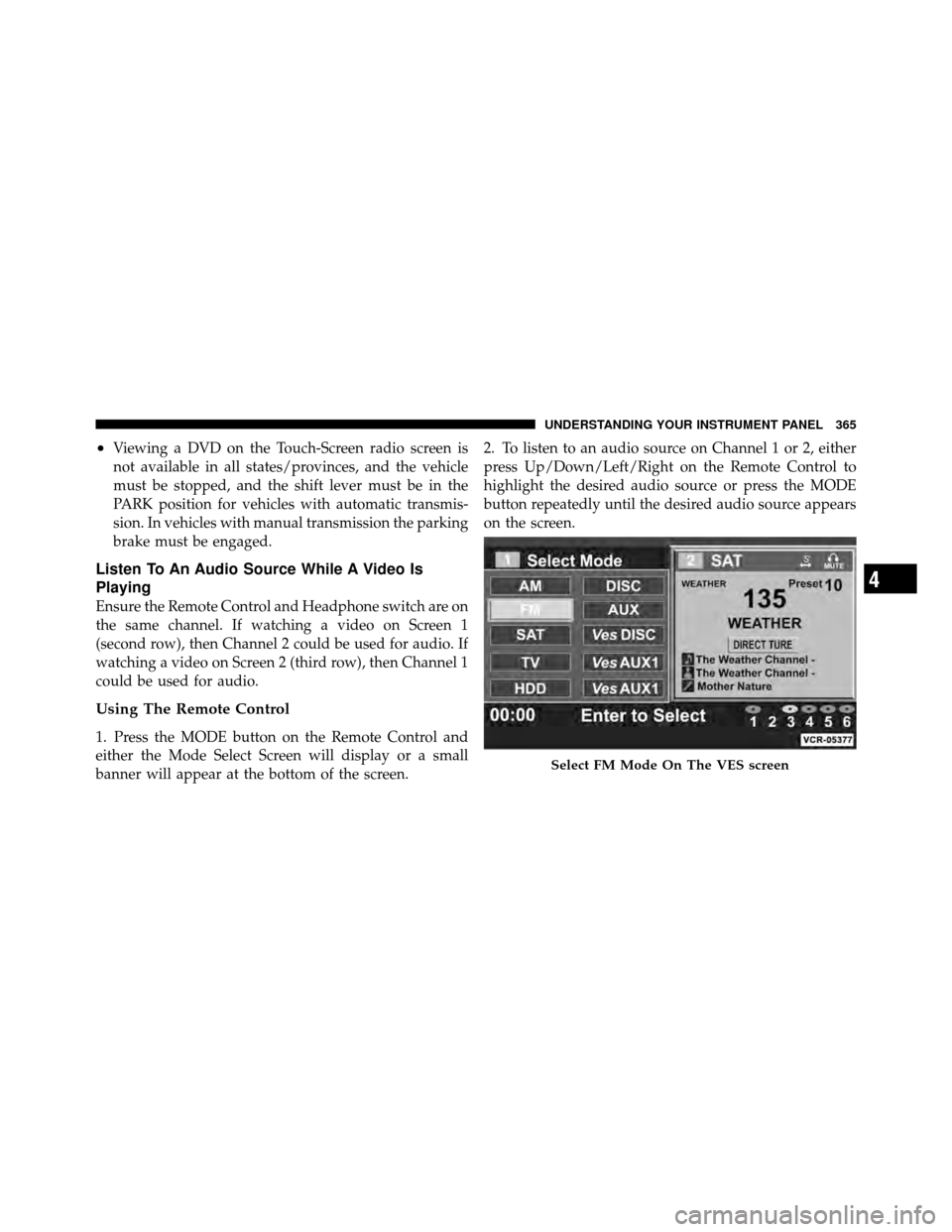
1. Press the MODE button on the Remote Control and
either the Mode Select Screen will display or a small
banner will appear at the bottom of the screen.2. To listen to an audio source on Channel 1 or 2, either
press Up/Down/Left/Right on the Remote Control to
highlight the desired audio source or press the MODE
button repeatedly until the desired audio source appears
on the screen.
Select FM Mode On The VES screen
4
UNDERSTANDING YOUR INSTRUMENT PANEL 365
Page 369 of 643
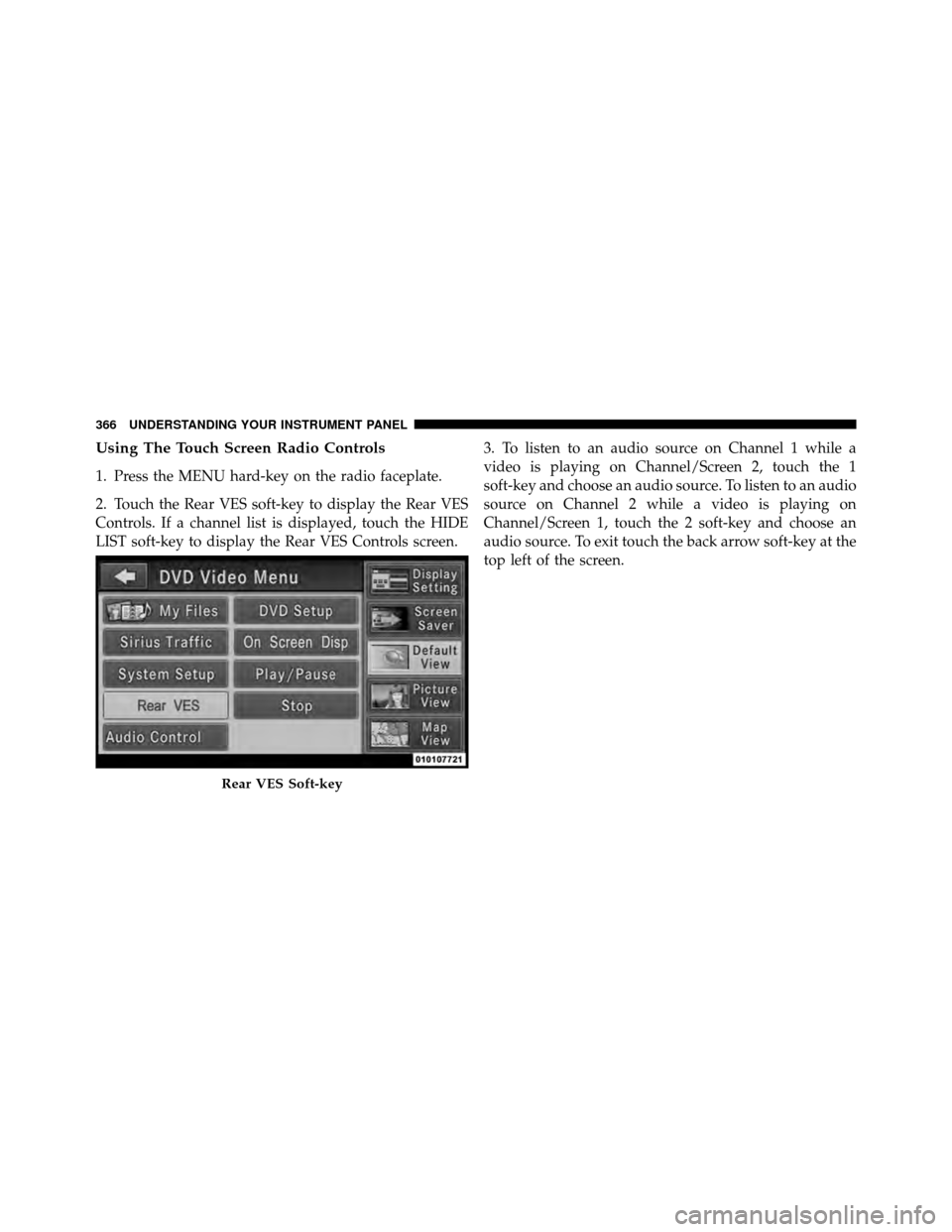
Using The Touch Screen Radio Controls
1. Press the MENU hard-key on the radio faceplate.
2. Touch the Rear VES soft-key to display the Rear VES
Controls. If a channel list is displayed, touch the HIDE
LIST soft-key to display the Rear VES Controls screen.3. To listen to an audio source on Channel 1 while a
video is playing on Channel/Screen 2, touch the 1
soft-key and choose an audio source. To listen to an audio
source on Channel 2 while a video is playing on
Channel/Screen 1, touch the 2 soft-key and choose an
audio source. To exit touch the back arrow soft-key at the
top left of the screen.
Rear VES Soft-key
366 UNDERSTANDING YOUR INSTRUMENT PANEL
Page 371 of 643
Important Notes For Dual Video Screen System
•
VES is able to transmit two channels of stereo audio
and video simultaneously.
•In split screen mode the left side equates to Channel 1
and the right side equates to Channel 2.
•Selecting a video source on Channel 1, the video
source will display on the second row screen or Screen
1 and can be heard on Channel 1.
•Selecting a video source on Channel 2, the video
source will display on the third row screen or Screen 2
and can be heard on Channel 2
•Audio can be heard through the headphones even
when the screen(s) are closed.
Remote Control
Controls And Indicators
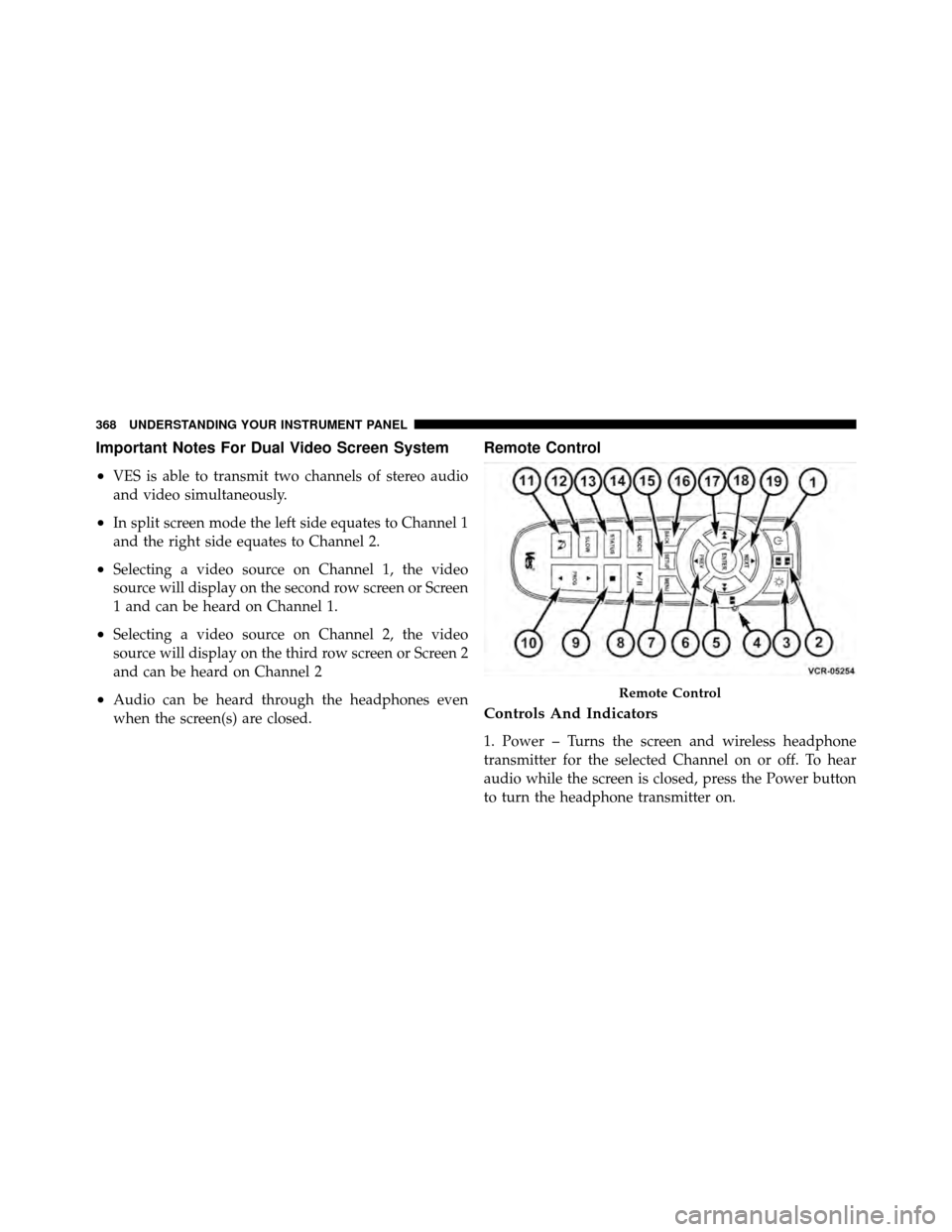
1. Power – Turns the screen and wireless headphone
transmitter for the selected Channel on or off. To hear
audio while the screen is closed, press the Power button
to turn the headphone transmitter on.
Remote Control
368 UNDERSTANDING YOUR INSTRUMENT PANEL
Page 372 of 643

2. Channel Selector Indicators – When a button is
pressed, the currently affected channel or channel button
is illuminated momentarily.
3. Light – Turns the remote control backlighting on or off.
The remote backlighting turns off automatically after five
seconds.
4. Channel/Screen Selector Switch - Indicates which
channel is being controlled by the remote control. When
the selector switch is in the Channel 1 position, the
remote controls the functionality of headphone Channel
1 (right side of the screen). When the selector switch is in
the Channel 2, position the remote controls the function-
ality of headphone Channel 2 (left side of the screen).
5.�� – In radio modes, press to seek the next tunable
station. In disc modes, press and hold to fast forward
through the current audio track or video chapter. In
menu modes use to navigate in the menu. 6.
� / Prev – In radio modes, press to select to the
previous station. In disc modes, press to advance to the
start of the current or previous audio track or video
chapter. In menu modes, use to navigate in the menu.
7. MENU – Press to return to the main menu of a DVD
disc, to select a satellite audio channel from the Station
list, or select playback modes (SCAN/RANDOM for a
CD).
8. �/ (Play/Pause) – Begin/resume or pause disc play.
9.
(Stop) – Stops disc play
10. PROG Up/Down – When listening to a radio mode,
pressing PROG Up selects the next preset and pressing
PROG Down selects the previous preset stored in the
radio. When listening to compressed audio on a data
disc, PROG Up selects the next directory and PROG
Down selects the previous directory. When listening to a
4
UNDERSTANDING YOUR INSTRUMENT PANEL 369