Page 72 of 514
Maintaining Your Air Bag System
WARNING!
•Modifications to any part of the air bag system
could cause it to fail when you need it. You could
be injured if the air bag system is not there to
protect you. Do not modify the components or
wiring, including adding any kind of badges or
stickers to the steering wheel hub trim cover or the
upper right side of the instrument panel. Do not
modify the front bumper, vehicle body structure,
or add aftermarket side steps or running boards.
•It is dangerous to try to repair any part of the air
bag system yourself. Be sure to tell anyone who
works on your vehicle that it has an air bag system.(Continued)
WARNING! (Continued)
•Do not attempt to modify any part of your air bag
system. The air bag may inflate accidentally or
may not function properly if modifications are
made. Take your vehicle to an authorized dealer
for any air bag system service. If your seat includ-
ing your trim cover and cushion needs to be
serviced in any way (including removal or
loosening/tightening of seat attachment bolts),
take the vehicle to your authorized dealer. Only
manufacturer approved seat accessories may be
used. If it is necessary to modify the air bag system
for persons with disabilities, contact your autho-
rized dealer.
70 THINGS TO KNOW BEFORE STARTING YOUR VEHICLE
Page 91 of 514
WARNING! (Continued)
•Always make sure that objects cannot fall into the
driver footwell while the vehicle is moving. Ob-
jects can become trapped under the brake pedal
and accelerator pedal causing a loss of vehicle
control.
•If required, mounting posts must be properly
installed, if not equipped from the factory.
Failure to properly follow floor mat installation or
mounting can cause interference with the brake
pedal and accelerator pedal operation causing loss
of control of the vehicle.
Periodic Safety Checks You Should Make Outside
The Vehicle
Tires
Examine tires for excessive tread wear and uneven wear
patterns. Check for stones, nails, glass, or other objectslodged in the tread or sidewall. Inspect the tread for cuts
and cracks. Inspect sidewalls for cuts, cracks and bulges.
Check the wheel nuts for tightness. Check the tires
(including spare) for proper cold inflation pressure.
Lights
Have someone observe the operation of exterior lights
while you work the controls. Check turn signal and high
beam indicator lights on the instrument panel.
Door Latches
Check for positive closing, latching, and locking.
Fluid Leaks
Check area under vehicle after overnight parking for fuel,
engine coolant, oil, or other fluid leaks. Also, if gasoline
fumes are detected or if fuel, power steering fluid, or
brake fluid leaks are suspected, the cause should be
located and corrected immediately.
2
THINGS TO KNOW BEFORE STARTING YOUR VEHICLE 89
Page 95 of 514
▫Lights On Reminder .................. 154
▫ Instrument Panel Dimmer .............. 154
▫ Map/Reading/Interior Lights ........... 155
� Windshield Wipers And Washers .......... 156
▫ Intermittent Wiper System .............. 157
▫ Windshield Washers .................. 158
▫ Mist Feature ........................ 159
▫ Headlights With Wipers Feature (Available
With Automatic Headlights Only) ......... 159
� Tilt/Telescoping Steering Column .......... 160
� Electronic Speed Control — If Equipped ..... 161
▫ To Activate ......................... 162
▫ To Set A Desired Speed ................ 162
▫ To Deactivate ....................... 162 ▫
To Resume Speed .................... 163
▫ To Vary The Speed Setting .............. 163
▫ To Accelerate For Passing .............. 163
� Garage Door Opener — If Equipped ........ 164
▫ Before You Begin Programming
HomeLink� ........................ 165
▫ Programming A Rolling Code ........... 166
▫ Programming A Non-Rolling Code ........ 168
▫ Canadian/Gate Operator Programming .... 169
▫ Using HomeLink� ................... 170
▫ Security ........................... 171
▫ Troubleshooting Tips .................. 171
▫ General Information .................. 172
3
UNDERSTANDING THE FEATURES OF YOUR VEHICLE 93
Page 117 of 514
The Uconnect™ Phone will then send the corresponding
phone number associated with the phonebook entry, as
tones over the phone.
NOTE:
•You may not hear all of the tones due to mobile phone
network configurations. This is normal.
•Some paging and voice mail systems have system time
out settings that are too short and may not allow the
use of this feature.
Barge In — Overriding Prompts
The “Voice Command” button can be used when you
wish to skip part of a prompt and issue your voice
command immediately. For example, if a prompt is
asking “Would you like to pair a phone, clear a...,” you
could press the
button and say, “Pair a Phone” to
select that option without having to listen to the rest of
the voice prompt.
Turning Confirmation Prompts ON/OFF
Turning confirmation prompts off will stop the system
from confirming your choices (e.g., the Uconnect™
Phone will not repeat a phone number before you dial it).
•Press thebutton to begin.
•After the “Ready” prompt and the following beep, say
one of the following:
“Setup Confirmation Prompts On”
“Setup Confirmation Prompts Off”
Phone And Network Status Indicators
If available on the radio and/or on a premium display
such as the instrument panel cluster, and supported by
your mobile phone, the Uconnect™ Phone will provide
notification to inform you of your phone and network
status when you are attempting to make a phone call
using Uconnect™ Phone. The status is given for network
signal strength, phone battery strength, etc.
3
UNDERSTANDING THE FEATURES OF YOUR VEHICLE 115
Page 139 of 514
WARNING! (Continued)
•Do not ride with the seatback reclined so that the
shoulder belt is no longer resting against your
chest. In a collision you could slide under the seat
belt, which could result in serious injury or death.
CAUTION!
Do not place any article under a power seat or
impede its ability to move as it may cause damage to
the seat controls. Seat travel may become limited if
movement is stopped by an obstruction in the seat’s
path.
Heated Seats — If Equipped
There are two heated seat switches that allow the driver
and passenger to operate the seats independently. The
controls for each heater are located near the bottom
center of the instrument panel (below the climate con-
trols).
You can choose from HIGH, LOW or OFF heat settings.
Amber indicator lights in each switch indicate the level of
heat in use. Two indicator lights will illuminate for
HIGH, one for LOW and none for OFF.Press the switch once to select HIGH-level
heating. Press the switch a second time to select
LOW-level heating. Press the switch a third
time to shut the heating elements OFF.
NOTE: Once a heat setting is selected, heat will be felt
within two to five minutes.
3
UNDERSTANDING THE FEATURES OF YOUR VEHICLE 137
Page 150 of 514
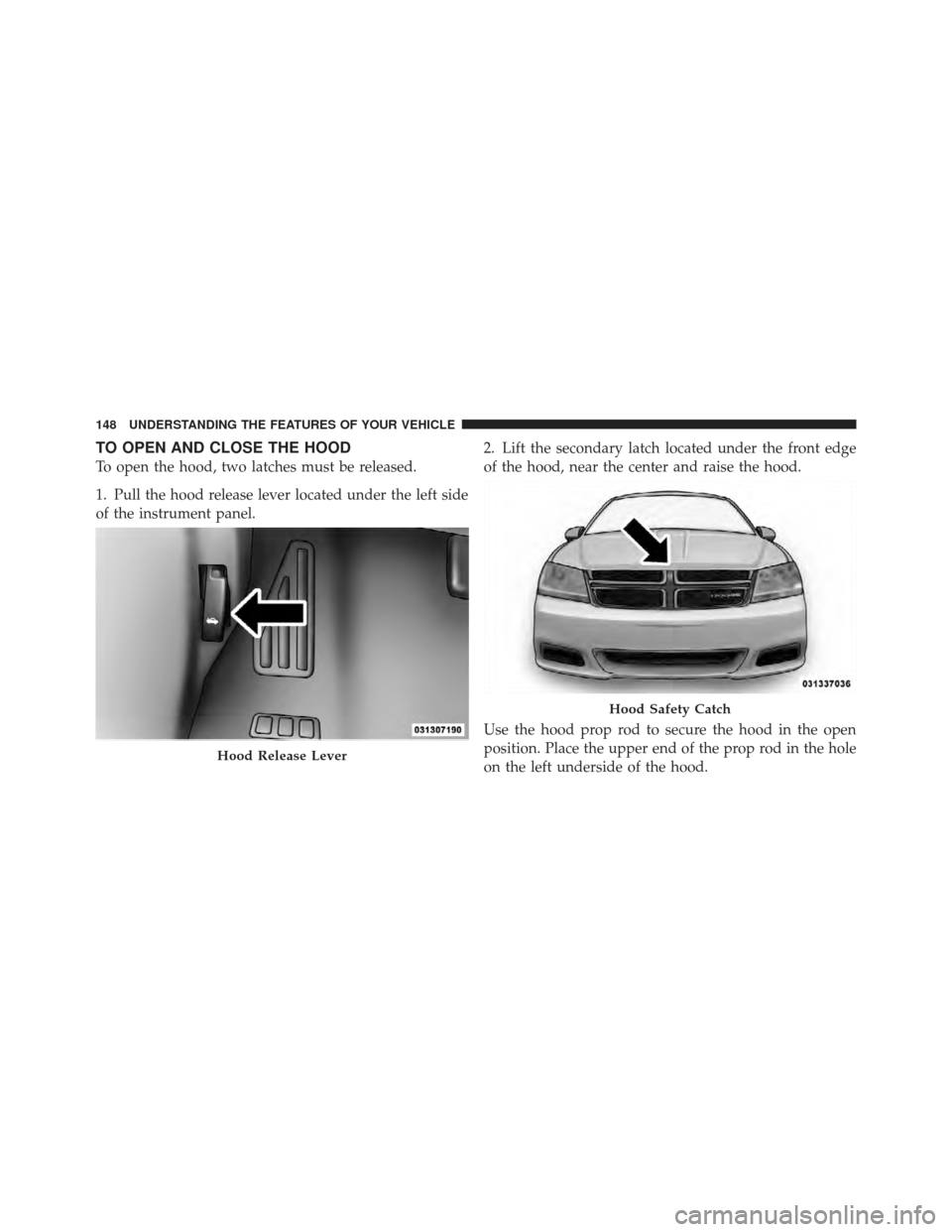
TO OPEN AND CLOSE THE HOOD
To open the hood, two latches must be released.
1. Pull the hood release lever located under the left side
of the instrument panel.2. Lift the secondary latch located under the front edge
of the hood, near the center and raise the hood.
Use the hood prop rod to secure the hood in the open
position. Place the upper end of the prop rod in the hole
on the left underside of the hood.
Hood Release Lever
Hood Safety Catch
148 UNDERSTANDING THE FEATURES OF YOUR VEHICLE
Page 152 of 514
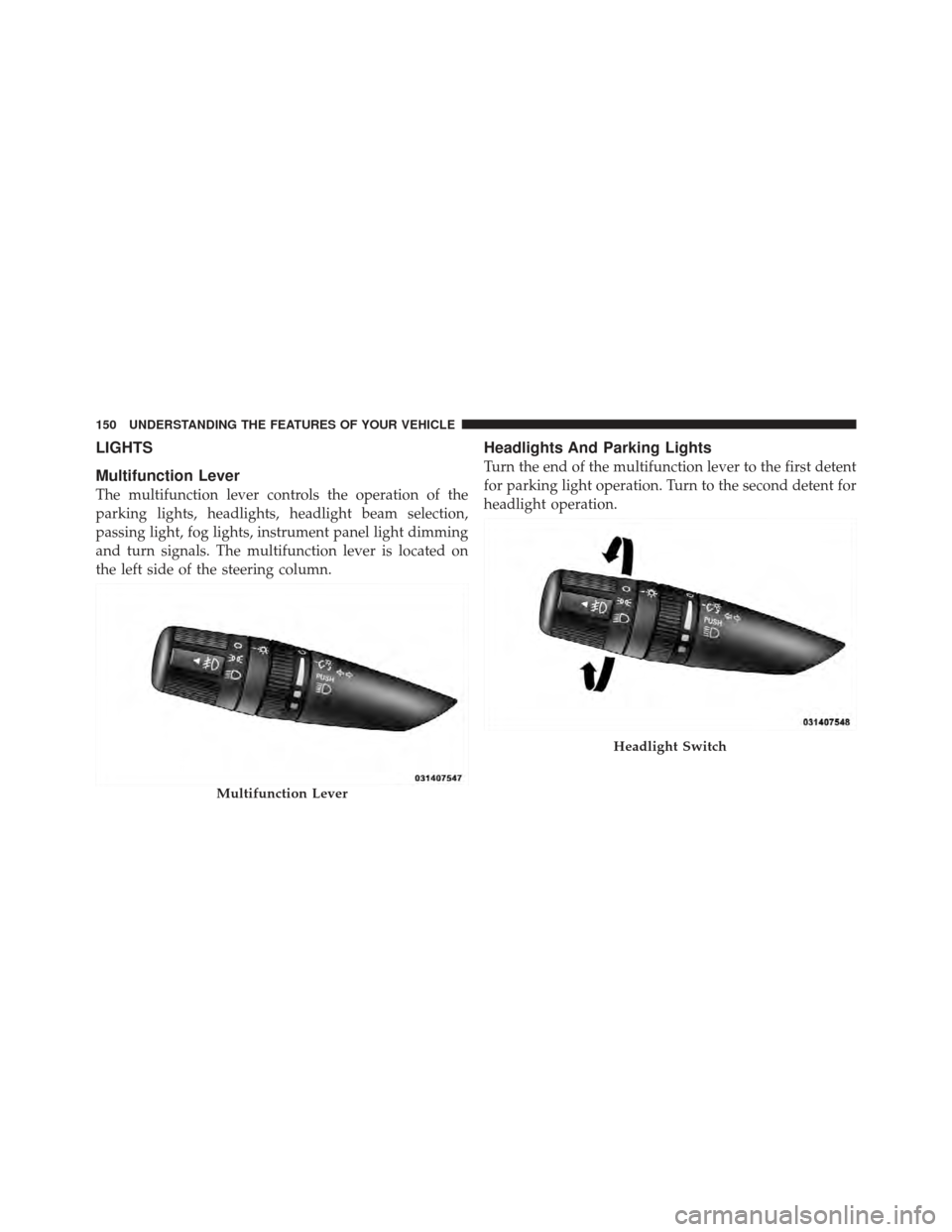
LIGHTS
Multifunction Lever
The multifunction lever controls the operation of the
parking lights, headlights, headlight beam selection,
passing light, fog lights, instrument panel light dimming
and turn signals. The multifunction lever is located on
the left side of the steering column.
Headlights And Parking Lights
Turn the end of the multifunction lever to the first detent
for parking light operation. Turn to the second detent for
headlight operation.
Multifunction Lever
Headlight Switch
150 UNDERSTANDING THE FEATURES OF YOUR VEHICLE
Page 153 of 514
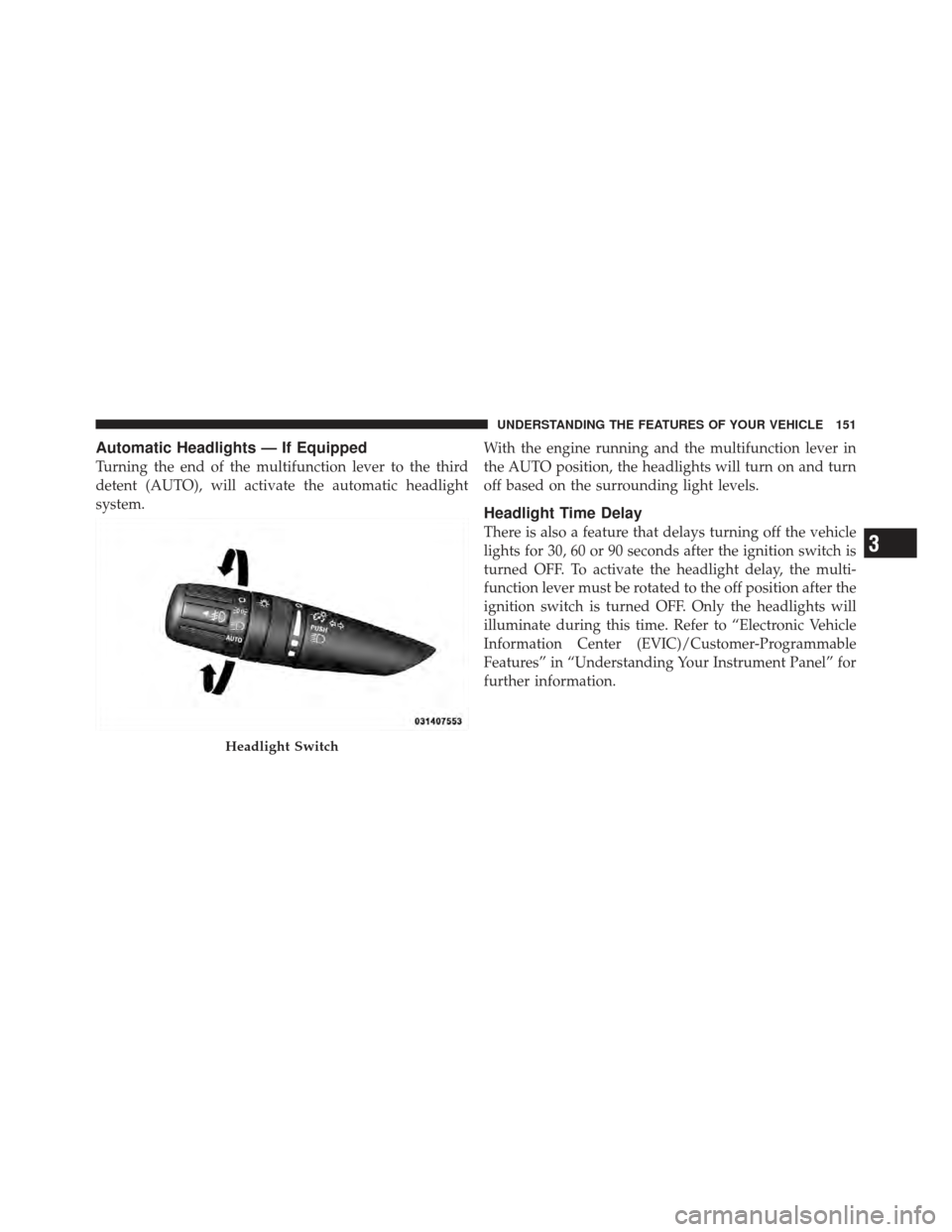
Automatic Headlights — If Equipped
Turning the end of the multifunction lever to the third
detent (AUTO), will activate the automatic headlight
system.With the engine running and the multifunction lever in
the AUTO position, the headlights will turn on and turn
off based on the surrounding light levels.
Headlight Time Delay
There is also a feature that delays turning off the vehicle
lights for 30, 60 or 90 seconds after the ignition switch is
turned OFF. To activate the headlight delay, the multi-
function lever must be rotated to the off position after the
ignition switch is turned OFF. Only the headlights will
illuminate during this time. Refer to “Electronic Vehicle
Information Center (EVIC)/Customer-Programmable
Features” in “Understanding Your Instrument Panel” for
further information.
Headlight Switch
3
UNDERSTANDING THE FEATURES OF YOUR VEHICLE 151