Page 202 of 514
off unless the parking brake is applied or a brake fault is
detected. If the light does not illuminate, have the light
inspected by an authorized dealer.
The light also will turn on when the parking brake is
applied with the ignition switch in the ON/RUN posi-
tion.
NOTE:This light shows only that the parking brake is
applied. It does not show the degree of brake application.
12. Tachometer
The silver area of the scale shows the permissible engine
revolutions-per-minute (RPM x 1000) for each gear range.
Before reaching the red area, ease up on the accelerator to
prevent engine damage.
13. Shift Lever Indicator
The Shift Lever Indicator is self-contained within the
instrument cluster. It displays the gear position of the
automatic transmission. NOTE:
You must apply the brakes before shifting from
PARK.
14. Odometer Display/Trip Odometer Display
The odometer display shows the total distance the ve-
hicle has been driven. U.S. Federal regulations require
that upon transfer of vehicle ownership, the seller certify
to the purchaser the correct mileage that the vehicle has
been driven. If your odometer needs to be repaired or
serviced, the repair technician should leave the odometer
reading the same as it was before the repair or service. If
s/he cannot do so, then the odometer must be set at zero,
and a sticker must be placed in the door jamb stating
what the mileage was before the repair or service. It is a
good idea for you to make a record of the odometer
reading before the repair/service, so that you can be sure
that it is properly reset, or that the door jamb sticker is
accurate if the odometer must be reset at zero.
200 UNDERSTANDING YOUR INSTRUMENT PANEL
Page 203 of 514
The two trip odometers show individual trip mileage. To
switch from odometer to trip odometers, press and
release the Trip Odometer button. To reset a trip odom-
eter, display the desired trip odometer to be reset then
push and hold the button until the display resets (ap-
proximately two seconds). Refer to “Trip Odometer But-
ton” for additional information.
Vehicle Odometer Messages
When the appropriate conditions exist, the odometer will
display the following messages:
door............................. Door Ajar
dECK ............................ T runk Ajar
LoW tirE ..................... LowTirePr essure
CHANgE OIL ............... Oil Change Required
gASCAP ....................... Fuel Cap Fault
HOTOIL .......Engine Oil Temperature Exceeds Safe
ThresholdNOTE:
If the instrument cluster is equipped with the
optional Electronic Vehicle Information Center (EVIC),
then all warnings including ”Low Tire,” “Door Ajar” and
“Trunk Ajar” will only display in the EVIC. (Refer to
“Electronic Vehicle Information Center (EVIC)” for spe-
cific messages).
LoW tirE
When the appropriate condition exists, the odometer
display will toggle between LoW and tirE for three
cycles.
HOTOIL
When this message is displayed there is a engine oil
over-temperature condition. When this condition occurs,
the “HOTOIL” message will be displayed in the odom-
eter along with a chime.
Refer to “If Your Engine Overheats” in “What To Do In
Emergencies”.
4
UNDERSTANDING YOUR INSTRUMENT PANEL 201
Page 204 of 514
gASCAP
If the vehicle diagnostic system detects a leak or change
in the evaporative system, or the fuel filler cap is loose,
improperly installed, or damaged, the words “gASCAP”
will display in the odometer display area. If this occurs,
tighten the fuel filler cap properly and press the odom-
eter reset button to turn off the “gASCAP” message.
(Refer to “Onboard Diagnostic System — OBDII” in
“Maintaining Your Vehicle” for further information). If
the problem continues, the message will appear the next
time the vehicle is started. See your authorized dealer
service center as soon as possible.
CHANgE OIL
Your vehicle is equipped with an engine oil change
indicator system. The “CHANgE OIL” message will flash
in the instrument cluster odometer for approximately
12 seconds after a single chime has sounded to indicate
the next scheduled oil change interval. The engine oil
change indicator system is duty cycle based, whichmeans the engine oil change interval may fluctuate
dependent upon your personal driving style.
Unless reset, this message will continue to display each
time you turn the ignition switch to the “ON” position.
To turn off the message temporarily, press and release the
Trip Odometer button on the instrument cluster. To reset
the oil change indicator system (after performing the
scheduled maintenance) perform the following proce-
dure:
1. Turn the ignition switch to the ON/RUN position
(do not start the engine).
2. Fully depress the accelerator pedal slowly 3 times
within 10 seconds.
3. Turn the ignition switch to the LOCK position.
NOTE: If the indicator message illuminates when you
start the vehicle, the oil change indicator system did not
reset. If necessary, repeat this procedure.
202 UNDERSTANDING YOUR INSTRUMENT PANEL
Page 205 of 514

4. For vehicles equipped with the Electronic Vehicle
Information Center (EVIC), refer to “Electronic Vehicle
Information Center (EVIC)”.
15. Cruise Indicator — If Equipped This indicator shows that the Electronic Speed
Control System is ON.
16. Odometer/Trip Odometer Reset Button
Trip Odometer
Press and release this button to change the display from
odometer to “Trip A.” Press and release it a second time
to change the display to “Trip B.” Press and release it a
third time to change the display back to the odometer.
To reset the trip odometer, first display the trip mileage
that you want to reset, “Trip A” or “Trip B.” Then push
and hold the button (approximately two seconds) until
the display resets to 0 miles (km). The odometer must be
in Trip Mode to reset the trip odometer. 17. Electronic Throttle Control (ETC) Indicator Light
This light informs you of a problem with the
Electronic Throttle Control (ETC) system. If a
problem is detected, the light will come on
while the engine is running. If the light remains
lit with the engine running, your vehicle will usually be
drivable and not need towing, however see your autho-
rized dealer for service as soon as possible.
If the light is flashing when the engine is running you
may experience power loss, an elevated/rough idle, and
increased brake pedal effort, and your vehicle may
require towing. Immediate service is required.
The light will come on when the ignition switch is first
turned on and remain on briefly as a bulb check. This is
normal. If the light does not come on during starting,
have the system checked by an authorized dealer.
4
UNDERSTANDING YOUR INSTRUMENT PANEL 203
Page 213 of 514
RESET Button
To reset the display shown, turn the ignition switch to the
ON position, then press and hold the RESET button
located on the steering wheel.
The following displays can be reset or changed:
•Trip A
•Trip B
Trip Odometer (ODO)
This display shows the distance traveled since the last
reset. Press and release the STEP button on the instru-
ment cluster to switch from odometer, to Trip A or Trip B.
Trip A
Shows the total distance traveled for Trip A since the last
reset.
Trip B
Shows the total distance traveled for Trip B since the last
reset.
ELECTRONIC VEHICLE INFORMATION CENTER
(EVIC) — IF EQUIPPED
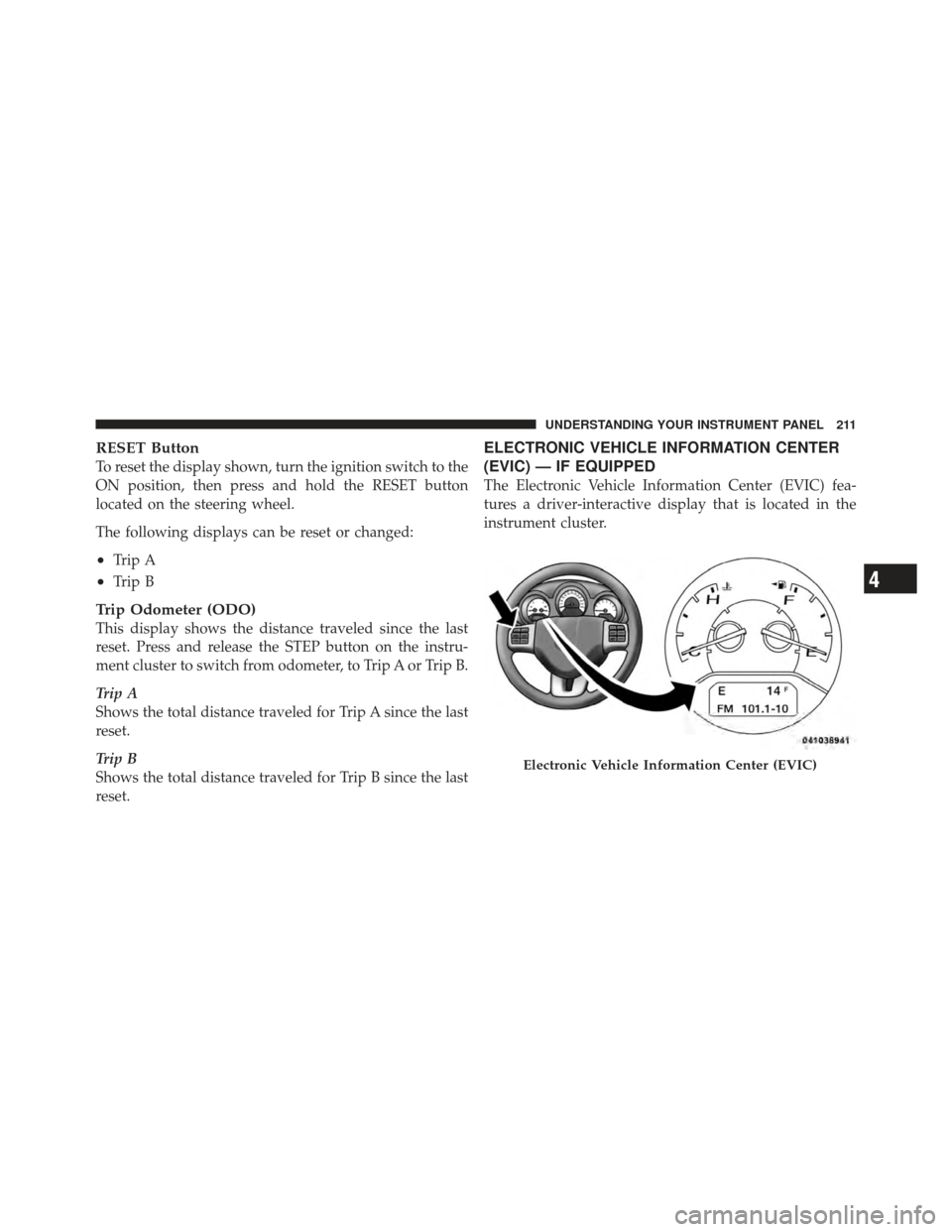
The Electronic Vehicle Information Center (EVIC) fea-
tures a driver-interactive display that is located in the
instrument cluster.
Electronic Vehicle Information Center (EVIC)
4
UNDERSTANDING YOUR INSTRUMENT PANEL 211
Page 214 of 514
The EVIC consists of the following:
•Compass Heading Display (N, S, E, W, NE, NW, SE,
SW)
•Mileage (Avg/MPG)
•Miles To Empty
•Low Tire Information (Tire Pressure Monitor System
(TPMS) Displays) — if equipped
•Timer
•Units
•System Warnings (Door Ajar, etc.)
•Personal Settings (Customer-Programmable Features)
•Outside Temperature Display (°F or °C)
•Audio Mode Displays – 12 preset Radio Stations or CD
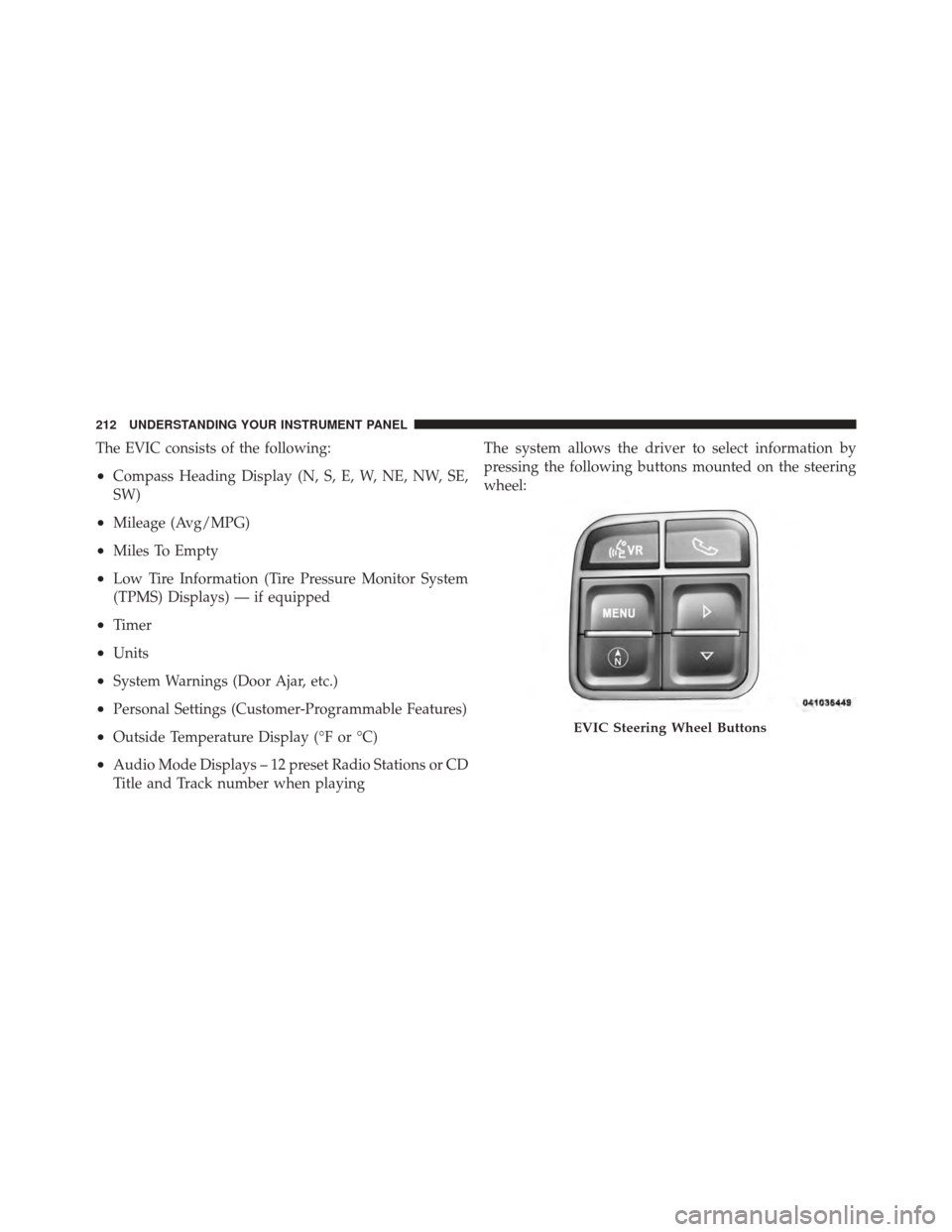
Title and Track number when playingThe system allows the driver to select information by
pressing the following buttons mounted on the steering
wheel:
EVIC Steering Wheel Buttons
212 UNDERSTANDING YOUR INSTRUMENT PANEL
Page 215 of 514

Press and release the MENU button to advance
the display to each of the EVIC Main Menu
features. Upon reaching the last item in the
Main Menu the EVIC will advance to the first
item in the Main Menu with the next MENU
button press and release.
Press and release the DOWN button to advance
the display through the various Trip Functions
or Personal Settings.Press and release the COMPASS button to
display the compass heading, the outside
temperature, and Audio Info (when the ra-
dio is on) screen when the current screen is
not the compass, outside temp, audio info
screen. Press and release the SELECT Button to accept
a selection. The SELECT Button also resets
various Trip Functions.
Electronic Vehicle Information Center (EVIC)
Displays
When the appropriate conditions exist, the EVIC displays
the following messages:
•Turn Signal On (with a continuous warning chime
after one mile traveled)
•Left Front Turn Signal Lamp Out (with a single chime)
•Left Rear Turn Signal Lamp Out (with a single chime)
•Right Front Turn Signal Lamp Out (with a single
chime)
MENU
Button
DOWN Button
COMPASS Button
SELECTButton
4
UNDERSTANDING YOUR INSTRUMENT PANEL 213
Page 217 of 514
Oil Change Required — If Equipped
Your vehicle is equipped with an engine oil change
indicator system. The Oil Change Required message will
flash in the EVIC display for approximately five seconds
after a single chime has sounded to indicate the next
scheduled oil change interval. The engine oil change
indicator system is duty cycle based, which means the
engine oil change interval may fluctuate dependent upon
your personal driving style.
Unless reset, this message will continue to display each
time you turn the ignition switch to the ON/RUN
position. To turn off the message temporarily, press and
release the MENU button. To reset the oil change indica-
tor system (after performing the scheduled maintenance),
perform the following procedure:
1. Turn the ignition switch to the ON position (Do not
start the engine.)2. Fully depress the accelerator pedal slowly three times
within 10 seconds.
3. Turn the ignition switch to the LOCK position.
NOTE:
If the indicator message illuminates when you
start the vehicle, the oil change indicator system did not
reset. If necessary repeat this procedure.
EVIC Main Menu
To step to each main menu feature press and release the
MENU button once for each step. A step from the last
item in the list will cause the first item in the feature list
to be displayed. The following features are in the Main
menu:
•Compass, Outside Temperature, Audio Information (if
radio is on) display
•Average Fuel Economy
•Distance to Empty
4
UNDERSTANDING YOUR INSTRUMENT PANEL 215