Page 264 of 358
03
A press on the dial gives access to short-cutmenus according to the display in the screen.
RADIO:
Activate / Deactivate TA
Activate / Deactivate RD
S
GENERAL OPERATION
DISPLAY ACCORDING TO CONTEXT
MUSIC MEDIA PLAYERS,
CD or USB (according to
media):
Play modes:
Normal
Random
Random on all media
Re
petition
TELEPHONE
(call in progress):
Private mode
FULL SCREEN MAP OR
IN A NEW WINDOW:
Stop / Restore guidance Select destination
Enter an address
Directory
GPS coordinates
Divert route
Move the map
Info. on location
Select as destination
Select as sta
ge
Save this place (contacts)
Quit map mode
Guidance criteria
Put call on hold
1
1
1
1
1
1
1
1
2
2
2
2
2
1
2
2
2
1
1
1
1
DTMF ring tones
Han
g up1
1
Guidance options 1
Change waveband
Activate / Deactivate TA information
2
2
Page 267 of 358
04
265
SELECTING A DESTINATION
NAVIGATION - GUIDANCE
TO ONE OF THE RECENT DESTINATIONS
Press NAV
to display the"Navigation - guidance" menu.
Select the desired destination and confi rm to start guidance. TOWARD
S A CONTACT IN THE CONTACTS DIRECTORY
Select " Select destination" andconfi rm, then select " Directory
" and confi rm.
Selection the desired destination from your contacts and confi rm "OK
" to start
the guidance.
Press NAVto display the"Navigation - guidance
" menu. Navi
gation towards a contact imported from your telephone is only
possible if the address is compatible with the system.
Page 281 of 358
06
279
USING THE TELEPHONE
Access to the "TELEPHONE" menu
""""""""pppppTelephoneTelephoneTelephoneTelephoneTelephoneTelephoneTelephoneTelephoneTelephoneTelephoneTelephoneTelephoneTelephoneTelephoneTl hTl hTl hTl hTl h""""""""
Press this button.
To make a call, select a number in the list and confi rm " OK"to start the call.
Connecting a different telephone deletes the list of
recent calls.
No telephone connected.
Telephone connected.
Incoming call.
Outgoing call.
Synchronisation of address book in progress.
Telephone call in progress.
In the top bar of the permanentdisplay
Go from the list to the menu (left/right).
or
Page 282 of 358
06
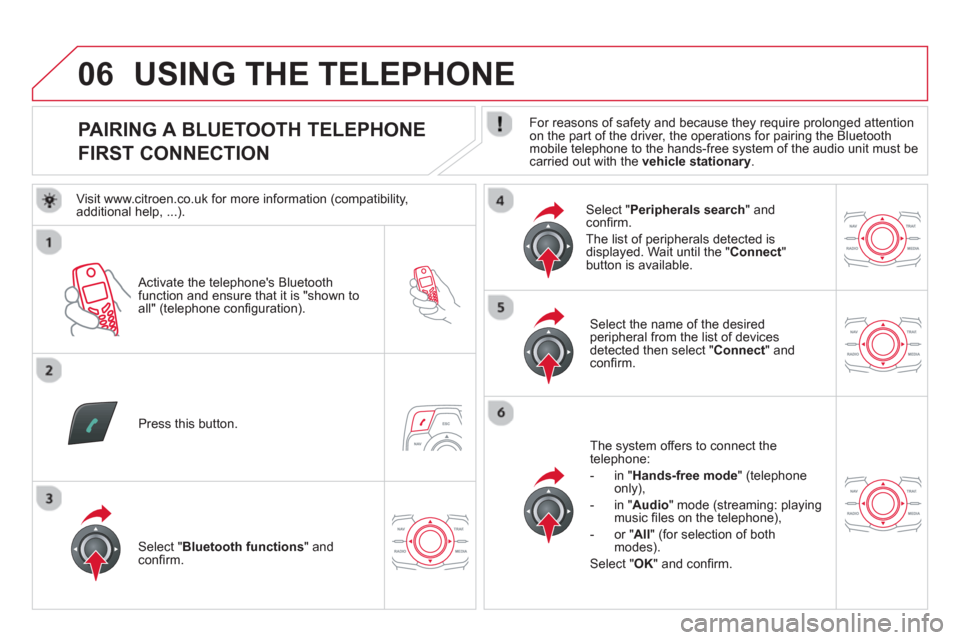
PAIRING A BLUETOOTH TELEPHONE
FIRST CONNECTION
For reasons of safety and because they require prolonged attention on the part of the driver, the operations for pairing the Bluetooth
mobile telephone to the hands-free system of the audio unit must becarried out with the vehicle stationary.
Activate the tele
phone's Bluetoothfunction and ensure that it is "shown to all" (telephone confi guration).
Pr
ess this button.
Select the name of the desired
peripheral from the list of devices detected then select "Connect
" and confi rm.
The s
ystem offers to connect the
telephone:
- in "
Hands-free mode" (telephoneonly),
- in "
Audio" mode (streaming: playingmusic fi les on the telephone),
-
or "All
" (for selection of both
modes).
Select " OK
" and confi rm.
Select " Bluetooth functions " and confi rm.
Select "Peripherals search" andconfi rm.
The list of
peripherals detected is
displayed. Wait until the " Connect"button is available.
USING THE TELEPHONE
Visit www.citroen.co.uk for more information (compatibility,
additional help, ...).
Page 283 of 358

06
281
Enter the same code on the telephone then accept
th
e connection.
Then accept automatic connection on the telephone to allow the
telephone to reconnect automaticall
y every time the vehicle is started.
Dependin
g on the type of telephone, the system will ask you to
accept or not the transfer of your contacts.
USING THE TELEPHONE
The "Hands-free mode" should be used in preference if "Streaming" is not desired.
The services available depend on the network, the
SIM card and the compatibility of the Bluetooth telephone used. Check the telephone manual and with your network provider for details of the services available to you.
The ability o
f the system to connect in only one mode depends on
the telephone. The two modes may both connect by default.
Select a code for the connection then confi rm " OK
".
On return to the vehicle,the last telephone connected
automatically reconnects, within around 30 seconds after switching on the ignition (Bluetooth activated and visible).
To modif
y the automatic connection mode, remove the pairing andpair the telephone again with the desired mode.
Page 284 of 358
06
SR
C
USING THE TELEPHONE
Press this button.
Select " Dial" then confi rm.
Select " Directory of contacts" thenconfi rm.
Dial the telephone number using the
virtual keypad selecting each number
in turn.
Confi rm " OK
" to make the call.
Press this button or make long press on
the steering mounted TEL/SRC
button.
CALLING A NEW NUMBER CALLING A CONTACT
Select the desired contact and confi rm.
Select the number and confi rm to start
the call.
MAKING A CALL
Use of the telephone is not recommended while driving. Werecommended that you park safely or make use of the steering mounted controls.
Page 285 of 358
06
SR
C
SRC
283
USING THE TELEPHONE
CALLING A RECENTLY DIALLED NUMBER
Press this button or make a long press on TEL/SRC, select "Call list" andconfi rm.
Select the desired number and confi rm.
To erase the calls lo
g, press PHONE
, select " Telephoneoptions" and confi rm then select " Delete calls log
" and confi rm.
ENDING A CALL
Press HANG UP.
or
It is alwa
ys possible to make a call directly from the telephone;
park the vehicle fi rst as a safety measure.
Make a long press on the steeringmounted TEL/SRC
button.
Page 287 of 358
06
SRC
SR
C
285
USING THE TELEPHONE
OPTIONS DURING A CALL *
During a call, press the MODE
button several times to select display of the
telephone screen, then press "OK"to open the contextual menu.
Select " Private mode
" and confi rm
to take the call on the handset.
Or select " Hands-free mode" andconfi rm to take the call via the vehicle's
speakers.
Select " Put call on hold" and confi rm
to put the current call on hold.
Or select " Resume the call" andconfi rm to resume the call on hold.
Select " DTMF ring tones
" to use thenumerical keypad, so as to navigate
through the menu of an interactive vocal server.
Select " Hang up " to end the call.
*
Depending on the compatibility of the phone and your service plan. it is possible to hold a 3-wa
y conference call by making 2 calls in succession*.Select " Conferencemode call " in thecontextual menu accessible using this button.
Or make a short press on this button.


