Page 36 of 140

34Comfort
Heating
1. Temperature adjustment
Turn the control from blue (cold) to red(hot) to adjust the temperature to suit your requirements.
2. Air fl ow adjustment
When the ignition is switched on, turn the control to obtain a flow of air which is sufficient
to ensure your comfort.
To maintain a certain level of comfort in thepassenger compar tment, avoid position 0whenever possible.
In position 0, a slight flow of air, due to themovement of the vehicle, can still be felt. Win
dscreen and side windows.
4. Rear screen demisting
With the engine running, press button 4
, the indicator lamp comes on.
The system demists the rear screen.
It is switched off by pressing control 4.
3. Air distribution adjustment
Footwells, diffusion grille and side
vents.
Di
ffusion grille and side vents.
Demisting and defrosting
To quickly demist or defrost the windscreen and side windows:
- set the air distribution to "Windscreen and side windows",
- place the temperature control 1
and the air
fl
ow control 2at maximum,
- close the side vents.
The air distribution can be adjusted byplacing the control in an intermediate
position.
Switch the system off as soon as you consider this necessary as a lower consumption of current reduces fuel consumption.
Windscreen, side windows and
f
ootwells.
Footwells.
Page 37 of 140
3
35 Comfort
1. Air conditioning On/Off
With the engine running, press thebutton, the indicator lamp comes on.
1.
Air conditioning On/Off 2.Te m p e r a t u r e a djustment3.Air flow adjustment
Air conditioning
2. Temperature adjustment
Turn the control from blue (cold) to red(hot) to adjust the temperature to suit your
requirements.
4. Air recirculation / Air intake
5. Air distribution adjustment 6.
Rear screen demisting
3. Air fl ow adjustment
When the ignition is switched on, turn the control to obtain a flow of air which is sufficient
to ensure your comfort.
To maintain a certain level of comfort in the
passenger compartment, avoid position 0whenever possible.
In position 0
, a slight flow of air, due to the
movement of the vehicle, can still be felt. The air conditionin
g will not operate if the air flow adjustment control 3 is in position 0.
To quickly obtain cooled air, you can use air recirculation for a few moments. Then return to exterior air intake.
Page 38 of 140

36Comfort
Footwells.
4. Air recirculation / Air intake
The recirculation of interior air (control 4to the left) enables you to
isolate the passenger compartment
from exterior odours and smoke.
5. Air distribution adjustment
Windscreen and side windows.
Windscreen, side windows andfootwells.
Footwells, diffusion
grille and side
vents.
Di
ffusion grille and side vents.
6. Rear screen demisting
As soon as possible, move control 4
to the right
to the "Intake of exterior air" position to avoid
the risks of deterioration of the air qualit
y and misting of the windscreen and side windows. The intake of exterior air
(control 4
tothe right) enables you to prevent and eliminate misting of the windscreenand side windows. With the en
gine running, pressbutton 6
, the indicator lamp comes on.
The system demists the rear screen.
It is switched off by pressingbutton 6again.
Demisting and defrosting
To quickly demist or defrost the windscreen and side windows:
- set the air distribution to "Windscreen and side windows",
- place the temperature control 2
and the air
flow control 3at maximum,
- close the side vents,
- place the air intake control 4
in th
e "A ir
intake" position,
- sw
itch on the air conditioning by pressing button 1.
Switch the system off as soon as you consider this necessary as a lower consumption of current reduces fuel consumption.
The air distribution can be adjusted by placing the control in an intermediate position.
In a humid climate, use of the air recirculation may cause misting of thewindows.
Page 50 of 140
48Safety
Audible warning system to aler t other road
users to an imminent danger.)Press the central part of the steering
wheel. Press the button
, the direction indicators flash.
They can operate with the ignition off.
When the vehicle is being driven,illumination of this warning lamp indicates that the parking brake is still
on or has not been properly released.
Parking brake
Applying
Pull the parking brake to immobilise your
vehicle.
Releasing
Pull on the handle and press the button to
release the parking brake.
Horn
Hazard warning lamps
When parking on a slope, direct your wheels towards the pavement and
pull the parking brake on.
Use the horn moderately and only in thefollowing circumstances:
- immediate danger, - approaching a location lacking visibility.
Page 53 of 140
7
51 Safety
Seat belts
3-door
5-door
The rear seats are equipped with two three-point inertia reel seat belts.
Yo u can store the seat belt buckles in the housing A.
Pull the strap, then inser t the buckle into thestalk.
Check that the seat belt is fastened correctly bypulling the strap.
To unfasten the seat belts, press the button on
th
e stalk.
Pretensioning front seat belts with force limiter
Safety in the event of front impactshas been improved by means of theintroduction of pretensioning seat beltswith force limiter for the front seats.Depending on the force of the impact, the pretensioning system instantly tightens the seat belts and pulls them against the body of the occupants.
The pretensioning seat belts are activewhen the ignition is on.
The force limiter reduces the pressure of the seat belt on the chest of the occupant, increasing their protection.
Fastening/Unfastening the seatbelts
Page 97 of 140
02
95
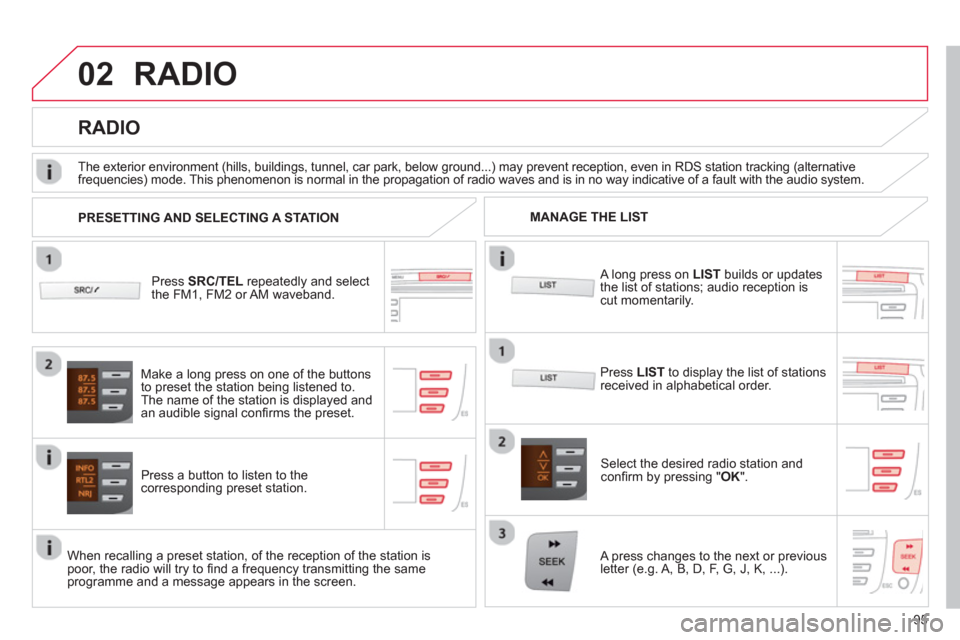
RADIO
Press SRC/TEL
repeatedly and select
the FM1, FM2 or AM waveband.
Press a button to listen to the corresponding preset station.
Select the desired radio station and confi rm by pressing "OK".
RADIO
Press LIST
to display the list of stations
received in alphabetical order.
The exterior environment
(hills, buildings, tunnel, car park, below ground...) may prevent reception, even in RDS station tracking (alternative
frequencies) mode. This phenomenon is normal in the propagation of radio waves and is in no way indicative of a fault with the audio system.
A long press on LISTbuilds or updates
the list of stations; audio reception iscut momentarily.
Make a lon
g press on one of the buttons
to preset the station being listened to.
The name o
f the station is displayed andan audible signal confi rms the preset.
A press chan
ges to the next or previous
letter (e.g. A, B, D, F, G, J, K, ...). MANAGE THE LIST
PRESETTING AND SELECTING A STATION
When recalling a preset station, of the reception of the station is poor, the radio will try to fi nd a frequency transmitting the same programme and a message appears in the screen.
Page 100 of 140
03
98
AUDIO
AUDIO CD
Insert 12 cm diameter circular compact discs only.
Some anti-piratin
g systems, on original discs or CDs copied using apersonal recorder, may cause faults which are no refl ection on thequality of the original player.
Without pressing the EJECT
button, insert a CD in the player, playbegins automatically.
To pla
y a disc which has already been
inserted, press the SRC/TEL
button several times until CD play is displayed.
Pr
ess one of the buttons to select a
track on the CD.
Pr
ess and hold one of the buttons for fast forward or backward.
PLAYING A CD
Page 102 of 140
03
VOLMENUSRC/
LISTESCSEEK +
_MP3
100
CD, USB
AUDIO
PLAYING A COMPILATION
Insert an MP3 compilation in the CD pla
yer or connect a memory stick to the USB port.
The system creates playlists
(temporary memory) the creation timefor which can take from a few seconds to several minutes.
The pla
ylists are updated every time the ignition is switched off or aUSB memory stick is connected.
Pla
y starts automatically after a period which depends on the capacity of the USB memory stick.
At a fi rst connection, the order suggested is by folder.When connecting again, the order previously chosen is retained.
To pla
y a disc or memory stick whichhas already been inserted, press
SRC/TELseveral times in succession and select " CD " or " USB".
Press one of the buttons to select the next or previous track.
Pr
ess one of the buttons to select the next or previous folder in the order chosen.
Pr
ess and hold one of the buttons for
fast forwards or backwards.


