Page 360 of 557
WARNING! (Continued)
•Unintended movement of a vehicle could injure
those in or near the vehicle. As with all vehicles,
you should never exit a vehicle while the engine is
running. Before exiting a vehicle, always apply the
parking brake, shift the transmission into PARK,
and turn the engine off. When the ignition is in the
OFF position, the shift lever is locked in the
PARK, securing the vehicle against unwanted
movement.
•When leaving the vehicle, always remove the key
fob from the ignition and lock your vehicle.(Continued)
WARNING! (Continued)
•Never leave children alone in a vehicle, or with
access to an unlocked vehicle. Allowing children
to be in a vehicle unattended is dangerous for a
number of reasons. A child or others could be
seriously or fatally injured. Children should be
warned not to touch the parking brake, brake
pedal or the shift lever.
•Do not leave the key fob in or near the vehicle, and
do not leave Keyless Enter-N-Go in the ACC or
ON/RUN mode. A child could operate power win-
dows, other controls, or move the vehicle.
358 STARTING AND OPERATING
Page 361 of 557
CAUTION!
•Before moving the shift lever out of PARK, you
must turn the ignition switch from the LOCK/OFF
position to the ON/RUN position, and also press
the brake pedal. Otherwise, damage to the shift
lever could result.
•DO NOT race the engine when shifting from
PARK or NEUTRAL into another gear range, as
this can damage the drivetrain.
The following indicators should be used to ensure that
you have engaged the shift lever into the PARK position:
•When shifting into PARK, move the shift lever all the
way forward and to the left until it stops and is fully
seated.
•Look at the shift lever position display and verify that
it indicates the PARK position.
•With brake pedal released, verify that the shift lever
will not move out of PARK.
REVERSE
This range is for moving the vehicle backward. Shift into
REVERSE only after the vehicle has come to a complete
stop.
NEUTRAL
Use this range when the vehicle is standing for prolonged
periods with engine running. The engine may be started
in this range. Set the parking brake and shift the trans-
mission into PARK if you must leave the vehicle.
5
STARTING AND OPERATING 359
Page 363 of 557

Transmission Limp Home Mode
Transmission function is monitored electronically for
abnormal conditions. If a condition is detected that could
result in transmission damage, Transmission Limp Home
Mode is activated. In this mode, the transmission remains
in the current gear until the vehicle is brought to a stop.
After the vehicle has stopped, the transmission will
remain in second gear regardless of which forward gear
is selected. PARK, REVERSE, and NEUTRAL will con-
tinue to operate. The Malfunction Indicator Light (MIL)
may be illuminated. Limp Home Mode allows the vehicle
to be driven to an authorized dealer for service without
damaging the transmission.In the event of a momentary problem, the transmission
can be reset to regain all forward gears by performing the
following steps:
1. Stop the vehicle.
2. Shift the transmission into PARK.
3. Turn the engine OFF.
4. Wait approximately 10 seconds.
5. Restart the engine.
6. Shift into the desired gear range. If the problem is no
longer detected, the transmission will return to normal
operation.
5
STARTING AND OPERATING 361
Page 364 of 557
NOTE:Even if the transmission can be reset, we recom-
mend that you visit your authorized dealer at your
earliest possible convenience. Your authorized dealer has
diagnostic equipment to determine if the problem could
recur.
If the transmission cannot be reset, authorized dealer
service is required.
Overdrive Operation
The automatic transmission includes an electronically
controlled Overdrive (fifth gear). The transmission will
automatically shift into the Overdrive gear if the follow-
ing conditions are present:
•the shift lever is in the DRIVE position,
•vehicle speed is sufficiently high, and
•the driver is not heavily pressing the accelerator
AUTOSTICK�
Steering Wheel Mounted Paddle Shifters Or
Console Mounted Shifter
AutoStick� is a driver-interactive transmission feature that
offers manual gear shifting to provide you with more
control of the vehicle. AutoStick� allows you to maximize
engine braking, and improve overall vehicle performance.
This system can also provide you with more control during
passing, city driving, cold slippery conditions, mountain
driving, trailer towing, and many other situations.
Operation
When the shift lever is in the DRIVE position, the
transmission will operate automatically, shifting between
the five available gears. To engage AutoStick�, simply
move the shift lever to the right or left (+/-) while in the
DRIVE position, or press one of the steering wheel
mounted shift paddles (+/-). When AutoStick �is active,
362 STARTING AND OPERATING
Page 365 of 557
the current transmission gear is displayed in the Elec-
tronic Vehicle Information Center (EVIC) portion of the
instrument cluster. In AutoStick�mode, the transmission
will shift when manually selected by the driver (using the
shift lever, or the shift paddles), unless an engine lugging
or overspeed condition would result. It will remain in the
selected gear until another upshift or downshift is cho-
sen, except as described below.
•The transmission will automatically downshift as the
vehicle slows (to prevent engine lugging) and will
display the current gear.
•The transmission will automatically downshift to first
gear when coming to a stop.
•You can start out in first or second gear. Tapping (+) (at
a stop) will allow starting in second gear. Starting out
in second gear is helpful in snowy or icy conditions.
•The system will ignore attempts to upshift at too low
of a vehicle speed.
•Transmission shifting will be more noticeable when
AutoStick� is engaged. To disengage AutoStick �mode,
hold the shift lever to the right or press and hold the (+)
shift paddle until “D” is once again displayed in the
instrument cluster. You can shift in or out of the
AutoStick� mode at any time without taking your foot
off the accelerator pedal.
•An “UPSHIFT” message will appear in the Electronic
Vehicle Information Center (EVIC) portion of the instru-
ment cluster when using AutoStick�, to alert the driver
to upshift to the next gear. The “UPSHIFT” message will
appear when approaching the maximum engine speed.
WARNING!
Do not downshift for additional engine braking on a
slippery surface. The drive wheels could lose their
grip and the vehicle could skid, causing a collision or
personal injury.
5
STARTING AND OPERATING 363
Page 366 of 557
Auto
•
If AutoStick�is engaged while in “Auto” mode, the
transmission will automatically shift up if maximum
engine speed is reached.
•Heavily pressing the accelerator pedal may generate
an automatic downshift for improved acceleration.
•This mode should be used for most driving situations.
Sport
•
If AutoStick is engaged while in “Sport” mode, the
transmission will remain in the selected gear even
when maximum engine speed is reached.
•Engine overspeed protection is achieved through fuel
cut off at or near redline.
•This mode will provide aggressive shifting and is
intended for spirited driving.
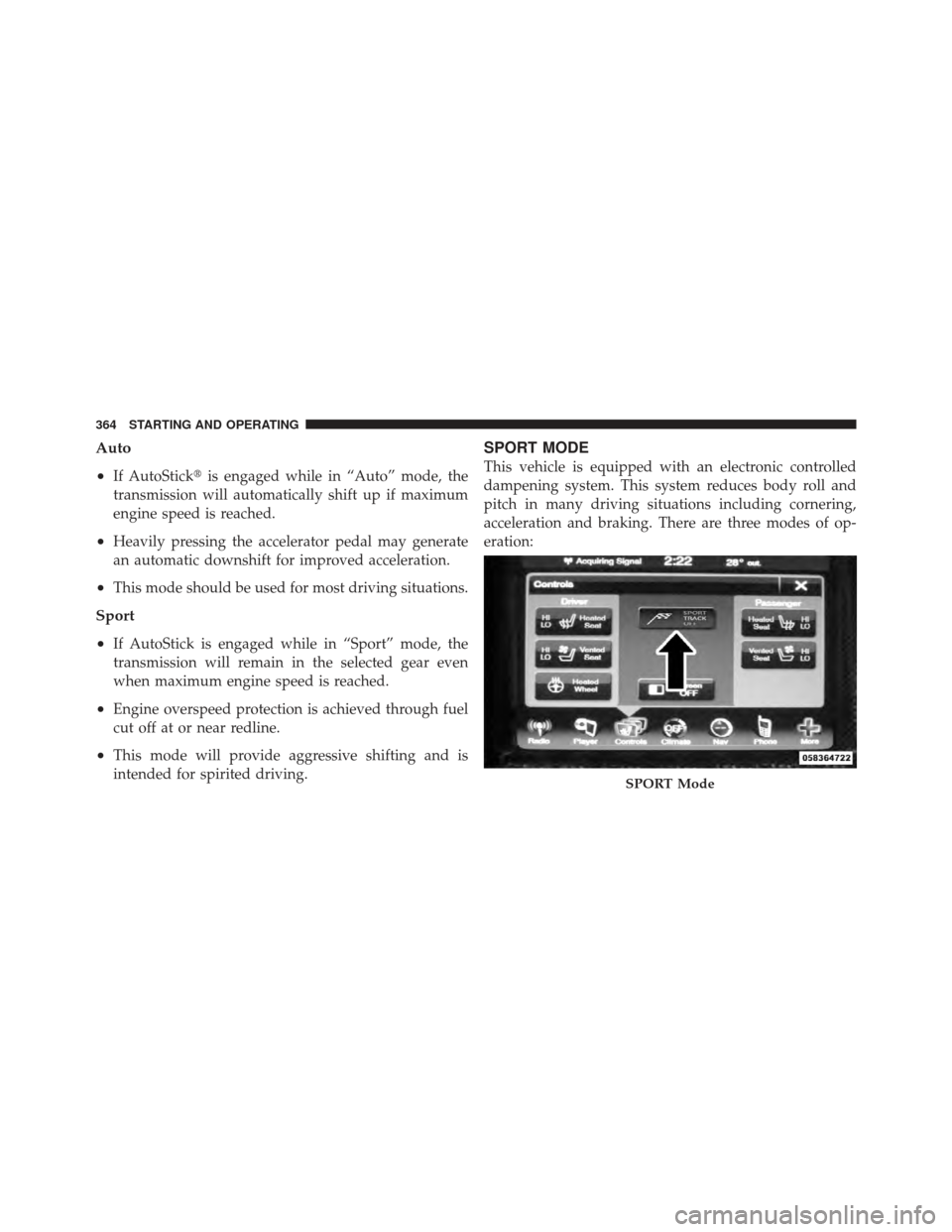
SPORT MODE
This vehicle is equipped with an electronic controlled
dampening system. This system reduces body roll and
pitch in many driving situations including cornering,
acceleration and braking. There are three modes of op-
eration:
SPORT Mode
364 STARTING AND OPERATING
Page 370 of 557
CAUTION! (Continued)
•Driving through standing water may cause dam-
age to your vehicle’s drivetrain components. Al-
ways inspect your vehicle’s fluids (i.e., engine oil,
transmission, axle, etc.) for signs of contamination
(i.e., fluid that is milky or foamy in appearance)
after driving through standing water. Do not con-
tinue to operate the vehicle if any fluid appears
contaminated, as this may result in further dam-
age. Such damage is not covered by the New
Vehicle Limited Warranty.
•Getting water inside your vehicle’s engine can
cause it to lock up and stall out, and cause serious
internal damage to the engine. Such damage is not
covered by the New Vehicle Limited Warranty.
WARNING!
•Driving through standing water limits your vehi-
cle’s traction capabilities. Do not exceed 5 mph
(8 km/h) when driving through standing water.
•Driving through standing water limits your vehi-
cle’s braking capabilities, which increases stop-
ping distances. Therefore, after driving through
standing water, drive slowly and lightly press on
the brake pedal several times to dry the brakes.
•Getting water inside your vehicle’s engine can cause
it to lock up and stall out, and leave you stranded.
•Failure to follow these warnings may result in
injuries that are serious or fatal to you, your passen-
gers, and others around you.
368 STARTING AND OPERATING
Page 372 of 557
Power Steering Fluid Check
Checking the power steering fluid level at a defined
service interval is not required. The fluid should only be
checked if a leak is suspected, abnormal noises are
apparent, and/or the system is not functioning as antici-
pated. Coordinate inspection efforts through an autho-
rized dealer.
CAUTION!
Do not use chemical flushes in your power steering
system as the chemicals can damage your power
steering components. Such damage is not covered by
the New Vehicle Limited Warranty.
WARNING!
Fluid level should be checked on a level surface and
with the engine off to prevent injury from moving
parts and to ensure accurate fluid level reading. Do
not overfill. Use only manufacturer’s recommended
power steering fluid.
If necessary, add fluid to restore to the proper indicated
level. With a clean cloth, wipe any spilled fluid from all
surfaces. Refer to “Fluids, Lubricants, and Genuine
Parts” in “Maintaining Your Vehicle” for further
information.
370 STARTING AND OPERATING