Page 297 of 576
which displays�0�immediately after reset. Then, the
history information will be erased, and the averaging will
continue from the last fuel average reading before the
reset.
There is an ECO icon in the lower portion of the EVIC
display. This icon will appear whenever the Multi-
Displacement System (MDS) (if equipped) allows the
engine to operate on four cylinders, or if you are driving
in a fuel efficient manner.
This feature allows you to monitor when you are driving
in a fuel efficient manner, and it can be used to modify
driving habits in order to increase fuel economy. Press the
BACK button to return to the main menu.
Distance To Empty (DTE)
Shows the estimated distance that can be traveled with
the fuel remaining in the tank. This estimated distance is
determined by a weighted average of the instantaneousand average fuel economy, according to the current fuel
tank level. DTE cannot be reset through the SELECT
button.
NOTE:Significant changes in driving style or vehicle
loading will greatly affect the actual drivable distance of
the vehicle, regardless of the DTE displayed value.
When the DTE value is less than 30 miles (48 km)
estimated driving distance, the DTE display will change
to a “LOW FUEL” message. This display will continue
until the vehicle runs out of fuel. Adding a significant
amount of fuel to the vehicle will turn off the “LOW
FUEL” message and a new DTE value will display. Press
the BACK button to return to the main menu.
Miles Per Gallon (MPG)
The Miles Per Gallon (MPG) feature displays instanta-
neous fuel economy in a bar graph below the DTE, this
function cannot be reset. Press the BACK button to return
to the main menu.
4
UNDERSTANDING YOUR INSTRUMENT PANEL 295
Page 299 of 576
Trip Info
Press and release the UP or DOWN button until�Trip
Info�is highlighted in the EVIC. Press and release the
SELECT button to display the following three trip fea-
tures in the next screen:
•Trip A
•Trip B
•Elapsed Time
Press the UP/DOWN buttons to cycle through all the
Trip Computer functions or press the BACK button to
return to the main menu.
The Trip Functions mode displays the following informa-
tion:
Trip A
Shows the total distance traveled for Trip A since the last
reset.
Trip B
Shows the total distance traveled for Trip B since the last
reset.
Elapsed Time
Shows the total elapsed time of travel since the last reset.
Elapsed time will increment when the ignition is in the
ON or START position.
Resetting A Trip Info Function
To Reset any of the three Trip Info functions, select the
function you want to reset using the UP or DOWN
buttons. Push the SELECT button until the feature dis-
plays zero.
4
UNDERSTANDING YOUR INSTRUMENT PANEL 297
Page 300 of 576
Tire PSI
Press and release the UP or DOWN button until�Tire PSI�
is highlighted in the EVIC. Press and release the SELECT
button and one of the following will be displayed:
•If tire pressure is OK for all tires a vehicle ICON is
displayed with tire pressure values in each corner of
the ICON.
•If one or more tires have low pressure,�Tire Pressure
LOW�is displayed with the vehicle ICON and the tire
pressure values in each corner of the ICON.
•If the Tire Pressure system requires service,�Service
Tire Pressure System�is displayed.
Tire PSI is an information only function and cannot be
reset. Press and release the BACK button to return to the
main menu.
Vehicle Info (Customer Information Features)
Press and release the UP or DOWN button until�Vehicle
Info�is highlighted in the EVIC. Press and release the
SELECT button and Coolant Temp will be displayed.
Press the UP or DOWN button to scroll through the
following information displays.
•Coolant Temp
Displays the actual coolant temperature.
•AWD Status — If Equipped
Displays a vehicle ICON with four wheels highlighted
and�AW D�if All Wheel Drive is active. Displays a
vehicle ICON with two wheels highlighted and�RWD�if
All Wheel Drive is inactive.
•Oil Temperature
Displays the actual oil temperature.
•Oil Pressure
Displays the actual oil pressure.
298 UNDERSTANDING YOUR INSTRUMENT PANEL
Page 310 of 576
•Remote Door Unlock Order
Touch the Remote Door Unlock Order soft-key to change
this display. When Unlock Driver Door Only On 1st Press
is selected, only the driver’s door will unlock on the first
press of the Remote Keyless Entry (RKE) transmitter
UNLOCK button. When Unlock Driver Door Only On 1st
Press is selected, you must press the RKE transmitter
UNLOCK button twice to unlock the passenger’s doors.
When Unlock All Doors On 1st Press is selected, all of the
doors will unlock on the first press of the RKE transmitter
UNLOCK button.
NOTE:If the vehicle is equipped with Keyless Enter-
N-Go (Passive Entry) and the EVIC is programmed to
Unlock All Doors On 1st Press, all doors will unlock no
matter which Passive Entry equipped door handle is
grasped. If Unlock Driver Door Only On 1st Press is
programmed, only the driver ’s door will unlock when
the driver ’s door is grasped. With Passive Entry, if
Unlock Driver Door Only On 1st Press is programmed,touching the handle more than once will only result in
the driver ’s door opening. If Unlock Driver Door Only
On 1st Press is selected, once the driver door is opened,
the interior door lock/unlock switch can be used to
unlock all the doors (or use the RKE transmitter).
•Memory Linked to FOB
Touch the Memory Linked to FOB soft-key to change this
display. This feature provides automatic driver seat po-
sitioning to enhance driver mobility when entering and
exiting the vehicle, driver 1 and driver 2 last mode,
settings and presets. To make your selection, touch the
Memory Linked to FOB soft-key and select ON or OFF.
Then touch the arrow back soft-key.
NOTE:The seat will return to the memorized seat
location (if Recall Memory with Remote Key Unlock is set
to ON) when the RKE transmitter is used to unlock the
door. Refer to “Driver Memory Seat” in “Understanding
The Features Of Your Vehicle” for further information.
308 UNDERSTANDING YOUR INSTRUMENT PANEL
Page 313 of 576
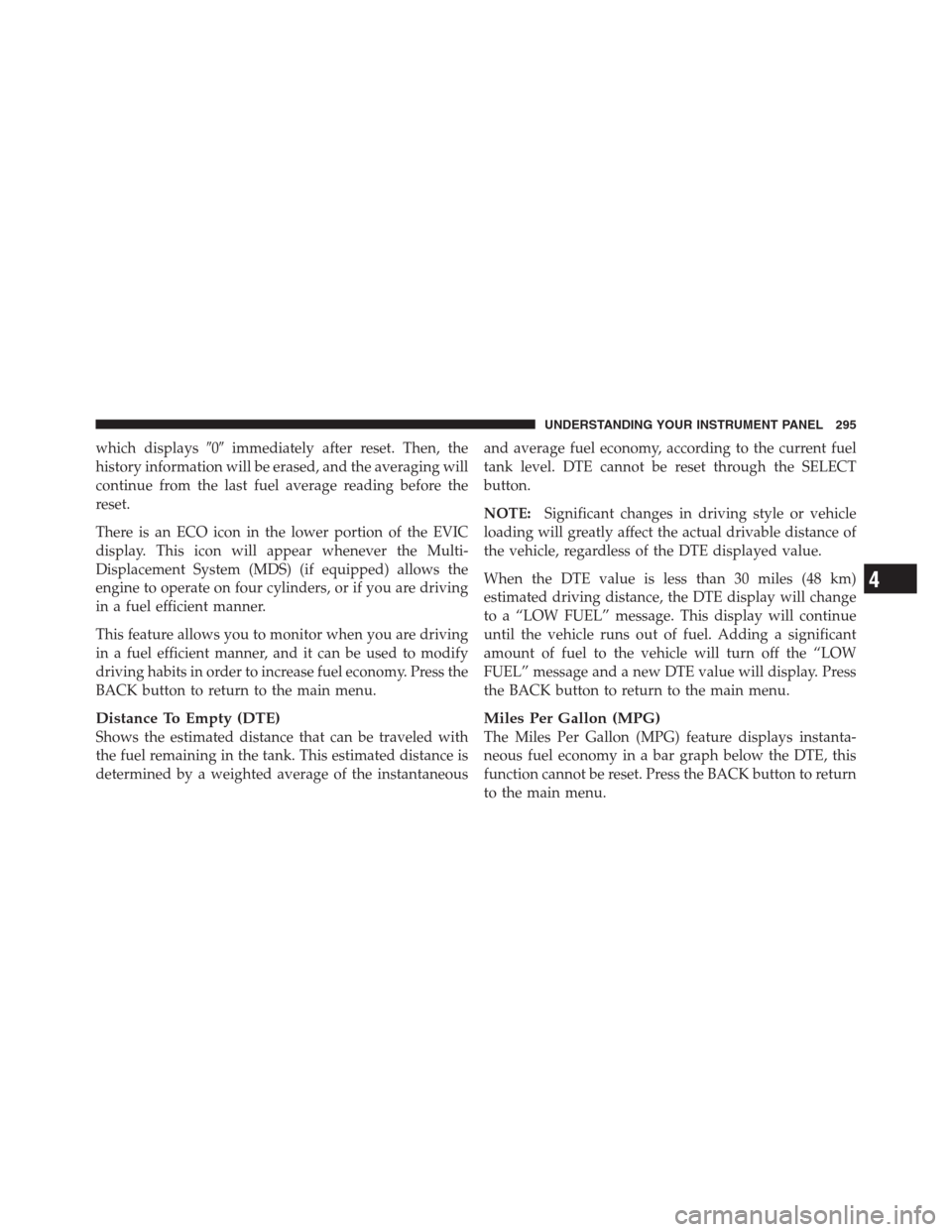
•Calibration
Touch the Calibration soft-key to change this setting. This
compass is self-calibrating, which eliminates the need to
manually reset the compass. When the vehicle is new, the
compass may appear erratic and the EVIC will display
CAL until the compass is calibrated. You may also
calibrate the compass by touching the ON soft-key and
completing one or more 360-degree turns (in an area free
from large metal or metallic objects) until the CAL
indicator displayed in the EVIC turns off. The compass
will now function normally.
NOTE:A good calibration requires a level surface and
an environment free from large metallic objects such as
buildings, bridges, underground cables, railroad tracks,
etc.
Compass Variance Map
4
UNDERSTANDING YOUR INSTRUMENT PANEL 311
Page 327 of 576

Compass Settings
After pressing the Compass Settings soft-key the follow-
ing settings will be available.
•Variance
Compass Variance is the difference between Magnetic
North and Geographic North. To compensate for the
differences the variance should be set for the zone where
the vehicle is driven, per the zone map. Once properly
set, the compass will automatically compensate for the
differences, and provide the most accurate compass
heading.
NOTE:Keep magnetic materials away from the top of
the instrument panel, such as iPod’s, Mobile Phones,
Laptops and Radar Detectors. This is where the compass
module is located, and it can cause interference with the
compass sensor, and it may give false readings.
•Perform Compass Calibration
Touch the Calibration soft-key to change this setting. This
compass is self-calibrating, which eliminates the need to
manually reset the compass. When the vehicle is new, the
compass may appear erratic and the EVIC will display
CAL until the compass is calibrated. You may also
Compass Variance Map
4
UNDERSTANDING YOUR INSTRUMENT PANEL 325
Page 333 of 576
The button located in the center of the left-hand control
will tune to the next preset station that you have pro-
grammed in the radio preset pushbutton.
CD Player
Pressing the top of the switch once will go to the next
track on the CD. Pressing the bottom of the switch once
will go to the beginning of the current track, or to the
beginning of the previous track if it is within one second
after the current track begins to play.
If you press the switch up or down twice, it plays the
second track; three times, it will play the third, etc.
The center button on the left side rocker switch has no
function for a single-disc CD player. However, when a
multiple-disc CD player is equipped on the vehicle, the
center button will select the next available CD in the
player.
CD/DVD DISC MAINTENANCE
To keep a CD/DVD in good condition, take the following
precautions:
1. Handle the disc by its edge; avoid touching the
surface.
2. If the disc is stained, clean the surface with a soft cloth,
wiping from center to edge.
3. Do not apply paper or tape to the disc; avoid scratch-
ing the disc.
4. Do not use solvents such as benzene, thinner, cleaners,
or anti-static sprays.
5. Store the disc in its case after playing.
6. Do not expose the disc to direct sunlight.
7. Do not store the disc where temperatures may become
too high.
4
UNDERSTANDING YOUR INSTRUMENT PANEL 331
Page 359 of 576
Shifting From DRIVE To SPORT/LOW
Vehicles Equipped With SPORT Mode
•To shift from DRIVE to SPORT, pull the shift lever
rearward until “S” is displayed in the EVIC.
•To shift back into DRIVE from SPORT, pull the shift
lever rearward until “D” is displayed in the EVIC.
Vehicles Equipped With LOW Mode
•To shift from DRIVE to LOW, pull the shift lever
rearward until “L” is displayed in the EVIC.
•To shift back into DRIVE from LOW, pull the shift
lever rearward until “D” is displayed in the EVIC.
Transmission Limp Home Mode
Transmission function is monitored electronically for
abnormal conditions. If a condition is detected that could
result in transmission damage, Transmission Limp Home
Mode is activated. In this mode, the transmission mayoperate only in certain gears, or may not shift at all.
Vehicle performance may be severely degraded and the
engine may stall. In some situations, the transmission
may not re-engage if the engine is turned off and
restarted. The Malfunction Indicator Light (MIL) may be
illuminated. A message in the instrument cluster will
inform the driver of the more serious conditions, and
indicate what actions may be necessary.
In the event of a momentary problem, the transmission
can be reset to regain all forward gears by performing the
following steps.
NOTE:In cases where the instrument cluster message
indicates the transmission may not re-engage after en-
gine shutdown, perform this procedure only in a desired
location (preferably, at your authorized dealer).
1. Stop the vehicle.
2. Shift the transmission into PARK, if possible.
5
STARTING AND OPERATING 357