2012 CHRYSLER 300 change time
[x] Cancel search: change timePage 304 of 576
•Units
Touch the Units soft-key to change this display. When in
this display, you may switch the EVIC, odometer, and
navigation system (if equipped) between US and Metric
units of measure. Touch US or Metric then touch the
arrow back soft-key. As you continue, the information
will display in the selected units of measure.
•Voice Response
Touch the Voice Response soft-key to change the Voice
Response Length settings. To change the Voice Response
Length, press and release the Brief or Long soft-key. Then
touch the arrow back soft-key.
•Touch Screen Beep
Touch the Touch Screen Beep soft-key to turn on or shut
off the sound heard when a touch screen button (soft-
key) is pressed. To change the Touch Screen Beep setting
press and release the ON or OFF soft-key, then touch the
arrow back soft-key.
•Fuel Saver Display
Touch the Fuel Saver Display soft-key to turn the “ECO”
message (located in the instrument cluster display) on or
off. To make your selection, touch the Fuel Saver Display
soft-key and select ON or OFF. Then touch the arrow
back soft-key.
Clock
•
Set Time
Touch the Set Time soft-key to change this display. When
in this display, you may select the time display settings.
To make your selection, touch the Set Time soft-key,
adjust the hours and minutes using the up and down
soft-keys, select AM or PM, select 12 hr or 24 hr. Then
touch the arrow back soft-key when all selections are
complete.
•Show Time Status
Touch the Show Time Status soft-key to change this
display. When in this display, you may turn on or shut off
302 UNDERSTANDING YOUR INSTRUMENT PANEL
Page 305 of 576

the digital clock in the status bar. To change the Show
Time Status setting, press and release the ON or OFF
soft-key. Then touch the arrow back soft-key.
•Sync Time
Touch the Sync Time soft-key to change this display.
When in this display, you may have the radio set the time
automatically. To change the Sync Time setting, press and
release the ON or OFF soft-key. Then touch the arrow
back soft-key.
Safety / Assistance
•
Front Collision Warning — If Equipped
Touch the Front Collision Warning soft-key to change this
display. The Front Collision Warning (FCW) feature can
be can be set to Far, set to Near or turned Off. The default
status of FCW is the Far setting. This means the system
will warn you of a possible collision with the vehicle in
front of you when you are farther away. This gives you
the most reaction time. To change the setting for moredynamic driving, select the Near setting. This warns you
of a possible collision when you are much closer to the
vehicle in front of you. This allows for a more dynamic
driving experience. To change the FCW status, press and
release the OFF, Near or Far button. Then touch the arrow
back soft-key.
For further information, refer to ”Adaptive Cruise Con-
trol (ACC)” in “Understanding The Features Of Your
Vehicle”.
•Park Assist
Touch the Park Assist soft-key to change this display. The
Rear Park Assist system will scan for objects behind the
vehicle when the transmission shift lever is in REVERSE
and the vehicle speed is less than 11 mph (18 km/h). The
system can be enabled with Sound Only, Sound and
Display, or turned OFF. To change the Park Assist status,
press and release the OFF, Sound Only or Sounds and
Display soft-key. Then touch the arrow back soft-key.
4
UNDERSTANDING YOUR INSTRUMENT PANEL 303
Page 308 of 576
•Auto High Beams “SmartBeam™”
Touch the Auto High Beams soft-key to change this
display. When this feature is selected, the high beam
headlights will deactivate automatically under certain
conditions. To make your selection, touch the Auto High
Beams soft-key and select ON or OFF. Then touch the
arrow back soft-key. Refer to “Lights/SmartBeam™ — If
Equipped” in “Understanding The Features Of Your
Vehicle” for further information.
•Daytime Running Lights
Touch the Daytime Running Lights soft-key to change
this display. When this feature is selected, the headlights
will turn on whenever the engine is running. To make
your selection, touch the Daytime Running Lights soft-
key and select ON or OFF. Then touch the arrow back
soft-key.
•Steering Directed Lights
Touch the Steering Directed Lights soft-key to change this
display. When this feature is selected, the headlights turn
relative to a change in direction of the steering wheel. To
make your selection, touch the Steering Directed Lights
soft-key and select ON or OFF. Then touch the arrow
back soft-key.
•Flash Headlights With Lock
Touch the Flash Headlights With Lock soft-key to change
this display. When this feature is selected, the headlights
will flash when the doors are locked or unlocked with the
Remote Keyless Entry (RKE) transmitter. This feature
may be selected with or without the sound horn on lock
feature selected. To make your selection, touch the Flash
Headlights With Lock soft-key and select ON or OFF.
Then touch the arrow back soft-key.
306 UNDERSTANDING YOUR INSTRUMENT PANEL
Page 316 of 576
NOTE:Only one touchscreen area may be selected at a
time.
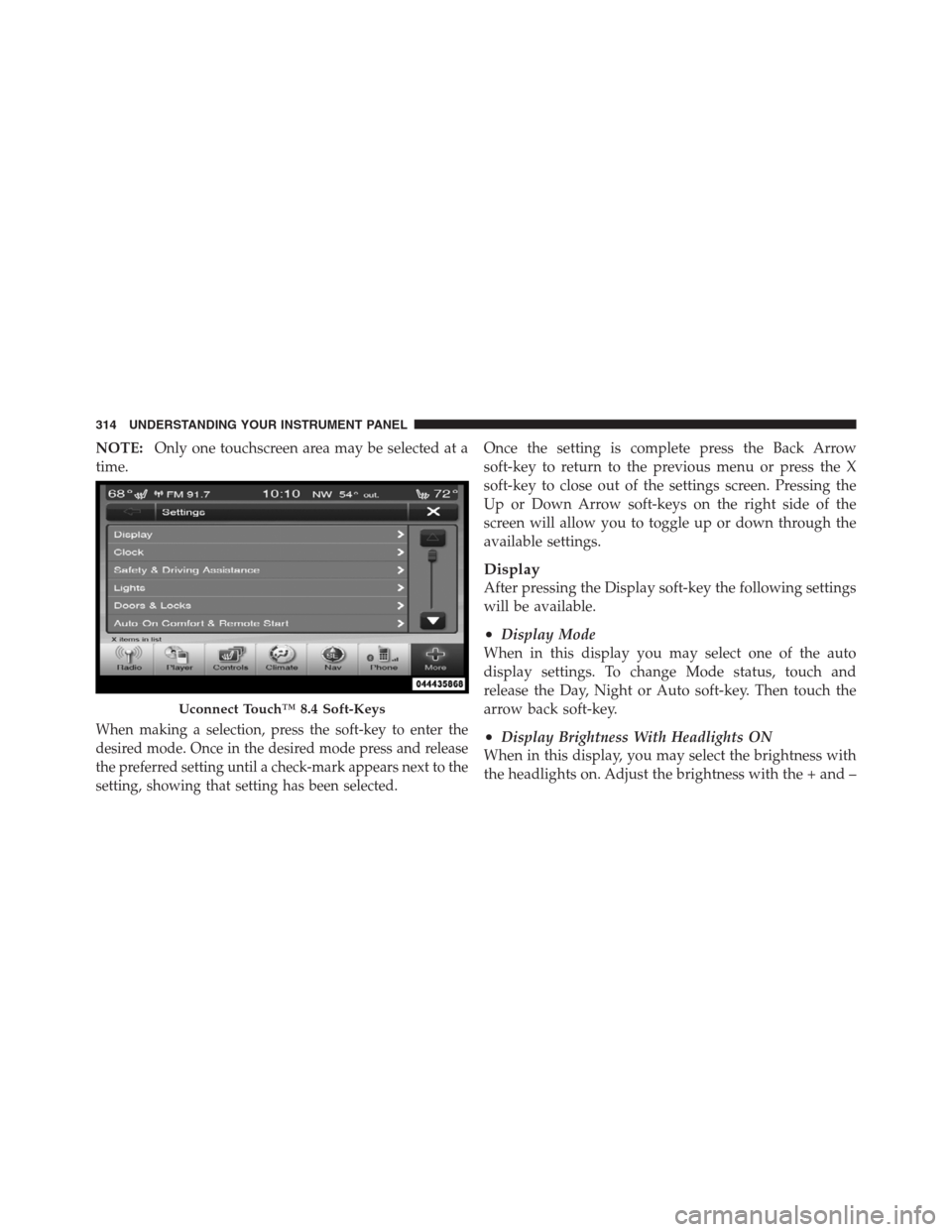
When making a selection, press the soft-key to enter the
desired mode. Once in the desired mode press and release
the preferred setting until a check-mark appears next to the
setting, showing that setting has been selected.
Once the setting is complete press the Back Arrow
soft-key to return to the previous menu or press the X
soft-key to close out of the settings screen. Pressing the
Up or Down Arrow soft-keys on the right side of the
screen will allow you to toggle up or down through the
available settings.
Display
After pressing the Display soft-key the following settings
will be available.
•Display Mode
When in this display you may select one of the auto
display settings. To change Mode status, touch and
release the Day, Night or Auto soft-key. Then touch the
arrow back soft-key.
•Display Brightness With Headlights ON
When in this display, you may select the brightness with
the headlights on. Adjust the brightness with the + and –
Uconnect Touch™ 8.4 Soft-Keys
314 UNDERSTANDING YOUR INSTRUMENT PANEL
Page 318 of 576
check-mark appears next to the setting, showing that
setting has been selected. Touch the back arrow soft-key
to return to the previous menu.
•Navigation Turn-By-Turn In Cluster
When this feature is selected, the turn-by-turn directions
will appear in the display as the vehicle approaches a
designated turn within a programmed route. To make
your selection, touch the Navigation Turn-By-Turn In
Cluster soft-key, until a check-mark appears next to the
setting, showing that setting has been selected. Touch the
back arrow soft-key to return to the previous menu.
•Fuel Saver Display In Cluster
The “ECO” message is located in the instrument cluster
display, this message can be turned on or off. To make
your selection, touch the Fuel Saver Display soft-key,
until a check-mark appears next to the setting, showing
that setting has been selected. Touch the back arrow
soft-key to return to the previous menu.
Clock
After pressing the Clock soft-key the following settings
will be available.
•Sync Time With GPS
When in this display, you may automatically have the
radio set the time. To change the Sync Time setting touch
the Sync with GPS Time soft-key until a check-mark
appears next to the setting, showing that setting has been
selected. Touch the back arrow soft-key to return to the
previous menu.
•Set Time Hours
When in this display, you may adjust the hours. The Sync
with GPS Time soft-key must be unchecked. To make
your selection touch the + or - soft-keys to adjust the
hours up or down. Touch the back arrow soft-key to
return to the previous menu or touch the X soft-key to
close out of the settings screen.
316 UNDERSTANDING YOUR INSTRUMENT PANEL
Page 319 of 576
•Set Time Minutes
When in this display, you may adjust the minutes. The
Sync with GPS Time soft-key must be unchecked. To
make your selection touch the + or - soft-keys to adjust
the minutes up or down. Touch the back arrow soft-key
to return to the previous menu or touch the X soft-key to
close out of the settings screen.
•Time Format
When in this display, you may select the time format
display setting. Touch the Time Format soft-key until a
check-mark appears next to the 12hrs or 24hrs setting,
showing that setting has been selected. Touch the back
arrow soft-key to return to the previous menu.
•Show Time In Status Bar
When in this display, you may turn on or shut off the
digital clock in the status bar. To change the Show Time
Status setting touch the Show Time in Status Bar soft-keyuntil a check-mark appears next to setting, showing that
setting has been selected. Touch the back arrow soft-key
to return to the previous menu.
Safety / Assistance
After pressing the Safety / Assistance soft-key the fol-
lowing settings will be available.
•Front Collision Sensitivity — If Equipped
The Front Collision Warning (FCW) feature can be can be
set to Far, set to Near or turned Off. The default status of
FCW is the Far setting. This means the system will warn
you of a possible collision with the vehicle in front of you
when you are farther away. This gives you the most
reaction time. To change the setting for more dynamic
driving, select the Near setting. This warns you of a
possible collision when you are much closer to the
vehicle in front of you. This allows for a more dynamic4
UNDERSTANDING YOUR INSTRUMENT PANEL 317
Page 322 of 576
and operating information. To make your selection, touch
the Hill Start Assist soft-key, until a check-mark appears
next to setting, showing that setting has been selected.
Touch the back arrow soft-key to return to the previous
menu.
Lights
After pressing the Lights soft-key the following settings
will be available.
•Headlight Illumination On Approach
When this feature is selected, the headlights will activate
and remain on for 0, 30, 60, or 90 seconds when the doors
are unlocked with the Remote Keyless Entry (RKE)
transmitter. To change the Illuminated Approach status,
touch the + or - soft-key to select your desired time
interval. Touch the back arrow soft-key to return to the
previous menu.
•Headlights With Wipers — If Equipped
When this feature is selected, and the headlight switch is
in the AUTO position, the headlights will turn on ap-
proximately 10 seconds after the wipers are turned on.
The headlights will also turn off when the wipers are
turned off if they were turned on by this feature. To make
your selection, touch the Headlights With Wipers soft-
key, until a check-mark appears next to setting, showing
that setting has been selected. Touch the back arrow
soft-key to return to the previous menu.
•Auto Dim High Beams “SmartBeam™” — If Equipped
When this feature is selected, the high beam headlights
will deactivate automatically under certain conditions. To
make your selection, touch the Auto High Beams soft-
key, until a check-mark appears next to setting, showing
that setting has been selected. Touch the back arrow
soft-key to return to the previous menu. Refer to “Lights/
SmartBeam™ — If Equipped” in “Understanding The
Features Of Your Vehicle” for further information.
320 UNDERSTANDING YOUR INSTRUMENT PANEL
Page 323 of 576

•Daytime Running Lights
When this feature is selected, the headlights will turn on
whenever the engine is running. To make your selection,
touch the Daytime Running Lights soft-key, until a
check-mark appears next to setting, showing that setting
has been selected. Touch the back arrow soft-key to
return to the previous menu.
•Steering Directed Lights
When this feature is selected, the headlights turn relative
to a change in direction of the steering wheel. To make
your selection, touch the Steering Directed Lights soft-
key, until a check-mark appears next to setting, showing
that setting has been selected. Touch the back arrow
soft-key to return to the previous menu.
•Flash Headlights With Lock
When this feature is selected, the headlights will flash
when the doors are locked or unlocked with the Remote
Keyless Entry (RKE) transmitter. This feature may beselected with or without the sound horn on lock feature
selected. To make your selection, touch the Flash Head-
lights with Lock soft-key, until a check-mark appears
next to setting, showing that setting has been selected.
Touch the back arrow soft-key to return to the previous
menu.
Doors & Locks
After pressing the Doors & Locks soft-key the following
settings will be available.
•Auto Unlock On Exit
When this feature is selected, all doors will unlock when
the vehicle is stopped and the transmission is in the
PARK or NEUTRAL position and the driver’s door is
opened. To make your selection, touch the Auto Unlock
On Exit soft-key, until a check-mark appears next to
setting, showing that setting has been selected. Touch the
back arrow soft-key to return to the previous menu.
4
UNDERSTANDING YOUR INSTRUMENT PANEL 321