Page 146 of 576
Natural Speech
Natural speech allows the user to speak commands in
phrases or complete sentences. The system filters out
certain non-word utterances and sounds such as “ah”
and “eh”. The system handles fill-in words such as “I
would like to”.
The system handles multiple inputs in the same phrase
or sentence such as “make a phone call” and “to Kelly
Smith”. For multiple inputs in the same phrase or sen-
tence, the system identifies the topic or context and
provides the associated follow-up prompt such as “Who
do you want to call?” in the case where a phone call was
requested but the specific name was not recognized.
The system utilizes continuous dialog; when the system
requires more information from the user it will ask a
question to which the user can respond without pressing
the Uconnect™ Voice Command
button.
Uconnect™ Voice Commands
The Uconnect™ Voice Command system understands
two types of commands. Universal commands are avail-
able at all times. Local commands are available if the
supported radio mode is active.
Start a dialogue by pressing the Uconnect™ Voice Com-
mand
button.
Changing the Volume
1. Start a dialogue by pressing the Voice Command
button.
2. Say a command (e.g., “Help”).
3. Use the ON/OFF VOLUME rotary knob to adjust the
volume to a comfortable level while the Voice Command
system is speaking. Please note the volume setting for
Voice Command is different than the audio system.
144 UNDERSTANDING THE FEATURES OF YOUR VEHICLE
Page 147 of 576
Starting Voice Recognition (VR) Session in
Radio/Player Modes
In this mode, you can say the following commands:
NOTE:The commands can be said on any screen when
a call is not active after pushing the Uconnect™ Voice
Command
button.
Disc
To switch to the disc mode, say “Change source to Disc”.
This command can be given in any mode or screen:
•“Track” (#) (to change the track)
3
UNDERSTANDING THE FEATURES OF YOUR VEHICLE 145
Page 164 of 576
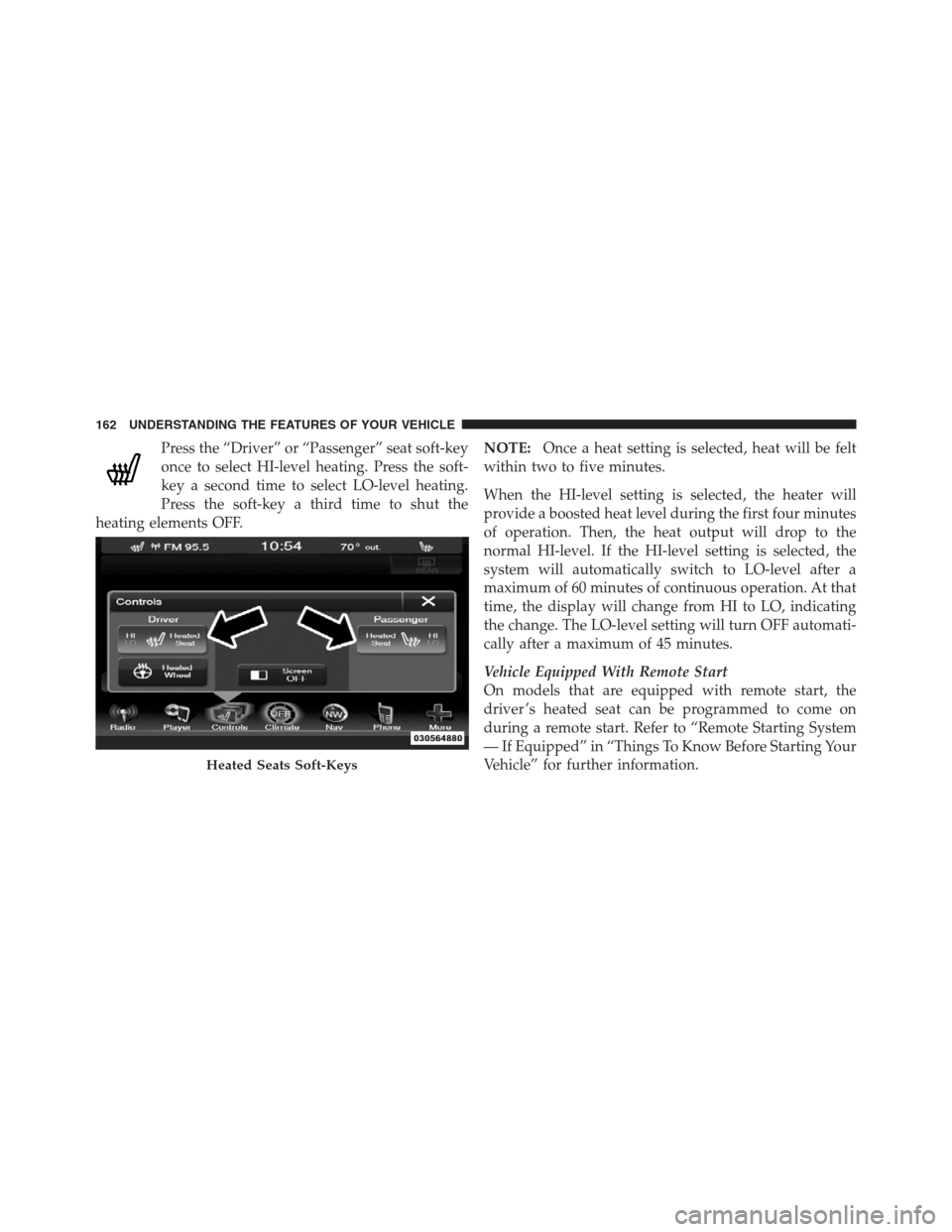
Press the “Driver” or “Passenger” seat soft-key
once to select HI-level heating. Press the soft-
key a second time to select LO-level heating.
Press the soft-key a third time to shut the
heating elements OFF.NOTE:Once a heat setting is selected, heat will be felt
within two to five minutes.
When the HI-level setting is selected, the heater will
provide a boosted heat level during the first four minutes
of operation. Then, the heat output will drop to the
normal HI-level. If the HI-level setting is selected, the
system will automatically switch to LO-level after a
maximum of 60 minutes of continuous operation. At that
time, the display will change from HI to LO, indicating
the change. The LO-level setting will turn OFF automati-
cally after a maximum of 45 minutes.
Vehicle Equipped With Remote Start
On models that are equipped with remote start, the
driver ’s heated seat can be programmed to come on
during a remote start. Refer to “Remote Starting System
— If Equipped” in “Things To Know Before Starting Your
Vehicle” for further information.
Heated Seats Soft-Keys
162 UNDERSTANDING THE FEATURES OF YOUR VEHICLE
Page 165 of 576
Rear Heated Seats
On some models, the two outboard seats are equipped
with heated seats. The heated seat switches for these
seats are located on the rear of the center console. There
are two heated seat switches that allow the rear passen-
gers to operate the seats independently.
You can choose from HI, LO or OFF heat settings. Amber
indicator lights in each switch indicate the level of heat in
use. Two indicator lights will illuminate for HI, one for
LO and none for OFF.
Press the switch once to select HI-level heating.
Press the switch a second time to select LO-
level heating. Press the switch a third time to
shut the heating elements OFF.
NOTE:
•Once a heat setting is selected, heat will be felt within
two to five minutes.
•The engine must be running for the heated seats to
operate.When the HI-level setting is selected, the heater will
provide a boosted heat level during the first four minutes
of operation. Then, the heat output will drop to the
normal HI-level. If the HI-level setting is selected, the
system will automatically switch to LO-level after a
maximum of 60 minutes of continuous operation. At that
time, the number of illuminated LEDs changes from two
to one, indicating the change. The LO-level setting will
turn OFF automatically after a maximum of 45 minutes.
Ventilated Seats — If Equipped
On some models, both the driver and passenger seats are
ventilated. Located in the seat cushion and seatback are
small fans that draw air from the seat surface through fine
perforations in the seat cover to help keep the driver and
front passenger cooler in higher ambient temperatures.
The ventilated seats can be operated using the Uconnect
Touch™ System.
3
UNDERSTANDING THE FEATURES OF YOUR VEHICLE 163
Page 178 of 576

Automatic Headlights — If Equipped
This system automatically turns the headlights on or off
according to ambient light levels. To turn the system on,
rotate the headlight switch counterclockwise to the
AUTO position. When the system is on, the headlight
time delay feature is also on. This means the headlights
will stay on for up to 90 seconds after you place the
ignition into the OFF position. To turn the automatic
system off, move the headlight switch out of the AUTO
position.
NOTE:The engine must be running before the head-
lights will come on in the automatic mode.
Headlights On With Wipers (Available With
Automatic Headlights Only)
When this feature is active, the headlights will turn on
approximately 10 seconds after the wipers are turned on
if the headlight switch is placed in the AUTO position. Inaddition, the headlights will turn off when the wipers are
turned off if they were turned on by this feature.
NOTE:The Headlights On with Wipers feature can be
turned on or off using the Uconnect Touch™ System,
refer to “Uconnect Touch™ Settings” in “Understanding
Your Instrument Panel” for further information.
Headlight Time Delay
This feature provides the safety of headlight illumination
for up to 90 seconds (programmable) when leaving your
vehicle in an unlit area.
To activate the delay feature, place the ignition in the OFF
position while the headlights are still on. Then, turn off
the headlights within 45 seconds. The delay interval
begins when the headlight switch is turned off.
If you turn the headlights or parking lights on, or place
the ignition in ACC or RUN, the system will cancel the
delay.
176 UNDERSTANDING THE FEATURES OF YOUR VEHICLE
Page 188 of 576
Dome Light Position
Rotate the dimmer control completely upward to the
second detent to turn on the interior lights. The interior
lights will remain on when the dimmer control is in this
position.
Interior Light Defeat (OFF)
Rotate the dimmer control to the extreme bottom OFF
position. The interior lights will remain off when the
doors are open.
Parade Mode (Daytime Brightness Feature)
Rotate the dimmer control upward to the first detent.
This feature brightens all text displays such as the
odometer, EVIC (if equipped), and radio when the park-
ing lights or headlights are on.
WINDSHIELD WIPERS AND WASHERS
The multifunction lever operates the windshield wipers
and washer when the ignition is placed in the ON/RUN
or ACC position. The multifunction lever is located on
the left side of the steering column.
Windshield Wiper/Washer Control
186 UNDERSTANDING THE FEATURES OF YOUR VEHICLE
Page 216 of 576

The “Clean Radar Sensor In Front Of Vehicle” message
can sometimes be displayed while driving in highly
reflective areas (i.e. tunnels with reflective tiles, or ice and
snow). The ACC system will recover after the vehicle has
left these areas. Under rare conditions, when the radar is
not tracking any vehicles or objects in its path this
warning may temporarily occur.
NOTE:If the ACC “Clean Radar Sensor In Front Of
Vehicle” warning is active Normal (Fixed Speed) Cruise
Control is still available. For additional information refer
to “Normal (Fixed Speed) Cruise Control Mode” in this
section.
If weather conditions are not a factor, the driver should
examine the sensor. It may require cleaning or removal of
an obstruction. The sensor is located in the center of the
vehicle behind the lower grille.To keep the ACC System operating properly, it is impor-
tant to note the following maintenance items:
•Always keep the sensor clean. Carefully wipe the
sensor lens with a soft cloth. Be cautious not to
damage the sensor lens.
•Do not remove any screws from the sensor. Doing so
could cause an ACC system malfunction or failure and
require a sensor realignment.
•If the sensor is damaged due to a collision, see your
authorized dealer for service.
•Do not attach or install any accessories near the sensor,
including transparent material or aftermarket grilles.
Doing so could cause an ACC system failure or
malfunction.
214 UNDERSTANDING THE FEATURES OF YOUR VEHICLE
Page 222 of 576
General Information
FCC Requirements For Vehicular Radar Systems
Classification Specifications:
47 C.F.R. Part 15
47 C.F.R Part 15.515
Normal (Fixed Speed) Cruise Control Mode
In addition to Adaptive Cruise Control mode, a normal
(fixed speed) Cruise Control mode is available for cruis-
ing at fixed speeds. The normal Cruise Control mode is
designed to maintain a set cruising speed without requir-
ing the driver to operate the accelerator. Cruise Control
can only be operated if the vehicle speed is above 20 mph
(32 km/h).
To change modes, press the MODE button when the
system is in either the OFF, READY, or SET position.
“Cruise Ready” will be displayed if the system was in
ACC READY or ACC SET position. “Cruise Off” will bedisplayed if the system was in the ACC OFF position. To
switch back to Adaptive Cruise Control mode, press the
MODE button a second time.
WARNING!
In the normal Cruise Control mode, the system will
not react to vehicles ahead. In addition, the proximity
warning does not activate and no alarm will sound
even if you are too close to the vehicle ahead since
neither the presence of the vehicle ahead nor the
vehicle-to vehicle distance is detected. Be sure to
maintain a safe distance between your vehicle and
the vehicle ahead. Always be aware which mode is
selected.
To Set A Desired Speed
When the vehicle reaches the speed desired, press the
SET-button and release. The EVIC will display the set
speed.
220 UNDERSTANDING THE FEATURES OF YOUR VEHICLE