Page 328 of 576
calibrate the compass by pressing the ON soft-key and
completing one or more 360-degree turns (in an area free
from large metal or metallic objects) until the CAL
indicator displayed in the EVIC turns off. The compass
will now function normally.
Audio
After pressing the Audio soft-key the following settings
will be available.
•Balance/Fade
When in this display you may adjust the Balance and
Fade settings.
•Equalizer
When in this display you may adjust the Bass, Mid and
Treble settings. Adjust the settings with the + and –
setting soft-keys or by selecting any point on the scale
between the + and – soft-keys. Then touch the arrow back
soft-key.NOTE:Bass/Mid/Treble allow you to simply slide your
finger up or down to change the setting as well as touch
directly on the desired setting.
•Speed Adjusted Volume
This feature increases or decreases volume relative to
vehicle speed. To change the Speed Adjusted Volume
touch the Off, 1, 2 or 3 soft-key. Then touch the arrow
back soft-key.
•Music Info Cleanup
This feature helps organize music files for optimized
music navigation. To make your selection, touch the
Music Info Cleanup soft-key, select On or Off followed by
pressing the arrow back soft-key.
•Surround Sound
This feature provides simulated surround sound mode.
To make your selection, touch the Surround Sound
soft-key, select On or Off followed by pressing the arrow
back soft-key.
326 UNDERSTANDING YOUR INSTRUMENT PANEL
Page 329 of 576
Phone/Bluetooth
After pressing the Phone/Bluetooth soft-key the follow-
ing settings will be available.
•Paired Devices
This feature shows which phones are paired to the
Phone/Bluetooth system. For further information, refer
to the Uconnect Touch™ Supplement.
SIRIUS Setup
After pressing the SIRIUS Setup soft-key the following
settings will be available.
•Channel Skip
SIRIUS can be programmed to designate a group of
channels that are the most desirable to listen to or to
exclude undesirable channels while scanning. To make
your selection, touch the Channel Skip soft-key, select the
channels you would like to skip followed by pressing the
arrow back soft-key.
•Subscription Information
New vehicle purchasers or lessees will receive a free
limited time subscription to SIRIUS Satellite Radio with
your radio. Following the expiration of the free services,
it will be necessary to access the information on the
Subscription Information screen in order to re-subscribe.
Touch the Subscription Info soft-key to access the Sub-
scription Information screen.
Write down the SIRIUS ID numbers for your receiver. To
reactivate your service, either call the number listed on
the screen or visit the provider online.
NOTE:SIRIUS Travel Link is a separate subscription.
4
UNDERSTANDING YOUR INSTRUMENT PANEL 327
Page 335 of 576
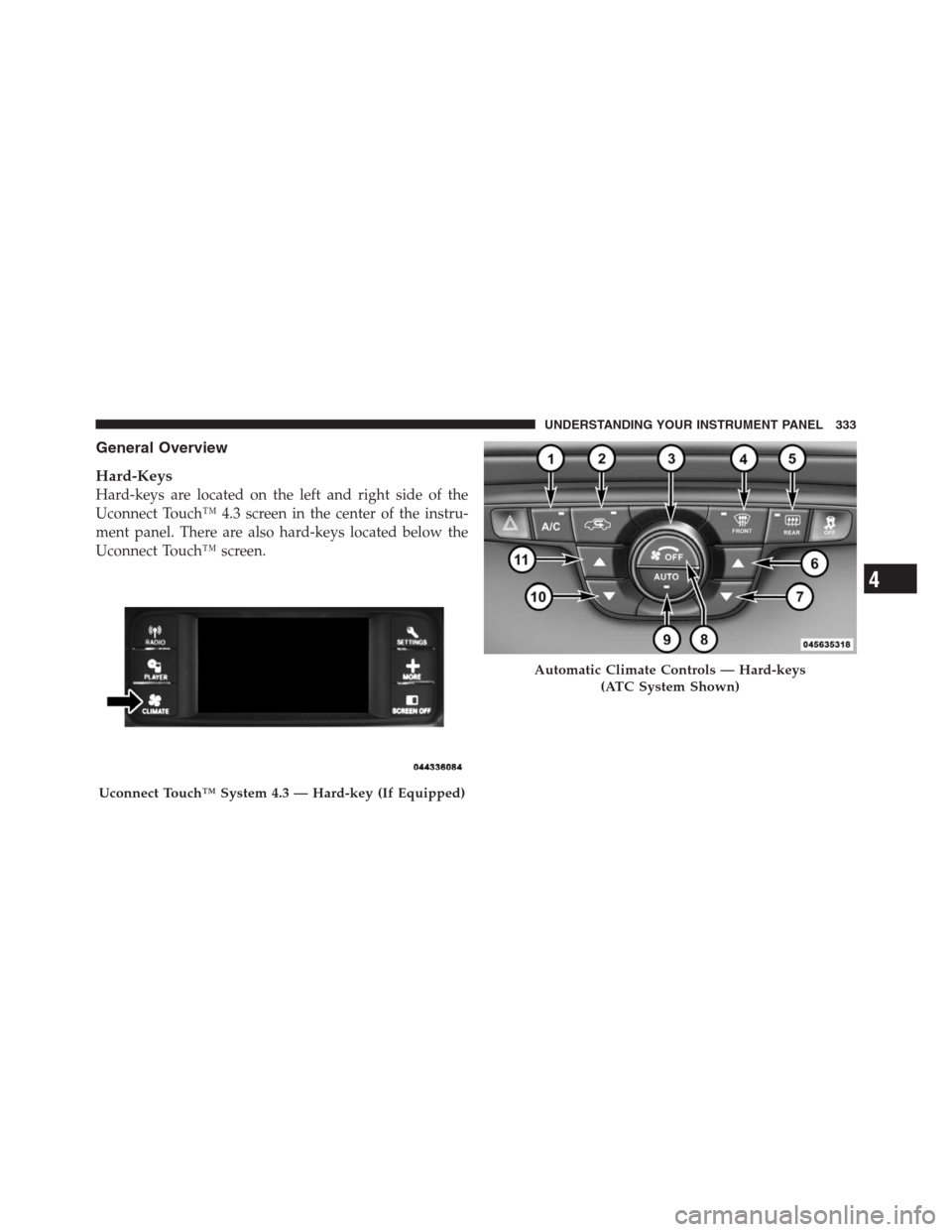
General Overview
Hard-Keys
Hard-keys are located on the left and right side of the
Uconnect Touch™ 4.3 screen in the center of the instru-
ment panel. There are also hard-keys located below the
Uconnect Touch™ screen.
Uconnect Touch™ System 4.3 — Hard-key (If Equipped)
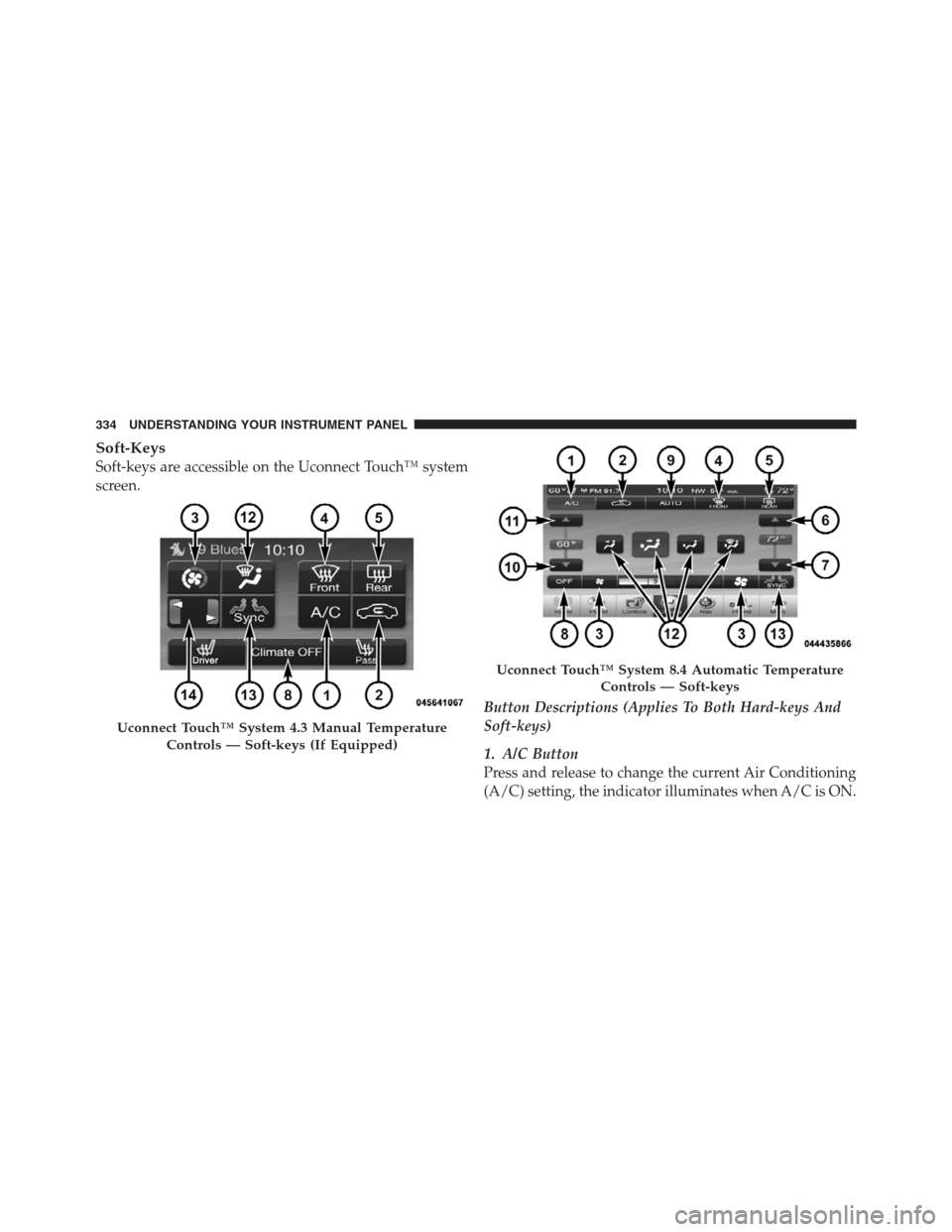
Automatic Climate Controls — Hard-keys
(ATC System Shown)
4
UNDERSTANDING YOUR INSTRUMENT PANEL 333
Page 336 of 576
Soft-Keys
Soft-keys are accessible on the Uconnect Touch™ system
screen.
Button Descriptions (Applies To Both Hard-keys And
Soft-keys)
1. A/C Button
Press and release to change the current Air Conditioning
(A/C) setting, the indicator illuminates when A/C is ON.
Uconnect Touch™ System 4.3 Manual Temperature
Controls — Soft-keys (If Equipped)
Uconnect Touch™ System 8.4 Automatic Temperature
Controls — Soft-keys
334 UNDERSTANDING YOUR INSTRUMENT PANEL
Page 337 of 576

Performing this function will cause the automatic opera-
tion to switch into manual mode and the AUTO indicator
will turn off.
2. Recirculation Button
Press and release to change the current setting, the
indicator illuminates when ON.
3. Blower Control
Blower control is used to regulate the amount of air
forced through the climate system. There are seven
blower speeds available. Adjusting the blower will cause
automatic mode to switch to manual operation. The
speeds can be selected using either hard-keys or soft-keys
as follows:
NOTE:For vehicles equipped with Remote Start, the
climate controls will not function during Remote Start
operation if the blower control is left in the “O” (Off)position. Blower control should be left in the “ON”
position to allow the climate control to either warm or
cool the vehicle
Hard-key
The blower speed increases as you turn the control
clockwise from the lowest blower setting. The blower
speed decreases as you turn the knob counter-clockwise.
Soft-key — Uconnect Touch™ System 4.3 (If Equipped)
Press the blower soft-key to enter the blower setting
screen. Once in the blower settings screen use the UP and
DOWN arrows to adjust the blower speed setting, or
directly select the speed setting by pressing the blower
bar area around the blower icon. The blower speed
increases as you press the UP arrow or move clockwise
on the setting scale and decreases when press the DOWN
arrow or move counter-clockwise on the setting scale.
4
UNDERSTANDING YOUR INSTRUMENT PANEL 335
Page 338 of 576
Soft-key — Uconnect Touch™ System 8.4
Use the small blower icon to reduce the blower setting
and the large blower icon to increase the blower setting.
Blower can also be selected by pressing the blower bar
area between the icons.
4. Front Defrost Button
Press and release to change the current airflow setting to
Defrost mode. The indicator illuminates when this fea-
ture is ON. Performing this function will cause the ATC
to switch into manual mode. The blower speed may
increase when Defrost mode is selected. If the front
defrost mode is turned off the climate system will return
the previous setting.
5. Rear Defrost Button
Press and release this button to turn on the rear window
defroster and the heated outside mirrors (if equipped).An indicator will illuminate when the rear window
defroster is on. The rear window defroster automatically
turns off after 10 minutes.
CAUTION!
Failure to follow these cautions can cause damage to
the heating elements:
•Use care when washing the inside of the rear
window. Do not use abrasive window cleaners on
the interior surface of the window. Use a soft cloth
and a mild washing solution, wiping parallel to
the heating elements. Labels can be peeled off
after soaking with warm water.
•Do not use scrapers, sharp instruments, or abra-
sive window cleaners on the interior surface of the
window.
•Keep all objects a safe distance from the window.
336 UNDERSTANDING YOUR INSTRUMENT PANEL
Page 341 of 576
13. SYNC
Press the Sync soft-key to toggle the Sync feature On/Off.
The Sync indicator is illuminated when this feature is
enabled. Sync is used to synchronize the passenger
temperature setting with the driver temperature setting.
Changing the passenger temperature setting while in
Sync will automatically exit this feature.
Climate Control Functions
A/C (Air Conditioning)
The Air Conditioning (A/C) button allows the operator
to manually activate or deactivate the air conditioning
system. When the air conditioning system is turned on,
cool dehumidified air will flow through the outlets into
the cabin. For improved fuel economy, press the A/C
button to turn off the air conditioning and manually
adjust the blower and airflow mode settings.NOTE:
•If fog or mist appears on the windshield or side glass,
select Defrost mode and increase blower speed.
•If your air conditioning performance seems lower than
expected, check the front of the A/C condenser (lo-
cated in front of the radiator), for an accumulation of
dirt or insects. Clean with a gentle water spray from
behind the radiator and through the condenser. Fabric
front fascia protectors may reduce airflow to the
condenser, reducing air conditioning performance.
Recirculation
When outside air contains smoke, odors, or
high humidity, or if rapid cooling is desired,
you may wish to recirculate interior air by
pressing the Recirculation control button. The
recirculation indicator will illuminate when this button is
selected. Push the button a second time to turn off the
Recirculation mode and allow outside air into the vehicle.
4
UNDERSTANDING YOUR INSTRUMENT PANEL 339
Page 342 of 576
NOTE:In cold weather, use of Recirculation mode may
lead to excessive window fogging. On systems with
Manual Climate Controls, the Recirculation mode is not
allowed in Defrost mode to improve window clearing
operation. Recirculation will be disabled automatically if
this mode is selected. Attempting to use Recirculation
while in this mode will cause the LED in the control
button to blink and then turn off.
Automatic Temperature Control (ATC)
ATC Hard-keys are located in the center of the instru-
ment panel.
Soft-keys are accessible on the Uconnect Touch™ system
screen.
Automatic Operation
1. Press the AUTO hard-key or soft-key button on the
Automatic Temperature Control (ATC) Panel.2.
Next, adjust the temperature you would like the system
to maintain by adjusting the driver and passenger tempera-
ture hard or soft control buttons (6, 7, 10, 11). Once the
desired temperature is displayed, the system will achieve
and automatically maintain that comfort level.
3. When the system is set up for your comfort level, it is
not necessary to change the settings. You will experience
the greatest efficiency by simply allowing the system to
function automatically.
NOTE:
•It is not necessary to move the temperature settings for
cold or hot vehicles. The system automatically adjusts
the temperature, mode and blower speed to provide
comfort as quickly as possible.
•The temperature can be displayed in U.S. or Metric
units by selecting the US/M customer-programmable
feature. Refer to the “Uconnect Touch™ System Set-
tings” in this section of the manual.
340 UNDERSTANDING YOUR INSTRUMENT PANEL