Page 103 of 517

Manually
Closing the power convertible top manually is a compli-
cated and physically demanding procedure, and it re-
quires a special tool to do so. In the event that you
experience a malfunction when operating the power
convertible top:
1. Read all of the Notes, Cautions, and Warning found
under “Power Convertible Top Usage Precautions” to
verify all operating conditions are met.
2. Check for Operation and Warning Messages as de-
scribed under “Power Convertible Top Operation and
Warning Messages.” If applicable, perform the related
action to correct the condition present.
3. If Steps 1 and 2 do not resolve the problem, refer to
“Emergency Bypass Mode”.
Wind Stop — If Equipped
The Wind Stop installs in the backseat area of the vehicle.
The Wind Stop will not interfere with power top opera-
tion. Therefore, it can remain installed when the top is up.
However, when not in use, the Wind Stop folds to allow
for convenient storage underneath the cargo shield in the
trunk.
NOTE:It is recommended that you lower the convert-
ible top before installing or removing the Wind Stop.
Installing The Wind Stop
1. Remove the Wind Stop from the trunk.
2. Unfold the Wind Stop framework.
3. Lay the small frame (1) flat on top of the large frame
(2) and snap the two frames together by engaging the
frame lock (3).
3
UNDERSTANDING THE FEATURES OF YOUR VEHICLE 101
Page 104 of 517
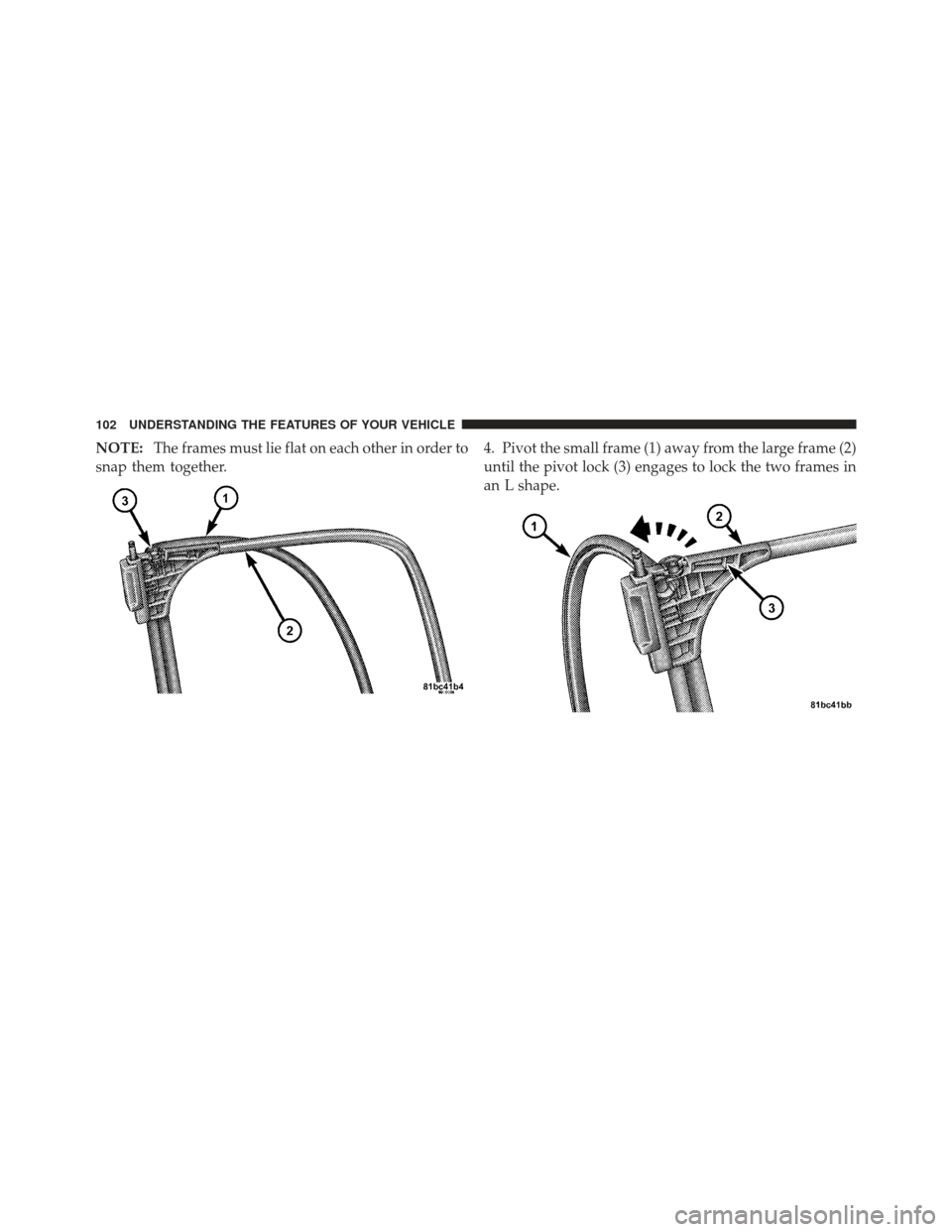
NOTE:The frames must lie flat on each other in order to
snap them together. 4. Pivot the small frame (1) away from the large frame (2)
until the pivot lock (3) engages to lock the two frames in
an L shape.
102 UNDERSTANDING THE FEATURES OF YOUR VEHICLE
Page 106 of 517
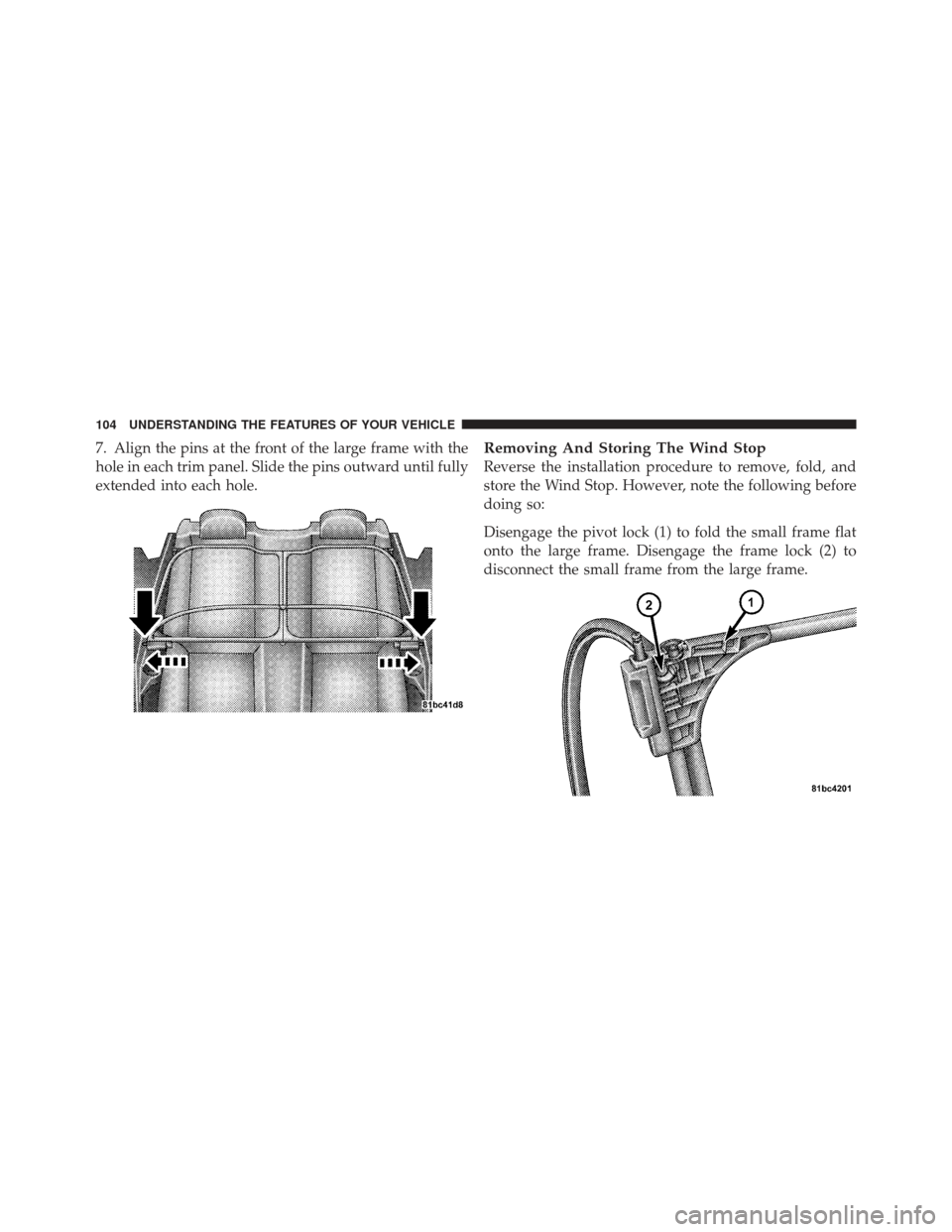
7. Align the pins at the front of the large frame with the
hole in each trim panel. Slide the pins outward until fully
extended into each hole.Removing And Storing The Wind Stop
Reverse the installation procedure to remove, fold, and
store the Wind Stop. However, note the following before
doing so:
Disengage the pivot lock (1) to fold the small frame flat
onto the large frame. Disengage the frame lock (2) to
disconnect the small frame from the large frame.
104 UNDERSTANDING THE FEATURES OF YOUR VEHICLE
Page 110 of 517
EVIC Mes-
sage\bEVIC
Message
Display
Ti m e
\b Odometer
Message
(<5mph
[8 km/h])\b\b Odometer
Message
Display
Ti m e
\b\b Odometer
Message
(>5mph
[8 km/h])\b\b Odometer
Message
Display
Ti m e
\b\b Chime Condition
Operator
Action
Required
CONVERT-
IBLE TOP
MAL-
FUNCTION 6 sec. TOP FAIL Display
Scrolls for
6 SecondsTOP
6 sec. Single
ChimeThe PTCM
Activated
the System
LOCKOUT
FeatureRefer to
Foot Note
\b\b\b
CONVERT-
IBLE TOP
MAL-
FUNCTION Until Fault
is No Lon-
ger De-
tected or
RepairedTOP FAIL Display
Scrolls un-
til Fault is
No Longer
Detected
or Re-
pairedTOP
Display
Flashes
until Fault
is No Lon-
ger De-
tected or
RepairedSingle
Chime
The PTCM
Activated
the System
LOCKOUT
FeatureSee your
authorized
dealer for
service
108 UNDERSTANDING THE FEATURES OF YOUR VEHICLE
Page 111 of 517
\bIf so equipped.
\b\b For vehicles not equipped with the EVIC.
\b\b\b The PTCM will lockout the power convertible top system if the vehicle charging system is malfunction-
ing, or the battery is run down, or the hydraulic pump is overheating. In addition, the system prohibits lower-
ing the top when ambient temperature is at 0°F (-18°C) or lower and raising the top when ambient temperature
is below -40°F (-40°C).
• If you are trying to lower the top and ambient temperature is 0°F (-18°C) or lower, wait until the temperature
rises and the top is thawed and dry before operating the power top. A soft top should not be lowered at tem-
peratures below 32°F (0°C).
• If you are trying to raise the top and ambient temperature is below -40°F (-40°C), wait until the temperature
rises before operating the power top.
• If the vehicle charging system is malfunctioning, see your authorized dealer for service.
• If the battery is run down, have it recharged and tested at your authorized dealer.
• Hydraulic pump overheating can occur if you lower and raise the top consecutively (usually more than six or
seven times depending upon the ambient temperature). Wait at least five minutes before operating the power
top again. NOTE:If lockout occurs due to hydraulic pump overheating, the system will allow you to raise the
top without waiting five minutes. However, do so only if necessary.
3
UNDERSTANDING THE FEATURES OF YOUR VEHICLE 109
Page 163 of 517
CAUTION!
To prevent possible damage, do not slam the hood to
close it. Use a firm downward push at the center of
the hood to ensure that both latches engage.
WARNING!
Be sure the hood is fully latched before driving your
vehicle. If the hood is not fully latched, it could open
when the vehicle is in motion and block your vision.
Failure to follow this warning could result in serious
injury or death.
LIGHTS
Multifunction Lever
The multifunction lever on the left side of the steering
column controls the operation of the headlights, parkinglights, turn signal lights, instrument panel lights, instru-
ment panel light dimming, interior lights and fog lights
(if equipped).
Multifunction Lever
3
UNDERSTANDING THE FEATURES OF YOUR VEHICLE 161
Page 164 of 517

Headlights And Parking Lights
Turn the end of the multifunction lever to the first detent
for parking light operation. Turn the end of the lever to
the second detent for headlight operation.
Lights-On Reminder
If the headlights or parking lights are on after the ignition
is turned to the LOCK position, a chime will sound to
alert the driver when the driver’s door is opened.
Automatic Headlights — If Equipped
This system automatically turns the headlights on or off
according to ambient light levels. To turn the system on,
turn the end of the multifunction lever to the AUTO
position. When the system is on, the Headlight Time
Delay feature is also on. This means the headlights will
stay on for up to 90 seconds after you turn the ignition
switch to the LOCK position. To turn the Automatic
System off, turn the end of the multifunction lever out of
the AUTO position.
NOTE:The engine must be running before the head-
lights will turn on in the Automatic mode.
Headlight Switch
162 UNDERSTANDING THE FEATURES OF YOUR VEHICLE
Page 165 of 517

Headlights With Wipers (Available With Automatic
Headlights Only)
When this feature is active, the headlights will turn on
approximately 10 seconds after the wipers are turned on
if the multifunction lever is placed in the AUTO position.
In addition, the headlights will turn off when the wipers
are turned off if they were turned on by this feature.
The Headlights with Wipers feature can be turned on or
off through the Electronic Vehicle Information Center
(EVIC) — if equipped. Refer to “Electronic Vehicle Infor-
mation Center (EVIC)/Customer-Programmable Fea-
tures” in “Understanding Your Instrument Panel” for
further information.
Headlight Time Delay — If Equipped
This feature is particularly useful when exiting your
vehicle in an unlit area. It provides the safety of headlight
illumination for about 90 seconds after turning the igni-
tion switch to the LOCK position.To activate the delay, turn the ignition switch to the
LOCK position while the headlights are still on. Then,
turn off the headlights within 45 seconds. The delay
interval begins when you turn off the headlights. Only
the headlights will illuminate during this time.
If you turn the headlights, parking lights, or ignition
switch ON again, the system will cancel the delay.
If you turn the headlights off before the ignition, they will
turn off in the normal manner.
The Headlight delay time is programmable on vehicles
equipped with the Electronic Vehicle Information Center
(EVIC). Refer to “Electronic Vehicle Information Center
(EVIC)/Customer-Programmable Features” in “Under-
standing Your Instrument Panel” for further information.
3
UNDERSTANDING THE FEATURES OF YOUR VEHICLE 163
![CHRYSLER 200 CONVERTIBLE 2012 1.G Owners Manual EVIC Mes-
sage\bEVIC
Message
Display
Ti m e
\b Odometer
Message
(<5mph
[8 km/h])\b\b Odometer
Message
Display
Ti m e
\b\b Odometer
Message
(>5mph
[8 km/h])\b\b Odometer
Message
Display
Ti m e
\b\b Chi](/manual-img/25/8446/w960_8446-109.png "CHRYSLER 200 CONVERTIBLE 2012 1.G Owners Manual EVIC Mes-
sage\bEVIC
Message
Display
Ti m e
\b Odometer
Message
(<5mph
[8 km/h])\b\b Odometer
Message
Display
Ti m e
\b\b Odometer
Message
(>5mph
[8 km/h])\b\b Odometer
Message
Display
Ti m e
\b\b Chi")
