2012 CHEVROLET VOLT audio
[x] Cancel search: audioPage 225 of 454

Black plate (33,1)Chevrolet Volt Owner Manual - 2012
Infotainment System 7-33
Muting a Call
During a call, all sounds from inside
the vehicle can be muted so that the
person on the other end of the call
cannot hear them.
To mute a call, press
b/g, and
then say “Mute Call.”
To cancel mute, press
b/g, and
then say “Un‐mute Call.”
Transferring a Call
Audio can be transferred between
the Bluetooth system and the cell
phone.
The cell phone must be paired and
connected with the Bluetooth
system before a call can be
transferred. The connection process
can take up to two minutes after the
ignition is turned to ON/RUN. To Transfer Audio from the
Bluetooth System to a Cell Phone
During a call with the audio in the
vehicle:
1. Press
b/g.
2. Say “Transfer Call.”
To Transfer Audio to the Bluetooth
System from a Cell Phone
During a call with the audio on the
cell phone, press
b/g. The audio
transfers to the vehicle. If the audio
does not transfer to the vehicle, use
the audio transfer feature on the cell
phone. See your cell phone
manufacturer's user guide for more
information.
Voice Pass-Thru
Voice pass‐thru allows access to the
voice recognition commands on the
cell phone. See your cell phone
manufacturer's user guide to see if
the cell phone supports this feature.
To access contacts stored in the cell
phone:
1. Press
b/g. The system
responds “Ready,”followed by
a tone.
2. Say “Bluetooth.”
3. Say “Voice.” The system
responds “OK, accessing
The cell phone's normal prompt
messages will go through their cycle
according to the phone's operating
instructions.
Page 227 of 454

Black plate (35,1)Chevrolet Volt Owner Manual - 2012
Infotainment System 7-35
Manufactured under license from
Dolby Laboratories. Dolby and the
double-D symbol are trademarks of
Dolby Laboratories.
MP3PRO audio decoding
technology licensed from Coding
Technologies, Fraunhofer IIS and
Thompson.
“Made for iPod”means that an
electronic accessory has been
designed to connect specifically to
iPod and has been certified by the
developer to meet Apple
performance standards.
iPod is a trademark of Apple
Computer, Inc., registered in the
U.S. and other countries.Music and video recognition
technology and related data are
provided by Gracenote
®. Gracenote
is the industry standard in music
recognition technology and related
content delivery. For more
information, visit
www.gracenote.com.
CD and music data from Gracenote,
Inc., copyright © 2000 to present
Gracenote. One or more patents
owned by Gracenote apply to this
product and service. See the
Gracenote website for a
non-exhaustive list of applicable
Gracenote patents. Gracenote and
CDDB, MusicID, Media VOCS, the
Gracenote logo and logotype, and
Page 256 of 454
Black plate (18,1)Chevrolet Volt Owner Manual - 2012
9-18 Driving and Operating
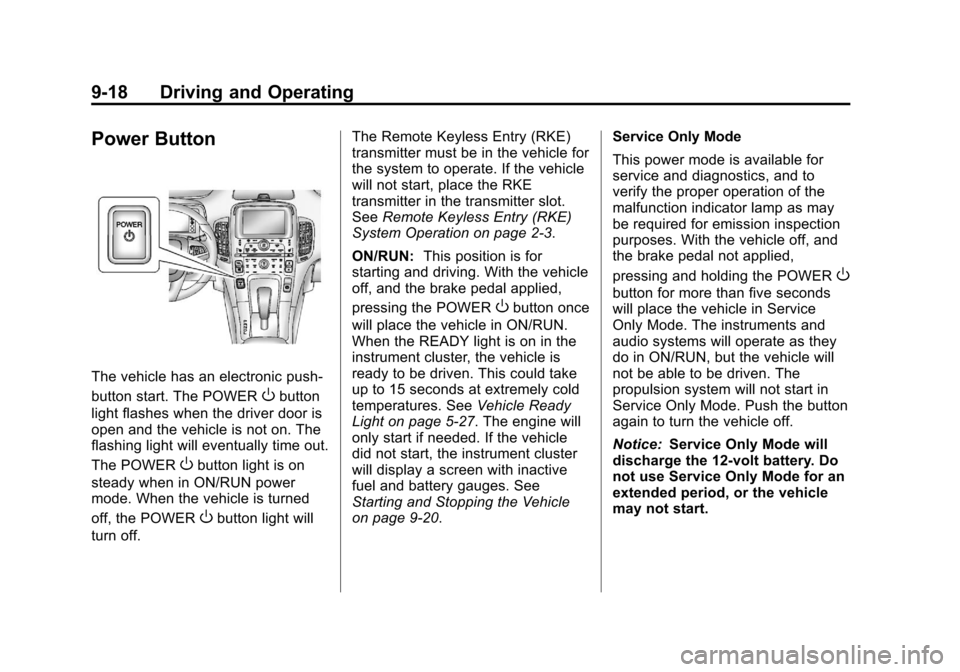
Power Button
The vehicle has an electronic push‐
button start. The POWER
Obutton
light flashes when the driver door is
open and the vehicle is not on. The
flashing light will eventually time out.
The POWER
Obutton light is on
steady when in ON/RUN power
mode. When the vehicle is turned
off, the POWER
Obutton light will
turn off. The Remote Keyless Entry (RKE)
transmitter must be in the vehicle for
the system to operate. If the vehicle
will not start, place the RKE
transmitter in the transmitter slot.
See
Remote Keyless Entry (RKE)
System Operation on page 2‑3.
ON/RUN: This position is for
starting and driving. With the vehicle
off, and the brake pedal applied,
pressing the POWER
Obutton once
will place the vehicle in ON/RUN.
When the READY light is on in the
instrument cluster, the vehicle is
ready to be driven. This could take
up to 15 seconds at extremely cold
temperatures. See Vehicle Ready
Light on page 5‑27. The engine will
only start if needed. If the vehicle
did not start, the instrument cluster
will display a screen with inactive
fuel and battery gauges. See
Starting and Stopping the Vehicle
on page 9‑20. Service Only Mode
This power mode is available for
service and diagnostics, and to
verify the proper operation of the
malfunction indicator lamp as may
be required for emission inspection
purposes. With the vehicle off, and
the brake pedal not applied,
pressing and holding the POWER
O
button for more than five seconds
will place the vehicle in Service
Only Mode. The instruments and
audio systems will operate as they
do in ON/RUN, but the vehicle will
not be able to be driven. The
propulsion system will not start in
Service Only Mode. Push the button
again to turn the vehicle off.
Notice:
Service Only Mode will
discharge the 12‐volt battery. Do
not use Service Only Mode for an
extended period, or the vehicle
may not start.
Page 258 of 454

Black plate (20,1)Chevrolet Volt Owner Manual - 2012
9-20 Driving and Operating
Starting and Stopping the
Vehicle
Starting Procedure
Move the shift lever to P (Park) or
N (Neutral). The propulsion system
will not start in any other position.
Notice:Do not try to shift to
P (Park) if the vehicle is moving
or the electric drive unit could be
damaged. Shift to P (Park) only
when the vehicle is stopped.
Notice: The vehicle is designed
to work with the electronics in the
vehicle. If you add electrical parts
or accessories, you could change
the way the vehicle operates.
Before adding electrical
equipment, check with your
dealer. If you do not, the vehicle
might not perform properly. Any
resulting damage would not be
covered by the vehicle warranty. The Remote Keyless Entry (RKE)
transmitter must be in the vehicle.
Press the brake pedal and push and
release the POWER
Obutton.
If the RKE transmitter is not in the
vehicle or something is interfering
with the transmitter, a message
displays in the Driver Information
Center (DIC). See Key and Lock
Messages on page 5‑51.
If the vehicle will not start due to a
low RKE transmitter battery, the
vehicle can still be driven. See
“Starting the Vehicle with a Low
Transmitter Battery” inRemote
Keyless Entry (RKE) System
Operation on page 2‑3.
A Welcome, Ready, and Good‐bye
audio message will be heard in the
vehicle and animated on the
instrument cluster when opening the
driver door upon entry, when the
vehicle is ready to be driven, and
when the vehicle is turned off.
Page 259 of 454

Black plate (21,1)Chevrolet Volt Owner Manual - 2012
Driving and Operating 9-21
The instrument cluster displays an
active fuel or battery gauge, along
with an audio startup cue, when the
vehicle is ready to be driven. This
could take up to 15 seconds at
extremely cold temperatures. The
engine will only start if needed.
If the vehicle did not start, the
instrument cluster will display a
screen with inactive fuel and battery
gauges. SeeStarting and Stopping
the Vehicle on page 9‑20.
Restarting Procedure
If the vehicle must be restarted
while it is still moving, move the shift
lever to N (Neutral) and press the
POWER
Obutton twice without
pressing the brake pedal. The
propulsion system will not restart in
any other position. Computers determine when the
engine needs to run. The engine
may start, if required, when the
propulsion system is on. Some
vehicle conditions that force the
engine to run are:
.Cold ambient temperatures.
.The hood is open or not
completely latched.
.The high voltage battery has a
low charge.
.The engine is needed to
maintain the high voltage battery
temperature.
.The engine needs to run for
maintenance.
See Maintenance Modes on
page 9‑28.
A chime will sound if the driver door
is opened while the vehicle is in ON/
RUN. Always press the POWER
O
button to turn the vehicle off before
exiting.
Stopping Procedure
For information on how to turn the
vehicle off, see Power Button on
page 9‑18.
Retained Accessory
Power (RAP)
The following features will operate
for up to 10 minutes or until the
driver door is opened:
.Audio System
.Power Windows
.Accessory Power Outlets
Page 443 of 454

Black plate (1,1)Chevrolet Volt Owner Manual - 2012
INDEX i-1
A
Accessories andModifications . . . . . . . . . . . . . . . . . 10-3
Accessory Power . . . . . . . . . . . . . . 9-21
Add-On Electrical Equipment . . . . . . . . . . . . . . . . . . . 9-65
Additional Information,
OnStar
®. . . . . . . . . . . . . . . . . . . . . . 14-5
Air Cleaner/Filter, Engine . . . . . 10-13
Air Conditioning . . . . . . . . . . . . . . . . 8-1
Air Vents . . . . . . . . . . . . . . . . . . . . . . . 8-8
Airbag System Check . . . . . . . . . . . . . . . . . . . . . . . . 3-32
How Does an AirbagRestrain? . . . . . . . . . . . . . . . . . . . 3-24
Passenger Sensing
System . . . . . . . . . . . . . . . . . . . . . . 3-26
What Makes an Airbag Inflate? . . . . . . . . . . . . . . . . . . . . . . 3-23
What Will You See after an
Airbag Inflates? . . . . . . . . . . . . . 3-24
When Should an Airbag Inflate? . . . . . . . . . . . . . . . . . . . . . . 3-22
Where Are the Airbags? . . . . . . 3-21 Airbags
Adding Equipment to the
Vehicle . . . . . . . . . . . . . . . . . . . . . . 3-31
Passenger Status Indicator . . . 5-18
Readiness Light . . . . . . . . . . . . . . 5-17
Servicing Airbag-Equipped Vehicles . . . . . . . . . . . . . . . . . . . . . 3-31
System Check . . . . . . . . . . . . . . . . 3-19
Alarm System Anti-theft . . . . . . . . . . . . . . . . . . . . . . 2-15
AM-FM Radio . . . . . . . . . . . . . . . . . . . 7-8
Antenna
Multi-band . . . . . . . . . . . . . . . . . . . . 7-13
Anti-theft Alarm System . . . . . . . . . . . . . . . . 2-15
Alarm System Messages . . . . . 5-53
Antilock Brake System (ABS) . . . . . . . . . . . . . . . . 9-33
Warning Light . . . . . . . . . . . . . . . . . 5-23
Appearance Care Exterior . . . . . . . . . . . . . . . . . . . . . 10-85
Interior . . . . . . . . . . . . . . . . . . . . . . 10-89
Assistance Program, Roadside . . . . . . . . . . . . . . . . . . . . . 13-6 Audio Players . . . . . . . . . . . . . . . . . 7-14
CD . . . . . . . . . . . . . . . . . . . . . . . . . . . 7-14
MP3 . . . . . . . . . . . . . . . . . . . . . . . . . . 7-16
Audio System Radio Reception . . . . . . . . . . . . . . 7-13
Theft-Deterrent Feature . . . . . . . . 7-2
Automatic
Climate Control System . . . . . . . . 8-1
Door Locks . . . . . . . . . . . . . . . . . . . 2-13
Auxiliary Devices . . . . . . . . . . . . . . . . . . . . . . . 7-18
B
Battery . . . . . . . . . . . . . . . . . . . . . . . 10-25
Gauge . . . . . . . . . . . . . . . . . . . . . . . . 5-14
High Voltage . . . . . . . . . . . . . . . . . . 5-14
Jump Starting . . . . . . . . . . . . . . . 10-75
Power Protection . . . . . . . . . . . . . . 6-6
Battery and Charging Messages. . . . . . . . . . . . . . . . . . . . 5-47
Blade Replacement, Wiper . . . 10-28
Bluetooth . . . . . . . . . . 7-22, 7-24, 7-28
Brake Parking, Electric . . . . . . . . . . . . . . 9-34
System Warning Light . . . . . . . . 5-22