2012 CHEVROLET SUBURBAN rear view mirror
[x] Cancel search: rear view mirrorPage 7 of 514

Black plate (1,1)Chevrolet Tahoe/Suburban Owner Manual - 2012
In Brief 1-1
In Brief
Instrument Panel
Instrument Panel Overview . . . . 1-2
Initial Drive Information
Initial Drive Information . . . . . . . . 1-4
Remote Keyless Entry (RKE)System . . . . . . . . . . . . . . . . . . . . . . 1-4
Remote Vehicle Start . . . . . . . . . 1-5
Door Locks . . . . . . . . . . . . . . . . . . . 1-5
Liftgate . . . . . . . . . . . . . . . . . . . . . . . . 1-6
Windows . . . . . . . . . . . . . . . . . . . . . . 1-6
Seat Adjustment . . . . . . . . . . . . . . 1-7
Memory Features . . . . . . . . . . . . 1-10
Second Row Seats . . . . . . . . . . 1-11
Third Row Seats . . . . . . . . . . . . . 1-11
Heated and Ventilated Seats . . . . . . . . . . . . . . . . . . . . . . . 1-11
Head Restraint Adjustment . . . . . . . . . . . . . . . . . 1-11 Safety Belts . . . . . . . . . . . . . . . . . . 1-12
Passenger Sensing
System . . . . . . . . . . . . . . . . . . . . . 1-12
Mirror Adjustment . . . . . . . . . . . . 1-13
Steering Wheel Adjustment . . . . . . . . . . . . . . . . . 1-14
Throttle and Brake Pedal Adjustment . . . . . . . . . . . . . . . . . 1-14
Interior Lighting . . . . . . . . . . . . . . 1-15
Exterior Lighting . . . . . . . . . . . . . 1-16
Windshield Wiper/Washer . . . . 1-16
Climate Controls . . . . . . . . . . . . . 1-17
Transmission . . . . . . . . . . . . . . . . 1-18
Four-Wheel Drive . . . . . . . . . . . . 1-19
Vehicle Features
Radio(s) . . . . . . . . . . . . . . . . . . . . . 1-20
Satellite Radio . . . . . . . . . . . . . . . 1-22
Portable Audio Devices . . . . . . 1-22
Bluetooth
®. . . . . . . . . . . . . . . . . . . 1-22
Steering Wheel Controls . . . . . 1-22
Cruise Control . . . . . . . . . . . . . . . 1-23 Navigation System . . . . . . . . . . . 1-23
Side Blind Zone
Alert (SBZA) . . . . . . . . . . . . . . . 1-24
Rear Vision Camera (RVC) . . . . . . . . . . . . . 1-24
Ultrasonic Parking Assist . . . . 1-24
Power Outlets . . . . . . . . . . . . . . . 1-24
Universal Remote System . . . 1-25
Sunroof . . . . . . . . . . . . . . . . . . . . . . 1-25
Performance and Maintenance
StabiliTrak®System . . . . . . . . . 1-26
Tire Pressure Monitor . . . . . . . . 1-26
Engine Oil Life System . . . . . . 1-27
Fuel E85 (85% Ethanol) . . . . . 1-27
Driving for Better Fuel Economy . . . . . . . . . . . . . . . . . . . 1-27
Roadside Assistance Program . . . . . . . . . . . . . . . . . . . . 1-28
OnStar
®. . . . . . . . . . . . . . . . . . . . . 1-28
Page 20 of 514
Black plate (14,1)Chevrolet Tahoe/Suburban Owner Manual - 2012
1-14 In Brief
Interior Mirrors
Vehicles with a manual rearview
mirror can be adjusted to see clearly
behind the vehicle. Hold the mirror
in the center to move it up or down
and side to side. Adjust the mirror
to avoid glare from the headlamps
behind you. Push the tab forward
for daytime use and pull it for
nighttime use.
Vehicles with the automatic dimming
feature will automatically reduce
glare from the headlamps of the
vehicle behind you. The dimming
feature comes on and the indicator
light illuminates each time the
vehicle is started.
SeeAutomatic Dimming Rearview
Mirror on page 2‑19 for more
information.
Steering Wheel
Adjustment
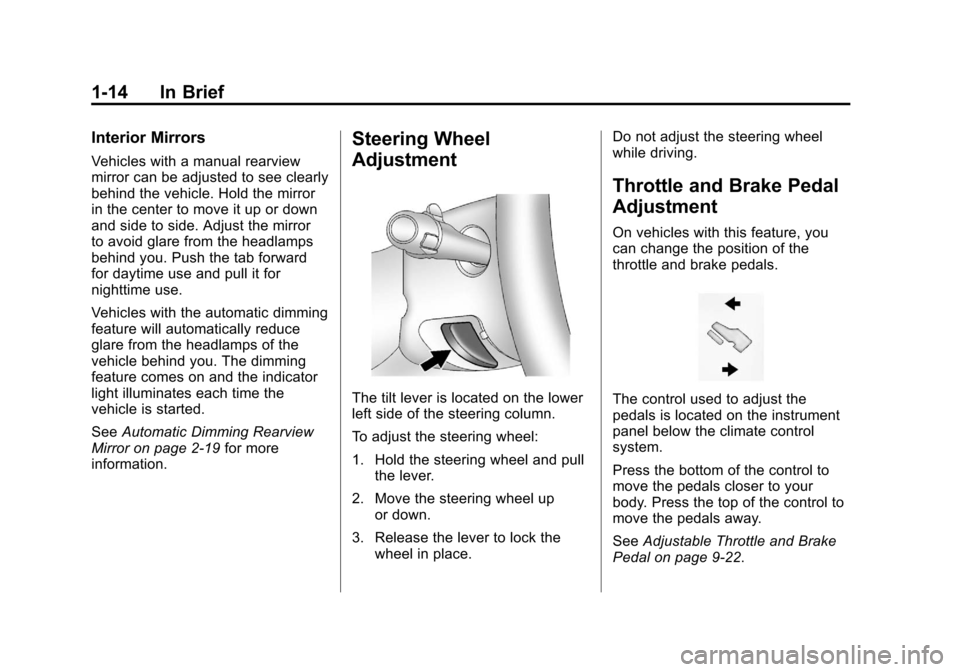
The tilt lever is located on the lower
left side of the steering column.
To adjust the steering wheel:
1. Hold the steering wheel and pull the lever.
2. Move the steering wheel up or down.
3. Release the lever to lock the wheel in place. Do not adjust the steering wheel
while driving.
Throttle and Brake Pedal
Adjustment
On vehicles with this feature, you
can change the position of the
throttle and brake pedals.
The control used to adjust the
pedals is located on the instrument
panel below the climate control
system.
Press the bottom of the control to
move the pedals closer to your
body. Press the top of the control to
move the pedals away.
See
Adjustable Throttle and Brake
Pedal on page 9‑22.
Page 30 of 514
Black plate (24,1)Chevrolet Tahoe/Suburban Owner Manual - 2012
1-24 In Brief
Side Blind Zone
Alert (SBZA)
If available, this feature will alert you
to vehicles located in the vehicle's
side blind zone. When the system
detects a vehicle in the side blind
zone, the SBZA display will light up
in the corresponding outside side
mirror.
The system is enabled at every
vehicle startup. It can be disabled
through the Driver Information
Center (DIC).
If the message SIDE BLIND ZONE
SYSTEM UNAVAILABLE appears
on the DIC, the system has been
disabled because the sensor is
blocked and cannot detect vehicles
in the blind zone. The sensor may
be blocked by mud, dirt, snow, ice,
slush, or even heavy rainstorms.
This message may also activate
during heavy rain or due to road
spray. The vehicle does not need
service.See
Side Blind Zone Alert (SBZA)
on page 9‑53 for more information.Rear Vision
Camera (RVC)
If available, the RVC displays a
view of the area behind the vehicle
when the vehicle is shifted into
R (Reverse). The display will appear
on either the inside rearview mirror
or navigation screen, if equipped.
To clean the camera lens, located
above the license plate, rinse it with
water and wipe it with a soft cloth.
SeeRear Vision Camera (RVC) on
page 9‑55.
Ultrasonic Parking Assist
If available, Ultrasonic Rear Parking
Assist (URPA) system uses sensors
on the rear bumper to assist with
parking and avoiding objects while
in R (Reverse). It operates at
speeds less than 8 km/h (5 mph). URPA uses audible beeps to
provide distance and system
information.
Keep the sensors on the vehicle's
rear bumper clean to ensure proper
operation.
See
Ultrasonic Parking Assist on
page 9‑51 for more information.
Power Outlets
The accessory power outlets can be
used to plug in electrical equipment,
such as a cell phone or MP3 player.
There are two under the climate
controls, one inside the center floor
console, one on the rear of the
center floor console and one
accessory power outlet in the rear
cargo area on the passenger side.
The accessory power outlets are
powered, even with the ignition
off. Continuing to use accessory
power outlets while the ignition is in
LOCK/OFF may cause the vehicle's
battery to run down.
SeePower Outlets on page 5‑8.
Page 31 of 514
Black plate (25,1)Chevrolet Tahoe/Suburban Owner Manual - 2012
In Brief 1-25
Universal Remote System
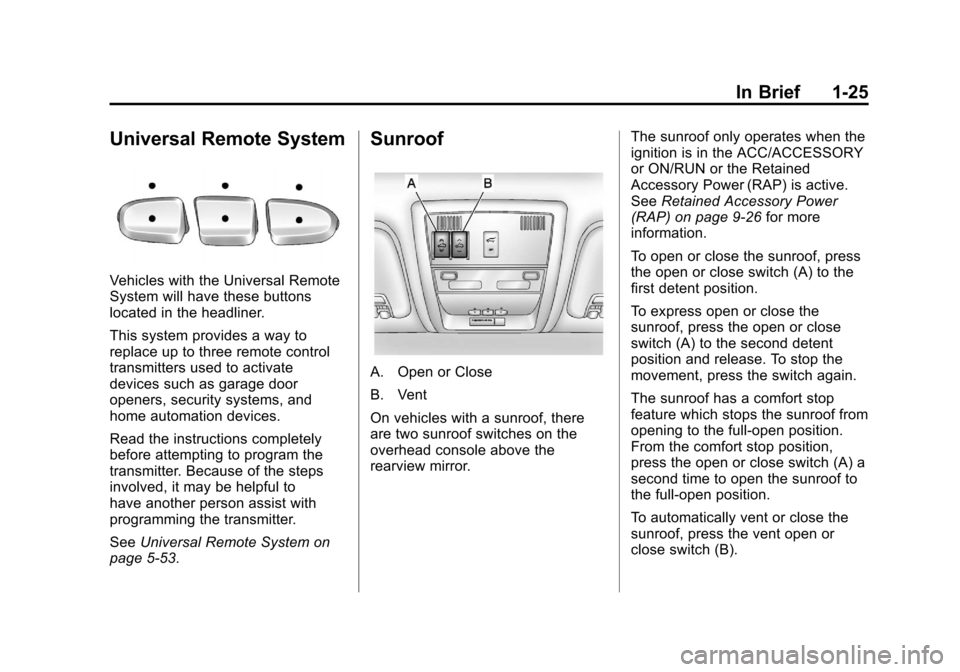
Vehicles with the Universal Remote
System will have these buttons
located in the headliner.
This system provides a way to
replace up to three remote control
transmitters used to activate
devices such as garage door
openers, security systems, and
home automation devices.
Read the instructions completely
before attempting to program the
transmitter. Because of the steps
involved, it may be helpful to
have another person assist with
programming the transmitter.
SeeUniversal Remote System on
page 5‑53.
Sunroof
A. Open or Close
B. Vent
On vehicles with a sunroof, there
are two sunroof switches on the
overhead console above the
rearview mirror. The sunroof only operates when the
ignition is in the ACC/ACCESSORY
or ON/RUN or the Retained
Accessory Power (RAP) is active.
See
Retained Accessory Power
(RAP) on page 9‑26 for more
information.
To open or close the sunroof, press
the open or close switch (A) to the
first detent position.
To express open or close the
sunroof, press the open or close
switch (A) to the second detent
position and release. To stop the
movement, press the switch again.
The sunroof has a comfort stop
feature which stops the sunroof from
opening to the full-open position.
From the comfort stop position,
press the open or close switch (A) a
second time to open the sunroof to
the full-open position.
To automatically vent or close the
sunroof, press the vent open or
close switch (B).
Page 35 of 514
Black plate (1,1)Chevrolet Tahoe/Suburban Owner Manual - 2012
Keys, Doors, and Windows 2-1
Keys, Doors, and
Windows
Keys and Locks
Keys . . . . . . . . . . . . . . . . . . . . . . . . . . 2-2
Remote Keyless Entry (RKE)System . . . . . . . . . . . . . . . . . . . . . . 2-2
Remote Keyless Entry (RKE) System Operation . . . . . . . . . . . 2-3
Remote Vehicle Start . . . . . . . . . 2-5
Door Locks . . . . . . . . . . . . . . . . . . . 2-7
Power Door Locks . . . . . . . . . . . . 2-8
Delayed Locking . . . . . . . . . . . . . . 2-8
Automatic Door Locks . . . . . . . . . 2-8
Lockout Protection . . . . . . . . . . . . 2-8
Safety Locks . . . . . . . . . . . . . . . . . . 2-8
Doors
Liftgate (Manual) . . . . . . . . . . . . . . 2-9
Liftgate (Power) . . . . . . . . . . . . . . 2-10
Power Assist Steps . . . . . . . . . . 2-13
Vehicle Security
Vehicle Security . . . . . . . . . . . . . . 2-13
Anti-theft Alarm System . . . . . . 2-13
Immobilizer . . . . . . . . . . . . . . . . . . 2-14
Immobilizer Operation . . . . . . . 2-14
Exterior Mirrors
Convex Mirrors . . . . . . . . . . . . . . 2-16
Manual Mirrors . . . . . . . . . . . . . . . 2-16
Trailer-Tow Mirrors . . . . . . . . . . . 2-17
Power Mirrors . . . . . . . . . . . . . . . . 2-17
Folding Mirrors . . . . . . . . . . . . . . . 2-17
Heated Mirrors . . . . . . . . . . . . . . . 2-18
Automatic Dimming Mirror . . . 2-18
Park Tilt Mirrors . . . . . . . . . . . . . . 2-19
Interior Mirrors
Manual Rearview Mirror . . . . . . 2-19
Automatic Dimming Rearview Mirror . . . . . . . . . . . . . . . . . . . . . . . 2-19
Windows
Windows . . . . . . . . . . . . . . . . . . . . . 2-20
Power Windows . . . . . . . . . . . . . 2-20
Sun Visors . . . . . . . . . . . . . . . . . . . 2-21
Roof
Sunroof . . . . . . . . . . . . . . . . . . . . . . 2-22
Page 52 of 514
Black plate (18,1)Chevrolet Tahoe/Suburban Owner Manual - 2012
2-18 Keys, Doors, and Windows
Power Foldaway
1. Press (A) to fold the mirrors outto the driving position.
2. Press (B) to fold the mirrors in to the folded position.
Resetting the Power Foldaway
Mirrors
Reset the power foldaway mirrors if:
.The mirrors are accidentally
obstructed while folding.
.They are accidentally manually
folded/unfolded.
.The mirrors will not stay in the
unfolded position.
.The mirrors shake and flutter at
normal driving speeds.
Fold and unfold them one time
using the mirror controls to reset
them to their normal position.
Manual Foldaway
Manually fold the mirrors inward
to prevent damage when going
through an automatic car wash. To
fold, push the mirrors toward the
vehicle. Push the mirrors outward,
to return to its original position.
Turn Signal Indicator
The vehicle may have a turn signal
indicator on the mirror. An arrow on
the mirror flashes in the direction of
the turn or lane change.
Ground Illumination Lamps
The mirrors may also include
ground illumination lamps in the
base of the mirror. These lamps
help to see the area near the
base of the front doors when it is
dark out.
Heated Mirrors
For vehicles with heated mirrors:
1(Rear Window Defogger):
Press to heat the mirrors.
See “Rear Window Defogger” under
Dual Automatic Climate Control
System on page 8‑4 orClimate
Control Systems on page 8‑1 for
more information.
Side Blind Zone Alert (SBZA)
If your vehicle has the Side Blind
Zone Alert (SBZA) system, see Side
Blind Zone Alert (SBZA) on
page 9‑53.
Automatic Dimming
Mirror
Vehicles with the dimming feature
have a driver outside mirror that
adjusts for the glare of headlamps
behind you. See Manual Rearview
Mirror on page 2‑19 for more
information.
Page 53 of 514
Black plate (19,1)Chevrolet Tahoe/Suburban Owner Manual - 2012
Keys, Doors, and Windows 2-19
Park Tilt Mirrors
Vehicles with the memory package
have a passenger and/or driver
mirror that tilts to a preselected
position when the vehicle is in
R (Reverse). This feature lets the
driver view the curb when parallel
parking. The mirror(s) return to the
original position when the vehicle is
shifted out of R (Reverse), or the
ignition is turned off.
Turn this feature on or off through
the Driver Information Center (DIC).
SeeVehicle Personalization (With
DIC Buttons) on page 5‑45 for more
information.
Interior Mirrors
Manual Rearview Mirror
Hold the mirror in the center to
move it for a clearer view of behind
your vehicle. Adjust the mirror to
avoid glare from the headlamps
behind you. Push the tab at the
bottom of the mirror forward for
daytime use and pull it for
nighttime use.
Automatic Dimming
Rearview Mirror
The vehicle may have an automatic
dimming inside rearview mirror.
Automatic dimming reduces the
glare from the headlamps of the
vehicle behind you. The dimming
feature comes on and the indicator
light illuminates each time the
ignition is turned to start.
O(On/Off): Press to turn the
dimming feature on or off. The vehicle may also have a Rear
Vision Camera (RVC). See
Rear
Vision Camera (RVC) on page 9‑55
for more information.
If the vehicle has a RVC,
the
Obutton for turning the
dimming feature on or off will not
be available.
Vehicles with OnStar have three
additional control buttons for the
OnStar system. See your dealer for
more information about OnStar and
how to subscribe to it. See OnStar
Overview on page 14‑1.
Cleaning the Mirror
Do not spray glass cleaner directly
on the mirror. Use a soft towel
dampened with water.
Page 56 of 514
Black plate (22,1)Chevrolet Tahoe/Suburban Owner Manual - 2012
2-22 Keys, Doors, and Windows
Roof
Sunroof
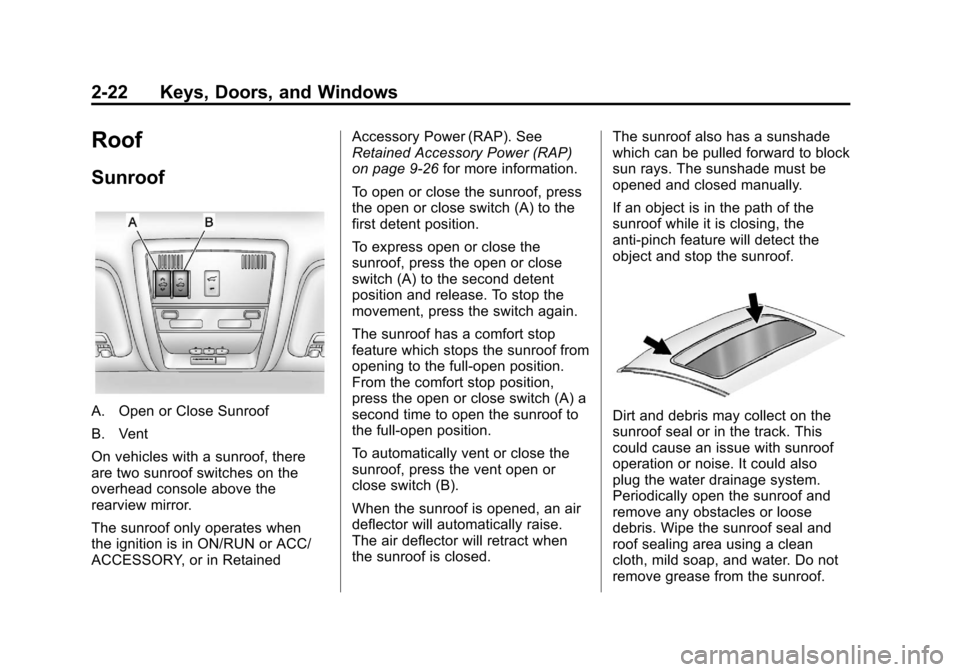
A. Open or Close Sunroof
B. Vent
On vehicles with a sunroof, there
are two sunroof switches on the
overhead console above the
rearview mirror.
The sunroof only operates when
the ignition is in ON/RUN or ACC/
ACCESSORY, or in RetainedAccessory Power (RAP). See
Retained Accessory Power (RAP)
on page 9‑26
for more information.
To open or close the sunroof, press
the open or close switch (A) to the
first detent position.
To express open or close the
sunroof, press the open or close
switch (A) to the second detent
position and release. To stop the
movement, press the switch again.
The sunroof has a comfort stop
feature which stops the sunroof from
opening to the full-open position.
From the comfort stop position,
press the open or close switch (A) a
second time to open the sunroof to
the full-open position.
To automatically vent or close the
sunroof, press the vent open or
close switch (B).
When the sunroof is opened, an air
deflector will automatically raise.
The air deflector will retract when
the sunroof is closed. The sunroof also has a sunshade
which can be pulled forward to block
sun rays. The sunshade must be
opened and closed manually.
If an object is in the path of the
sunroof while it is closing, the
anti-pinch feature will detect the
object and stop the sunroof.Dirt and debris may collect on the
sunroof seal or in the track. This
could cause an issue with sunroof
operation or noise. It could also
plug the water drainage system.
Periodically open the sunroof and
remove any obstacles or loose
debris. Wipe the sunroof seal and
roof sealing area using a clean
cloth, mild soap, and water. Do not
remove grease from the sunroof.