2012 CHEVROLET SUBURBAN radio
[x] Cancel search: radioPage 403 of 514
Black plate (53,1)Chevrolet Tahoe/Suburban Owner Manual - 2012
Vehicle Care 10-53
Remove the valve cap from the
tire valve stem. Press the tire
gauge firmly onto the valve to
get a pressure measurement.
If the cold tire inflation pressure
matches the recommended
pressure on the Tire and
Loading Information label, no
further adjustment is necessary.
If the inflation pressure is low,
add air until the recommended
pressure is reached. If the
inflation pressure is high, press
on the metal stem in the center
of the tire valve to release air.
Recheck the tire pressure with
the tire gauge
Return the valve caps on the
valve stems to prevent leaks
and keep out dirt and moisture.Tire Pressure Monitor
System
The Tire Pressure Monitor System
(TPMS) uses radio and sensor
technology to check tire pressure
levels. The TPMS sensors monitor
the air pressure in your tires and
transmit tire pressure readings to a
receiver located in the vehicle.
Each tire, including the spare
(if provided), should be checked
monthly when cold and inflated to
the inflation pressure recommended
by the vehicle manufacturer on the
vehicle placard or tire inflation
pressure label. (If your vehicle has
tires of a different size than the size
indicated on the vehicle placard or
tire inflation pressure label, you
should determine the proper tire
inflation pressure for those tires.)
As an added safety feature, your
vehicle has been equipped with a
tire pressure monitoring system
(TPMS) that illuminates a low tirepressure telltale when one or
more of your tires is significantly
under‐inflated.
Accordingly, when the low tire
pressure telltale illuminates, you
should stop and check your tires as
soon as possible, and inflate them
to the proper pressure. Driving on
a significantly under‐inflated tire
causes the tire to overheat and can
lead to tire failure. Under‐inflation
also reduces fuel efficiency and
tire tread life, and may affect the
vehicle's handling and stopping
ability.
Please note that the TPMS is
not a substitute for proper tire
maintenance, and it is the driver's
responsibility to maintain correct
tire pressure, even if under‐inflation
has not reached the level to trigger
illumination of the TPMS low tire
pressure telltale.
Your vehicle has also been
equipped with a TPMS malfunction
indicator to indicate when the
system is not operating properly.
Page 404 of 514
Black plate (54,1)Chevrolet Tahoe/Suburban Owner Manual - 2012
10-54 Vehicle Care
The TPMS malfunction indicator is
combined with the low tire pressure
telltale. When the system detects a
malfunction, the telltale will flash for
approximately one minute and then
remain continuously illuminated.
This sequence will continue upon
subsequent vehicle start‐ups as
long as the malfunction exists.
When the malfunction indicator is
illuminated, the system may not be
able to detect or signal low tire
pressure as intended. TPMS
malfunctions may occur for a variety
of reasons, including the installation
of replacement or alternate tires or
wheels on the vehicle that prevent
the TPMS from functioning properly.
Always check the TPMS malfunction
telltale after replacing one or more
tires or wheels on your vehicle to
ensure that the replacement or
alternate tires and wheels allow
the TPMS to continue to function
properly.
SeeTire Pressure Monitor
Operation on page 10‑54 for
additional information.Federal Communications
Commission (FCC) Rules and
with Industry Canada
Standards
See Radio Frequency Statement on
page 13‑20 for information
regarding Part 15 of the Federal
Communications Commission (FCC)
Rules and with Industry Canada
Standards RSS-GEN/210/220/310.
Tire Pressure Monitor
Operation
If the vehicle is a hybrid, see the
hybrid supplement for more
information.
This vehicle may have a Tire
Pressure Monitor System (TPMS).
The TPMS is designed to warn the
driver when a low tire pressure
condition exists. TPMS sensors are
mounted onto each tire and wheel
assembly, excluding the spare tire
and wheel assembly. The TPMS
sensors monitor the air pressure in the tires and transmit the tire
pressure readings to a receiver
located in the vehicle.
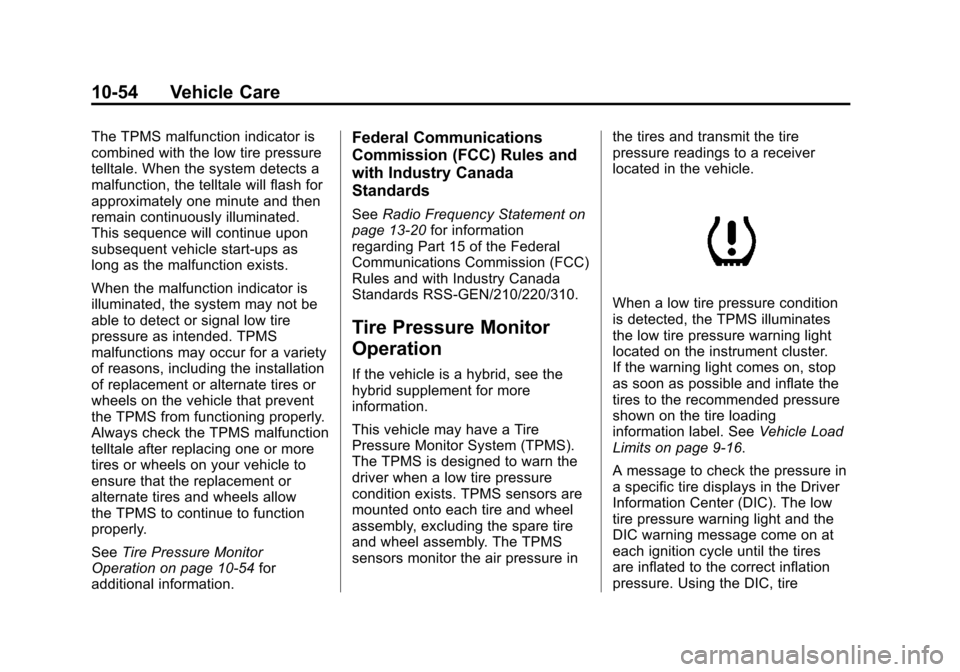
When a low tire pressure condition
is detected, the TPMS illuminates
the low tire pressure warning light
located on the instrument cluster.
If the warning light comes on, stop
as soon as possible and inflate the
tires to the recommended pressure
shown on the tire loading
information label. See
Vehicle Load
Limits on page 9‑16.
A message to check the pressure in
a specific tire displays in the Driver
Information Center (DIC). The low
tire pressure warning light and the
DIC warning message come on at
each ignition cycle until the tires
are inflated to the correct inflation
pressure. Using the DIC, tire
Page 406 of 514
Black plate (56,1)Chevrolet Tahoe/Suburban Owner Manual - 2012
10-56 Vehicle Care
.The TPMS sensor matching
process was not done or not
completed successfully after
rotating the tires. The
malfunction light and the DIC
message should go off after
successfully completing the
sensor matching process. See
"TPMS Sensor Matching
Process" later in this section.
.One or more TPMS sensors
are missing or damaged. The
malfunction light and the DIC
message should go off when the
TPMS sensors are installed and
the sensor matching process is
performed successfully. See
your dealer for service.
.Replacement tires or wheels do
not match the original equipment
tires or wheels. Tires and wheels
other than those recommended
could prevent the TPMS from
functioning properly. SeeBuying
New Tires on page 10‑59.
.Operating electronic devices or
being near facilities using radio
wave frequencies similar to the
TPMS could cause the TPMS
sensors to malfunction.
If the TPMS is not functioning
properly, it cannot detect or signal a
low tire condition. See your dealer
for service if the TPMS malfunction
light and DIC message comes on
and stays on.
TPMS Sensor Matching
Process
Each TPMS sensor has a unique
identification code. The identification
code needs to be matched to a new
tire/wheel position after rotating the
vehicle’s tires or replacing one or
more of the TPMS sensors. The
TPMS sensor matching process
should also be performed after
replacing a spare tire with a road
tire containing the TPMS sensor.
The malfunction light and the DIC
message should go off at the next
ignition cycle. The sensors are
matched to the tire/wheel positions, using a TPMS relearn tool, in the
following order: driver side front tire,
passenger side front tire, passenger
side rear tire, and driver side rear.
See your dealer for service or to
purchase a relearn tool.
There are two minutes to match
the first tire/wheel position, and
five minutes overall to match all
four tire/wheel positions. If it takes
longer, the matching process stops
and must be restarted.
The TPMS sensor matching process
is outlined below:
1. Set the parking brake.
2. Turn the ignition to ON/RUN with
the engine off.
3. Press
QandKon the
Remote Keyless Entry (RKE)
transmitter at the same time for
approximately five seconds. The
horn sounds twice to signal the
receiver is in relearn mode and
TIRE LEARNING ACTIVE
message displays on the DIC
screen.
Page 433 of 514
Black plate (83,1)Chevrolet Tahoe/Suburban Owner Manual - 2012
Vehicle Care 10-83
2. Get the vehicles close enoughso the jumper cables can reach,
but be sure the vehicles are
not touching each other. If they
are, it could cause a ground
connection you do not want. You
would not be able to start your
vehicle, and the bad grounding
could damage the electrical
systems.
To avoid the possibility of the
vehicles rolling, set the parking
brake firmly on both vehicles
involved in the jump start
procedure. Put the automatic
transmission in P (Park) or a
manual transmission in
N (Neutral) before setting the
parking brake. If the vehicle has
a four-wheel-drive transfer case
with a N (Neutral) position, be
sure the transfer case is in a
drive gear, not in N (Neutral). Notice:
If any accessories are left
on or plugged in during the jump
starting procedure, they could
be damaged. The repairs would
not be covered by the vehicle
warranty. Whenever possible,
turn off or unplug all accessories
on either vehicle when jump
starting the vehicle.
3. Turn off the ignition on both
vehicles. Unplug unnecessary
accessories plugged into the
accessory power outlets. Turn
off the radio and all the lamps
that are not needed. This avoids
sparks and helps save both
batteries. And it could save the
radio!
4. Open the hood on the other vehicle and locate the
positive (+) and negative (−)
terminal locations on that
vehicle.
Your vehicle has a remote
positive (+) jump starting
terminal and a remote
negative (−) jump starting terminal. You should always use
these remote terminals instead
of the terminals on the battery.
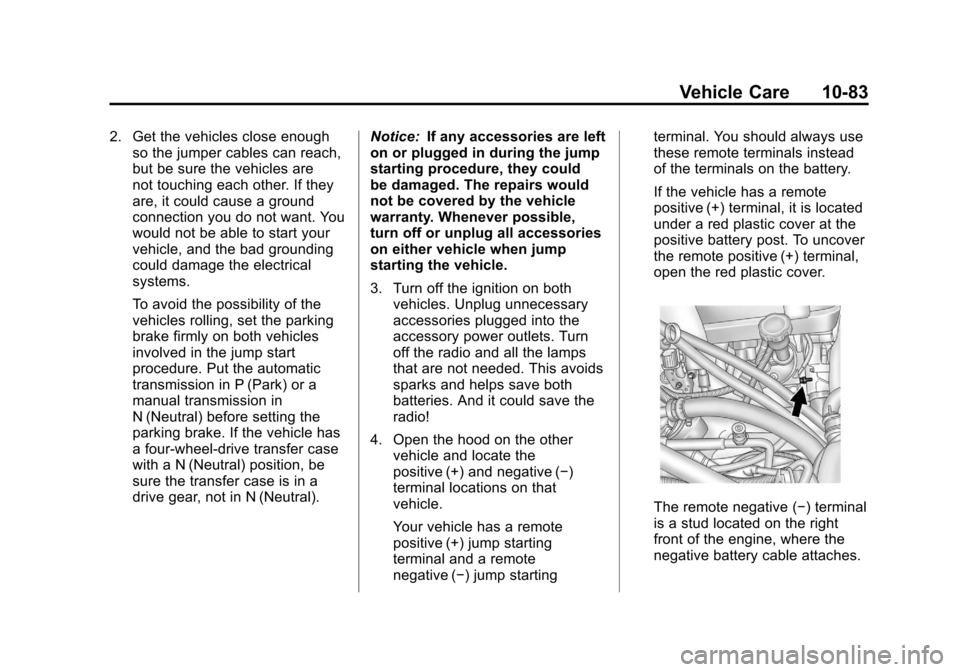
If the vehicle has a remote
positive (+) terminal, it is located
under a red plastic cover at the
positive battery post. To uncover
the remote positive (+) terminal,
open the red plastic cover.
The remote negative (−) terminal
is a stud located on the right
front of the engine, where the
negative battery cable attaches.
Page 473 of 514

Black plate (1,1)Chevrolet Tahoe/Suburban Owner Manual - 2012
Customer Information 13-1
Customer
Information
Customer Information
Customer SatisfactionProcedure (U.S. and
Canada) . . . . . . . . . . . . . . . . . . . . 13-1
Customer Satisfaction Procedure (Mexico) . . . . . . . . 13-3
Customer Assistance Offices (U.S. and Canada) . . . . . . . . . 13-4
Customer Assistance Offices (Mexico) . . . . . . . . . . . . . . . . . . . . 13-5
Customer Assistance for Text Telephone (TTY) Users (U.S.
and Canada) . . . . . . . . . . . . . . . 13-6
Online Owner Center . . . . . . . . 13-6
GM Mobility Reimbursement Program (U.S. and
Canada) . . . . . . . . . . . . . . . . . . . . 13-7
Roadside Assistance Program (U.S. and Canada) . . . . . . . . . 13-7
Roadside Assistance Program (Mexico) . . . . . . . . . . . . . . . . . . . . 13-9
Scheduling Service Appointments (U.S. and
Canada) . . . . . . . . . . . . . . . . . . 13-12 Courtesy Transportation
Program (U.S. and
Canada) . . . . . . . . . . . . . . . . . . 13-13
Collision Damage Repair (U.S. and Canada) . . . . . . . . 13-14
Service Publications Ordering Information . . . . . . 13-16
Reporting Safety Defects
Reporting Safety Defects tothe United States
Government . . . . . . . . . . . . . . . 13-17
Reporting Safety Defects to the Canadian
Government . . . . . . . . . . . . . . . 13-18
Reporting Safety Defects to General Motors . . . . . . . . . . . 13-18
Vehicle Data Recording and
Privacy
Vehicle Data Recording and
Privacy . . . . . . . . . . . . . . . . . . . . 13-19
Event Data Recorders . . . . . . 13-19
OnStar
®. . . . . . . . . . . . . . . . . . . . 13-20
Navigation System . . . . . . . . . 13-20
Radio Frequency Identification (RFID) . . . . . . . 13-20
Radio Frequency Statement . . . . . . . . . . . . . . . . . 13-20
Customer Information
Customer Satisfaction
Procedure (U.S. and
Canada)
Your satisfaction and goodwill are
important to your dealer and to
Chevrolet. Normally, any concerns
with the sales transaction or the
operation of the vehicle will be
resolved by your dealer's sales or
service departments. Sometimes,
however, despite the best intentions
of all concerned, misunderstandings
can occur. If your concern has not
been resolved to your satisfaction,
the following steps should be taken:
STEP ONE: Discuss your concern
with a member of dealership
management. Normally, concerns
can be quickly resolved at that level.
If the matter has already been
reviewed with the sales, service,
or parts manager, contact the owner
of your dealership or the general
manager.
Page 491 of 514
Black plate (19,1)Chevrolet Tahoe/Suburban Owner Manual - 2012
Customer Information 13-19
Vehicle Data
Recording and
Privacy
This GM vehicle has a number of
sophisticated computers that record
information about the vehicle’s
performance and how it is driven.
For example, the vehicle uses
computer modules to monitor and
control engine and transmission
performance, to monitor the
conditions for airbag deployment
and deploy airbags in a crash, and,
if so equipped, to provide antilock
braking to help the driver control the
vehicle. These modules may store
data to help your dealer technician
service the vehicle. Some modules
may also store data about how you
operate the vehicle, such as rate of
fuel consumption or average speed.
These modules may also retain the
owner’s personal preferences, such
as radio presets, seat positions, and
temperature settings.
Event Data Recorders
This vehicle has an Event Data
Recorder (EDR). The main purpose
of an EDR is to record, in certain
crash or near crash-like situations,
such as an airbag deployment or
hitting a road obstacle, data that
will assist in understanding how a
vehicle's systems performed. The
EDR is designed to record data
related to vehicle dynamics and
safety systems for a short period of
time, typically 30 seconds or less.
The EDR in this vehicle is designed
to record such data as:
.How various systems in the
vehicle were operating.
.Whether or not the driver and
passenger safety belts were
buckled/fastened.
.How far, if at all, the driver was
pressing the accelerator and/or
brake pedal.
.How fast the vehicle was
traveling. This data can help provide a better
understanding of the circumstances
in which crashes and injuries occur.
Important:
EDR data is recorded
by the vehicle only if a non-trivial
crash situation occurs; no data is
recorded by the EDR under normal
driving conditions and no personal
data (e.g., name, gender, age,
and crash location) is recorded.
However, other parties, such as
law enforcement, could combine
the EDR data with the type
of personally identifying data
routinely acquired during a crash
investigation.
To read data recorded by an EDR,
special equipment is required, and
access to the vehicle or the EDR is
needed. In addition to the vehicle
manufacturer, other parties, such
as law enforcement, that have the
special equipment, can read the
information if they have access to
the vehicle or the EDR.
Page 492 of 514
Black plate (20,1)Chevrolet Tahoe/Suburban Owner Manual - 2012
13-20 Customer Information
GM will not access this data or
share it with others except: with the
consent of the vehicle owner or,
if the vehicle is leased, with the
consent of the lessee; in response
to an official request by police or
similar government office; as part of
GM's defense of litigation through
the discovery process; or, as
required by law. Data that GM
collects or receives may also be
used for GM research needs or may
be made available to others for
research purposes, where a need is
shown and the data is not tied to a
specific vehicle or vehicle owner.
OnStar®
If the vehicle is equipped with an
active OnStar system, that system
may also record data in crash or
near crash‐like situations. The
OnStar Terms and Conditions
provides information on data
collection and use and is available
at www.onstar.com (U.S.) or
www.onstar.ca (Canada), or by
pressing the
Qbutton andspeaking to an advisor. See
OnStar
Overview on page 14‑1 for more
information.
Navigation System
If the vehicle has a navigation
system, use of the system may
result in the storage of destinations,
addresses, telephone numbers, and
other trip information. Refer to the
navigation manual for information
on stored data and for deletion
instructions.
Radio Frequency
Identification (RFID)
RFID technology is used in some
vehicles for functions such as tire
pressure monitoring and ignition
system security, as well as in
connection with conveniences
such as key fobs for remote door
locking/unlocking and starting, and
in-vehicle transmitters for garage
door openers. RFID technology in
GM vehicles does not use or record personal information or link with
any other GM system containing
personal information.
Radio Frequency
Statement
This vehicle has systems that
operate on a radio frequency that
comply with Part 15 of the Federal
Communications Commission (FCC)
rules and with Industry Canada
Standards RSS‐GEN/210/220/310.
Operation is subject to the following
two conditions:
1. The device may not cause
harmful interference.
2. The device must accept any interference received, including
interference that may cause
undesired operation of the
device.
Changes or modifications to any of
these systems by other than an
authorized service facility could void
authorization to use this equipment.
Page 498 of 514
Black plate (6,1)Chevrolet Tahoe/Suburban Owner Manual - 2012
14-6 OnStar
OnStar service cannot work unless
your vehicle is in a place where
OnStar has an agreement with a
wireless service provider for service
in that area, and the wireless
service provider has coverage,
network capacity, reception, and
technology compatible with OnStar’s
service. Service involving location
information about the vehicle cannot
work unless GPS signals are
available, unobstructed, and
compatible with the OnStar
hardware. OnStar service may not
work if the OnStar equipment is not
properly installed or it has not been
properly maintained. If equipment
or software is added, connected,
or modified, OnStar service may
not work. Other problems beyond
OnStar ’s control may prevent
service such as hills, tall buildings,
tunnels, weather, electrical system
design and architecture of the
vehicle, damage to the vehicle in a
crash, or wireless phone network
congestion or jamming. See
Radio Frequency Statement on
page 13‑20 for information
regarding Part 15 of the Federal
Communications Commission (FCC)
rules and Industry Canada
Standards RSS-GEN/210/220/310.
Services for People with
Disabilities
Advisors provide services to help
subscribers with physical disabilities
and medical conditions.
Push
Qfor help with:
.Locating a gas station with an
attendant to pump gas.
.Finding a hotel, restaurant, etc.,
that meets accessibility needs.
.Providing directions to the
closest hospital or pharmacy
in urgent situations.
TTY Users
OnStar has the ability to
communicate to the deaf,
hard‐of‐hearing, or speech‐impaired
customers while in the vehicle. The available dealer‐installed TTY
system can provide in-vehicle
access to all of the OnStar services,
except Virtual Advisor and OnStar
Turn‐by‐Turn Navigation.
Onstar.com
The website provides access to
account information, manages the
OnStar subscription, and allows
viewing of videos of each service.
Get subscription plan pricing
and sign up for OnStar Vehicle
Diagnostics. Click on the
“My
Account” tab on the home page.
OnStar Personal Identification
Number (PIN)
A PIN is needed to access some of
the OnStar services, like Remote
Door Unlock and Stolen Vehicle
Assistance. You will be prompted
to change the PIN the first time
when speaking with an Advisor. To
change the OnStar PIN, call OnStar
and provide the Advisor with the
current number.