2012 CHEVROLET SUBURBAN low
[x] Cancel search: lowPage 23 of 514
Black plate (17,1)Chevrolet Tahoe/Suburban Owner Manual - 2012
In Brief 1-17
6:Slow wipes.
?:Fast wipes.
L:Push this paddle to spray
washer fluid on the windshield.
Rear Wiper Window Wiper/Washer
To turn the rear wiper on, slide the
lever to a wiper position.
9: Turns the wiper off.
5: Turns on the rear wiper delay.
Z:Turns on the rear wiper.
=:Press the button on the end of
the lever to spray washer fluid on
the rear window.
See Windshield Wiper/Washer on
page 5‑5 andRear Window Wiper/
Washer on page 5‑5.
Climate Controls
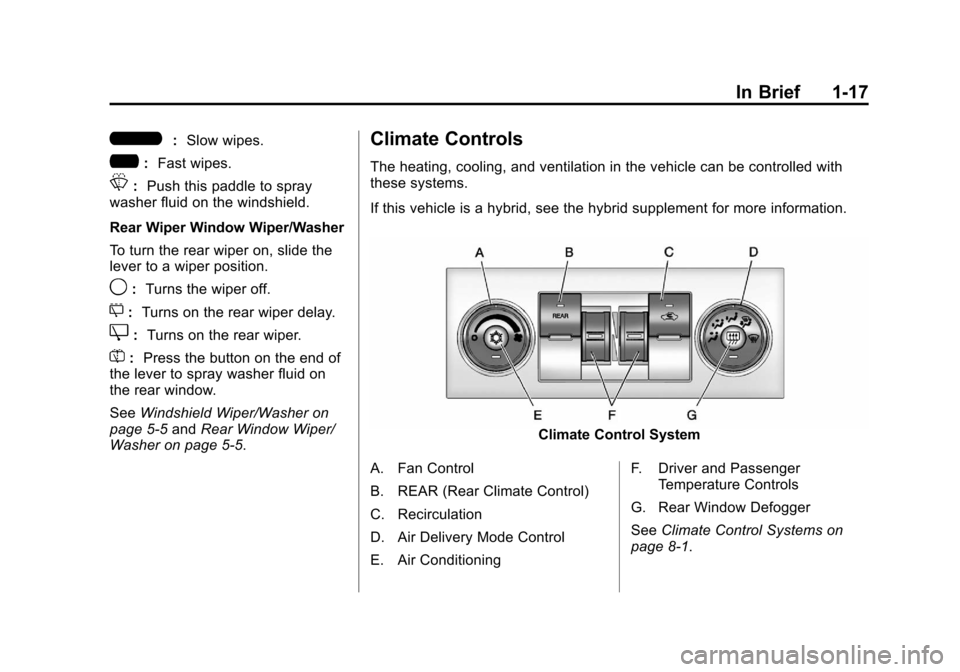
The heating, cooling, and ventilation in the vehicle can be controlled with
these systems.
If this vehicle is a hybrid, see the hybrid supplement for more information.
Climate Control System
A. Fan Control
B. REAR (Rear Climate Control)
C. Recirculation
D. Air Delivery Mode Control
E. Air Conditioning F. Driver and Passenger
Temperature Controls
G. Rear Window Defogger
See Climate Control Systems on
page 8‑1.
Page 24 of 514
Black plate (18,1)Chevrolet Tahoe/Suburban Owner Manual - 2012
1-18 In Brief
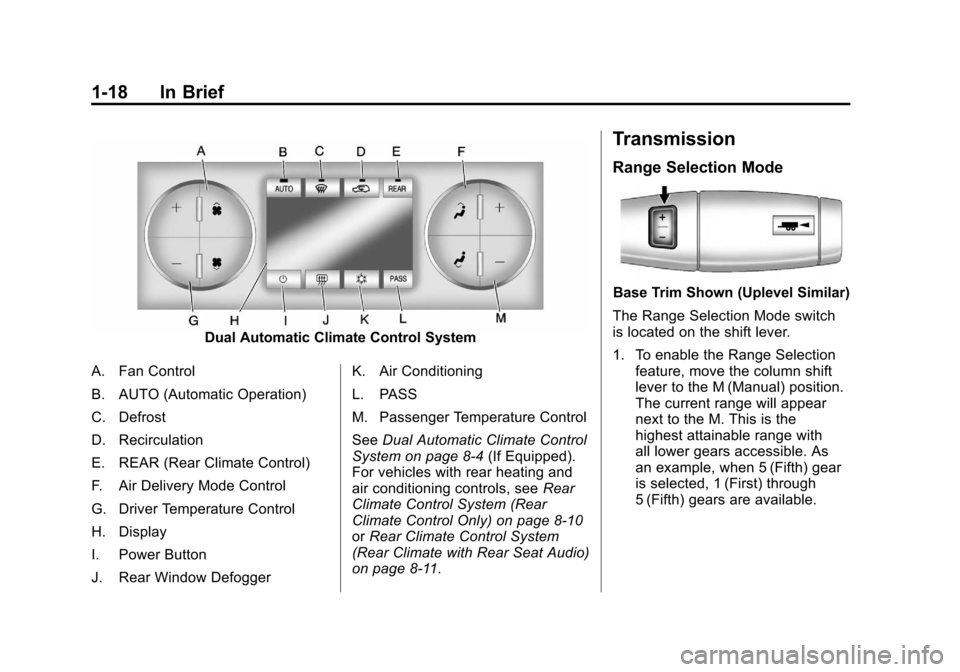
Dual Automatic Climate Control System
A. Fan Control
B. AUTO (Automatic Operation)
C. Defrost
D. Recirculation
E. REAR (Rear Climate Control)
F. Air Delivery Mode Control
G. Driver Temperature Control
H. Display
I. Power Button
J. Rear Window Defogger K. Air Conditioning
L. PASS
M. Passenger Temperature Control
See
Dual Automatic Climate Control
System on page 8‑4 (If Equipped).
For vehicles with rear heating and
air conditioning controls, see Rear
Climate Control System (Rear
Climate Control Only) on page 8‑10
or Rear Climate Control System
(Rear Climate with Rear Seat Audio)
on page 8‑11.
Transmission
Range Selection Mode
Base Trim Shown (Uplevel Similar)
The Range Selection Mode switch
is located on the shift lever.
1. To enable the Range Selection feature, move the column shift
lever to the M (Manual) position.
The current range will appear
next to the M. This is the
highest attainable range with
all lower gears accessible. As
an example, when 5 (Fifth) gear
is selected, 1 (First) through
5 (Fifth) gears are available.
Page 25 of 514
Black plate (19,1)Chevrolet Tahoe/Suburban Owner Manual - 2012
In Brief 1-19
2. Press the plus/minus buttons,located on the steering column
shift lever, to select the desired
range of gears for current driving
conditions. See Manual Mode on
page 9‑34.
While using Range Selection Mode,
cruise control and the Tow/Haul
mode can be used.
Grade Braking is not available when
Range Selection Mode is active.
See Tow/Haul Mode on page 9‑35.
Four-Wheel Drive
If the vehicle has Four-Wheel Drive,
you can send the engine's driving
power to all four wheels for extra
traction.
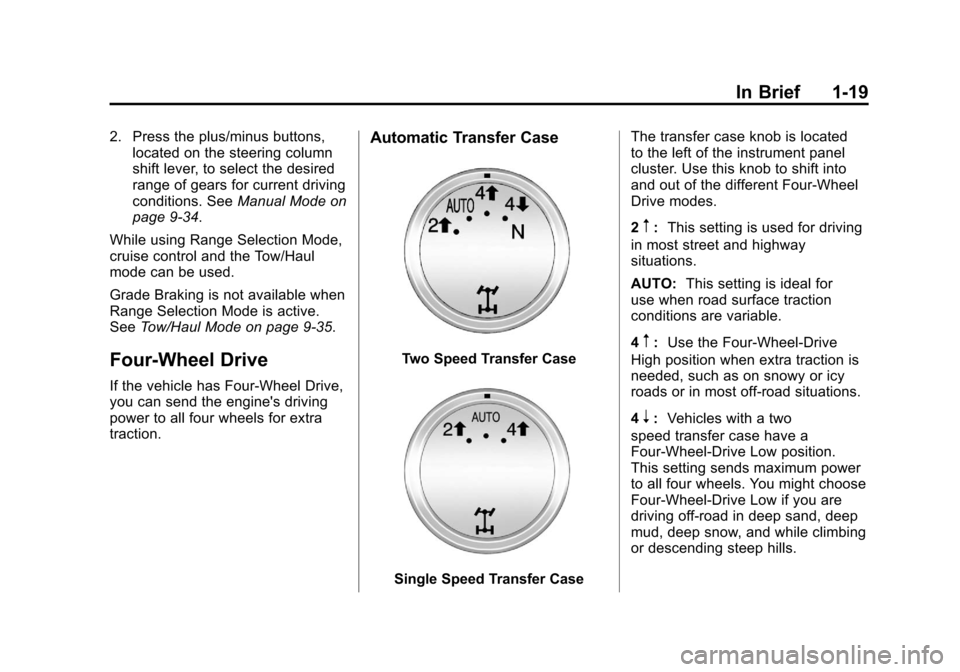
Automatic Transfer Case
Two Speed Transfer Case
Single Speed Transfer Case The transfer case knob is located
to the left of the instrument panel
cluster. Use this knob to shift into
and out of the different Four-Wheel
Drive modes.
2
m:
This setting is used for driving
in most street and highway
situations.
AUTO: This setting is ideal for
use when road surface traction
conditions are variable.
4
m: Use the Four-Wheel-Drive
High position when extra traction is
needed, such as on snowy or icy
roads or in most off-road situations.
4
n: Vehicles with a two
speed transfer case have a
Four-Wheel-Drive Low position.
This setting sends maximum power
to all four wheels. You might choose
Four-Wheel-Drive Low if you are
driving off-road in deep sand, deep
mud, deep snow, and while climbing
or descending steep hills.
Page 27 of 514
Black plate (21,1)Chevrolet Tahoe/Suburban Owner Manual - 2012
In Brief 1-21
©SEEK or¨SEEK:Seek or scan
stations.
4: Press to switch the display
between the radio station frequency
and the time. While the ignition is
off, press this button to display the
time. Press to display additional text
information related to the current
FM-RDS or XM station; or CD, MP3,
or WMA song. If information is
available during XM, CD, MP3,
or WMA playback, the song title
information displays on the top line
of the display and artist information
displays on the bottom line. When
information is not available, “NO
INFO” displays.
For more information about these
and other radio features, see
Operation on page 7‑3. For vehicles with a Rear Seat
Entertainment System (RSE) and
Rear Seat Audio System (RSA), see
Rear Seat Entertainment (RSE)
System on page 7‑35
andRear
Seat Audio (RSA) System on
page 7‑45 for more information.
Storing Radio Stations
A maximum of 36 stations can
be stored as favorites using the
six softkeys located below the radio
station frequency tabs and by using
the radio FAV button. Press FAV
to go through up to six pages of
favorites, each having six favorite
stations available per page. Each
page of favorites can contain any
combination of AM, FM, or XM
stations.
For more information, see “Storing
Radio Stations” inAM-FM Radio on
page 7‑8.
Setting the Clock
To set the time and date:
1. Turn the ignition key to ACC/ ACCESSORY or ON/RUN, then
press
O, to turn the radio on.
2. Press
Hto display HR, MIN,
MM, DD, and YYYY (hour,
minute, month, day, and year).
3. Press the softkey located under any one of the labels to be
changed.
4. To increase or decrease the time or date, turn
fclockwise or
counter‐clockwise.
For detailed instructions on setting
the clock for the vehicle's specific
audio system, see Clock on
page 5‑8.
Page 28 of 514
Black plate (22,1)Chevrolet Tahoe/Suburban Owner Manual - 2012
1-22 In Brief
Satellite Radio
XM is a satellite radio service
based in the 48 contiguous
United States and 10 Canadian
provinces. XM satellite radio has a
wide variety of programming and
commercial-free music, coast to
coast, and in digital-quality sound.
A fee is required to receive the
XM service.
For more information, refer to:
.www.xmradio.com or call
1-800-929-2100 (U.S.)
.www.xmradio.ca or call
1-877-438-9677 (Canada)
See Satellite Radio on page 7‑9.
Portable Audio Devices
This vehicle has an auxiliary input,
located on the audio faceplate,
and a USB port located on the
instrument panel or in the center
console. External devices such
as iPod
®, laptop computers,
MP3 players, CD changers, USB storage device, etc. can be
connected to the auxiliary port
using a 3.5 mm (1/8 in) input jack
or the USB port depending on the
audio system.
See
Auxiliary Devices on page 7‑30
for further information.
Bluetooth®
For vehicles with a Bluetooth
system, it allows users with a
Bluetooth‐enabled cell phone to
make and receive hands-free calls
using the vehicle’ s audio system
and controls.
The Bluetooth‐enabled cell phone
must be paired with the Bluetooth
system before it can be used in the
vehicle. Not all phones will support
all functions. For more information,
visit www.gm.com/bluetooth.
For more information, see Bluetooth
on page 7‑47.
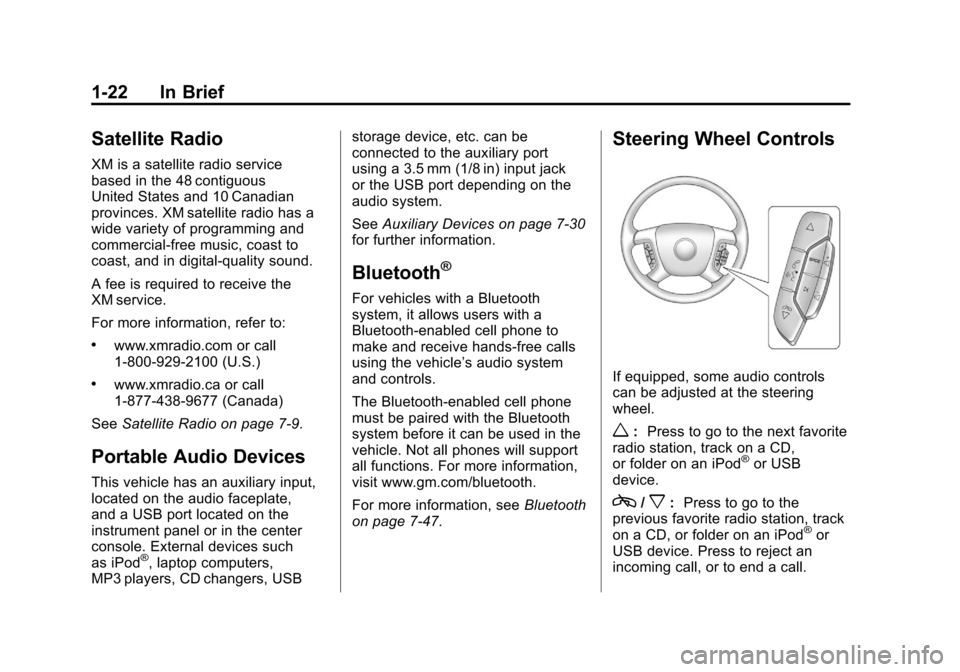
Steering Wheel Controls
If equipped, some audio controls
can be adjusted at the steering
wheel.
w: Press to go to the next favorite
radio station, track on a CD,
or folder on an iPod
®or USB
device.
c/x: Press to go to the
previous favorite radio station, track
on a CD, or folder on an iPod
®or
USB device. Press to reject an
incoming call, or to end a call.
Page 33 of 514
Black plate (27,1)Chevrolet Tahoe/Suburban Owner Manual - 2012
In Brief 1-27
During cooler conditions, the low tire
pressure warning light may appear
when the vehicle is first started and
then turn off. This may be an early
indicator that the tire pressures are
getting low and the tires need to be
inflated to the proper pressure.
The TPMS does not replace normal
monthly tire maintenance. It is the
driver’s responsibility to maintain
correct tire pressures.
See Tire Pressure Monitor System
on page 10‑53.
Engine Oil Life System
The engine oil life system calculates
engine oil life based on vehicle use
and, on most vehicles, displays a
DIC message when it is necessary
to change the engine oil and filter.
The oil life system should be reset
to 100% only following an oil
change. Resetting the Oil Life System
To reset the Engine Oil Life System
on most vehicles:
1. Display OIL LIFE REMAINING
on the DIC. If the vehicle does
not have DIC buttons, the
vehicle must be in P (Park) to
access this display.
2. Press and hold the SET/RESET button on the DIC, or the trip
odometer reset stem if the
vehicle does not have DIC
buttons, for more than
five seconds. The oil life will
change to 100%.
On all vehicles, the Engine Oil Life
System can be reset as follows:
1. Turn the ignition to ON/RUN with the engine off.
2. Fully press the accelerator pedal slowly three times within
five seconds.
3. Display OIL LIFE REMAINING on the DIC. If the display
shows 100%, the system is
reset. See
Engine Oil Life System on
page 10‑9.
Fuel E85 (85% Ethanol)
Vehicles that have a FlexFuel badge
and a yellow fuel cap can use either
unleaded gasoline or ethanol fuel
containing up to 85% ethanol (E85).
See Fuel E85 (85% Ethanol) on
page 9‑62. For all other vehicles,
use only the unleaded gasoline
described under Recommended
Fuel on page 9‑60.
Driving for Better Fuel
Economy
Driving habits can affect fuel
mileage. Here are some driving
tips to get the best fuel economy
possible.
.Avoid fast starts and accelerate
smoothly.
.Brake gradually and avoid
abrupt stops.
.Avoid idling the engine for long
periods of time.
Page 34 of 514
Black plate (28,1)Chevrolet Tahoe/Suburban Owner Manual - 2012
1-28 In Brief
.When road and weather
conditions are appropriate,
use cruise control.
.Always follow posted speed
limits or drive more slowly when
conditions require.
.Keep vehicle tires properly
inflated.
.Combine several trips into a
single trip.
.Replace the vehicle's tires with
the same TPC Spec number
molded into the tire's sidewall
near the size.
.Follow recommended scheduled
maintenance.
Roadside Assistance
Program
U.S.:1-800-243-8872
TTY Users (U.S.): 1-888-889-2438
Canada: 1-800-268-6800
Mexico: 01-800-466-0800
As the owner of a new Chevrolet,
you are automatically enrolled in the
Roadside Assistance program.
See Roadside Assistance Program
(U.S. and Canada) on page 13‑7
or Roadside Assistance Program
(Mexico) on page 13‑9 for more
information.
Roadside Assistance and OnStar
(U.S. and Canada)
If you have an active OnStar
subscription, press the
Qbutton
and the current GPS location will
be sent to an OnStar advisor who
will assess your problem, contact
Roadside Assistance, and relay
your exact location to get the help
you need. Online Owner Center
(U.S. and Canada)
The Online Owner Center is
a complimentary service that
includes online service reminders,
vehicle maintenance tips, online
owner manual, special privileges,
and more.
Sign up today at:
www.chevyownercenter.com
(U.S.) or
www.gm.ca (Canada).
OnStar®
If equipped, this vehicle has
a comprehensive, in-vehicle
system that can connect to a live
Advisor for Emergency, Security,
Navigation, Connection, and
Diagnostic Services. See OnStar
Overview on page 14‑1 for more
information.
Page 37 of 514
Black plate (3,1)Chevrolet Tahoe/Suburban Owner Manual - 2012
Keys, Doors, and Windows 2-3
If there is a decrease in the RKE
operating range:
.Check the distance. The
transmitter may be too far from
the vehicle.
.Check the location. Other
vehicles or objects may be
blocking the signal.
.Check the transmitter's battery.
See“Battery Replacement” later
in this section.
.If the transmitter is still not
working correctly, see your
dealer or a qualified technician
for service.
Remote Keyless Entry
(RKE) System Operation
The Remote Keyless Entry (RKE)
transmitter functions work up to
60 m (195 ft) away from the vehicle.
There are other conditions which
can affect the performance of the
transmitter. See Remote Keyless
Entry (RKE) System on page 2‑2.
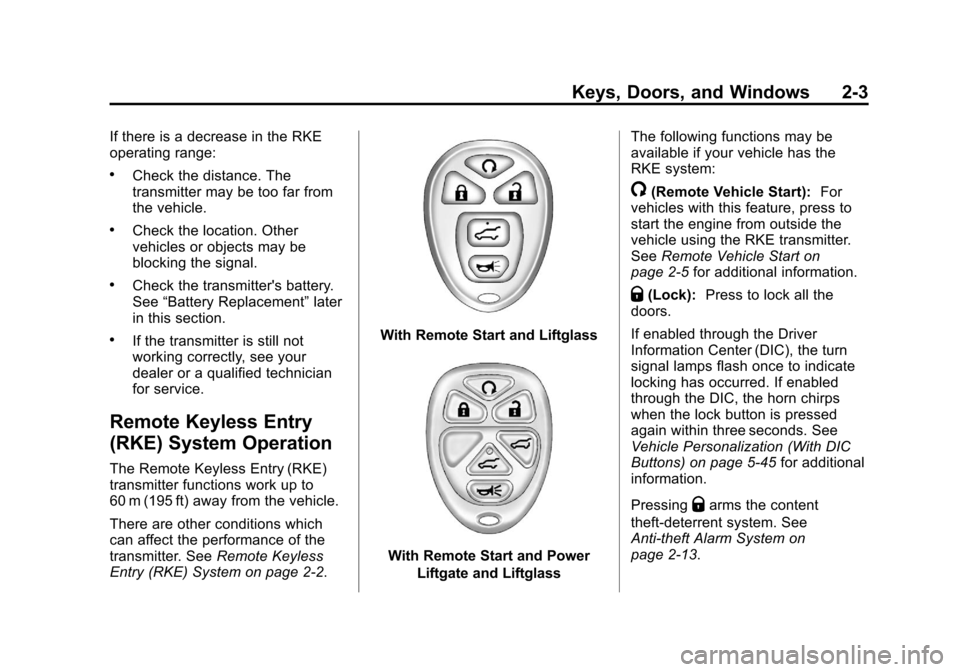
With Remote Start and Liftglass
With Remote Start and Power
Liftgate and Liftglass The following functions may be
available if your vehicle has the
RKE system:
/(Remote Vehicle Start):
For
vehicles with this feature, press to
start the engine from outside the
vehicle using the RKE transmitter.
See Remote Vehicle Start on
page 2‑5 for additional information.
Q(Lock):Press to lock all the
doors.
If enabled through the Driver
Information Center (DIC), the turn
signal lamps flash once to indicate
locking has occurred. If enabled
through the DIC, the horn chirps
when the lock button is pressed
again within three seconds. See
Vehicle Personalization (With DIC
Buttons) on page 5‑45 for additional
information.
Pressing
Qarms the content
theft‐deterrent system. See
Anti-theft Alarm System on
page 2‑13.