2012 CHEVROLET SILVERADO drain
[x] Cancel search: drainPage 63 of 584
Black plate (21,1)Chevrolet Silverado Owner Manual - 2012
Keys, Doors, and Windows 2-21
Vent:From the closed position,
press and hold the rear of the switch
to vent the sunroof. To close the
sunroof, press and hold the front of
the switch.
Open: From the vent position,
the sunroof can be fully opened
either manually or by using the
express-open feature. To open
manually, press the rear of the
switch to the first detent and hold
until the sunroof has reached the
desired position. To open using
express-open, press the rear of the
switch to the second detent and
release. The sunroof will move to
the full open position. To stop the
sunroof partway, press the switch a
second time. Close:
From the vent, or open
position, press and hold the front of
the switch to close the sunroof.
The sunroof also has a roller
sunshade that can be used to
block the rays of the sun. The roller
sunshade can be manually operated
with the sunroof in an open or
closed position. To open the
sunshade, press and unlatch it, and
roll it back. To close, pull it forward
and latch it into the closed position.
When the sunroof is opened, an air
deflector will automatically raise.
The air deflector will retract when
the sunroof is closed.
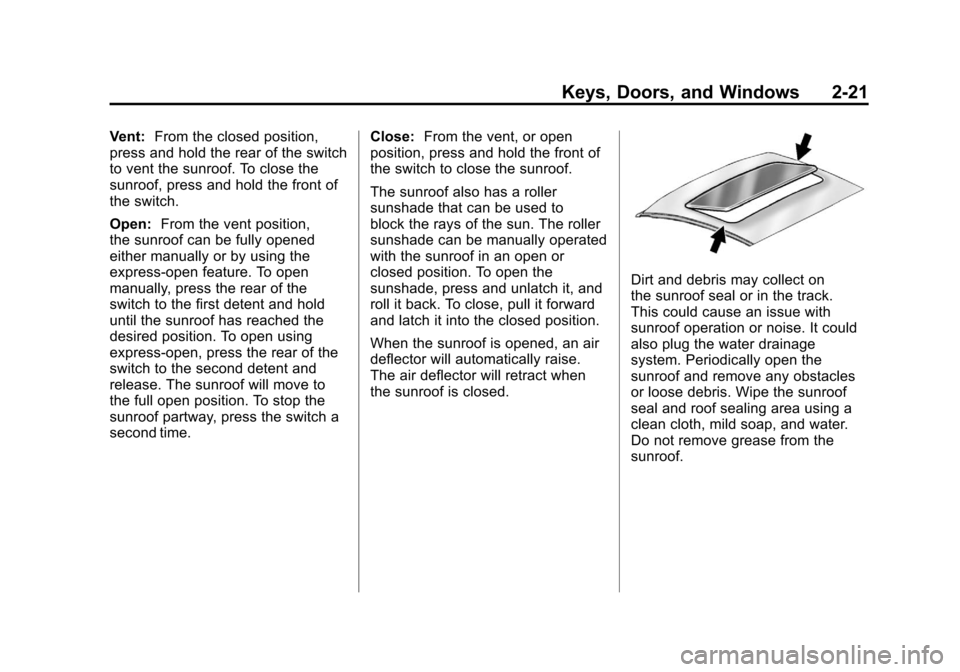
Dirt and debris may collect on
the sunroof seal or in the track.
This could cause an issue with
sunroof operation or noise. It could
also plug the water drainage
system. Periodically open the
sunroof and remove any obstacles
or loose debris. Wipe the sunroof
seal and roof sealing area using a
clean cloth, mild soap, and water.
Do not remove grease from the
sunroof.
Page 64 of 584
Black plate (22,1)Chevrolet Silverado Owner Manual - 2012
2-22 Keys, Doors, and Windows
Sunroof (Crew Cab)
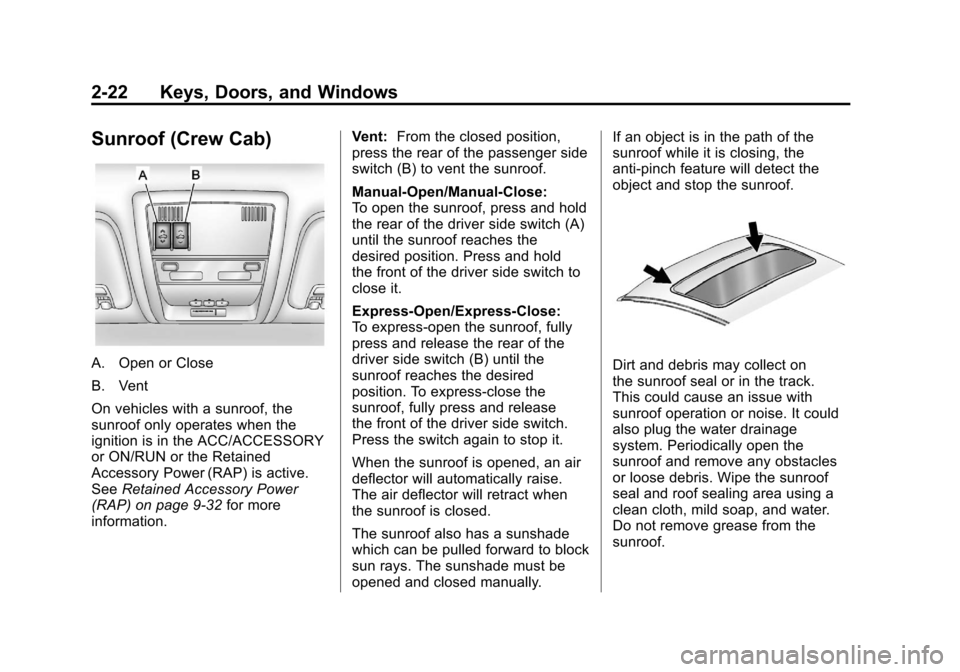
A. Open or Close
B. Vent
On vehicles with a sunroof, the
sunroof only operates when the
ignition is in the ACC/ACCESSORY
or ON/RUN or the Retained
Accessory Power (RAP) is active.
SeeRetained Accessory Power
(RAP) on page 9‑32 for more
information. Vent:
From the closed position,
press the rear of the passenger side
switch (B) to vent the sunroof.
Manual-Open/Manual-Close:
To open the sunroof, press and hold
the rear of the driver side switch (A)
until the sunroof reaches the
desired position. Press and hold
the front of the driver side switch to
close it.
Express-Open/Express-Close:
To express-open the sunroof, fully
press and release the rear of the
driver side switch (B) until the
sunroof reaches the desired
position. To express-close the
sunroof, fully press and release
the front of the driver side switch.
Press the switch again to stop it.
When the sunroof is opened, an air
deflector will automatically raise.
The air deflector will retract when
the sunroof is closed.
The sunroof also has a sunshade
which can be pulled forward to block
sun rays. The sunshade must be
opened and closed manually. If an object is in the path of the
sunroof while it is closing, the
anti-pinch feature will detect the
object and stop the sunroof.Dirt and debris may collect on
the sunroof seal or in the track.
This could cause an issue with
sunroof operation or noise. It could
also plug the water drainage
system. Periodically open the
sunroof and remove any obstacles
or loose debris. Wipe the sunroof
seal and roof sealing area using a
clean cloth, mild soap, and water.
Do not remove grease from the
sunroof.
Page 149 of 584

Black plate (11,1)Chevrolet Silverado Owner Manual - 2012
Instruments and Controls 5-11
The accessory power outlets are
powered, even when the ignition is
in LOCK/OFF. Continuing to use
power outlets while the ignition is in
LOCK/OFF may cause the vehicle's
battery to run down.
{WARNING
Power is always supplied to the
outlets. Do not leave electrical
equipment plugged in when the
vehicle is not in use because the
vehicle could catch fire and cause
injury or death.
Notice: Leaving electrical
equipment plugged in for an
extended period of time while
the vehicle is off will drain the
battery. Always unplug electrical
equipment when not in use and
do not plug in equipment that
exceeds the maximum 20 ampere
rating. Certain power accessory plugs may
not be compatible to the accessory
power outlet and could overload
vehicle or adapter fuses. If a
problem is experienced, see your
dealer.
When adding electrical equipment,
be sure to follow the proper
installation instructions included
with the equipment. See
Add-On
Electrical Equipment on page 9‑115.
Notice: Hanging heavy
equipment from the power
outlet can cause damage not
covered by the vehicle warranty.
The power outlets are designed
for accessory power plugs only,
such as cell phone charge cords.
Cigarette Lighter
To use the cigarette lighter,
push it in all the way, and let go.
When it is ready for use, the lighter
pops back out.
Notice: Holding a cigarette lighter
in while it is heating does not let
the lighter back away from the
heating element when it is hot.
Damage from overheating can
occur to the lighter or heating
element, or a fuse could be
blown. Do not hold a cigarette
lighter in while it is heating.
Page 180 of 584
Black plate (42,1)Chevrolet Silverado Owner Manual - 2012
5-42 Instruments and Controls
Vehicle Messages
Messages displayed on the DIC
indicate the status of the vehicle or
some action may be needed to
correct a condition. Multiple
messages may appear one after
another.
The messages that do not
require immediate action can be
acknowledged and cleared by
pressing
V(Set/Reset) or the trip
odometer reset stem.
The messages that require
immediate action cannot be cleared
until that action is performed.
All messages should be taken
seriously and clearing the message
does not correct the problem.
The following are the possible
messages and some information
about them.
If the vehicle has a diesel engine,
see the Duramax
®diesel
supplement for more information.
Battery Voltage and
Charging Messages
BATTERY LOW START
VEHICLE
When the vehicle’ s battery is
severely discharged, this message
will display and four chimes
will sound. Start the vehicle
immediately. If the vehicle is not
started and the battery continues to
discharge, the climate controls,
heated seats, and audio systems
will shut off and the vehicle may
require a jump start. These systems
will function again after the vehicle
is started.
SERVICE BATTERY
CHARGING SYSTEM
On some vehicles, this message
displays if there is a problem with
the battery charging system.
Under certain conditions, the
charging system light may also turn
on in the instrument panel cluster. See
Charging System Light on
page 5‑23. Driving with this problem
could drain the battery. Turn off all
unnecessary accessories. Have the
electrical system checked as soon
as possible. See your dealer.
Brake System Messages
SERVICE BRAKE SYSTEM
This message displays along with
the brake system warning light if
there is a problem with the brake
system. See Brake System Warning
Light on page 5‑26. If this message
appears, stop as soon as possible
and turn off the vehicle. Restart the
vehicle and check for the message
on the DIC display. If the message
is still displayed or appears again
when you begin driving, the brake
system needs service as soon as
possible. See your dealer.
Page 190 of 584

Black plate (52,1)Chevrolet Silverado Owner Manual - 2012
5-52 Instruments and Controls
Vehicle
Personalization
Vehicle Personalization
(With DIC Buttons)
The vehicle may have customization
capabilities that allow you to
program certain features to one
preferred setting. Customization
features can only be programmed to
one setting on the vehicle and
cannot be programmed to a
preferred setting for two different
drivers.
All of the customization options
may not be available on the vehicle.
Only the options available will be
displayed on the DIC.The default settings for the
customization features were set
when the vehicle left the factory, but
may have been changed from their
default state since then.
The customization preferences
are automatically recalled.
To change customization
preferences, use the following
procedure.
Entering the Feature
Settings Menu
1. Turn the ignition on and place
the vehicle in P (Park).
To avoid excessive drain on the
battery, turn the headlamps off.
2. Press the customization button to scroll through the available
customizable options.
Feature Settings Menu Items
The following customization features
allow you to program settings to the
vehicle:
DISPLAY IN ENGLISH
This feature will only display if a
language other than English has
been set. This feature allows you to
change the language in which the
DIC messages appear to English.
Press the customization button
until the PRESS
VTO DISPLAY IN
ENGLISH screen appears on the
DIC display. Press the set/reset
button once to display all DIC
messages in English.
DISPLAY LANGUAGE
This feature allows you to select
the language in which the DIC
messages will appear.
Page 206 of 584
Black plate (2,1)Chevrolet Silverado Owner Manual - 2012
6-2 Lighting
The exterior lamps control has four
positions:
O(Off):Turns off the automatic
headlamps and Daytime Running
Lamps (DRL). Turn the headlamp
control to the off position again to
turn the automatic headlamps or
DRL back on.
For vehicles first sold in Canada,
the off position will only work when
the vehicle is shifted into P (Park).
AUTO (Automatic): Automatically
turns on the headlamps at normal
brightness, together with the
following:
.Parking Lamps
.Instrument Panel Lights
.Taillamps
.License Plate Lamps
.Roof Marker Lamps
(If Equipped) When the vehicle is turned off and
the headlamps are in AUTO, the
headlamps may automatically
remain on for a set time. The time of
the delay can be changed using the
DIC. See
Driver Information Center
(DIC) on page 5‑32
;(Parking Lamps): Turns on
the parking lamps together with the
following:
.Instrument Panel Lights
.Taillamps
.License Plate Lamps
.Roof Marker Lamps
(If Equipped)
2(Headlamps): Turns on the
headlamps together with the
following:
.Parking Lamps
.Instrument Panel Lights
.Taillamps
.License Plate Lamps
.Roof Marker Lamps
(If Equipped)
When the headlamps are turned
on while the vehicle is on, the
headlamps turn off automatically
10 minutes after the ignition is
turned off. When the headlamps are
turned on while the vehicle is off,
the headlamps will stay on for
10 minutes before automatically
turning off to prevent the battery
from being drained. Turn the
headlamp control to off and then
back to the headlamp on position to
make the headlamps stay on for an
additional 10 minutes.
Push the turn signal/multifunction
lever toward the instrument panel to
change the headlamps from low
beam to high beam.
Page 315 of 584
Black plate (29,1)Chevrolet Silverado Owner Manual - 2012
Driving and Operating 9-29
The switch stays in this position
when the engine is running.
The transmission is also unlocked
in this position on automatic
transmission vehicles.
If you leave the key in the ACC/
ACCESSORY or ON/RUN position
with the engine off, the battery could
be drained. You may not be able to
start the vehicle if the battery is
allowed to drain for an extended
period of time.
D (START):This is the position that
starts the engine. When the engine
starts, release the key. The ignition
switch returns to ON/RUN for
driving.
If the vehicle is equipped with a
radio, a warning tone will sound
when the driver door is opened, the
ignition is in ACC/ACCESSORY or
LOCK/OFF and the key is in the
ignition.Starting the Engine
If the vehicle has a diesel engine,
see the Duramax diesel supplement
for more information.
If the vehicle is a hybrid, see the
hybrid supplement for more
information.
Notice: The engine is designed
to work with the electronics in
the vehicle. If you add electrical
parts or accessories, you could
change the way the engine
operates. Before adding electrical
equipment, check with your
dealer. If you do not, the engine
might not perform properly. Any
resulting damage would not be
covered by the vehicle warranty.
Place the transmission in the
proper gear.
Automatic Transmission
Move the shift lever to P (Park) or
N (Neutral). The engine will not start
in any other position. To restart the
engine when the vehicle is already
moving, use N (Neutral) only.
Notice: Do not try to shift to
P (Park) if the vehicle is moving.
If you do, you could damage the
transmission. Shift to P (Park)
only when the vehicle is stopped.
Manual Transmission
The shift lever should be in
N (Neutral) and the parking brake
engaged. Hold the clutch pedal
down to the floor and start the
engine. The vehicle will not start
if the clutch pedal is not all the
way down.
Page 316 of 584
Black plate (30,1)Chevrolet Silverado Owner Manual - 2012
9-30 Driving and Operating
Starting Procedure
1. With your foot off the acceleratorpedal, turn the ignition key to
START. When the engine starts,
let go of the key. The idle speed
will go down as your engine gets
warm. Do not race the engine
immediately after starting it.
Operate the engine and
transmission gently to allow the
oil to warm up and lubricate all
moving parts.
The vehicle has a Computer-
Controlled Cranking System.
This feature assists in starting
the engine and protects
components. If the ignition key is
turned to the START position,
and then released when the
engine begins cranking, the
engine will continue cranking
for a few seconds or until the
vehicle starts. If the engine does
not start and the key is held in
START for many seconds, cranking will be stopped after
15 seconds to prevent cranking
motor damage. To prevent gear
damage, this system also
prevents cranking if the engine
is already running. Engine
cranking can be stopped by
turning the ignition switch to
the ACC/ACCESSORY or
LOCK/OFF position.
When the Low Fuel warning
lamp is on and the FUEL LEVEL
LOW message is displayed in
the Driver Information Center
(DIC), the Computer‐Controlled
Cranking System is disabled
to prevent possible vehicle
component damage. When this
happens, hold the ignition switch
in the START position to
continue engine cranking.
Notice: Cranking the engine for
long periods of time, by returning
the key to the START position
immediately after cranking has
ended, can overheat and damage the cranking motor, and drain the
battery. Wait at least 15 seconds
between each try, to let the
cranking motor cool down.
2. If the engine does not start
after 5‐10 seconds, especially
in very cold weather (below
−18°C or 0°F), it could be
flooded with too much gasoline.
Try pushing the accelerator
pedal all the way to the floor
and holding it there as you hold
the key in START for up to
15 seconds. Wait at least
15 seconds between each try, to
allow the cranking motor to cool
down. When the engine starts,
let go of the key and accelerator.
If the vehicle starts briefly but
then stops again, do the same
thing. This clears the extra
gasoline from the engine. Do not
race the engine immediately
after starting it. Operate the
engine and transmission gently
until the oil warms up and
lubricates all moving parts.