2012 CHEVROLET SILVERADO radio
[x] Cancel search: radioPage 219 of 584
Black plate (5,1)Chevrolet Silverado Owner Manual - 2012
Infotainment System 7-5
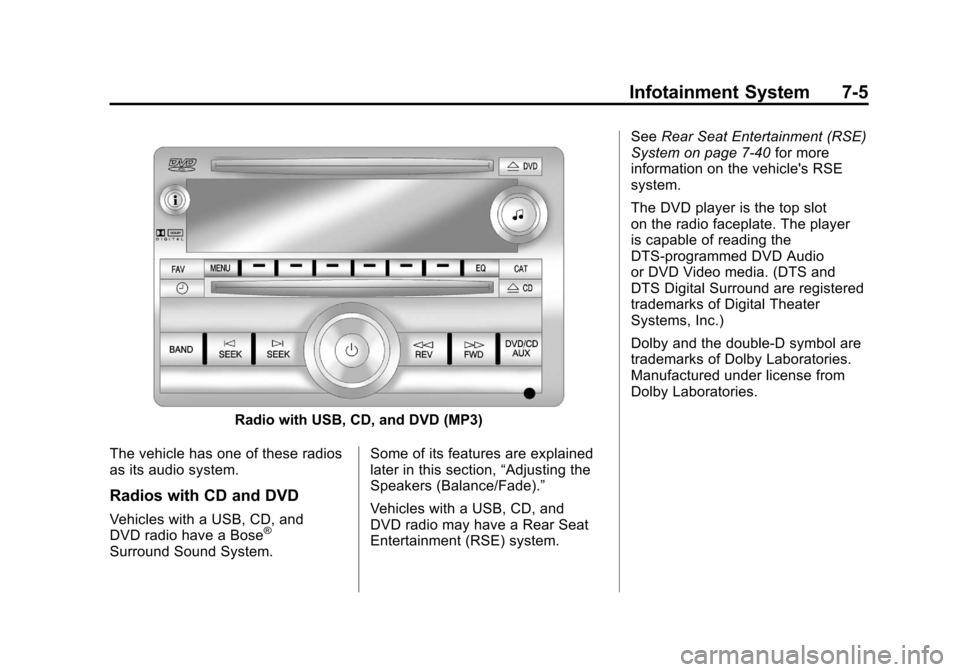
Radio with USB, CD, and DVD (MP3)
The vehicle has one of these radios
as its audio system.
Radios with CD and DVD
Vehicles with a USB, CD, and
DVD radio have a Bose®
Surround Sound System. Some of its features are explained
later in this section,
“Adjusting the
Speakers (Balance/Fade).”
Vehicles with a USB, CD, and
DVD radio may have a Rear Seat
Entertainment (RSE) system. See
Rear Seat Entertainment (RSE)
System on page 7‑40 for more
information on the vehicle's RSE
system.
The DVD player is the top slot
on the radio faceplate. The player
is capable of reading the
DTS‐programmed DVD Audio
or DVD Video media. (DTS and
DTS Digital Surround are registered
trademarks of Digital Theater
Systems, Inc.)
Dolby and the double-D symbol are
trademarks of Dolby Laboratories.
Manufactured under license from
Dolby Laboratories.
Page 220 of 584
Black plate (6,1)Chevrolet Silverado Owner Manual - 2012
7-6 Infotainment System
Using the Radio
O(Power/Volume):Press to turn
the system on and off.
Turn clockwise or counterclockwise
to increase or decrease the volume.
4(Information) (AM-FM Radio and
AM-FM Radio with CD): Press to
switch the display between the radio
station frequency and the time.
While the ignition is off, press this
button to display the time. Press to
display additional text information
related to the current FM-RDS or
XM station; or CD, MP3, or WMA
song. If information is available
during XM, CD, MP3, or WMA
playback, the song title information
displays on the top line of the
display and artist information
displays on the bottom line.
When information is not available,
“NO INFO” displays. Speed Compensated Volume
(SCV):
Radios with Speed
Compensated Volume (SCV)
automatically adjust the radio
volume to compensate for road and
wind noise as the vehicle's speed
changes while driving, so that the
volume level stays consistent.
To activate SCV:
1. Set the radio volume to the desired level.
2. Press the MENU button to display the radio setup menu.
3. Press the softkey under the AUTO VOLUM (automatic
volume) tab on the radio display.
4. Press the softkey under the desired Speed Compensated
Volume setting (OFF, Low, Med,
or High) to select the level of
radio volume compensation.
The display times out after
approximately 10 seconds. Each
higher setting allows for more
radio volume compensation at
faster vehicle speeds.
Setting the Tone (Bass/Treble)
(AM-FM Radio and AM-FM
Radio with CD)
To adjust the bass or treble:
1. Press the
fknob until Bass or
Treble displays.
2. To adjust the setting, do one of the following:
.Turn thefknob.
.Press either¨SEEK,
or
©SEEK.
.Press either\FWD,
or
sREV.
EQ (Equalization): Press this
button to choose bass and treble
equalization settings designed for
different types of music. Selecting
MANUAL, or changing bass or
treble, returns the EQ to the manual
bass and treble settings.
Unique EQ settings can be saved
for each source.
Page 221 of 584
Black plate (7,1)Chevrolet Silverado Owner Manual - 2012
Infotainment System 7-7
Setting the Tone
(Bass/Midrange/Treble)
(All Except AM-FM Radio
and Radio with CD)
BASS/MID/TREB (Bass, Midrange,
or Treble):To adjust the bass,
midrange, or treble:
1. Press the
fknob until the tone
control tabs display.
2. Highlight the desired tone control tab by doing one of the
following:
.Press thefknob.
.Press the softkey under the
desired tab.
3. Adjust the setting by doing one of the following:
.Turn thefknob clockwise
or counterclockwise.
.Press the¨SEEK,
or
©SEEK.
.Press the\FWD,
or
sREV. If a station's frequency is weak or if
there is static, decrease the treble.
To quickly adjust bass, midrange,
or treble to the middle position,
press the softkey positioned under
the BASS, MID, or TREB tab for
more than two seconds. A beep
sounds and the level adjusts to the
middle position.
To quickly adjust all tone and
speaker controls to the middle
position, press the
fknob for more
than two seconds until a beep
sounds.
EQ (Equalization): Press this
button to choose bass and treble
equalization settings designed for
different types of music. Selecting
MANUAL, or changing bass or
treble, returns the EQ to the manual
bass and treble settings.
Unique EQ settings can be saved
for each source.
If the radio has a Bose
®audio
system, the EQ settings are either
MANUAL or TALK.
Adjusting the Speakers
(Balance/Fade) (AM-FM Radio
and AM-FM Radio with CD)
To adjust the balance or fade:
1. Press
`or press thefknob
until the speaker control label
displays.
2. To adjust the setting, do one of the following:
.Turn thefknob.
.Press either¨SEEK,
or
©SEEK.
.Press either\FWD,
or
sREV.
Page 222 of 584
Black plate (8,1)Chevrolet Silverado Owner Manual - 2012
7-8 Infotainment System
Adjusting the Speakers
(Balance/Fade) (All Except
AM-FM Radio and Radio
with CD)
BAL/FADE (Balance/Fade):
To adjust the balance or fade:
1. Press the
fknob until the
speaker control tabs display.
2. Highlight the desired speaker control tab by doing one of the
following:
.Press thefknob..Press the softkey under the
desired tab.
3. Adjust the setting by doing one of the following:
.Turn thefknob clockwise
or counterclockwise.
.Press the¨SEEK,
or
©SEEK.
.Press the\FWD,
or
sREV. To quickly adjust all speaker and
tone controls to the middle position,
press the
fknob for more than
two seconds.
If the Rear Seat Audio (RSA) is
turned on, the radio disables FADE
and mutes the rear speakers.
Radio Messages
Calibration Error: The audio
system has been calibrated for
the vehicle from the factory.
If Calibration Error displays, it
means that the radio has not been
configured properly for the vehicle
and it must be returned to your
dealer for service.
Locked or Loc: One of these
messages will display when the
THEFTLOCK
®system has locked
up the radio. Take the vehicle to
your dealer for service.
If any error occurs repeatedly or
if an error cannot be corrected,
contact your dealer.
Radio
AM-FM Radio
Radio Data System (RDS)
For radios with the Radio Data
System (RDS) feature, it only works
with FM stations that broadcast
RDS information. This system relies
upon receiving specific information
from these stations and only works
when the information is available.
While the radio is tuned to an
FM-RDS station, the station name
or call letters will display. In rare
cases, a radio station could
broadcast incorrect information that
causes the radio features to work
improperly. If this happens, contact
the radio station.
4(Information) (RDS Features):
For vehicles with RDS features,
press
4to display additional text
information related to the current
FM-RDS station. If information is
available, the song title information
displays on the top line of the
Page 223 of 584
Black plate (9,1)Chevrolet Silverado Owner Manual - 2012
Infotainment System 7-9
display and artist information
displays on the bottom line.
When information is not available,
“NO INFO”displays.
Finding a Station
BAND:Press to switch between
AM, FM, or XM™, if equipped.
f(Tune): Turn to manually select
radio stations.
©SEEK: Press to seek the
previous radio station. Press and
hold for a few seconds until a
beep sounds to scan for radio
stations in descending order; press
the
©SEEK button again to stop
scanning radio stations. The radio
only seeks and scans stations
with a strong signal that are in the
selected band.
For the AM-FM Radio, press and
hold the
©SEEK for four seconds
until a double beep sounds to scan
the preset stations. The station
frequency flashes while the radio is
in the scan mode.
¨SEEK: Press to seek the next
radio station. Press and hold for a
few seconds until a beep sounds to
scan for radio stations in ascending
order; press the
¨SEEK button
again to stop scanning radio
stations. The radio only seeks and
scans stations with a strong signal
that are in the selected band.
For the AM-FM Radio, press and
hold the
¨SEEK for four seconds
until a double beep sounds to scan
the preset stations. The station
frequency flashes while the radio is
in the scan mode.
sREV: Press to manually tune to
a radio station in descending order.
\FWD: Press to manually tune to
a radio station in ascending order.
FAV (Favorites): Press to select
different favorites pages for stored
radio stations.
Storing Radio Stations
Drivers are encouraged to store the
radio station while the vehicle is
parked; see Defensive Driving on
page 9‑3. Tune to stored radio
stations using the presets, favorites
button, and steering wheel controls,
if the vehicle has this feature.
Radios that have a FAV button store
radio stations as favorites. Up to
36 stations can be programmed as
favorites using the six softkeys
below the radio station frequency
tabs and by using the FAV button.
Press the FAV button to go through
up to six pages of favorites, each
having six favorite stations available
per page. Each page of favorites
can contain any combination of AM,
FM, or XM, if equipped, stations.
Radios that do not have a FAV
button store radio stations as
presets. Up to 18 stations
(6 FM1, 6 FM2, and 6 AM),
can be programmed on the
six numbered pushbuttons.
Page 224 of 584
Black plate (10,1)Chevrolet Silverado Owner Manual - 2012
7-10 Infotainment System
Setting Preset Stations
To store presets:
1. Tune to a radio station.
2. Press and hold one of thesix numbered pushbuttons for
three seconds until a beep
sounds.
3. Repeat Steps 1 and 2 to store additional radio stations.
Storing a Radio Station as a
Favorite
To store a station as a favorite:
1. Tune to a radio station.
2. Press the FAV button to display the page where the station will
be stored.
3. Press and hold one of the six softkeys until a beep sounds.
4. Repeat Steps 1 through 3 to store additional radio stations. The number of favorites pages can
be set up using the MENU button.
To set up the number of favorites
pages:
1. Press the MENU button.
2. Press the softkey located below
the FAV 1-6 tab.
3. Select the number of favorites pages by pressing the softkey
located below the displayed
page numbers.
4. Press the FAV button, or let the menu time out, to return to the
original main radio screen
showing the radio station
frequency tabs and to begin
the process of programming
favorites.Satellite Radio
XM™ Satellite Radio Service
XM is a satellite radio service
based in the 48 contiguous
United States and 10 Canadian
provinces. XM Satellite Radio has a
wide variety of programming and
commercial-free music, coast to
coast, and in digital-quality sound.
A service fee is required to receive
the XM service. If the service needs
to be reactivated, the radio will
display “No Subscription Please
Renew on channel XM1.”
For more information, contact
XM at www.xmradio.com or
1-800-929-2100 in the U.S.,
and www.xmradio.ca or
1-877-438-9677 in Canada.
Page 225 of 584
Black plate (11,1)Chevrolet Silverado Owner Manual - 2012
Infotainment System 7-11
4(Information) (XM Satellite Radio
Service): For vehicles with XM,
press
4to display additional text
information related to the current
XM channel. If information is
available, the song title information
displays on the top line of the
display and artist information
displays on the bottom line.
When information is not available,
“NO INFO” displays.
Finding a Channel
BAND:Press to switch between
AM, FM, or XM™, if equipped.
f(Tune): Turn to manually select
an XM channel.
©SEEK: Press to go to the
previous XM channel.
¨SEEK: Press to go to the next
XM channel.
sREV: Press to go to the
previous XM category.
\FWD: Press to go to the next
XM category.
FAV (Favorites): Press to select
different favorites pages for stored
radio stations.
CAT (Category): The CAT button is
used to find XM channels when the
radio is in the XM mode.
Finding a Category (CAT)
Station
To find XM channels in a category:
1. Press the CAT button to display the category tabs. Continue
pressing the CAT button until the
desired category name displays.
.Radios with CD and DVD
can also navigate the
category list by pressing
the
\FWD or thesREV
buttons. 2. Press either of the two softkeys
below the desired category tab
to immediately tune to the first
XM station in that category.
To go to the previous or next XM
station in the selected category,
do one of the following:
.Turn thefknob.
.Press the softkey below
the right or left arrows in the
category tab.
.Press©SEEK or¨SEEK.
3. To exit the category search mode, press the FAV button or
BAND button to display the
favorites again.
Page 226 of 584
Black plate (12,1)Chevrolet Silverado Owner Manual - 2012
7-12 Infotainment System
Adding and Removing Categories
Categories cannot be added or
removed while the vehicle is moving
faster than 8 km/h (5 mph).
To add or remove a category:
1. Press the MENU button.
2. Press the softkey located belowthe XM CAT tab.
3. Turn the
fknob to display the
category to add or remove.
4. Press the softkey located under the Add or Remove tab.
To restore all removed
categories, press the softkey
under the Restore All tab.
5. Repeat the steps to remove more categories.
Storing XM Channels
Drivers are encouraged to store
XM channels while the vehicle is
parked; see Defensive Driving on
page 9‑3. Tune to stored radio
stations using the presets, favorites
button, and steering wheel controls,
if the vehicle has this feature.
Up to 36 stations can be
programmed as favorites using the
six softkeys below the radio station
frequency tabs and by using the
FAV button. Press the FAV button
to go through up to six pages of
favorites, each having six favorite
stations available per page. Each
page of favorites can contain any
combination of AM, FM, or XM,
if equipped, stations. Storing an XM Channel as a
Favorite
To store a station as a favorite:
1. Tune to an XM channel.
2. Press the FAV button to display
the page where the station will
be stored.
3. Press and hold one of the six softkeys until a beep sounds.
4. Repeat Steps 1 through 3 to store additional radio stations.
The number of favorites pages can
be set up using the MENU button.
To set up the number of favorites
pages:
1. Press the MENU button.
2. Press the softkey located below the FAV 1-6 tab.