2012 CHEVROLET SILVERADO change time
[x] Cancel search: change timePage 267 of 584
Black plate (53,1)Chevrolet Silverado Owner Manual - 2012
Infotainment System 7-53
When to Speak:A short tone
sounds after the system responds
indicating when it is waiting for a
voice command. Wait until the tone
and then speak.
How to Speak: Speak clearly in a
calm and natural voice.
Audio System
When using the in‐vehicle Bluetooth
system, sound comes through the
vehicle's front audio system
speakers and overrides the audio
system. Use the audio system
volume knob, during a call, to
change the volume level. The
adjusted volume level remains in
memory for later calls. To prevent
missed calls, a minimum volume
level is used if the volume is turned
down too low.
Bluetooth Controls
Use the buttons located on the
steering wheel to operate the
in‐vehicle Bluetooth system.
See Steering Wheel Controls on
page 5‑3 for more information.
b/g(Mute/Push To Talk):
Press to answer incoming calls,
confirm system information, and
start speech recognition.
c/x(End): Press to end a call,
reject a call, or cancel an operation.
Pairing
A Bluetooth enabled cell phone
must be paired to the Bluetooth
system and then connected to the
vehicle before it can be used. See
the cell phone manufacturer's user
guide for Bluetooth functions before
pairing the cell phone. If a Bluetooth
phone is not connected, calls will be
made using OnStar Hands‐Free
Calling, if equipped. See OnStar
Overview on page 14‑1 for more
information. Pairing Information
.A Bluetooth phone with MP3
capability cannot be paired to
the vehicle as a phone and an
MP3 player at the same time.
.Up to five cell phones can be
paired to the Bluetooth system.
.The pairing process is disabled
when the vehicle is moving.
.Pairing only needs to be
completed once, unless the
pairing information on the cell
phone changes or the cell phone
is deleted from the system.
.Only one paired cell phone can
be connected to the Bluetooth
system at a time.
.If multiple paired cell phones
are within range of the system,
the system connects to the first
available paired cell phone in the
order that they were first paired
to the system. To connect to a
different paired phone, see
“Connecting to a Different
Phone”
later in this section.
Page 269 of 584
Black plate (55,1)Chevrolet Silverado Owner Manual - 2012
Infotainment System 7-55
3. Say“Change phone.”
.If another cell phone is
found, the response will be
“
connected.”
.If another cell phone is not
found, the original phone
remains connected.
Storing and Deleting Phone
Numbers
The system can store up to
30 phone numbers as name tags in
the Hands‐Free Directory that is
shared between the Bluetooth and
OnStar systems, if equipped.
The following commands are used
to delete and store phone numbers.
Store:This command will store a
phone number, or a group of
numbers as a name tag.
Digit Store: This command allows
a phone number to be stored as a
name tag by entering the digits one
at a time. Delete:
This command is used to
delete individual name tags.
Delete All Name Tags: This
command deletes all stored name
tags in the Hands‐Free Calling
Directory and the OnStar
Turn‐by‐Turn Destinations
Directory, if equipped.
Using the “Store”Command
1. Press and hold
b/gfor
two seconds.
2. Say “Store.”
3. Say the phone number or group of numbers you want to store all
at once with no pauses, then
follow the directions given by the
system to save a name tag for
this number.
Using the “Digit Store” Command
If an unwanted number is
recognized by the system, say
“Clear” at any time to clear the
last number. To hear all of the numbers
recognized by the system,
say
“Verify” at any time.
1. Press and hold
b/gfor
two seconds.
2. Say “Digit Store.”
3. Say each digit, one at a time, that you want to store. After
each digit is entered, the system
repeats back the digit it heard
followed by a tone. After the
last digit has been entered, say
“Store,” and then follow the
directions given by the system to
save a name tag for this number.
Using the “Delete”Command
1. Press and hold
b/gfor
two seconds.
2. Say “Delete.”
3. Say the name tag you want to delete.
Page 270 of 584
Black plate (56,1)Chevrolet Silverado Owner Manual - 2012
7-56 Infotainment System
Using the“Delete All Name Tags”
Command
This command deletes all stored
name tags in the Hands‐Free
Calling Directory and the OnStar
Turn‐by‐Turn Destinations Directory,
if equipped.
To delete all name tags:
1. Press and hold
b/gfor
two seconds.
2. Say “Delete all name tags.”
Listing Stored Numbers
The list command will list all stored
numbers and name tags.
Using the “List”Command
1. Press and hold
b/gfor
two seconds.
2. Say “Directory.”
3. Say “Hands‐Free Calling.”
4. Say “List.”
Making a Call
Calls can be made using the
following commands.
Dial or Call: The dial or call
command can be used
interchangeably to dial a phone
number or a stored name tag.
Digit Dial: This command allows
a phone number to be dialed by
entering the digits one at a time.
Re‐dial: This command is used to
dial the last number used on the
cell phone.
Using the “Dial”or“Call”
Command
1. Press and hold
b/gfor
two seconds.
2. Say “Dial”or“Call.”
3. Say the entire number without pausing, or say the name tag.
Once connected, the person called
will be heard through the audio
speakers. Using the
“Digit Dial” Command
The digit dial command allows a
phone number to be dialed by
entering the digits one at a time.
After each digit is entered, the
system repeats back the digit it
heard followed by a tone.
If an unwanted number is
recognized by the system, say
“Clear” at any time to clear the
last number.
To hear all of the numbers
recognized by the system,
say “Verify” at any time.
1. Press and hold
b/gfor
two seconds.
2. Say “Digit Dial.”
3. Say each digit, one at a time, that you want to dial. After each
digit is entered, the system
repeats back the digit it heard
followed by a tone. After the
last digit has been entered,
say “Dial.”
Page 276 of 584

Black plate (2,1)Chevrolet Silverado Owner Manual - 2012
8-2 Climate Controls
Air Delivery Mode Control:Turn
clockwise or counterclockwise to
change the direction of the airflow
inside the vehicle. The knob can be
positioned between two modes to
select a combination of those
modes.
Select from the following:
H(Vent): Air is directed to the
instrument panel outlets.
)(Bi-Level): Air is divided
between the instrument panel and
floor outlets.
6(Floor): Air is directed to the
floor outlets, with some air directed
to the windshield and side window
outlets. In this mode, the system
automatically selects outside air.
Recirculation cannot be selected in
floor mode.
-(Defog): This mode clears the
windows of fog or moisture. Air is
directed to the windshield, floor
outlets, and side window vents.
0(Defrost): This mode removes
fog or frost from the windshield
more quickly. Air is directed to the
windshield and the side window
vents, with some air directed to
the floor vents. The system
automatically forces outside air
into the vehicle.
The recirculation mode cannot be
selected in the defog or defrost
mode. When either mode is
selected, the system runs the air
conditioning compressor, unless the
outside temperature is close to
freezing.
Do not drive the vehicle until all the
windows are clear.
:(Outside Air): Press to
turn the outside air mode on.
An indicator light comes on to
show that outside air is on.
In this mode outside air circulates
throughout the vehicle. The outside
air mode can be used with all
modes, but it cannot be used with
the recirculation mode.
?(Recirculation): Press to
turn the recirculation mode on.
An indicator light comes on to show
that recirculation is on.
This mode recirculates and helps
to quickly cool the air inside the
vehicle. It can be used to help
prevent outside air and odors from
entering the vehicle.
The recirculation mode cannot be
used with floor, defog or defrost
modes. If recirculation is selected
with one of these modes, the
indicator light flashes three times
and then turns off. While in
recirculation mode the windows may
fog when the weather is cold and
Page 282 of 584

Black plate (8,1)Chevrolet Silverado Owner Manual - 2012
8-8 Climate Controls
Manual Operation
D C(Fan Control):Press these
buttons to increase or decrease the
fan speed.
Pressing either fan button while in
automatic control places the fan
under manual control. The fan
setting remains displayed and the
AUTO light turns off. The air
delivery mode remains under
automatic control.
H G(Air Delivery Mode Control):
Press these buttons to change the
direction of the airflow in the vehicle.
Repeatedly press either button until
the desired mode appears on the
display.
Pressing either mode button while
the system is off changes the air
delivery mode without turning the
system on.
Pressing either mode button
while in automatic control places
the mode under manual control. The air delivery mode setting
displays and the AUTO light turns
off. The fan remains under
automatic control.
H(Vent):
Air is directed to the
instrument panel outlets.
)(Bi-Level): Air is divided
between the instrument panel and
floor outlets. Some air is directed
toward the windshield and side
window outlets.
6(Floor): Air is directed to the
floor outlets, with some to the
windshield, side window outlets, and
second row floor outlets. In this
mode, the system automatically
selects outside air.
-(Defog): This mode clears the
windows of fog or moisture. Air is
directed to the windshield, floor
outlets, and side window vents.
In this mode, the system turns off
recirculation and runs the air
conditioning compressor unless the
outside temperature is close to freezing. The recirculation mode
cannot be selected while in the
defrost mode.
0(Defrost):
This mode removes
fog or frost from the windshield
more quickly. Air is directed to the
windshield and side window vents,
with some directed to the floor
vents. In this mode, the system
automatically forces outside air
into the vehicle and runs the air
conditioning compressor unless the
outside temperature is close to
freezing. The recirculation mode
cannot be selected while in the
defrost mode.
The passenger temperature control
cannot be activated while in
defrost mode. If the PASS button is
pressed, the button indicator flashes
three times and will not work. If the
passenger temperature buttons are
adjusted, the driver temperature
indicator changes. The passenger
temperature will not be displayed.
Page 312 of 584
Black plate (26,1)Chevrolet Silverado Owner Manual - 2012
9-26 Driving and Operating
Starting and
Operating
New Vehicle Break-In
Notice:The vehicle does not
need an elaborate break-in. But it
will perform better in the long run
if you follow these guidelines:
.Keep the vehicle speed at
88 km/h (55 mph) or less for
the first 805 km (500 miles).
.Do not drive at any one
constant speed, fast or
slow, for the first 805 km
(500 miles). Do not make
full-throttle starts. Avoid
downshifting to brake or
slow the vehicle.
.Avoid making hard stops for
the first 322 km (200 miles) or
so. During this time the new
brake linings are not yet
broken in. Hard stops with
new linings can mean
premature wear and earlier
replacement. Follow this
breaking-in guideline every
time you get new brake
linings.
.Do not tow a trailer during
break-in. See Trailer Towing
on page 9‑86 for the trailer
towing capabilities of
the vehicle and more
information.
Following break‐in, engine speed
and load can be gradually
increased.
Adjustable Throttle and
Brake Pedal
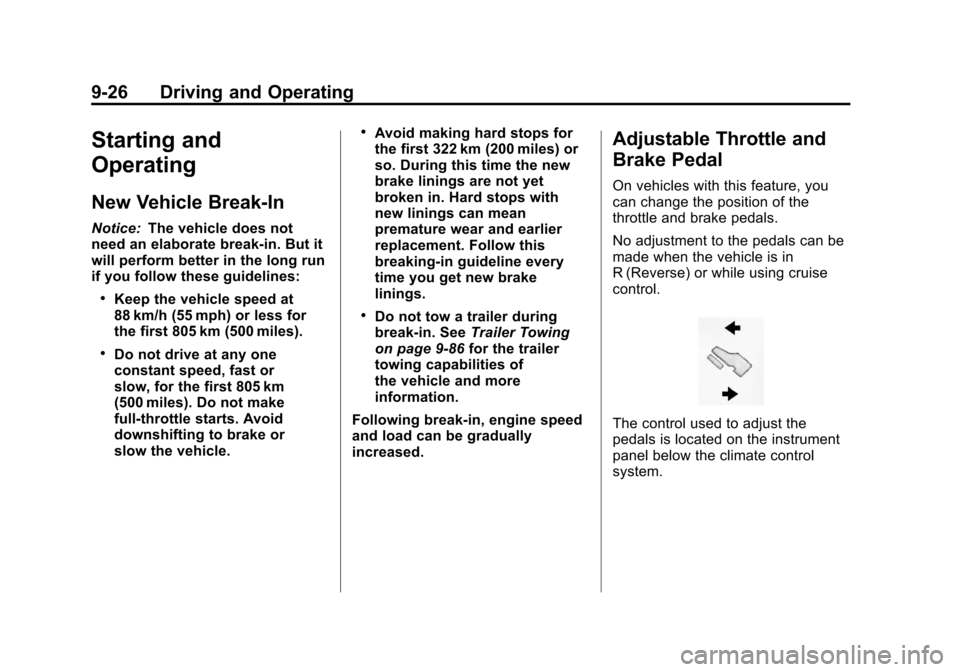
On vehicles with this feature, you
can change the position of the
throttle and brake pedals.
No adjustment to the pedals can be
made when the vehicle is in
R (Reverse) or while using cruise
control.
The control used to adjust the
pedals is located on the instrument
panel below the climate control
system.
Page 315 of 584
Black plate (29,1)Chevrolet Silverado Owner Manual - 2012
Driving and Operating 9-29
The switch stays in this position
when the engine is running.
The transmission is also unlocked
in this position on automatic
transmission vehicles.
If you leave the key in the ACC/
ACCESSORY or ON/RUN position
with the engine off, the battery could
be drained. You may not be able to
start the vehicle if the battery is
allowed to drain for an extended
period of time.
D (START):This is the position that
starts the engine. When the engine
starts, release the key. The ignition
switch returns to ON/RUN for
driving.
If the vehicle is equipped with a
radio, a warning tone will sound
when the driver door is opened, the
ignition is in ACC/ACCESSORY or
LOCK/OFF and the key is in the
ignition.Starting the Engine
If the vehicle has a diesel engine,
see the Duramax diesel supplement
for more information.
If the vehicle is a hybrid, see the
hybrid supplement for more
information.
Notice: The engine is designed
to work with the electronics in
the vehicle. If you add electrical
parts or accessories, you could
change the way the engine
operates. Before adding electrical
equipment, check with your
dealer. If you do not, the engine
might not perform properly. Any
resulting damage would not be
covered by the vehicle warranty.
Place the transmission in the
proper gear.
Automatic Transmission
Move the shift lever to P (Park) or
N (Neutral). The engine will not start
in any other position. To restart the
engine when the vehicle is already
moving, use N (Neutral) only.
Notice: Do not try to shift to
P (Park) if the vehicle is moving.
If you do, you could damage the
transmission. Shift to P (Park)
only when the vehicle is stopped.
Manual Transmission
The shift lever should be in
N (Neutral) and the parking brake
engaged. Hold the clutch pedal
down to the floor and start the
engine. The vehicle will not start
if the clutch pedal is not all the
way down.
Page 345 of 584
Black plate (59,1)Chevrolet Silverado Owner Manual - 2012
Driving and Operating 9-59
ABS can change the brake pressure
to each wheel, as required, faster
than any driver could. This can help
the driver steer around the obstacle
while braking hard.
As the brakes are applied, the
computer keeps receiving updates
on wheel speed and controls
braking pressure accordingly.
Remember: ABS does not change
the time needed to get a foot up to
the brake pedal or always decrease
stopping distance. If you get too
close to the vehicle in front of you,
there will not be enough time to
apply the brakes if that vehicle
suddenly slows or stops. Always
leave enough room up ahead to
stop, even with ABS.Using ABS
Do not pump the brakes. Just hold
the brake pedal down firmly and let
antilock work. You might feel the
brakes vibrate or hear some noise,
but this is normal.
Braking in Emergencies
If the vehicle has ABS, it allows the
driver to steer and brake at the
same time. However, if the vehicle
does not have ABS, the first
reaction, to hit the brake pedal hard
and hold it down, might be the
wrong thing to do. The wheels can
stop rolling. Once they do, the
vehicle cannot respond to the
driver's steering. Momentum will
carry it in whatever direction it was
headed when the wheels stopped
rolling. That could be off the road,
into the very thing the driver was
trying to avoid, or into traffic.If the vehicle does not have ABS,
use a squeeze braking technique.
This gives maximum braking while
maintaining steering control. Do this
by pushing on the brake pedal with
steadily increasing pressure.
In an emergency, you will probably
want to squeeze the brakes hard
without locking the wheels. If you
hear or feel the wheels sliding, ease
off the brake pedal. This helps
retain steering control. With ABS,
it is different.
In many emergencies, steering can
help more than even the very best
braking.