2012 CHEVROLET ORLANDO Fuel
[x] Cancel search: FuelPage 126 of 378

Black plate (22,1)Chevrolet Orlando Owner Manual - 2012
5-22 Instruments and Controls
Cruise Control Light
The cruise control light is white
whenever the cruise control is set,
and turns green when the cruise
control is active.
The light turns off when the cruise
control is turned off. SeeCruise
Control on page 9‑32 for more
information.
Door Ajar Light
For base level clusters this light
comes on above the Driver
Information Center (DIC). For
uplevel clusters, this light comes on
in the Driver Information Center
(DIC) when a door is open or not
securely latched.
Before driving, check that all doors
are properly closed.
Information Displays
Driver Information
Center (DIC)
The DIC displays information about
your vehicle. It also displays
warning messages if a system
problem is detected. See Vehicle
Messages (Base Level) on
page 5‑26 orVehicle Messages
(Uplevel) on page 5‑26 for more
information. All messages appear in
the DIC display located in the center
of the instrument panel cluster.
DIC Operation and Displays
The DIC has different displays
which can be accessed by using
the DIC buttons on the turn signal
lever located on the left side of the
steering wheel. The DIC displays
trip, fuel, and warning messages if a
system problem is detected.
Page 127 of 378

Black plate (23,1)Chevrolet Orlando Owner Manual - 2012
Instruments and Controls 5-23
DIC Buttons
A.SET/CLR: Press to set or clear
the menu item displayed.
B.
w/x(Thumbwheel): Use to
scroll through the menus.
A marker will move across the
bottom of the page as you
scroll.
C. MENU: Press to display the
Trip/Fuel menu and the Vehicle
Information menu. This button is
also used to return to or exit the
last screen displayed on
the DIC.
Trip/Fuel Menu Items
Press MENU on the turn signal
lever until the Trip/Fuel Information
menu displays. Use
w/xto
scroll through the menu items. Not
all items are available on every
vehicle. The following is a list of all
possible menu items:
.Trip 1
.Trip 2
.Fuel Range
.Average Fuel Economy
.Instantaneous Fuel Economy
.Average Speed
.Fuel Used
.Digital Speed
Trip 1 and Trip 2
These displays show the current
distance traveled, in either
kilometers (km) or miles (mi), from
the last reset for the trip odometer.
Some models have one trip
odometer and some have two. The trip odometer can be reset to
zero by pressing and holding the
SET/CLR button while the trip
odometer display is showing.
Fuel Range
This displays the approximate
distance the vehicle can be driven
without refueling. The fuel range
estimate is based on an average of
the vehicle's fuel economy over
recent driving history and the
amount of fuel remaining in the fuel
tank. On some models, this display
is shown as
.km (mi). Fuel range
cannot be reset.
Average Fuel Economy
The Average Fuel Economy display
shows the approximate average
liters per 100 kilometers (L/100 km)
or miles per gallon (mpg). This
number is based on the number of
L/100 km (mpg) recorded since the
last time this menu item was reset.
On some models, this display is
shown as
c .L/100 km (mpg).
Page 128 of 378

Black plate (24,1)Chevrolet Orlando Owner Manual - 2012
5-24 Instruments and Controls
Reset the average consumption by
pressing SET/CLR when it is
displayed.
Instantaneous Fuel Economy
The Instantaneous Fuel Economy
display shows the current fuel
economy in liters per 100 kilometers
(L/100 km) or miles per gallon
(mpg). This number reflects only the
fuel economy that the vehicle has
right now and changes frequently as
driving conditions change. Unlike
average fuel economy, this display
cannot be reset.
Average Speed
This displays the average speed of
the vehicle in kilometers per hour
(km/h) or miles per hour (mph). This
average is based on the various
vehicle speeds recorded since the
last reset. On some models, this
display is shown as
ckm/h (mph).
Reset the average speed by
pressing SET/CLR when it is
displayed. Fuel Used
This display shows the approximate
liters (L) or gallons (gal) of fuel that
have been used since last reset.
The fuel used can be reset by
pressing the SET/CLR button while
the Fuel Used display is showing.
Digital Speed
The speedometer shows how fast
the vehicle is moving in either
kilometers per hour (km/h) or miles
per hour (mph). The speedometer
cannot be reset.
Vehicle Information Menu
Items
Press MENU on the turn signal
lever until the Vehicle Information
menu is displayed. Use
w/xto
scroll through the menu items. Not
all items are available on every
vehicle. The following is a list of all
of the possible menu items:
.Units
.Tire Pressure
.Remaining Oil Life
.Battery Voltage
.Blank Display
Units
Move
w/xto change between
metric or US when the Unit display
is active. Press SET/CLR to confirm
the setting. On some models, you
will have to select 1, 2, or 3 for the
Unit display. 1 is Imperial units, 2 is
US units, and 3 is metric units. This
will change the displays on the
cluster and DIC to the type of
measurements you select.
Tire Pressure
The display may show a vehicle
with the approximate pressures of
all four tires. Tire pressure is
displayed in either kilopascal (kPa)
or in pounds per square inch (psi).
On some models, this display only
allows for matching of the TPMS
sensors. In this case, the display
will show TIRE LEARN. See Tire
Pressure Monitor System on
Page 133 of 378

Black plate (29,1)Chevrolet Orlando Owner Manual - 2012
Instruments and Controls 5-29
message stays on, the vehicle
should be taken to your dealer for
service as soon as possible.
Fuel System Messages
FUEL LEVEL LOW
This message displays when the
vehicle is low on fuel. Refuel as
soon as possible.
TIGHTEN GAS CAP
This message displays when the
fuel cap is not on tight. Tighten the
fuel cap.
Key and Lock Messages
REPLACE BATTERY IN
REMOTE KEY
This message displays when the
battery in the Remote Keyless Entry
(RKE) transmitter needs to be
replaced.
Lamp Messages
AUTOMATIC LIGHT
CONTROL ON
This message is displayed when the
automatic light control has been
turned on. SeeAutomatic Headlamp
System on page 6‑3.
AUTOMATIC LIGHT
CONTROL OFF
This message is displayed when the
automatic light control has been
turned off. See Automatic Headlamp
System on page 6‑3.
XXX TURN INDICATOR
FAILURE
When one of the turn signals is out,
this message displays to show
which bulb needs to be replaced.
See Bulb Replacement on
page 10‑25 andReplacement Bulbs
on page 10‑30 for more information
on turn signal bulb replacement.
TURN SIGNAL ON
This message is displayed if the
turn signal has been left on. Turn off
the turn signal.
Object Detection System
Messages
PARK ASSIST OFF
This message displays when the
park assist system has been turned
off or when there is a temporary
condition causing the system to be
disabled. See Ultrasonic Parking
Assist on page 9‑35.
SERVICE PARK ASSIST
This message displays if there is a
problem with the Ultrasonic Rear
Parking Assist (URPA) system. Do
not use this system to help you
park. See Ultrasonic Parking Assist
on page 9‑35 for more information.
See your dealer for service.
Page 189 of 378
Black plate (1,1)Chevrolet Orlando Owner Manual - 2012
Driving and Operating 9-1
Driving and
Operating
Driving Information
Distracted Driving . . . . . . . . . . . . . 9-2
Defensive Driving . . . . . . . . . . . . . 9-2
Drunk Driving . . . . . . . . . . . . . . . . . 9-3
Control of a Vehicle . . . . . . . . . . . 9-3
Braking . . . . . . . . . . . . . . . . . . . . . . . 9-3
Steering . . . . . . . . . . . . . . . . . . . . . . . 9-3
Off-Road Recovery . . . . . . . . . . . . 9-4
Loss of Control . . . . . . . . . . . . . . . . 9-5
Driving on Wet Roads . . . . . . . . . 9-6
Highway Hypnosis . . . . . . . . . . . . 9-7
Hill and Mountain Roads . . . . . . 9-7
Winter Driving . . . . . . . . . . . . . . . . . 9-8
If the Vehicle Is Stuck . . . . . . . . . 9-9
Vehicle Load Limits . . . . . . . . . . 9-10
Starting and Operating
New Vehicle Break-In . . . . . . . . 9-14
Ignition Positions . . . . . . . . . . . . 9-15
Starting the Engine . . . . . . . . . . 9-17
Engine Heater . . . . . . . . . . . . . . . 9-18
Retained AccessoryPower (RAP) . . . . . . . . . . . . . . . 9-19 Shifting Into Park (Automatic
Transmission) . . . . . . . . . . . . . . 9-19
Shifting out of Park . . . . . . . . . . 9-20
Parking . . . . . . . . . . . . . . . . . . . . . . 9-21
Parking over Things That Burn . . . . . . . . . . . . . . . . . . 9-21
Engine Exhaust
Engine Exhaust . . . . . . . . . . . . . . 9-21
Running the Vehicle WhileParked . . . . . . . . . . . . . . . . . . . . . 9-22
Automatic Transmission
Automatic Transmission . . . . . 9-23
Manual Mode . . . . . . . . . . . . . . . . 9-24
Manual Transmission
Manual Transmission . . . . . . . . 9-25
Brakes
Antilock BrakeSystem (ABS) . . . . . . . . . . . . . . 9-27
Parking Brake . . . . . . . . . . . . . . . 9-28
Brake Assist . . . . . . . . . . . . . . . . . 9-29
Ride Control Systems
Traction Control System (TCS) . . . . . . . . . . . . . . 9-29
StabiliTrak
®System . . . . . . . . . 9-31
Cruise Control
Cruise Control . . . . . . . . . . . . . . . 9-32
Object Detection Systems
Ultrasonic Parking Assist . . . . 9-35
Fuel
Fuel . . . . . . . . . . . . . . . . . . . . . . . . . 9-36
Recommended Fuel . . . . . . . . . 9-37
Gasoline Specifications . . . . . . 9-37
Fuels in Foreign Countries . . . 9-37
Fuel Additives . . . . . . . . . . . . . . . 9-37
Filling the Tank . . . . . . . . . . . . . . 9-38
Filling a Portable Fuel Container . . . . . . . . . . . . . . . . . . . 9-40
Towing
General TowingInformation . . . . . . . . . . . . . . . . . 9-40
Driving Characteristics and Towing Tips . . . . . . . . . . . . . . . . 9-41
Trailer Towing . . . . . . . . . . . . . . . . 9-44
Towing Equipment . . . . . . . . . . . 9-45
Conversions and Add-Ons
Add-On Electrical Equipment . . . . . . . . . . . . . . . . . 9-46
Page 197 of 378
Black plate (9,1)Chevrolet Orlando Owner Manual - 2012
Driving and Operating 9-9
WARNING (Continued)
If the vehicle is stuck in the snow:
.Clear away snow from around
the base of your vehicle,
especially any that is blocking
the exhaust pipe.
.Check again from time to
time to be sure snow does
not collect there.
.Open a window about 5 cm
(2 in) on the side of the
vehicle that is away from the
wind to bring in fresh air.
.Fully open the air outlets on
or under the instrument
panel.
.Adjust the climate control
system to a setting that
circulates the air inside the
vehicle and set the fan speed
to the highest setting.
See“Climate Control
Systems”in the Index.
(Continued)
WARNING (Continued)
For more information about
carbon monoxide, see Engine
Exhaust on page 9‑21.
Run the engine for short periods
only as needed to keep warm, but
be careful.
To save fuel, run the engine for only
short periods as needed to warm
the vehicle and then shut the engine
off and close the window most of
the way to save heat. Repeat this
until help arrives but only when you
feel really uncomfortable from the
cold. Moving about to keep warm
also helps.
If it takes some time for help to
arrive, now and then when you run
the engine, push the accelerator
pedal slightly so the engine runs
faster than the idle speed. This
keeps the battery charged to restart
the vehicle and to signal for help
with the headlamps. Do this as little
as possible to save fuel.
If the Vehicle Is Stuck
Slowly and cautiously spin the
wheels to free the vehicle when
stuck in sand, mud, ice, or snow.
If the vehicle has a traction system,
it can often help to free a stuck
vehicle. Refer to the vehicle's
traction system in the Index. If stuck
too severely for the traction system
to free the vehicle, turn the traction
system off and use the rocking
method.
{WARNING
If the vehicle's tires spin at high
speed, they can explode, and you
or others could be injured. The
vehicle can overheat, causing an
engine compartment fire or other
damage. Spin the wheels as little
as possible and avoid going
above 55 km/h (35 mph).
Page 201 of 378
Black plate (13,1)Chevrolet Orlando Owner Manual - 2012
Driving and Operating 9-13
Refer to the vehicle's Tire and
Loading Information label for
specific information about the
vehicle's capacity weight and
seating positions. The combined
weight of the driver, passengers,
and cargo should never exceed
the vehicle's capacity weight.
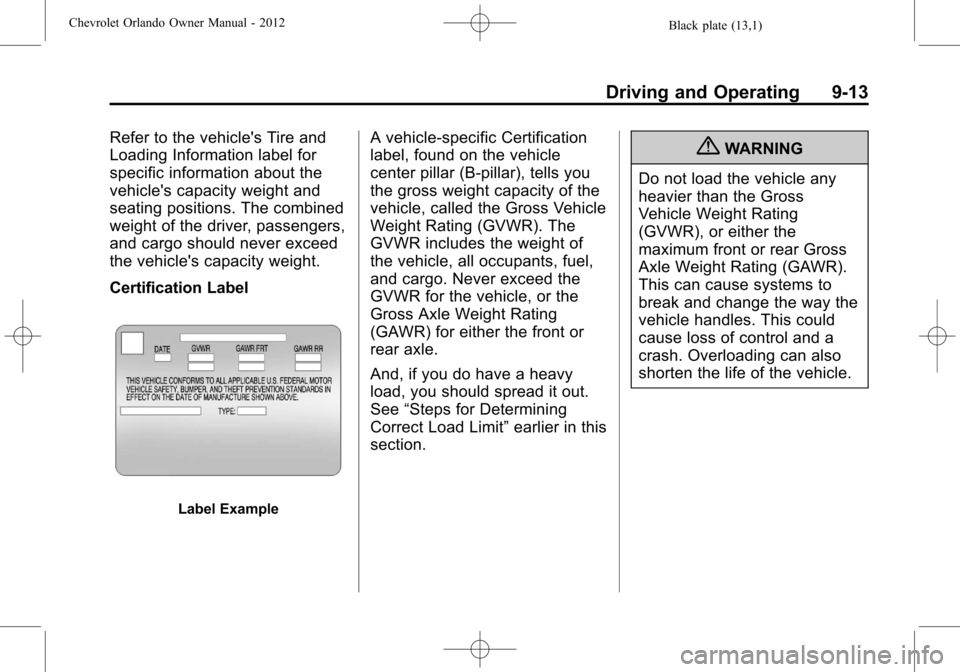
Certification Label
Label Example
A vehicle-specific Certification
label, found on the vehicle
center pillar (B-pillar), tells you
the gross weight capacity of the
vehicle, called the Gross Vehicle
Weight Rating (GVWR). The
GVWR includes the weight of
the vehicle, all occupants, fuel,
and cargo. Never exceed the
GVWR for the vehicle, or the
Gross Axle Weight Rating
(GAWR) for either the front or
rear axle.
And, if you do have a heavy
load, you should spread it out.
See“Steps for Determining
Correct Load Limit” earlier in this
section.{WARNING
Do not load the vehicle any
heavier than the Gross
Vehicle Weight Rating
(GVWR), or either the
maximum front or rear Gross
Axle Weight Rating (GAWR).
This can cause systems to
break and change the way the
vehicle handles. This could
cause loss of control and a
crash. Overloading can also
shorten the life of the vehicle.
Page 206 of 378
Black plate (18,1)Chevrolet Orlando Owner Manual - 2012
9-18 Driving and Operating
engine and transmission gently
to allow the oil to warm up and
lubricate all moving parts.
The vehicle has a
Computer-Controlled Cranking
System. This feature assists in
starting the engine and protects
components. If the ignition key is
turned to the START position,
and then released when the
engine begins cranking, the
engine will continue cranking for
a few seconds or until the
vehicle starts. If the engine does
not start and the key is held in
START for many seconds,
cranking will be stopped after
15 seconds to prevent cranking
motor damage. To prevent gear
damage, this system also
prevents cranking if the engine
is already running. Engine
cranking can be stopped by
turning the ignition switch to
ACC/ACCESSORY or
LOCK/OFF.Notice:
Cranking the engine for
long periods of time, by returning
the key to the START position
immediately after cranking has
ended, can overheat and damage
the cranking motor, and drain the
battery. Wait at least 15 seconds
between each try, to let the
cranking motor cool down.
2. If the engine does not start after
five to 10 seconds, especially in
very cold weather (below −18°C
or 0°F), it could be flooded with
too much gasoline. Try pushing
the accelerator pedal all the way
to the floor and holding it there
as you hold the key in START
for up to a maximum of
15 seconds. Wait at least
15 seconds between each try, to
allow the cranking motor to cool
down. When the engine starts,
let go of the key or button, and
the accelerator. If the vehicle
starts briefly but then stops
again, do the same thing. This
clears the extra gasoline from
the engine. Do not race the engine immediately after starting
it. Operate the engine and
transmission gently until the oil
warms up and lubricates all
moving parts.
Engine Heater
The engine heater can help in cold
weather conditions at or below
−18°C (0°F) for easier starting and
better fuel economy during engine
warm-up. Plug in the heater at least
four hours before starting the
vehicle. An internal thermostat in
the plug-end of the cord will prevent
engine heater operation at
temperatures above
−18°C (0°F).
To Use The Engine Heater
1. Turn off the engine.
2. Open the hood and unwrap the
electrical cord stored near the air
cleaner.
3. Plug it into a normal, grounded 110-volt AC outlet.