2012 CHEVROLET MALIBU seat
[x] Cancel search: seatPage 1 of 398

Black plate (1,1)Chevrolet Malibu Owner Manual - 2012
2012 Chevrolet Malibu Owner ManualM
In Brief. . . . . . . . . . . . . . . . . . . . . . . . 1-1
Instrument Panel . . . . . . . . . . . . . . 1-2
Initial Drive Information . . . . . . . . 1-4
Vehicle Features . . . . . . . . . . . . . 1-16
Performance and Maintenance . . . . . . . . . . . . . . . . 1-20
Keys, Doors, and Windows . . . . . . . . . . . . . . . . . . . . 2-1
Keys and Locks . . . . . . . . . . . . . . . 2-2
Doors . . . . . . . . . . . . . . . . . . . . . . . . . . 2-9
Vehicle Security . . . . . . . . . . . . . . 2-11
Exterior Mirrors . . . . . . . . . . . . . . . 2-13
Interior Mirrors . . . . . . . . . . . . . . . . 2-14
Windows . . . . . . . . . . . . . . . . . . . . . 2-15
Roof . . . . . . . . . . . . . . . . . . . . . . . . . . 2-18
Seats and Restraints . . . . . . . . . 3-1
Head Restraints . . . . . . . . . . . . . . . 3-2
Front Seats . . . . . . . . . . . . . . . . . . . . 3-3
Rear Seats . . . . . . . . . . . . . . . . . . . . 3-8 Safety Belts . . . . . . . . . . . . . . . . . . . . 3-9
Airbag System . . . . . . . . . . . . . . . . 3-19
Child Restraints . . . . . . . . . . . . . . 3-33
Storage . . . . . . . . . . . . . . . . . . . . . . . 4-1
Storage Compartments . . . . . . . . 4-1
Additional Storage Features . . . . . . . . . . . . . . . . . . . . . 4-3
Instruments and Controls . . . . 5-1
Controls . . . . . . . . . . . . . . . . . . . . . . . 5-2
Warning Lights, Gauges, and Indicators . . . . . . . . . . . . . . . . . . . . 5-9
Information Displays . . . . . . . . . . 5-24
Vehicle Messages . . . . . . . . . . . . 5-26
Vehicle Personalization . . . . . . . 5-31
Lighting . . . . . . . . . . . . . . . . . . . . . . . 6-1
Exterior Lighting . . . . . . . . . . . . . . . 6-1
Interior Lighting . . . . . . . . . . . . . . . . 6-5
Lighting Features . . . . . . . . . . . . . . 6-6 Infotainment System
. . . . . . . . . 7-1
Introduction . . . . . . . . . . . . . . . . . . . . 7-1
Radio . . . . . . . . . . . . . . . . . . . . . . . . . . 7-6
Audio Players . . . . . . . . . . . . . . . . 7-15
Phone . . . . . . . . . . . . . . . . . . . . . . . . 7-25
Climate Controls . . . . . . . . . . . . . 8-1
Climate Control Systems . . . . . . 8-1
Air Vents . . . . . . . . . . . . . . . . . . . . . . . 8-9
Driving and Operating . . . . . . . . 9-1
Driving Information . . . . . . . . . . . . . 9-2
Starting and Operating . . . . . . . 9-16
Engine Exhaust . . . . . . . . . . . . . . 9-23
Automatic Transmission . . . . . . 9-24
Brakes . . . . . . . . . . . . . . . . . . . . . . . 9-28
Ride Control Systems . . . . . . . . 9-30
Cruise Control . . . . . . . . . . . . . . . . 9-33
Fuel . . . . . . . . . . . . . . . . . . . . . . . . . . 9-36
Towing . . . . . . . . . . . . . . . . . . . . . . . 9-42
Conversions and Add-Ons . . . 9-48
Page 7 of 398
Black plate (1,1)Chevrolet Malibu Owner Manual - 2012
In Brief 1-1
In Brief
Instrument Panel
Instrument Panel . . . . . . . . . . . . . . 1-2
Initial Drive Information
Initial Drive Information . . . . . . . . 1-4
Remote Keyless Entry (RKE)System . . . . . . . . . . . . . . . . . . . . . . 1-4
Remote Vehicle Start . . . . . . . . . 1-4
Door Locks . . . . . . . . . . . . . . . . . . . 1-5
Trunk Release . . . . . . . . . . . . . . . . 1-5
Windows . . . . . . . . . . . . . . . . . . . . . . 1-6
Seat Adjustment . . . . . . . . . . . . . . 1-7
Second Row Seats . . . . . . . . . . . 1-9
Heated Seats . . . . . . . . . . . . . . . . . 1-9
Head Restraint Adjustment . . . . . . . . . . . . . . . . . 1-10
Safety Belts . . . . . . . . . . . . . . . . . . 1-10
Passenger Sensing System . . . . . . . . . . . . . . . . . . . . . 1-10 Mirror Adjustment . . . . . . . . . . . . 1-11
Steering Wheel
Adjustment . . . . . . . . . . . . . . . . . 1-12
Interior Lighting . . . . . . . . . . . . . . 1-12
Exterior Lighting . . . . . . . . . . . . . 1-13
Windshield Wiper/Washer . . . . 1-13
Climate Controls . . . . . . . . . . . . . 1-14
Transmission . . . . . . . . . . . . . . . . 1-15
Vehicle Features
Radio(s) . . . . . . . . . . . . . . . . . . . . . 1-16
Satellite Radio . . . . . . . . . . . . . . . 1-17
Portable Audio Devices (Auxiliary Input or
USB Port) . . . . . . . . . . . . . . . . . . 1-18
Bluetooth
®. . . . . . . . . . . . . . . . . . . 1-18
Steering Wheel Controls . . . . . 1-18
Cruise Control . . . . . . . . . . . . . . . 1-19
Driver Information
Center (DIC) . . . . . . . . . . . . . . . 1-19
Power Outlets . . . . . . . . . . . . . . . 1-20
Performance and Maintenance
Traction Control System (TCS) . . . . . . . . . . . . . . 1-20
Electronic Stability Control (ESC) . . . . . . . . . . . . . . 1-20
Tire Pressure Monitor . . . . . . . . 1-21
Tire Sealant and
Compressor Kit . . . . . . . . . . . . . 1-21
Engine Oil Life System . . . . . . 1-22
Fuel E85 (85% Ethanol) . . . . . 1-22
Driving for Better Fuel Economy . . . . . . . . . . . . . . . . . . . 1-22
Roadside Assistance Program . . . . . . . . . . . . . . . . . . . . 1-23
OnStar
®. . . . . . . . . . . . . . . . . . . . . 1-23
Page 13 of 398
Black plate (7,1)Chevrolet Malibu Owner Manual - 2012
In Brief 1-7
Seat Adjustment
Manual Seats
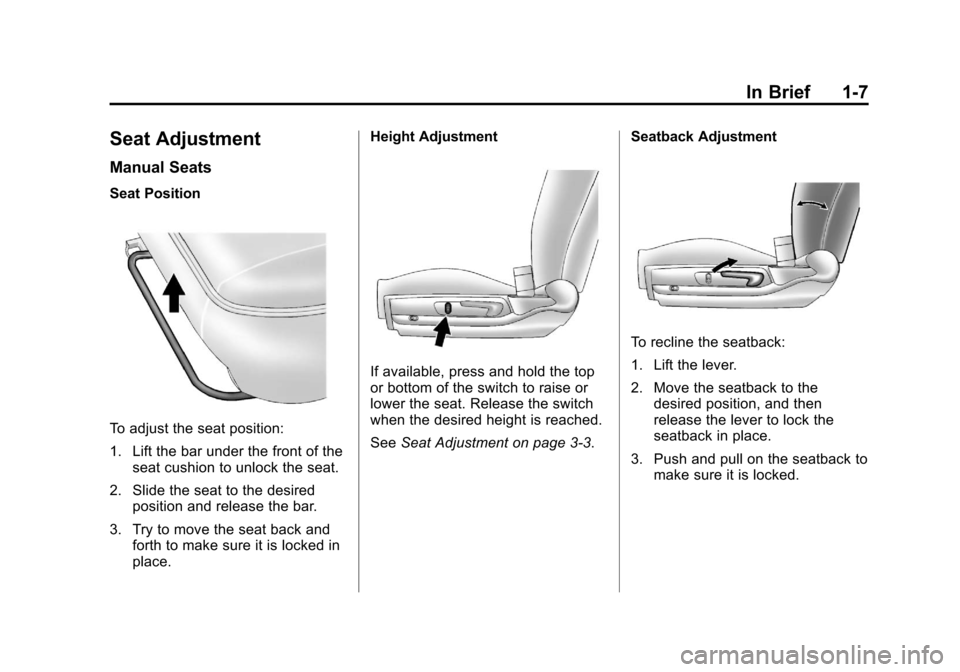
Seat Position
To adjust the seat position:
1. Lift the bar under the front of theseat cushion to unlock the seat.
2. Slide the seat to the desired position and release the bar.
3. Try to move the seat back and forth to make sure it is locked in
place. Height Adjustment
If available, press and hold the top
or bottom of the switch to raise or
lower the seat. Release the switch
when the desired height is reached.
See
Seat Adjustment on page 3‑3. Seatback Adjustment
To recline the seatback:
1. Lift the lever.
2. Move the seatback to the
desired position, and then
release the lever to lock the
seatback in place.
3. Push and pull on the seatback to make sure it is locked.
Page 14 of 398
Black plate (8,1)Chevrolet Malibu Owner Manual - 2012
1-8 In Brief
To return the seatback to the upright
position:
1. Lift the lever fully withoutapplying pressure to the
seatback, and the seatback will
return to the upright position.
2. Push and pull on the seatback to make sure it is locked.
See “Manual Reclining Seatbacks”
under Reclining Seatbacks on
page 3‑5.Power Seats
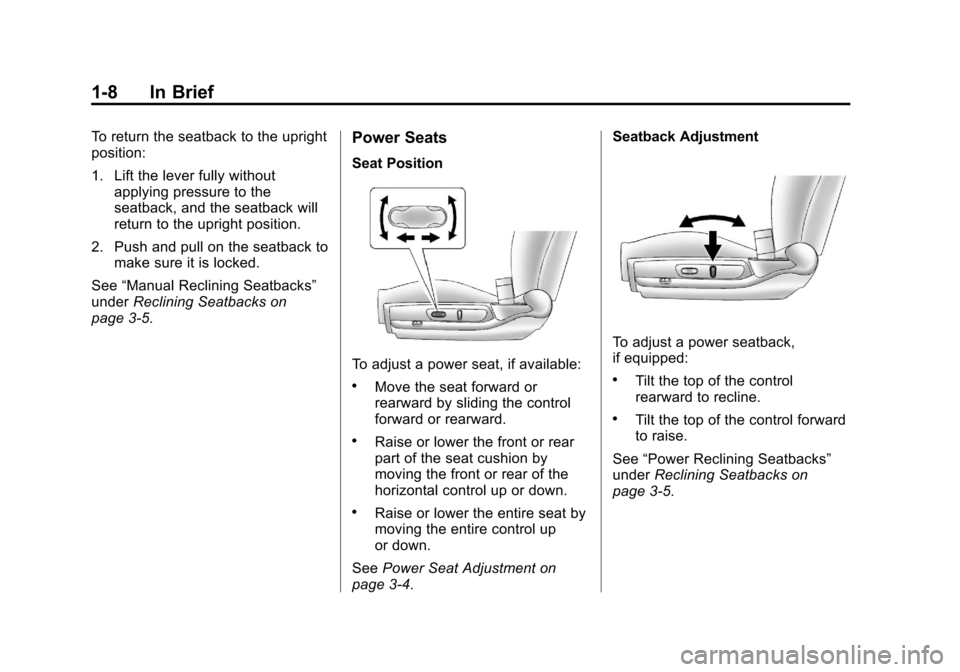
Seat Position
To adjust a power seat, if available:
.Move the seat forward or
rearward by sliding the control
forward or rearward.
.Raise or lower the front or rear
part of the seat cushion by
moving the front or rear of the
horizontal control up or down.
.Raise or lower the entire seat by
moving the entire control up
or down.
See Power Seat Adjustment on
page 3‑4. Seatback Adjustment
To adjust a power seatback,
if equipped:
.Tilt the top of the control
rearward to recline.
.Tilt the top of the control forward
to raise.
See “Power Reclining Seatbacks”
under Reclining Seatbacks on
page 3‑5.
Page 15 of 398
Black plate (9,1)Chevrolet Malibu Owner Manual - 2012
In Brief 1-9
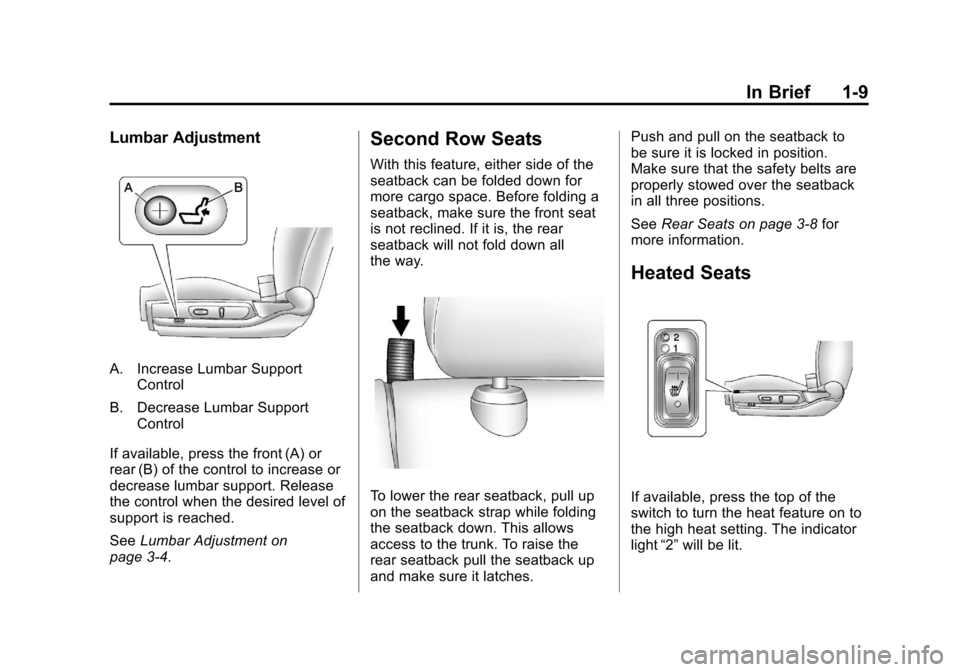
Lumbar Adjustment
A. Increase Lumbar SupportControl
B. Decrease Lumbar Support Control
If available, press the front (A) or
rear (B) of the control to increase or
decrease lumbar support. Release
the control when the desired level of
support is reached.
See Lumbar Adjustment on
page 3‑4.
Second Row Seats
With this feature, either side of the
seatback can be folded down for
more cargo space. Before folding a
seatback, make sure the front seat
is not reclined. If it is, the rear
seatback will not fold down all
the way.
To lower the rear seatback, pull up
on the seatback strap while folding
the seatback down. This allows
access to the trunk. To raise the
rear seatback pull the seatback up
and make sure it latches. Push and pull on the seatback to
be sure it is locked in position.
Make sure that the safety belts are
properly stowed over the seatback
in all three positions.
See
Rear Seats on page 3‑8 for
more information.
Heated Seats
If available, press the top of the
switch to turn the heat feature on to
the high heat setting. The indicator
light “2”will be lit.
Page 16 of 398
Black plate (10,1)Chevrolet Malibu Owner Manual - 2012
1-10 In Brief
Press the top of the switch again
to go to the low heat setting.
The indicator light“1”will be lit.
Press the bottom of the switch to
turn the feature off.
The heated seats are canceled
when the ignition is turned off.
For more information, see Heated
Front Seats on page 3‑7.
Head Restraint
Adjustment
Do not drive until the head restraints
for all occupants are installed and
adjusted properly.
To achieve a comfortable seating
position, change the seatback
recline angle as little as necessary
while keeping the seat and the head
restraint height in the proper
position.
For more information see Head
Restraints on page 3‑2 andSeat
Adjustment on page 3‑3.
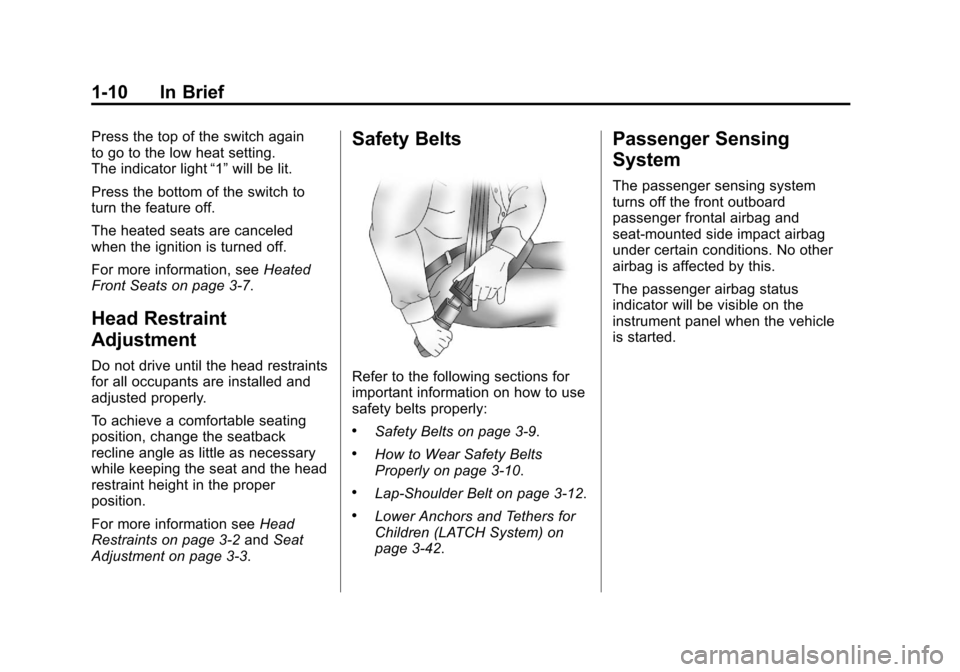
Safety Belts
Refer to the following sections for
important information on how to use
safety belts properly:
.Safety Belts on page 3‑9.
.How to Wear Safety Belts
Properly on page 3‑10.
.Lap-Shoulder Belt on page 3‑12.
.Lower Anchors and Tethers for
Children (LATCH System) on
page 3‑42.
Passenger Sensing
System
The passenger sensing system
turns off the front outboard
passenger frontal airbag and
seat-mounted side impact airbag
under certain conditions. No other
airbag is affected by this.
The passenger airbag status
indicator will be visible on the
instrument panel when the vehicle
is started.
Page 18 of 398
Black plate (12,1)Chevrolet Malibu Owner Manual - 2012
1-12 In Brief
Steering Wheel
Adjustment
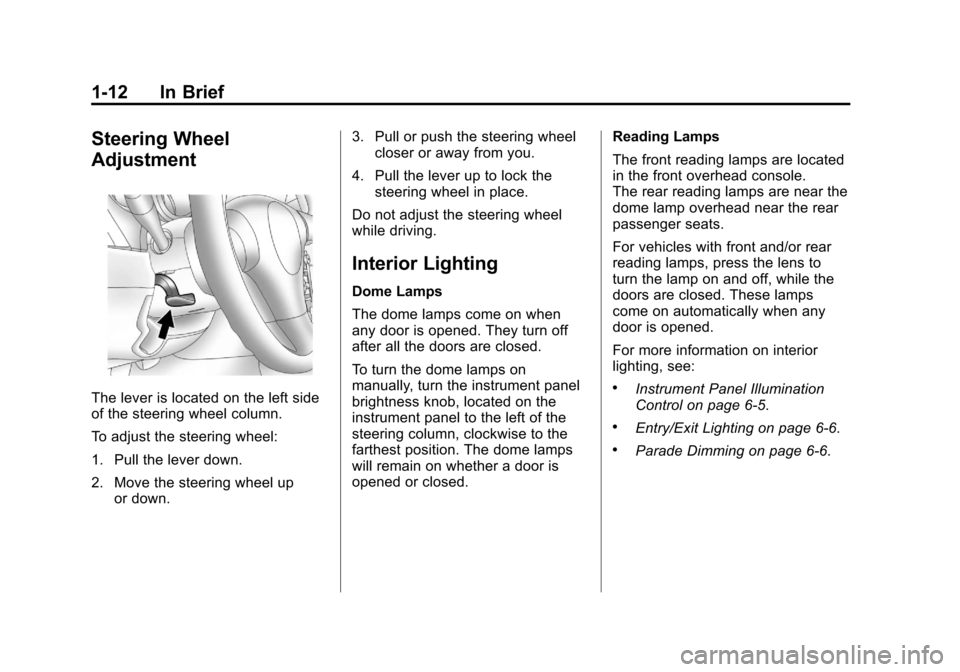
The lever is located on the left side
of the steering wheel column.
To adjust the steering wheel:
1. Pull the lever down.
2. Move the steering wheel upor down. 3. Pull or push the steering wheel
closer or away from you.
4. Pull the lever up to lock the steering wheel in place.
Do not adjust the steering wheel
while driving.
Interior Lighting
Dome Lamps
The dome lamps come on when
any door is opened. They turn off
after all the doors are closed.
To turn the dome lamps on
manually, turn the instrument panel
brightness knob, located on the
instrument panel to the left of the
steering column, clockwise to the
farthest position. The dome lamps
will remain on whether a door is
opened or closed. Reading Lamps
The front reading lamps are located
in the front overhead console.
The rear reading lamps are near the
dome lamp overhead near the rear
passenger seats.
For vehicles with front and/or rear
reading lamps, press the lens to
turn the lamp on and off, while the
doors are closed. These lamps
come on automatically when any
door is opened.
For more information on interior
lighting, see:
.Instrument Panel Illumination
Control on page 6‑5.
.Entry/Exit Lighting on page 6‑6.
.Parade Dimming on page 6‑6.
Page 43 of 398
Black plate (13,1)Chevrolet Malibu Owner Manual - 2012
Keys, Doors, and Windows 2-13
damaged. See your dealer who can
service the theft-deterrent system
and have a new key made.
It is possible for the theft-deterrent
system decoder to learn the
transponder value of a new or
replacement key. Up to 10 keys can
be programmed for the vehicle.
The following procedure is for
programming additional keys only.
To program the new key:
1. Verify that the new key hasa
1stamped on it.
2. Insert the already programmed key in the ignition and start the
engine. If the engine will not
start, see your dealer for service.
3. After the engine has started, turn the key to LOCK/OFF, and
remove the key. 4. Insert the key to be programmed
and turn it to ON/RUN within
five seconds of the original key
being turned to LOCK/OFF in
Step 3.
The security light will turn off
once the key has been
programmed. It may not be
apparent that the security light
went on due to how quickly the
key is programmed.
5. Repeat Steps 1 through 4 if additional keys are to be
programmed.
Do not leave the key or device that
disarms or deactivates the theft
deterrent system in the vehicle.
Exterior Mirrors
Convex Mirrors
{WARNING
A convex mirror can make things,
like other vehicles, look farther
away than they really are. If you
cut too sharply into the right lane,
you could hit a vehicle on the
right. Check the inside mirror or
glance over your shoulder before
changing lanes.
The passenger side mirror is convex
shaped. A convex mirror's surface is
curved so more can be seen from
the driver seat.