Page 149 of 374
Black plate (47,1)Chevrolet Impala Owner Manual - 2012
Instruments and Controls 5-47
.If a switch is set between
the up and down position,
write“Middle.”
The switch settings written
down in Step 2 will now
become the button strokes
to be entered into the
Universal Home Remote in
Step 4. Be sure to enter the
switch settings written down
in Step 2, in order from left
to right, into the Universal
Home Remote, when
completing Step 4.
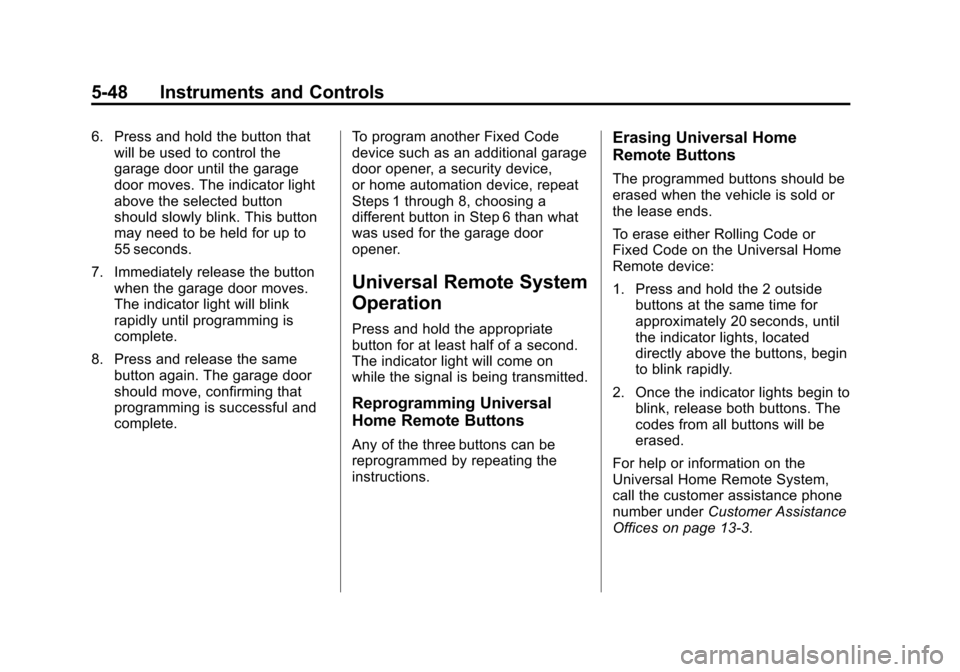
3. From inside your vehicle, first firmly press all three buttons at
the same time for about
three seconds. Release the
buttons to put the Universal
Home Remote into
programming mode.
A. Left Button ("Up," "+,"or "On.")
B. Middle Button ("Middle," "0," or "Neutral.")
C. Right Button ("Down," "-," or "Off.") 4. The indicator lights will
blink slowly. Enter each switch
setting from Step 2 into your
vehicle's Universal Home
Remote. You will have two and
one-half minutes to complete
Step 4. Now press one button on
the Universal Home Remote for
each switch setting as follows:
.If you wrote “Left,”press
the left button in the
vehicle.
.If you wrote “Right,”press
the right button in the
vehicle.
.If you wrote “Middle,”press
the middle button in the
vehicle.
5. After entering all of the switch positions, again, firmly press and
release all three buttons at the
same time. The indicator lights
will turn on.
Page 150 of 374
Black plate (48,1)Chevrolet Impala Owner Manual - 2012
5-48 Instruments and Controls
6. Press and hold the button thatwill be used to control the
garage door until the garage
door moves. The indicator light
above the selected button
should slowly blink. This button
may need to be held for up to
55 seconds.
7. Immediately release the button when the garage door moves.
The indicator light will blink
rapidly until programming is
complete.
8. Press and release the same button again. The garage door
should move, confirming that
programming is successful and
complete. To program another Fixed Code
device such as an additional garage
door opener, a security device,
or home automation device, repeat
Steps 1 through 8, choosing a
different button in Step 6 than what
was used for the garage door
opener.
Universal Remote System
Operation
Press and hold the appropriate
button for at least half of a second.
The indicator light will come on
while the signal is being transmitted.
Reprogramming Universal
Home Remote Buttons
Any of the three buttons can be
reprogrammed by repeating the
instructions.
Erasing Universal Home
Remote Buttons
The programmed buttons should be
erased when the vehicle is sold or
the lease ends.
To erase either Rolling Code or
Fixed Code on the Universal Home
Remote device:
1. Press and hold the 2 outside
buttons at the same time for
approximately 20 seconds, until
the indicator lights, located
directly above the buttons, begin
to blink rapidly.
2. Once the indicator lights begin to blink, release both buttons. The
codes from all buttons will be
erased.
For help or information on the
Universal Home Remote System,
call the customer assistance phone
number under Customer Assistance
Offices on page 13‑3.
Page 151 of 374
Black plate (1,1)Chevrolet Impala Owner Manual - 2012
Lighting 6-1
Lighting
Exterior Lighting
Exterior Lamp Controls . . . . . . . . 6-1
Headlamp High/Low-BeamChanger . . . . . . . . . . . . . . . . . . . . . 6-2
Flash-to-Pass . . . . . . . . . . . . . . . . . 6-3
Daytime Running Lamps (DRL)/Automatic Headlamp
System . . . . . . . . . . . . . . . . . . . . . . 6-3
Hazard Warning Flashers . . . . . 6-4
Turn and Lane-Change Signals . . . . . . . . . . . . . . . . . . . . . . 6-4
Fog Lamps . . . . . . . . . . . . . . . . . . . . 6-5
Interior Lighting
Instrument Panel Illumination Control . . . . . . . . . . . . . . . . . . . . . . 6-5
Courtesy Lamps . . . . . . . . . . . . . . 6-6
Dome Lamps . . . . . . . . . . . . . . . . . 6-6
Reading Lamps . . . . . . . . . . . . . . . 6-6
Lighting Features
Entry Lighting . . . . . . . . . . . . . . . . . 6-7
Delayed Entry Lighting . . . . . . . . 6-7
Delayed Exit Lighting . . . . . . . . . 6-7
Parade Dimming . . . . . . . . . . . . . . 6-7
Battery Load Management . . . . 6-8
Battery Power Protection . . . . . . 6-8
Exterior Lighting
Exterior Lamp Controls
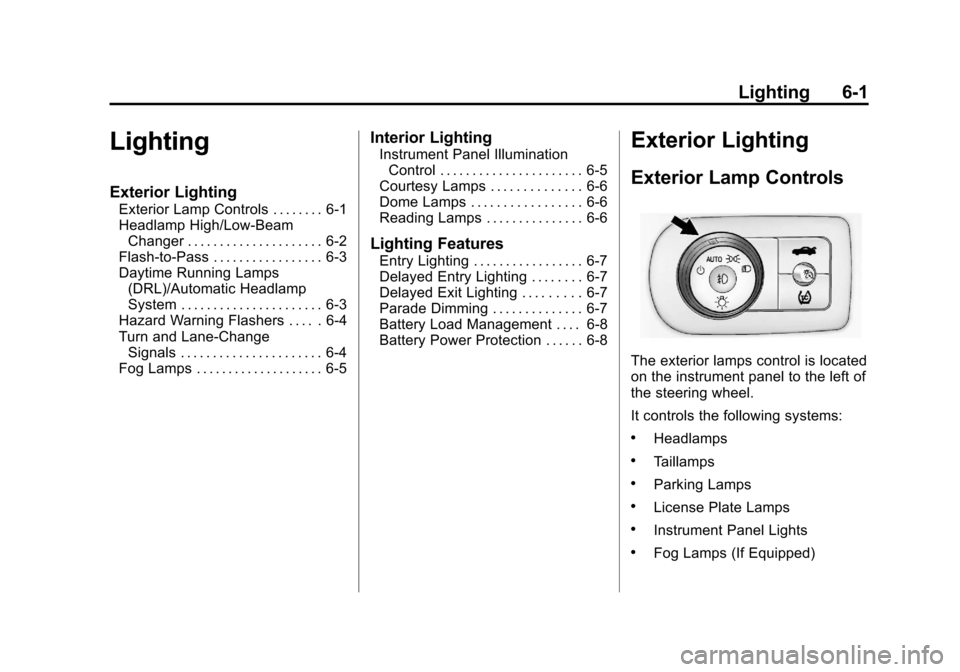
The exterior lamps control is located
on the instrument panel to the left of
the steering wheel.
It controls the following systems:
.Headlamps
.Taillamps
.Parking Lamps
.License Plate Lamps
.Instrument Panel Lights
.Fog Lamps (If Equipped)
Page 152 of 374
Black plate (2,1)Chevrolet Impala Owner Manual - 2012
6-2 Lighting
The exterior lamps control has four
positions:
O(Off):Turns off the automatic
headlamps and Daytime Running
Lamps (DRL). Turning the headlamp
control to the off position again will
turn the automatic headlamps or
DRL back on. For vehicles first sold
in Canada, the off position only
works when the vehicle is shifted
into the P (Park) position.
AUTO (Automatic): Automatically
turns on the headlamps at normal
brightness, together with the
following:
.Parking Lamps
.Instrument Panel Lights
.Taillamps
.License Plate Lamps
;(Parking Lamps): Turns on
the parking lamps together with the
following:
.Instrument Panel Lights
.Taillamps
.License Plate Lamps
2(Headlamps): Turns on the
headlamps together with the
following lamps listed below. When
the headlamps are turned on while
the vehicle is on, the headlamps will
turn off automatically 10 minutes
after the ignition is turned off. When
the headlamps are turned on while
the vehicle is off, the headlamps will
stay on for 10 minutes before
automatically turning off to prevent
the battery from being drained. Turn
the headlamp control to off and then
back to the headlamp on position to
make the headlamps stay on for an
additional 10 minutes.
.Parking Lamps
.Taillamps
.License Plate Lamps
.Instrument Panel Lights
#(Fog Lamps) (If Equipped):
Turns on the fog lamps.
See Fog Lamps on page 6‑5.
Headlamp High/
Low-Beam Changer
To change the headlamps from low
beam to high beam, push the turn
signal/multifunction lever away
from you.
This instrument panel cluster light
3comes on if the high‐beam
lamps are turned on while the
ignition is in ON/RUN.
To change the headlamps from high
beam to low beam, pull the turn
signal lever toward you.
Page 153 of 374

Black plate (3,1)Chevrolet Impala Owner Manual - 2012
Lighting 6-3
Flash-to-Pass
This feature is used to signal to the
vehicle ahead that you want
to pass.
If the headlamps are off or in the
low‐beam position, pull the turn
signal lever toward you to
momentarily switch to high beams.
Release the lever to turn the
high-beam headlamps off.
Daytime Running Lamps
(DRL)/Automatic
Headlamp System
Daytime Running Lamps (DRL) can
make it easier for others to see the
front of your vehicle during the day.
Fully functional daytime running
lamps are required on all vehicles
first sold in Canada.The DRL system makes the
low-beam headlamps come on at a
reduced brightness when the
following conditions are met:
.The ignition is in the ON/RUN
position.
.The exterior lamps control is
in AUTO.
.The engine is running.
When the DRL are on, the regular
headlamps, taillamps, sidemarker,
and other lamps are not on. The
instrument panel and cluster are
also not on.
The headlamps automatically
change from DRL to the regular
headlamps depending on the
darkness of the surroundings. The
other lamps that come on with the
headlamps will also come on. When it is bright enough outside,
the headlamps go off and the DRL
come on.
The regular headlamp system
should be turned on when needed.
Do not cover the light sensor on top
of the instrument panel because it
works with the DRL.
Page 154 of 374
Black plate (4,1)Chevrolet Impala Owner Manual - 2012
6-4 Lighting
Hazard Warning Flashers
The hazard warning flashers let you
warn others that you have a
problem.
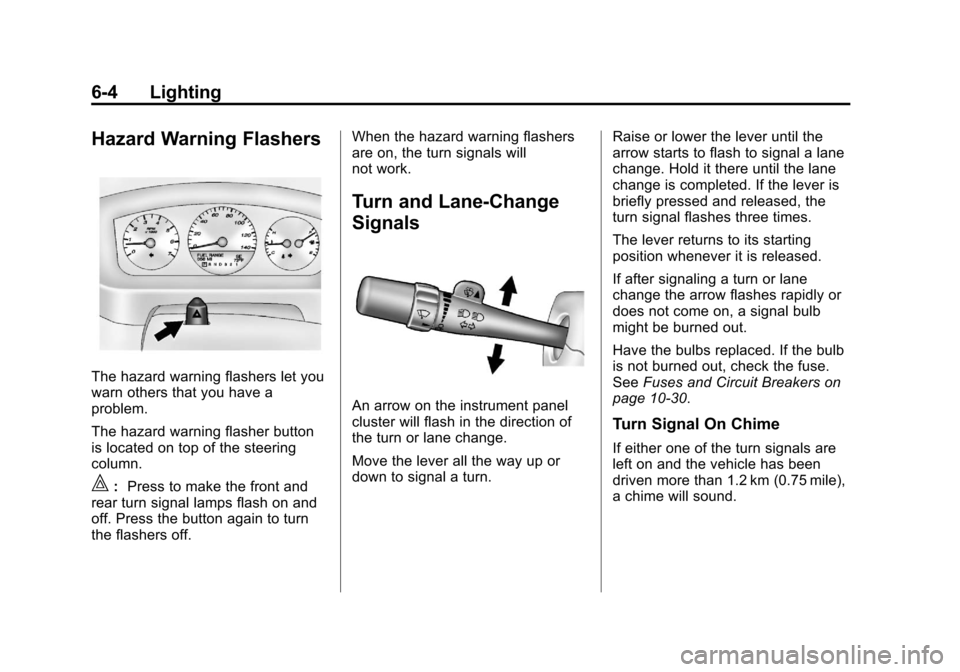
The hazard warning flasher button
is located on top of the steering
column.
|:Press to make the front and
rear turn signal lamps flash on and
off. Press the button again to turn
the flashers off. When the hazard warning flashers
are on, the turn signals will
not work.
Turn and Lane-Change
Signals
An arrow on the instrument panel
cluster will flash in the direction of
the turn or lane change.
Move the lever all the way up or
down to signal a turn.
Raise or lower the lever until the
arrow starts to flash to signal a lane
change. Hold it there until the lane
change is completed. If the lever is
briefly pressed and released, the
turn signal flashes three times.
The lever returns to its starting
position whenever it is released.
If after signaling a turn or lane
change the arrow flashes rapidly or
does not come on, a signal bulb
might be burned out.
Have the bulbs replaced. If the bulb
is not burned out, check the fuse.
See
Fuses and Circuit Breakers on
page 10‑30.
Turn Signal On Chime
If either one of the turn signals are
left on and the vehicle has been
driven more than 1.2 km (0.75 mile),
a chime will sound.
Page 155 of 374
Black plate (5,1)Chevrolet Impala Owner Manual - 2012
Lighting 6-5
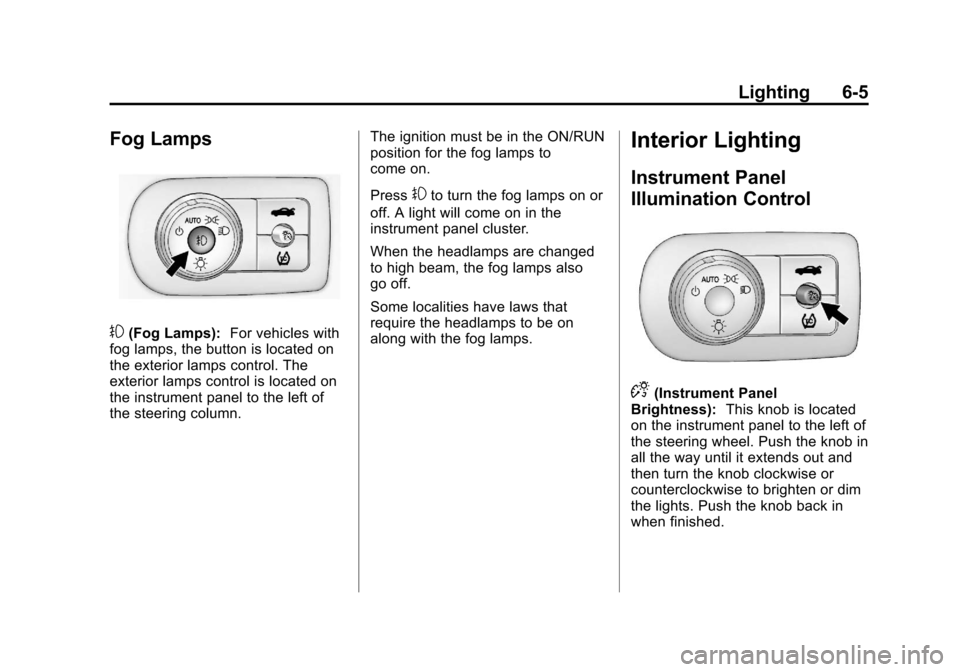
Fog Lamps
#(Fog Lamps):For vehicles with
fog lamps, the button is located on
the exterior lamps control. The
exterior lamps control is located on
the instrument panel to the left of
the steering column. The ignition must be in the ON/RUN
position for the fog lamps to
come on.
Press
#to turn the fog lamps on or
off. A light will come on in the
instrument panel cluster.
When the headlamps are changed
to high beam, the fog lamps also
go off.
Some localities have laws that
require the headlamps to be on
along with the fog lamps.
Interior Lighting
Instrument Panel
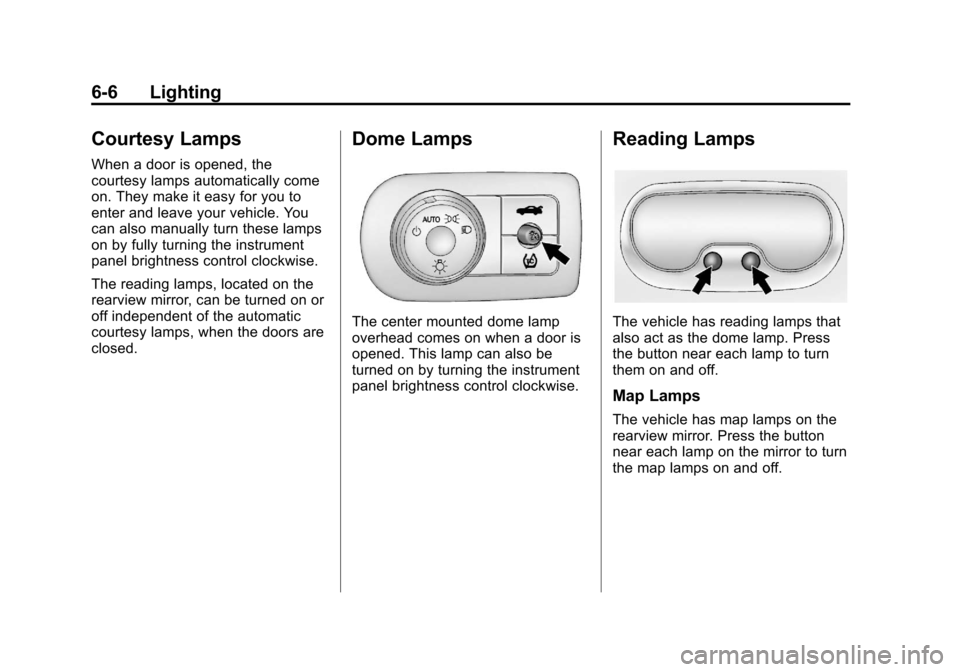
Illumination Control
D(Instrument Panel
Brightness): This knob is located
on the instrument panel to the left of
the steering wheel. Push the knob in
all the way until it extends out and
then turn the knob clockwise or
counterclockwise to brighten or dim
the lights. Push the knob back in
when finished.
Page 156 of 374
Black plate (6,1)Chevrolet Impala Owner Manual - 2012
6-6 Lighting
Courtesy Lamps
When a door is opened, the
courtesy lamps automatically come
on. They make it easy for you to
enter and leave your vehicle. You
can also manually turn these lamps
on by fully turning the instrument
panel brightness control clockwise.
The reading lamps, located on the
rearview mirror, can be turned on or
off independent of the automatic
courtesy lamps, when the doors are
closed.
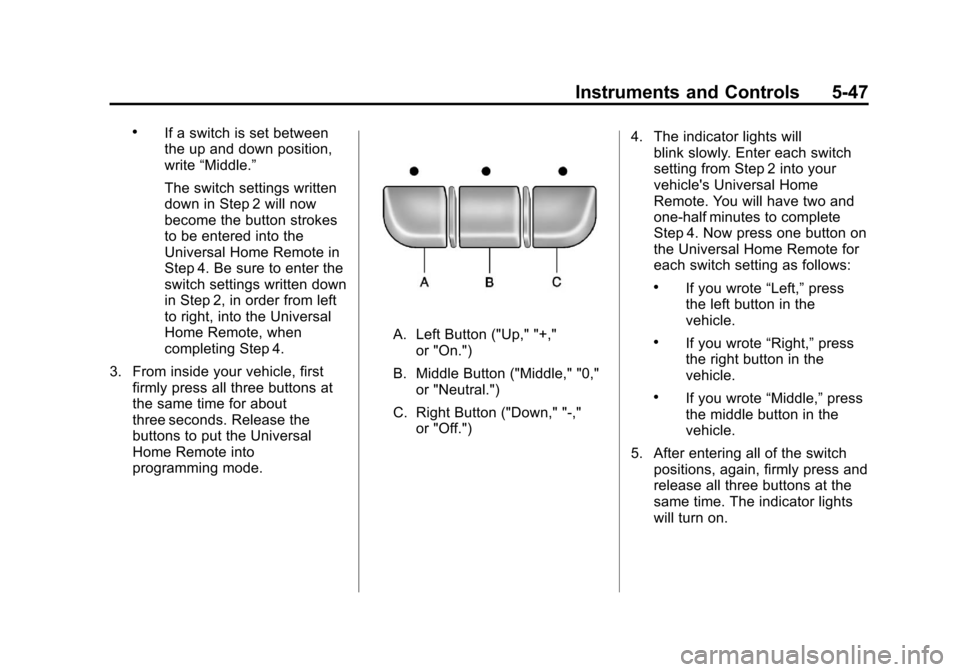
Dome Lamps
The center mounted dome lamp
overhead comes on when a door is
opened. This lamp can also be
turned on by turning the instrument
panel brightness control clockwise.
Reading Lamps
The vehicle has reading lamps that
also act as the dome lamp. Press
the button near each lamp to turn
them on and off.
Map Lamps
The vehicle has map lamps on the
rearview mirror. Press the button
near each lamp on the mirror to turn
the map lamps on and off.