2012 CHEVROLET IMPALA remote start
[x] Cancel search: remote startPage 288 of 374

Black plate (46,1)Chevrolet Impala Owner Manual - 2012
10-46 Vehicle Care
TPMS Sensor Matching
Process
Each TPMS sensor has a unique
identification code. The identification
code needs to be matched to a new
tire/wheel position after rotating the
vehicle’s tires or replacing one or
more of the TPMS sensors. Also,
the TPMS sensor matching process
should be performed after replacing
a spare tire with a road tire
containing the TPMS sensor. The
malfunction light and the DIC
message should go off at the next
ignition cycle. The sensors are
matched to the tire/wheel positions,
using a TPMS relearn tool, in the
following order: driver side front tire,
passenger side front tire, passenger
side rear tire, and driver side rear.
See your dealer for service or to
purchase a relearn tool.
There are two minutes to match the
first tire/wheel position, and
five minutes overall to match all four
tire/wheel positions. If it takes
longer, the matching process stops
and must be restarted.The TPMS sensor matching
process is:
1. Set the parking brake.
2. Turn the ignition to ON/RUN with
the engine off.
3. Press the Remote Keyless Entry (RKE) transmitter's Qand "
buttons at the same time for
approximately five seconds. The
horn sounds twice to signal the
receiver is in relearn mode and
the TIRE LEARNING ACTIVE
message displays on the DIC
screen.
4. Start with the driver side front tire.
5. Place the relearn tool against the tire sidewall, near the valve
stem. Then press the button to
activate the TPMS sensor.
A horn chirp confirms that the
sensor identification code has
been matched to this tire and
wheel position. 6. Proceed to the passenger side
front tire, and repeat the
procedure in Step 5.
7. Proceed to the passenger side rear tire, and repeat the
procedure in Step 5.
8. Proceed to the driver side rear tire, and repeat the procedure in
Step 5. The horn sounds two
times to indicate the sensor
identification code has been
matched to the driver side rear
tire, and the TPMS sensor
matching process is no longer
active. The TIRE LEARNING
ACTIVE message on the DIC
display screen goes off.
9. Turn the ignition to LOCK/OFF.
10. Set all four tires to the recommended air pressure
level as indicated on the Tire
and Loading Information label.
Page 307 of 374
Black plate (65,1)Chevrolet Impala Owner Manual - 2012
Vehicle Care 10-65
{WARNING
An electric fan can start up even
when the engine is not running
and can injure you. Keep hands,
clothing and tools away from any
underhood electric fan.
{WARNING
Using a match near a battery can
cause battery gas to explode.
People have been hurt doing this,
and some have been blinded.
Use a flashlight if you need more
light.
Be sure the battery has enough
water. You do not need to add
water to the battery installed in
your new vehicle. But if a battery
has filler caps, be sure the right
amount of fluid is there. If it is low,(Continued)
WARNING (Continued)
add water to take care of that
first. If you don't, explosive gas
could be present.
Battery fluid contains acid that
can burn you. Do not get it on
you. If you accidentally get it in
your eyes or on your skin, flush
the place with water and get
medical help immediately.
{WARNING
Fans or other moving engine
parts can injure you badly. Keep
your hands away from moving
parts once the engine is running.
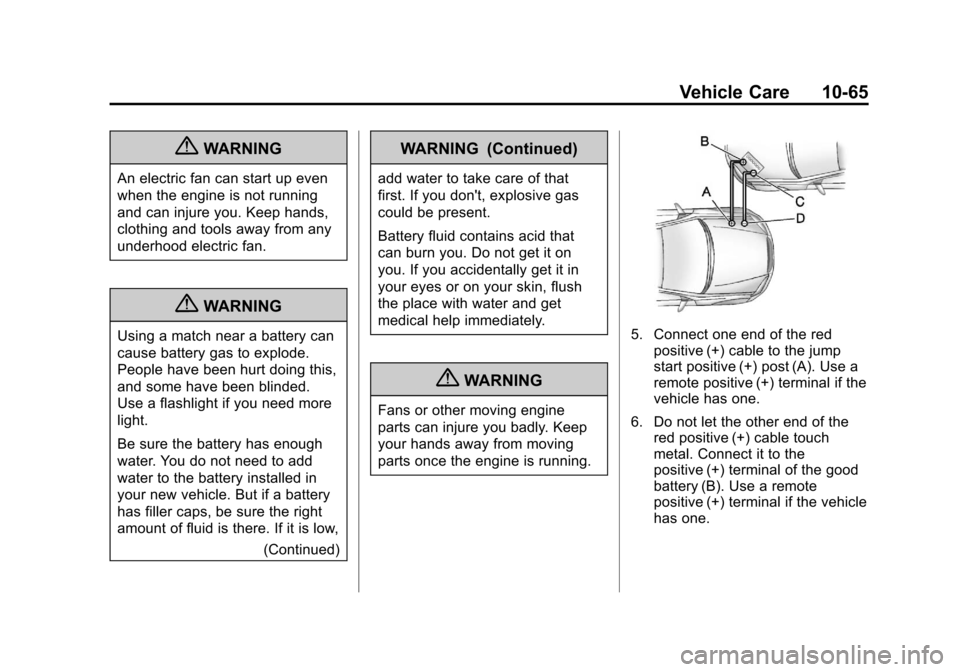
5. Connect one end of the redpositive (+) cable to the jump
start positive (+) post (A). Use a
remote positive (+) terminal if the
vehicle has one.
6. Do not let the other end of the red positive (+) cable touch
metal. Connect it to the
positive (+) terminal of the good
battery (B). Use a remote
positive (+) terminal if the vehicle
has one.
Page 308 of 374
Black plate (66,1)Chevrolet Impala Owner Manual - 2012
10-66 Vehicle Care
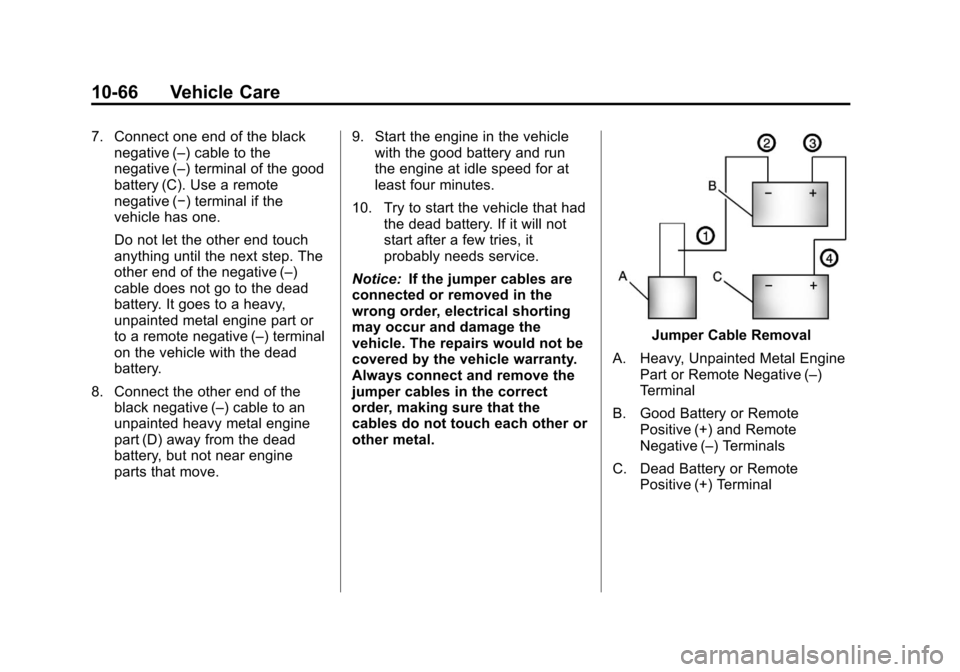
7. Connect one end of the blacknegative (–) cable to the
negative (–) terminal of the good
battery (C). Use a remote
negative (−) terminal if the
vehicle has one.
Do not let the other end touch
anything until the next step. The
other end of the negative (–)
cable does not go to the dead
battery. It goes to a heavy,
unpainted metal engine part or
to a remote negative (–) terminal
on the vehicle with the dead
battery.
8. Connect the other end of the black negative (–) cable to an
unpainted heavy metal engine
part (D) away from the dead
battery, but not near engine
parts that move. 9. Start the engine in the vehicle
with the good battery and run
the engine at idle speed for at
least four minutes.
10. Try to start the vehicle that had the dead battery. If it will not
start after a few tries, it
probably needs service.
Notice: If the jumper cables are
connected or removed in the
wrong order, electrical shorting
may occur and damage the
vehicle. The repairs would not be
covered by the vehicle warranty.
Always connect and remove the
jumper cables in the correct
order, making sure that the
cables do not touch each other or
other metal.
Jumper Cable Removal
A. Heavy, Unpainted Metal Engine Part or Remote Negative (–)
Terminal
B. Good Battery or Remote Positive (+) and Remote
Negative (–) Terminals
C. Dead Battery or Remote Positive (+) Terminal
Page 354 of 374

Black plate (16,1)Chevrolet Impala Owner Manual - 2012
13-16 Customer Information
OnStar®
If the vehicle is equipped with an
active OnStar system, that system
may also record data in crash or
near crash‐like situations. The
OnStar Terms and Conditions
provides information on data
collection and use and is available
at www.onstar.com (U.S.) or
www.onstar.ca (Canada), or by
pressing the
Qbutton and
speaking to an advisor. See OnStar
Overview on page 14‑1 for more
information.
Radio Frequency
Identification (RFID)
RFID technology is used in some
vehicles for functions such as tire
pressure monitoring and ignition
system security, as well as in
connection with conveniences such
as key fobs for remote door locking/
unlocking and starting, and
in-vehicle transmitters for garage
door openers. RFID technology in
GM vehicles does not use or record
personal information or link with any
other GM system containing
personal information.
Radio Frequency
Statement
This vehicle has systems that
operate on a radio frequency that
comply with Part 15 of the Federal
Communications Commission (FCC)
rules and with Industry Canada
Standards RSS‐GEN/210/220/310.
Operation is subject to the following
two conditions:
1. The device may not cause harmful interference.
2. The device must accept any interference received, including
interference that may cause
undesired operation of the
device.
Changes or modifications to any of
these systems by other than an
authorized service facility could void
authorization to use this equipment.
Page 359 of 374
Black plate (5,1)Chevrolet Impala Owner Manual - 2012
OnStar 14-5
OnStar Mobile App
With an iPhone®or
Android™-based mobile device,
an OnStar mobile app can be
downloaded. The vehicle can be
remote started, if equipped, or the
doors can be unlocked from
anywhere there is cell phone
service. It can also check the fuel
level, tire pressure, and oil life.
It can connect to an OnStar Advisor
anytime. For OnStar mobile app
compatibility or further information,
see www.onstar.com.
Diagnostics
OnStar Vehicle Diagnostics will
perform a vehicle check every
month. It will check the engine,
transmission, antilock brakes, and
major vehicle systems. It also
checks the tire pressures, if the
vehicle is equipped with the Tire
Pressure Monitoring System. If a
diagnostics check is needed
between e-mails, push
Q, and an
Advisor can run a check.
OnStar Additional
Information
Transferring Service
PushQto request account transfer
eligibility information. The Advisor
can assist in canceling or removing
account information. If OnStar
receives information that vehicle
ownership has changed, OnStar
may send a voice message to the
vehicle, requesting updated account
information.
Reactivation for Subsequent
Owners
PushQand follow the prompts to
speak to an Advisor as soon as
possible after acquiring the vehicle.
The Advisor will update vehicle
records and will explain the OnStar
service offers and options available.
How OnStar Service Works
Automatic Crash Response,
Emergency Services, Crisis Assist,
Stolen Vehicle Assistance, Vehicle
Diagnostics, Remote Door Unlock,
Roadside Assistance, Turn-by-Turn
Navigation, and Hands-Free Calling
are available on most vehicles. Not
all OnStar services are available
everywhere or on all vehicles. For
more information, a full description
of OnStar services, system
limitations, and OnStar terms and
conditions, see www.onstar.com
(U.S.) or www.onstar.ca (Canada);
contact OnStar at 1-888-4-ONSTAR
(1‐888‐466‐7827) or TTY
1‐877‐248‐2080; or push
Qto
speak with an Advisor. OnStar
services require a vehicle electrical
system, wireless service, and GPS
satellite technologies to be available
and operating for features to
function properly. These systems
may not operate if the battery is
discharged or disconnected.
Page 368 of 374

Black plate (6,1)Chevrolet Impala Owner Manual - 2012
i-6 INDEX
Hill and Mountain Roads . . . . . . . . 9-7
Hood . . . . . . . . . . . . . . . . . . . . . . . . . . 10-5
Horn . . . . . . . . . . . . . . . . . . . . . . . . . . . . 5-3
How to Wear Safety BeltsProperly . . . . . . . . . . . . . . . . . . . . . . 3-11
I
Ignition Positions . . . . . . . . . . . . . . 9-16
Ignition Transmission LockCheck . . . . . . . . . . . . . . . . . . . . . . . 10-23
Immobilizer . . . . . . . . . . . . . . . . . . . . 2-12
Infants and Young Children, Restraints . . . . . . . . . . . . . . . . . . . . 3-38
Infotainment . . . . . . . . . . . . . . . . . . . . 7-1
Instrument Cluster . . . . . . . . . . . . . 5-10
Introduction . . . . . . . . . . . . . . . . . . . . . . . iii
J
Jump Starting . . . . . . . . . . . . . . . . . 10-64
K
Key and Lock Messages . . . . . . . 5-33
Keyless Entry Remote (RKE) System . . . . . . . . 2-3
Keys . . . . . . . . . . . . . . . . . . . . . . . . . . . . 2-2
L
Labeling, Tire Sidewall . . . . . . . . 10-36
Lamp Messages . . . . . . . . . . . . . . . 5-33
Lamps Courtesy . . . . . . . . . . . . . . . . . . . . . . . 6-6
Dome . . . . . . . . . . . . . . . . . . . . . . . . . . 6-6
Exterior Controls . . . . . . . . . . . . . . . 6-1
License Plate . . . . . . . . . . . . . . . 10-29
Malfunction Indicator . . . . . . . . . 5-16
Reading . . . . . . . . . . . . . . . . . . . . . . . 6-6
Lap Belt . . . . . . . . . . . . . . . . . . . . . . . 3-18
Lap-Shoulder Belt . . . . . . . . . . . . . 3-13
LATCH System Replacing Parts after aCrash . . . . . . . . . . . . . . . . . . . . . . . 3-51
LATCH, Lower Anchors and Tethers for Children . . . . . . . . . . 3-45 Light
Electronic Stability Control
(ESC), Off . . . . . . . . . . . . . . . . . . . 5-20
Electronic Stability Control (ESC)/Traction Control
System (TCS) Indicator
Warning . . . . . . . . . . . . . . . . . . . . . 5-21
Lighter, Cigarette . . . . . . . . . . . . . . . 5-8
Lighting Delayed Entry . . . . . . . . . . . . . . . . . 6-7
Delayed Exit . . . . . . . . . . . . . . . . . . . 6-7
Entry . . . . . . . . . . . . . . . . . . . . . . . . . . 6-7
Illumination Control . . . . . . . . . . . . 6-5
Parade Dimming . . . . . . . . . . . . . . . 6-7
Lights Airbag Readiness . . . . . . . . . . . . . 5-14
Antilock Brake System
(ABS) Warning . . . . . . . . . . . . . . 5-20
Brake System Warning . . . . . . . 5-19
Charging System . . . . . . . . . . . . . 5-16
Cruise Control . . . . . . . . . . . . . . . . 5-24
Engine Coolant Temperature Warning . . . . . . . 5-21
Page 371 of 374

Black plate (9,1)Chevrolet Impala Owner Manual - 2012
INDEX i-9
R
Radio FrequencyIdentification (RFID) . . . . . . . . 13-16
Statement . . . . . . . . . . . . . . . . . . 13-16
Radios AM-FM Radio . . . . . . . . . . . . . . . . . . 7-6
Reception . . . . . . . . . . . . . . . . . . . . 7-12
Satellite . . . . . . . . . . . . . . . . . . . . . . . . 7-8
Reading Lamps . . . . . . . . . . . . . . . . . 6-6
Rear Seats . . . . . . . . . . . . . . . . . . . . . 3-8
Rear Storage . . . . . . . . . . . . . . . . . . . 4-2
Rearview Mirror Automatic Dimming . . . . . . . . . . . 2-15
Rearview Mirrors . . . . . . . . . . . . . . 2-15
Reclining Seatbacks . . . . . . . . . . . . 3-5
Recommended Fuel . . . . . . . . . . . . . . . . . . . . . . . . . . 9-37
Recommended Fluids and Lubricants . . . . . . . . . . . . . . . . . . . 11-11
Records
Maintenance . . . . . . . . . . . . . . . . .11-13
Recreational Vehicle Towing . . . . . . . . . . . . . . . . . . . . . . 10-67
Reimbursement Program, GM Mobility . . . . . . . . . . . . . . . . . . 13-5 Remote Keyless Entry
(RKE) System . . . . . . . . . . . . . 2-2, 2-3
Remote Vehicle Start . . . . . . . . . . . 2-5
Replacement Bulbs . . . . . . . . . . . 10-29
Replacement Parts Airbags . . . . . . . . . . . . . . . . . . . . . . . 3-35
Maintenance . . . . . . . . . . . . . . . . .11-12
Replacing Airbag System . . . . . . 3-35
Replacing LATCH System Parts after a Crash . . . . . . . . . . . 3-51
Replacing Safety Belt
System Parts after a Crash . . . 3-20
Reporting Safety Defects Canadian Government . . . . . . 13-14
General Motors . . . . . . . . . . . . . 13-14
U.S. Government . . . . . . . . . . . 13-13
Restraints Where to Put . . . . . . . . . . . . . . . . . 3-43
Retained Accessory Power (RAP) . . . . . . . . . . . . . . . . . 9-20
Ride Control Systems . . . . . . . . . 9-32
Electronic Stability (ESC) . . . . . 9-32
Messages . . . . . . . . . . . . . . . . . . . . 5-33
Roads Driving, Wet . . . . . . . . . . . . . . . . . . . 9-6 Roadside Assistance
Program . . . . . . . . . . . . . . . . . . . . . . 13-6
Roof Sunroof . . . . . . . . . . . . . . . . . . . . . . . 2-18
Rotation, Tires . . . . . . . . . . . . . . . . 10-47
Routing, Engine Drive Belt . . . . . 12-3
Running the Vehicle While Parked . . . . . . . . . . . . . . . . . . . . . . . 9-25
S
Safety Belts . . . . . . . . . . . . . . . . . . . 3-10Care . . . . . . . . . . . . . . . . . . . . . . . . . . 3-19
Extender . . . . . . . . . . . . . . . . . . . . . . 3-19
How to Wear Safety BeltsProperly . . . . . . . . . . . . . . . . . . . . . 3-11
Lap Belt . . . . . . . . . . . . . . . . . . . . . . 3-18
Lap-Shoulder Belt . . . . . . . . . . . . 3-13
Reminders . . . . . . . . . . . . . . . . . . . . 5-13
Replacing after a Crash . . . . . . 3-20
Use During Pregnancy . . . . . . . . 3-17
Safety Defects Reporting Canadian Government . . . . . . 13-14
General Motors . . . . . . . . . . . . . 13-14
U.S. Government . . . . . . . . . . . 13-13
Page 372 of 374

Black plate (10,1)Chevrolet Impala Owner Manual - 2012
i-10 INDEX
Safety Locks . . . . . . . . . . . . . . . . . . . . 2-9
Safety System Check . . . . . . . . . . 3-19
Satellite Radio . . . . . . . . . . . . . . . . . . 7-8
Scheduling Appointments . . . . . . 13-8
SeatsAdjustment, Front . . . . . . . . . . . . . . 3-3
Center Seat . . . . . . . . . . . . . . . . . . . 3-4
Head Restraints . . . . . . . . . . . . . . . 3-2
Heated Front . . . . . . . . . . . . . . . . . . 3-7
Lumbar Adjustment, Front . . . . . 3-4
Power Adjustment, Front . . . . . . 3-4
Rear . . . . . . . . . . . . . . . . . . . . . . . . . . . 3-8
Reclining Seatbacks . . . . . . . . . . . 3-5
Securing Child Restraints . . . . . . . . . . . . . . 3-51, 3-53
Security
Light . . . . . . . . . . . . . . . . . . . . . . . . . . 5-23
Vehicle . . . . . . . . . . . . . . . . . . . . . . . 2-11
Security, OnStar
®. . . . . . . . . . . . . . 14-2
Service Accessories and
Modifications . . . . . . . . . . . . . . . . 10-3
Doing Your Own Work . . . . . . . . 10-4
Engine Soon Light . . . . . . . . . . . . 5-16
Maintenance Records . . . . . . .11-13 Service (cont.)
Maintenance, General
Information . . . . . . . . . . . . . . . . . . 11-1
Parts Identification Label . . . . . 12-1
Publications Ordering
Information . . . . . . . . . . . . . . . . 13-12
Scheduling Appointments . . . . . 13-8
Vehicle Messages . . . . . . . . . . . . 5-35
Servicing the Airbag . . . . . . . . . . . 3-33
Shift Lock Control Function
Check, Automatic
Transmission . . . . . . . . . . . . . . . . 10-22
Shifting Into Park . . . . . . . . . . . . . . . . . . . . . . 9-21
Out of Park . . . . . . . . . . . . . . . . . . . 9-22
Sidemarker Bulb Replacement . . . . . . . . . . 10-28
Signals, Turn and
Lane-Change . . . . . . . . . . . . . . . . . 6-4
Spare Tire Compact . . . . . . . . . . . . . . . . . . . . 10-63
Specifications and Capacities . . . . . . . . . . . . . . . . . . . . 12-2
Speedometer . . . . . . . . . . . . . . . . . . 5-11
Start Vehicle, Remote . . . . . . . . . . 2-5 Starter Switch Check . . . . . . . . . 10-22
Starting the Engine . . . . . . . . . . . . 9-18
Steering . . . . . . . . . . . . . . . . . . . . . . . . 9-4
Fluid, Power . . . . . . . . . . . . . . . . 10-17
Wheel Adjustment . . . . . . . . . . . . . 5-2
Wheel Controls . . . . . . . . . . . . . . . . 5-3
Stoplamps and Back-Up Lamps
Bulb Replacement . . . . . . . . . . 10-28
Storage Rear . . . . . . . . . . . . . . . . . . . . . . . . . . . 4-2
Storage Areas
Armrest . . . . . . . . . . . . . . . . . . . . . . . . 4-1
Center Console . . . . . . . . . . . . . . . . 4-2
Convenience Net . . . . . . . . . . . . . . 4-2
Glove Box . . . . . . . . . . . . . . . . . . . . . 4-1
Sunglasses . . . . . . . . . . . . . . . . . . . . 4-1
Stuck Vehicle . . . . . . . . . . . . . . . . . . 9-10
Sun Visors . . . . . . . . . . . . . . . . . . . . . 2-17
Sunglass Storage . . . . . . . . . . . . . . . 4-1
Sunroof . . . . . . . . . . . . . . . . . . . . . . . . 2-18
Symbols . . . . . . . . . . . . . . . . . . . . . . . . . . iv
System Infotainment . . . . . . . . . . . . . . . . . . . 7-1