2012 CHEVROLET IMPALA remote start
[x] Cancel search: remote startPage 33 of 374

Black plate (7,1)Chevrolet Impala Owner Manual - 2012
Keys, Doors, and Windows 2-7
The remote vehicle start feature will
not operate if any of the follow
occur:
.The vehicle's key is in the
ignition.
.The vehicle's hood is open.
.The hazard warning flashers
are on.
.The check engine light is on.
SeeMalfunction Indicator Lamp
on page 5‑16.
.The engine coolant temperature
is too high.
.The oil pressure is low.
.The content theft-deterrent alarm
has been activated.
.Two remote vehicle starts,
or one start with a time
extension, have already been
provided for that ignition cycle.
Door Locks
{WARNING
Unlocked doors can be
dangerous.
.Passengers, especially
children, can easily open the
doors and fall out of a moving
vehicle. When a door is
locked, the handle will not
open it. The chance of being
thrown out of the vehicle in a
crash is increased if the
doors are not locked. So, all
passengers should wear
safety belts properly and the
doors should be locked
whenever the vehicle is
driven.
.Young children who get into
unlocked vehicles may be
unable to get out. A child can
be overcome by extreme heat
and can suffer permanent
(Continued)
WARNING (Continued)
injuries or even death from
heat stroke. Always lock the
vehicle whenever leaving it.
.Outsiders can easily enter
through an unlocked door
when you slow down or stop
the vehicle. Locking the doors
can help prevent this from
happening.
From the outside, use the key in the
driver door or use the Remote
Keyless Entry (RKE) transmitter to
lock and unlock the vehicle. From
the inside, use the manual or power
door locks.
To lock or unlock the driver side
door from the outside with the key,
insert the key and turn it clockwise
or counterclockwise.
To lock or unlock the door from the
inside, push or pull the manual
lock knob.
Page 38 of 374
Black plate (12,1)Chevrolet Impala Owner Manual - 2012
2-12 Keys, Doors, and Windows
Once armed, the alarm will go off if
someone tries to enter the vehicle
without using the RKE transmitter or
a key or turns the ignition on with an
incorrect key. The horn will sound
and the turn signal lamps will flash
for about 30 seconds.
When the alarm is armed, the trunk
may be opened with the RKE
transmitter. The power door lock
switches are disabled and the doors
remain locked. You must use your
RKE transmitter or your key to
unlock the doors when the system is
armed.
Arming with the Power Lock
Switch
The alarm system will arm when
you use either power lock switch to
lock the doors while any door is
open and the key is removed from
the ignition. The alarm system will
not arm if the trunk is open when
you use either power lock switch to
lock the doors.
Arming with the RKE
Transmitter
The alarm system will arm when
you use your RKE transmitter to
lock the doors, if the key is not in
the ignition.
Disarming with the RKE
Transmitter
The alarm system will disarm when
you use your RKE transmitter to
unlock the doors.
The first time a remote unlock
command is received, three flashes
will be seen and three horn chirps
heard to indicate an alarm condition
has occurred since last arming.
Disarming with Your Key
The alarm system will disarm when
you use your key to unlock the
doors or insert your key in the
ignition and turn it from the LOCK/
OFF position.
Immobilizer
SeeRadio Frequency Statement on
page 13‑16 for information
regarding Part 15 of the Federal
Communications Commission (FCC)
rules and Industry Canada
Standards RSS-GEN/210/220/310.
Immobilizer Operation
This vehicle has PASS-Key®III+
(Personalized Automotive Security
System) theft-deterrent system.
PASS-Key III+ is a passive
theft-deterrent system.
The system is automatically armed
when the key is removed from the
ignition.
The system is automatically
disarmed when the key is turned to
ON/RUN, ACC/ACCESSORY,
or START from the LOCK/OFF
position.
You do not have to manually arm or
disarm the system.
Page 72 of 374

Black plate (28,1)Chevrolet Impala Owner Manual - 2012
3-28 Seats and Restraints
.The vehicle has a crash sensing
and diagnostic module which
records information after a
crash. SeeVehicle Data
Recording and Privacy on
page 13‑14 andEvent Data
Recorders on page 13‑15.
.Let only qualified technicians
work on the airbag systems.
Improper service can mean that
an airbag system will not work
properly. See your dealer for
service.
Passenger Sensing
System
The vehicle has a passenger
sensing system for the right front
passenger position. The passenger
airbag status indicator will be visible
on the instrument panel when the
vehicle is started.
United States
Canada
The words ON and OFF, or the
symbol for on and off, will be visible
during the system check. If you are
using remote start to start the
vehicle from a distance, if equipped,
you may not see the system check.
When the system check is
complete, either the word ON or the
word OFF, or the symbol for on or
off, will be visible. See Passenger
Airbag Status Indicator on
page 5‑15. The passenger sensing system will
turn off the right front passenger
frontal airbag under certain
conditions. The driver airbag,
seat‐mounted side impact airbags,
and roof‐rail airbags are not affected
by the passenger sensing system.
The passenger sensing system
works with sensors that are part of
the right front passenger seat. The
sensors are designed to detect the
presence of a properly-seated
occupant and determine if the right
front passenger frontal airbag
should be enabled (may inflate)
or not.
According to accident statistics,
children are safer when properly
secured in a rear seat in the correct
child restraint for their weight
and size.
Page 117 of 374
Black plate (15,1)Chevrolet Impala Owner Manual - 2012
Instruments and Controls 5-15
Passenger Airbag Status
Indicator
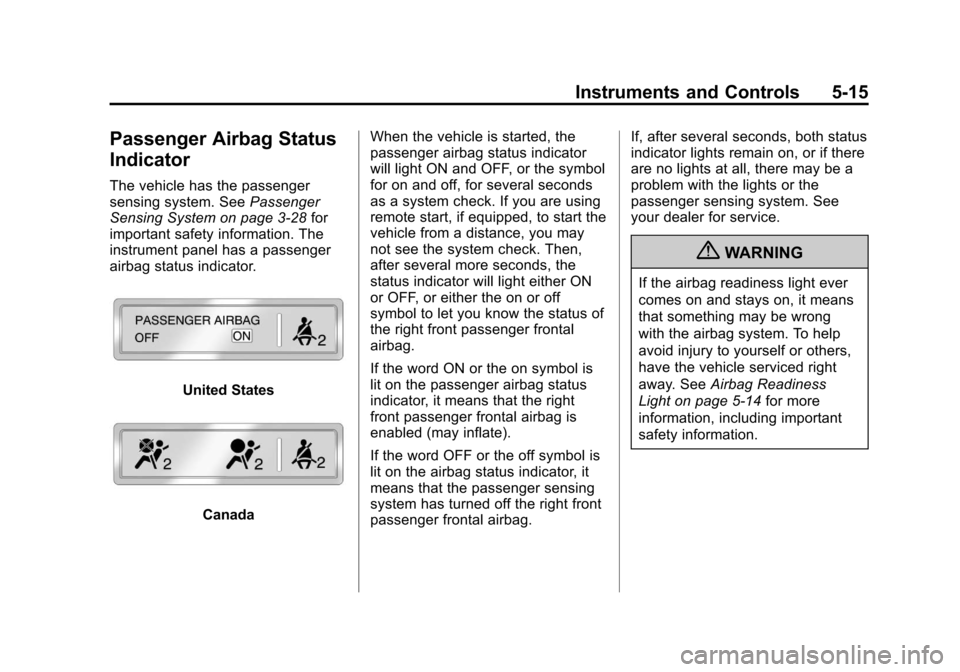
The vehicle has the passenger
sensing system. SeePassenger
Sensing System on page 3‑28 for
important safety information. The
instrument panel has a passenger
airbag status indicator.
United States
Canada When the vehicle is started, the
passenger airbag status indicator
will light ON and OFF, or the symbol
for on and off, for several seconds
as a system check. If you are using
remote start, if equipped, to start the
vehicle from a distance, you may
not see the system check. Then,
after several more seconds, the
status indicator will light either ON
or OFF, or either the on or off
symbol to let you know the status of
the right front passenger frontal
airbag.
If the word ON or the on symbol is
lit on the passenger airbag status
indicator, it means that the right
front passenger frontal airbag is
enabled (may inflate).
If the word OFF or the off symbol is
lit on the airbag status indicator, it
means that the passenger sensing
system has turned off the right front
passenger frontal airbag. If, after several seconds, both status
indicator lights remain on, or if there
are no lights at all, there may be a
problem with the lights or the
passenger sensing system. See
your dealer for service.
{WARNING
If the airbag readiness light ever
comes on and stays on, it means
that something may be wrong
with the airbag system. To help
avoid injury to yourself or others,
have the vehicle serviced right
away. See
Airbag Readiness
Light on page 5‑14 for more
information, including important
safety information.
Page 132 of 374

Black plate (30,1)Chevrolet Impala Owner Manual - 2012
5-30 Instruments and Controls
Door Ajar Messages
DRIVER DOOR OPEN
This message displays when the
driver door is not closed properly.
Make sure that the door is closed
completely.
HOOD OPEN
If your vehicle has the remote start
feature, this message displays when
the hood is not closed properly.
Make sure that the hood is closed
completely. SeeHood on page 10‑5.
LEFT REAR DOOR OPEN
This message displays when the
driver side rear door is not closed
properly. Make sure that the door is
closed completely.
PASSENGER DOOR OPEN
This message displays when the
front passenger door is not closed
properly. Make sure that the door is
closed completely.
RIGHT REAR DOOR OPEN
This message displays when the
passenger side rear door is not
closed properly. Make sure that the
door is closed completely.
TRUNK OPEN
This message displays when the
trunk is not closed completely. Make
sure that the trunk is closed
completely. SeeTrunk on
page 2‑10.
Engine Cooling System
Messages
ENGINE HOT A/C
(Air Conditioning) OFF
This message displays when the
engine coolant becomes hotter than
the normal operating temperature.
To avoid added strain on a hot
engine, the air conditioning
compressor is automatically turned
off. When the coolant temperature
returns to normal, the A/C operation
automatically resumes. You can
continue to drive your vehicle. If this
message continues to appear, have
the system repaired by your dealer
as soon as possible to avoid
compressor damage.
Page 144 of 374
Black plate (42,1)Chevrolet Impala Owner Manual - 2012
5-42 Instruments and Controls
REMOTE START
If your vehicle has this feature, it
allows you to turn the remote start
off or on. The remote start feature
allows you to start the engine from
outside of the vehicle using the
Remote Keyless Entry (RKE)
transmitter. SeeRemote Vehicle
Start on page 2‑5 for more
information.
Press the customization button until
REMOTE START appears on the
DIC display. Press the set/reset
button once to access the settings
for this feature. Then press the
customization button to scroll
through the following settings:
OFF: The remote start feature will
be disabled.
ON (default): The remote start
feature will be enabled. NO CHANGE:
No change will be
made to this feature. The current
setting will remain.
To select a setting, press the set/
reset button while the desired
setting is displayed on the DIC.
FACTORY SETTINGS
This feature allows you to set all of
the customization features back to
their factory default settings.
Press the customization button until
FACTORY SETTINGS appears on
the DIC display. Press the set/reset
button once to access the settings
for this feature. Then press the
customization button to scroll
through the following settings:
RESTORE ALL (default): The
customization features will be set to
their factory default settings. DO NOT RESTORE:
The
customization features will not be
set to their factory default settings.
To select a setting, press the set/
reset button while the desired
setting is displayed on the DIC.
EXIT FEATURE SETTINGS
This feature allows you to exit the
FEATURE SETTINGS menu.
Press the customization button until
FEATURE SETTINGS PRESS
V
TO EXIT appears in the DIC display.
Press the set/reset button once to
exit the menu.
If you do not exit, pressing the
customization button again will
return you to the beginning of the
FEATURE SETTINGS menu.
Page 146 of 374
Black plate (44,1)Chevrolet Impala Owner Manual - 2012
5-44 Instruments and Controls
Be sure to keep the original remote
control transmitter for use in other
vehicles, as well as for future
programming. Only the original
remote control transmitter is needed
for Fixed Code programming. The
programmed buttons should be
erased when the vehicle is sold or
the lease ends. See“Erasing
Universal Home Remote Buttons” in
this section.
Park the vehicle outside of the
garage when programming a garage
door. Be sure that people and
objects are clear of the garage door
or gate that is being programmed.
Programming Universal Home
Remote —Rolling Code
For questions or help programming
the Universal Home Remote
System, call 1-866-572-2728 or go
to www.learcar2u.com.
Most garage door openers sold after
1996 are Rolling Code units. Programming a garage door opener
involves time-sensitive actions, so
read the entire procedure before
starting. Otherwise, the device will
time out and the procedure will have
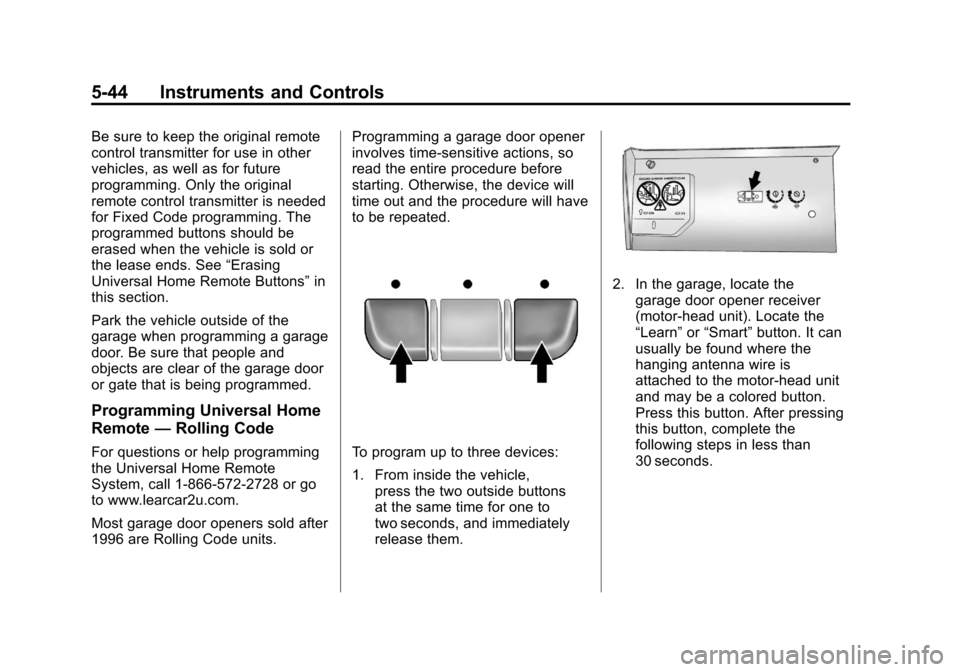
to be repeated.To program up to three devices:
1. From inside the vehicle,
press the two outside buttons
at the same time for one to
two seconds, and immediately
release them.
2. In the garage, locate thegarage door opener receiver
(motor-head unit). Locate the
“Learn” or“Smart” button. It can
usually be found where the
hanging antenna wire is
attached to the motor-head unit
and may be a colored button.
Press this button. After pressing
this button, complete the
following steps in less than
30 seconds.
Page 147 of 374
Black plate (45,1)Chevrolet Impala Owner Manual - 2012
Instruments and Controls 5-45
3. Immediately return to thevehicle. Press and hold the
Universal Home Remote button
that will be used to control the
garage door until the garage
door moves. The indicator light,
above the selected button,
should slowly blink. This button
may need to be held for up to
20 seconds.
4. Immediately, within one second, release the button when the
garage door moves. The
indicator light will blink rapidly
until programming is complete.
5. Press and release the same button again. The garage door
should move, confirming that
programming is successful and
complete.
To program another Rolling Code
device such as an additional garage
door opener, a security device,
or home automation device, repeat
Steps 1 through 5, choosing a different function button in Step 3
than what was used for the garage
door opener.
If these instructions do not work,
the garage door opener is probably
a Fixed Code unit. Follow the
Programming instructions that follow
for a Fixed Code garage door
opener.
Programming Universal Home
Remote
—Fixed Code
For questions or help programming
the Universal Home Remote
System, call 1-866-572-2728 or go
to www.learcar2u.com.
Most garage door openers sold
before 1996 are Fixed Code units.
Programming a garage door opener
involves time-sensitive actions, so
read the entire procedure before
starting. Otherwise, the device will
time out and the procedure will have
to be repeated.To program up to three devices:
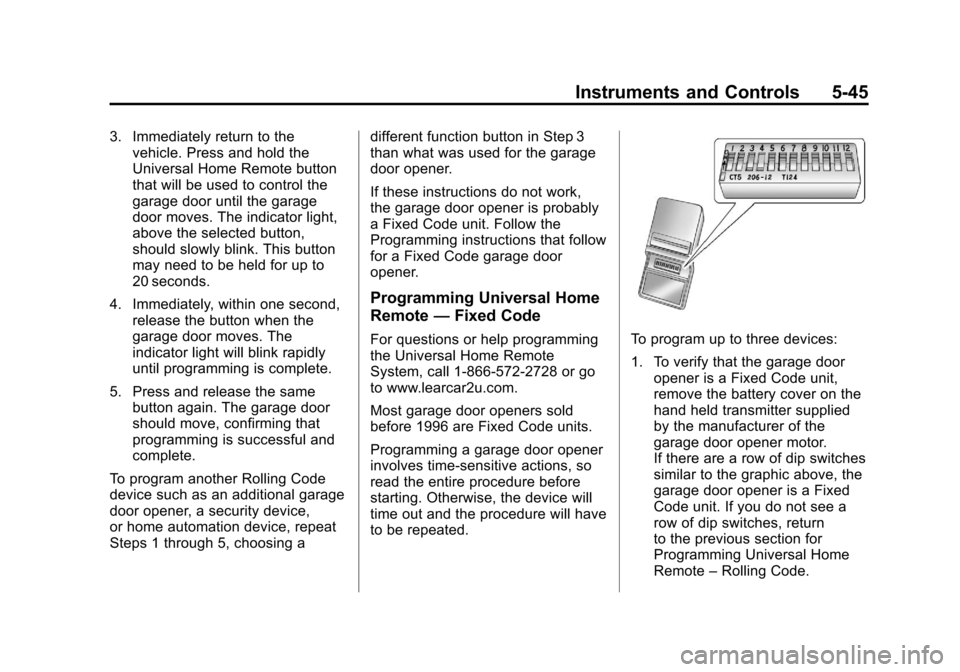
1. To verify that the garage door
opener is a Fixed Code unit,
remove the battery cover on the
hand held transmitter supplied
by the manufacturer of the
garage door opener motor.
If there are a row of dip switches
similar to the graphic above, the
garage door opener is a Fixed
Code unit. If you do not see a
row of dip switches, return
to the previous section for
Programming Universal Home
Remote –Rolling Code.