2012 CHEVROLET EQUINOX display
[x] Cancel search: displayPage 194 of 428
Black plate (34,1)Chevrolet Equinox Owner Manual - 2012
7-34 Infotainment System
4. Select album to view songs.
5. Select the desired song from thelist to begin playback.
Podcasts:
1. Press to view the podcasts stored on the iPod.
2. Select a podcast name to play the desired podcast.
Composers:
1. Press to view the composers stored on the iPod.
2. Select a composer name to view a list of all songs by that
composer.
3. Select the desired song from the list to begin playback. Audio Books:
1. Press to view the audio books
stored on the iPod.
2. Select an audio book name to view a list of all audio books.
3. Select the desired audio book from the list to begin playback.
Playing from an iPhone®
This feature supports the following
iPhone model:
.iPhone (3G –3GS)
To use the iPhone, follow the same
instructions as stated earlier for
using an iPod.
Rear Seat
Infotainment
Rear Seat Audio (RSA)
System
Vehicles with this feature allow the
rear seat passengers to listen to
and control any of the music
sources: radio, CDs, DVDs, or other
auxiliary sources. RSA can only
control music sources that the front
seat passengers are not listening to,
except on radios where dual control
is allowed.
RSA can function when the front
radio is off.
Xdisplays on the
infotainment system when RSA
is on.
Page 195 of 428
Black plate (35,1)Chevrolet Equinox Owner Manual - 2012
Infotainment System 7-35
Audio can be heard through wired
headphones (not included) plugged
into the jacks on the RSA. If the
vehicle has a Rear Seat
Entertainment system with wireless
headphones, audio can also be
heard on Channel 2 of the wireless
headphones.
To listen to a portable audio device
through the RSA, attach the
portable audio device to either the
front or rear auxiliary input,
if available. Turn the device on, then
choose the front auxiliary input with
the RSA SRCE button.
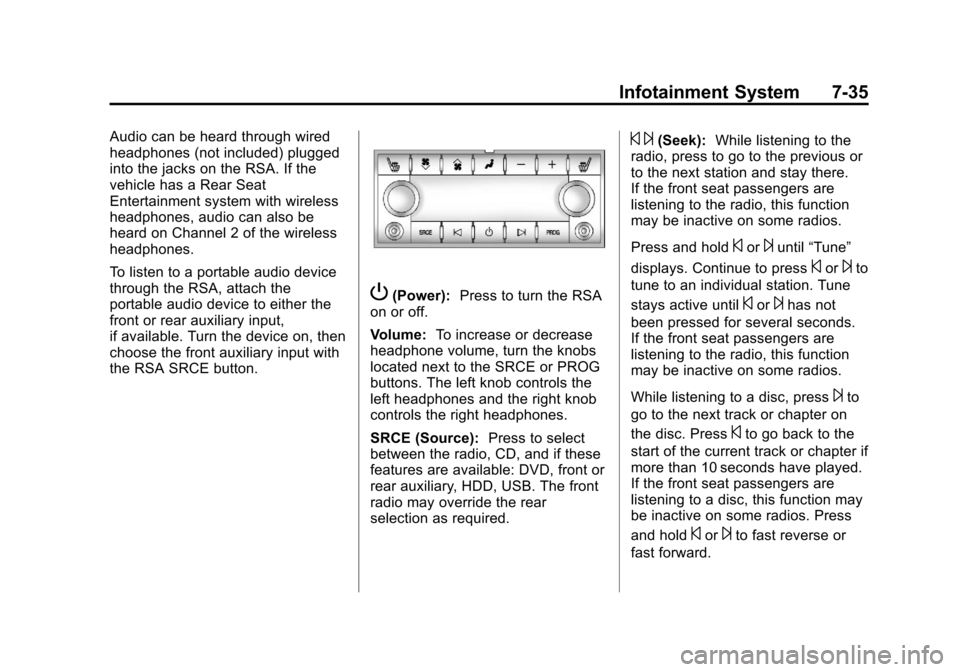
P(Power):Press to turn the RSA
on or off.
Volume: To increase or decrease
headphone volume, turn the knobs
located next to the SRCE or PROG
buttons. The left knob controls the
left headphones and the right knob
controls the right headphones.
SRCE (Source): Press to select
between the radio, CD, and if these
features are available: DVD, front or
rear auxiliary, HDD, USB. The front
radio may override the rear
selection as required.
© ¨(Seek): While listening to the
radio, press to go to the previous or
to the next station and stay there.
If the front seat passengers are
listening to the radio, this function
may be inactive on some radios.
Press and hold
©or¨until “Tune”
displays. Continue to press
©or¨to
tune to an individual station. Tune
stays active until
©or¨has not
been pressed for several seconds.
If the front seat passengers are
listening to the radio, this function
may be inactive on some radios.
While listening to a disc, press
¨to
go to the next track or chapter on
the disc. Press
©to go back to the
start of the current track or chapter if
more than 10 seconds have played.
If the front seat passengers are
listening to a disc, this function may
be inactive on some radios. Press
and hold
©or¨to fast reverse or
fast forward.
Page 196 of 428
Black plate (36,1)Chevrolet Equinox Owner Manual - 2012
7-36 Infotainment System
When a DVD video menu is being
displayed, press
©or¨to cursor up
or down on the menu. Hold
©or¨to
cursor left or right on the menu.
PROG (Program): Press to go to
the next preset radio station or
channel set on the main radio. If the
front seat passengers are listening
to the radio, this function may be
inactive on some radios.
When a CD or DVD audio disc is
playing, press PROG to go to the
beginning of the disc or display disc
info. If the front seat passengers are
listening to a disc, this function may
be inactive on some radios. When a disc is playing in the CD or
DVD changer, press and hold
PROG to select the next disc,
if multiple discs are loaded. If the
front seat passengers are listening
to a disc, this function may be
inactive on some radios.
The PROG button may be used to
access the menu of an MP3. Once
in the menu, use
©or¨to make
selections.
When a DVD video menu is
displayed, press PROG, or press
and hold PROG to perform the
menu function, then press ENTER.
Phone
Bluetooth (Overview)
For vehicles equipped with the
MyLink or IntelliLink infotainment
system, see the separate MyLink/
IntelliLink Features and Functions
Guide for more information.
For vehicles equipped with
Bluetooth capability, the system can
interact with many cell phones,
allowing:
.Placement and receipt of calls in
a hands-free mode.
.Sharing of the cell phone’s
address book or contact list with
the vehicle.
Page 198 of 428
Black plate (38,1)Chevrolet Equinox Owner Manual - 2012
7-38 Infotainment System
Infotainment System Controls
If equipped, the infotainment system
allows certain controls to be
selected on the infotainment display.
For information about how to
navigate the menu system using the
infotainment controls, seeOperation
on page 7‑10.
5or5\?(PHONE/MUTE): Press
to enter the Phone main menu.
Press
5\?to mute the audio
system.
Voice Recognition
The voice recognition system uses
commands to control the system
and dial phone numbers.
Noise: The system may not
recognize voice commands if there
is too much background noise.
When to Speak: A tone sounds to
indicate that the system is ready for
a voice command. Wait for the tone
and then speak.
How to Speak: Speak clearly in a
calm and natural voice.
Audio System
When using the Bluetooth system,
sound comes through the vehicle's
front audio system speakers and
overrides the audio system. Use the
VOL/
Oknob during a call to
change the volume level. The
adjusted volume level remains in
memory for later calls. The system
maintains a minimum volume level.
Other Information
The Bluetooth®word mark and
logos are owned by the Bluetooth®
SIG, Inc. and any use of such marks
by General Motors is under license.
Other trademarks and trade names
are those of their respective owners.
See Radio Frequency Statement on
page 13‑17 for information
regarding Part 15 of the Federal
Communications Commission (FCC)
rules and Industry Canada
Standards RSS-GEN/210/220/310.
Bluetooth (Infotainment
Controls)
For vehicles equipped with the
MyLink or IntelliLink infotainment
system, see the separate MyLink/
IntelliLink Features and Functions
Guide for more information.
For information about how to
navigate the menu system using the
infotainment controls, see Operation
on page 7‑10.
Pairing
A Bluetooth‐enabled cell phone
must be paired to the Bluetooth
system and then connected to the
vehicle before it can be used. See
your cell phone manufacturer's user
guide for Bluetooth functions before
pairing the cell phone. If a Bluetooth
phone is not connected, calls will be
made using OnStar Hands‐Free
Calling, if available. See OnStar
Overview on page 14‑1 for more
information.
Page 199 of 428
Black plate (39,1)Chevrolet Equinox Owner Manual - 2012
Infotainment System 7-39
Pairing Information
.A Bluetooth phone with MP3
capability cannot be paired to
the vehicle as a phone and an
MP3 player at the same time.
.Up to five cell phones can be
paired to the Bluetooth system.
.The pairing process is disabled
when the vehicle is moving.
.Pairing only needs to be
completed once, unless the
pairing information on the cell
phone changes or the cell phone
is deleted from the system.
.Only one paired cell phone can
be connected to the Bluetooth
system at a time.
.If multiple paired cell phones are
within range of the system, the
system connects to the first
available paired cell phone in the
order that they were first paired
to the system. To link to a
different paired phone, see
“Linking to a Different Phone”
later in this section.Pairing a Phone
1. Press the CONFIG button.
2. Select Phone Settings or
Bluetooth Settings.
3. Select Bluetooth.
4. Select Pair Device (Phone). A four‐digit Personal
Identification Number (PIN)
appears on the display. The PIN
is used in Step 6.
5. Start the pairing process on the cell phone to be paired to the
vehicle. See the cell phone
manufacturer's user guide for
information on this process.
6. Locate the device named “Your
Vehicle” in the list on the cell
phone. Follow the instructions
on the cell phone to enter the
PIN provided in Step 4. After the
PIN is successfully entered, the
system prompts you to provide a
name for the paired cell phone.
This name will be used to
indicate which phones are
paired and connected to the vehicle. The system responds
with
“
successfully paired” after the
pairing process is complete.
7. Repeat Steps 1 through 6 to pair additional phones.
Listing All Paired and Connected
Phones
1. Press the CONFIG button.
2. Select Phone Settings or Bluetooth Settings.
3. Select Bluetooth.
4. Select Device List.
Deleting a Paired Phone
1. Press the CONFIG button.
2. Select Phone Settings or Bluetooth Settings.
3. Select Bluetooth.
4. Select Device List.
5. Select the phone to delete and follow the on screen prompts.
Page 214 of 428
Black plate (4,1)Chevrolet Equinox Owner Manual - 2012
8-4 Climate Controls
Manual Operation
O(Power):Press to turn the
climate control system on or off.
A(Fan Control): Turn to increase
or decrease the fan speed.
Adjusting the fan speed while in
automatic mode places the fan
under manual control. The AUTO
indicator light turns off. The air
delivery mode remains in automatic
control.
Temperature Control: Turn to
increase or decrease the
temperature inside the vehicle.
H/G(Air Delivery Mode
Control): Press mode up or mode
down to cycle through the different
air delivery modes. The current
mode is shown on the display.
Select from the following:
F (Vent): Air is directed to the
instrument panel outlets. *
(Bi-Level): Air is directed to the
instrument panel outlets and the
floor outlets.
7 (Floor): Air is directed to the
floor outlets.
W(Defog): Clears the windows of
fog or moisture. Air is directed to the
windshield and floor outlets.
0FRONT (Front Defrost): Clears
the windshield of fog or frost more
quickly. Air is directed to the
windshield and side window outlets.
Selecting defrost disables the
automatic mode.
For best results, clear all snow and
ice from the windshield before
defrosting.
Do not drive the vehicle until all the
windows are clear.
Air Conditioning
A/C (Air Conditioning): Press to
turn the air conditioning on or off.
If the fan is turned off or the outside
temperature falls below freezing, the
air conditioning will not work. When
in AUTO, the air conditioning will
come on automatically as needed.
h(Recirculation): Press to turn
on the recirculation. Press to
alternate between recirculation and
outside air, if the vehicle does not
have a separate outside air button.
The indicator light turns on when
recirculation is selected. Air is
recirculated inside the vehicle.
It helps quickly cool the air inside
the vehicle or prevent outside air
and odors from entering.
%(Outside Air, If Equipped):
Press to turn on the outside air. An
indicator light comes on. Outside air
is circulated throughout the vehicle.
Page 238 of 428
Black plate (22,1)Chevrolet Equinox Owner Manual - 2012
9-22 Driving and Operating
If the vehicle must be shut off in an
emergency:
1. Brake using a firm and steadypressure. Do not pump the
brakes repeatedly. This may
deplete power assist, requiring
increased brake pedal force.
2. Shift the vehicle to N (Neutral). This can be done while the
vehicle is moving. After shifting
to N (Neutral), firmly apply the
brakes and steer the vehicle to a
safe location.
3. Come to a complete stop, shift to P (Park), and turn the ignition
to LOCK/OFF. On vehicles with
an automatic transmission, the
shift lever must be in P (Park) to
turn the ignition switch to the
LOCK/OFF position.
4. Set the parking brake. See Parking Brake on page 9‑33.{WARNING
Turning off the vehicle while
moving may cause loss of power
assist in the brake and steering
systems and disable the airbags.
While driving, only shut the
vehicle off in an emergency.
If the vehicle cannot be pulled over,
and must be shut off while driving,
turn the ignition to ACC/
ACCESSORY.
The ignition switch can bind in the
LOCK/OFF position with the wheels
turned off center. If this happens,
move the steering wheel from right
to left while turning the key to ACC/
ACCESSORY. If this does not work,
then the vehicle needs service.
B (ACC/ACCESSORY): This
position provides power to some of
the electrical accessories. It unlocks
the steering wheel and ignition. To
move the key from ACC/ ACCESSORY to LOCK/OFF, push
in the key and then turn it to
LOCK/OFF.
C (ON/RUN):
The ignition switch
stays in this position when the
engine is running. This position can
be used to operate the electrical
accessories, including the
ventilation fan and 12‐volt power
outlets, as well as to display some
warning and indicator lights. This
position can also be used for
service and diagnostics, and to
verify the proper operation of the
malfunction indicator lamp as may
be required for emission inspection
purposes. The transmission is also
unlocked in this position on
automatic transmission vehicles.
The battery could be drained if the
key is left in the ACC/ACCESSORY
or ON/RUN position with the engine
off. The vehicle might not start if the
battery is allowed to drain for an
extended period of time.
Page 247 of 428
Black plate (31,1)Chevrolet Equinox Owner Manual - 2012
Driving and Operating 9-31
Manual Mode
Electronic Range Select
(ERS) Mode
ERS or manual mode allows for the
selection of the range of gear
positions. Use this mode when
driving downhill or towing a trailer to
limit the top gear and vehicle speed.
The shift position indicator within the
Driver Information Center (DIC) will
display a number next to the M
indicating the highest available gear
under manual mode and the driving
conditions when manual mode was
selected.
To use this feature:
1. Move the shift lever toM (Manual Mode).
2. Press the plus/minus button on the shift lever, to increase or
decrease the gear range
available. When shifting to M (Manual Mode),
the transmission will shift to a preset
lower gear range. For this preset
range, the highest gear available is
displayed next to the M in the DIC.
See
Driver Information Center (DIC)
on page 5‑24 for more information.
All gears below that number are
available to use. For example, when
4 (Fourth) is shown next to the M,
1 (First) through 4 (Fourth) gears are
shifted automatically. To shift to
5 (Fifth) gear, press the + (Plus)
button or shift into D (Drive).
M (Manual Mode) will prevent
shifting to a lower gear range if the
engine speed is too high. If vehicle
speed is not reduced within the time
allowed, the lower gear range shift
will not be completed. Slow the
vehicle, then press the −(Minus)
button to the desired lower gear
range.
While using the ERS, cruise control
can be used.
Fuel Economy Mode
Vehicles with a 2.4L engine have a
Fuel Economy Mode. When
engaged, fuel economy mode can
improve the vehicle's fuel economy.
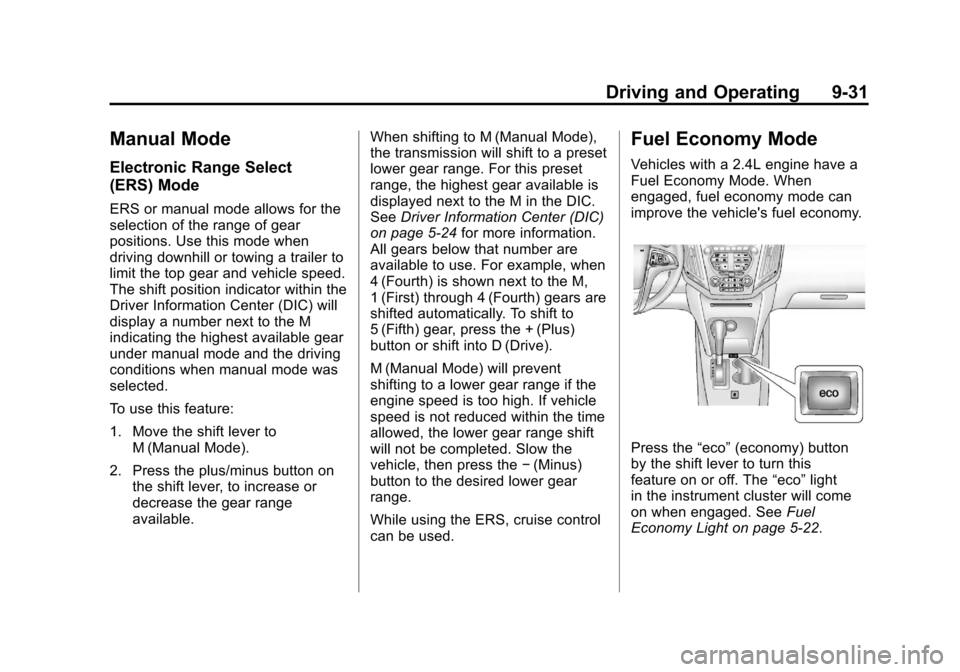
Press the “eco”(economy) button
by the shift lever to turn this
feature on or off. The “eco”light
in the instrument cluster will come
on when engaged. See Fuel
Economy Light on page 5‑22.