2012 CHEVROLET EQUINOX phone
[x] Cancel search: phonePage 164 of 428

Black plate (4,1)Chevrolet Equinox Owner Manual - 2012
7-4 Infotainment System
E. Buttons 1 to 6
.Radio: Saves and selects
favorite stations.
F. AUX
.Selects a connected
external audio source.
G.
EBACK
.Menu: Moves one
level back.
.Character Input: Deletes
the last character.
H. INFO
.Radio: Shows available
information about the
current station.
.CD: Shows available
information about the
current track. I. MENU/SEL
.Press: Opens the menus
and selects menu items.
.Turn: Highlights menu
items or sets values while
in a menu. Manually
selects radio stations while
listening to the radio.
J.
k
.CD: Plays or pauses
the CD.
K. CD
.Selects the CD player
when listening to a
different audio source.
L.
5/?
.Opens the phone
main menu.
.Mutes the audio system. M.
lSEEK
.Radio: Seeks the next
station.
.CD: Selects the next track
or fast forwards within a
track.
N.
H
.Opens the clock menu.
O. CONFIG
.Opens the settings menu.
P.
X(CD Eject)
.Removes a disc from the
CD slot.
Q. TONE
.Opens the tone menu.
Page 165 of 428
Black plate (5,1)Chevrolet Equinox Owner Manual - 2012
Infotainment System 7-5
Overview (Radio with CD
and Touchscreen)
For vehicles equipped with the
MyLink®or IntelliLink®infotainment
system, see the separate MyLink/
IntelliLink Features and Functions
Guide for more information.
Keeping your eyes on the road and
your mind on the drive is important
for safe driving. The infotainment
system has built-in features
intended to help with this by
disabling some features when
driving. A grayed-out function is not
available when the vehicle is
moving. All functions are available when the
vehicle is parked. Do the following
before driving:.Become familiar with the
infotainment system operation,
buttons on the faceplate, and
touch-sensitive screen buttons.
.Set up the audio by presetting
favorite stations, setting the
tone, and adjusting the
speakers.
.Set up phone numbers in
advance so they can be called
easily by pressing a single
button or a single voice
command for vehicles equipped
with phone capability.
{WARNING
Taking your eyes off the road too
long or too often while using the
navigation system could cause a
crash and you or others could be
injured or killed. Focus your
attention on driving and limit
glances at the moving map on the
navigation screen. Use voice
guidance whenever possible.
Infotainment System Overview
The infotainment system is
controlled by using the buttons on
the faceplate and the touch screen.
See
“Infotainment Control Buttons”
in this section for more information.
Page 166 of 428
Black plate (6,1)Chevrolet Equinox Owner Manual - 2012
7-6 Infotainment System
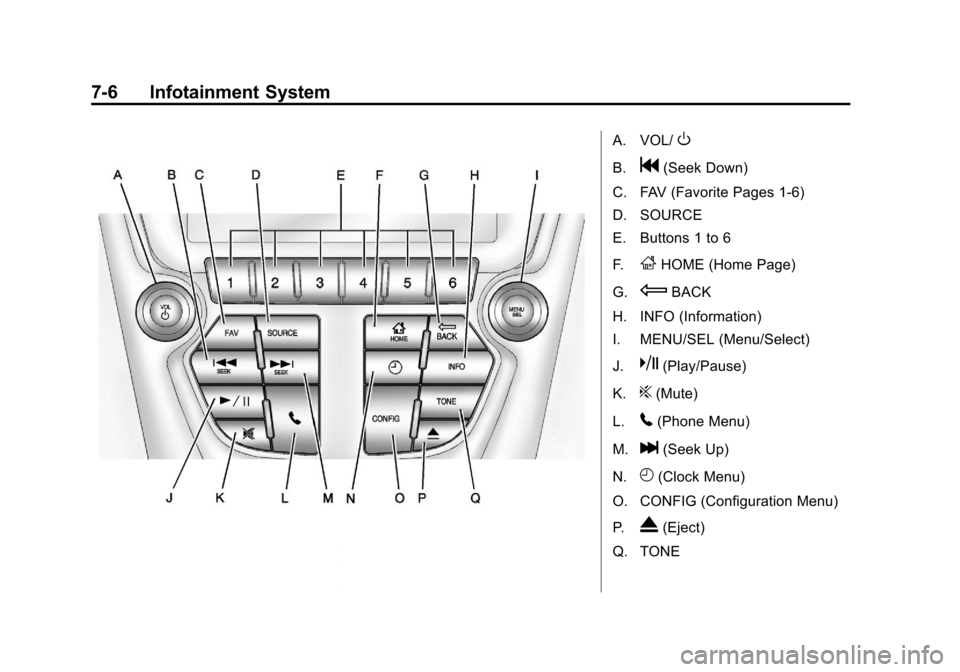
A. VOL/O
B.g(Seek Down)
C. FAV (Favorite Pages 1-6)
D. SOURCE
E. Buttons 1 to 6
F.
FHOME (Home Page)
G.
EBACK
H. INFO (Information)
I. MENU/SEL (Menu/Select)
J.
k(Play/Pause)
K.
?(Mute)
L.
5(Phone Menu)
M.
l(Seek Up)
N.
H(Clock Menu)
O. CONFIG (Configuration Menu)
P.
X(Eject)
Q. TONE
Page 167 of 428
Black plate (7,1)Chevrolet Equinox Owner Manual - 2012
Infotainment System 7-7
Infotainment Control Buttons
The buttons on the faceplate are
used to start primary functions while
using the infotainment system.
VOL/
O(Volume/Power):
1. Press to turn the system on and off.
2. Turn to adjust the volume.
k(Play/Pause): Presskto start,
pause, and resume playback. See
CD Player on page 7‑23, and MP3
on page 7‑26 for more information.
SOURCE: Press to change the
audio sources such as AM-FM
Radio, XM™ (if equipped), CD,
and AUX.
TONE: Press to access the sound
menu screen to adjust bass,
midrange, and treble. See AM-FM
Radio (Radio with CD) on page 7‑14
or AM-FM Radio (Radio with CD
and Touchscreen) on page 7‑16 for
more information. INFO (Information):
Press to
toggle through an audio information
screen.
CONFIG (Configure): Press to
adjust features for radio, display,
phone, vehicle, and time.
F/HOME: See“Home Page”
following in this section.
MENU/SEL: Turn to highlight a
feature. Press to activate the
highlighted feature.
5(Phone): SeeBluetooth
(Overview) on page 7‑36 or
Bluetooth (Infotainment Controls) on
page 7‑38 orBluetooth (Voice
Recognition) on page 7‑42 for more
information.
EBACK: Press to return to the
previous screen in a menu.
If on a page accessed directly by a
faceplate button or Home Page
screen button, pressing
EBACK
will go to the previous menu. FAV (Favorite Pages 1-6):
Press
to display the current page number
above the preset buttons. The
stored stations for each list display
on the touch-sensitive preset
buttons at the bottom of the screen.
The number of preset FAV lists can
be changed in the
Configuration Menu.
l(Seek Up):
1. Press to seek the next track.
2. Press and hold to fast forward through a track.
3. Release the button to return to playing speed. See CD Player
on page 7‑23 andMP3 on
page 7‑26 for more information.
4. For AM, FM, or XM (if equipped), press to seek to the next strong
station.
Page 169 of 428
Black plate (9,1)Chevrolet Equinox Owner Manual - 2012
Infotainment System 7-9
Press the Phone screen button to
display the Phone main page. See
Bluetooth (Overview) on page 7‑36
orBluetooth (Infotainment Controls)
on page 7‑38 orBluetooth (Voice
Recognition) on page 7‑42.
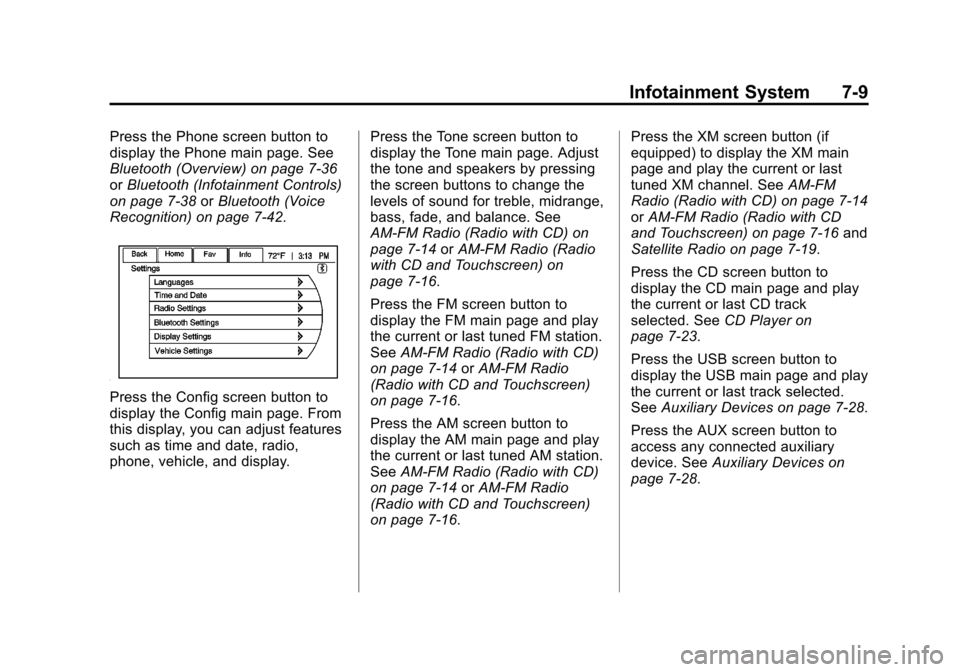
Press the Config screen button to
display the Config main page. From
this display, you can adjust features
such as time and date, radio,
phone, vehicle, and display. Press the Tone screen button to
display the Tone main page. Adjust
the tone and speakers by pressing
the screen buttons to change the
levels of sound for treble, midrange,
bass, fade, and balance. See
AM-FM Radio (Radio with CD) on
page 7‑14
orAM-FM Radio (Radio
with CD and Touchscreen) on
page 7‑16.
Press the FM screen button to
display the FM main page and play
the current or last tuned FM station.
See AM-FM Radio (Radio with CD)
on page 7‑14 orAM-FM Radio
(Radio with CD and Touchscreen)
on page 7‑16.
Press the AM screen button to
display the AM main page and play
the current or last tuned AM station.
See AM-FM Radio (Radio with CD)
on page 7‑14 orAM-FM Radio
(Radio with CD and Touchscreen)
on page 7‑16. Press the XM screen button (if
equipped) to display the XM main
page and play the current or last
tuned XM channel. See
AM-FM
Radio (Radio with CD) on page 7‑14
or AM-FM Radio (Radio with CD
and Touchscreen) on page 7‑16 and
Satellite Radio on page 7‑19.
Press the CD screen button to
display the CD main page and play
the current or last CD track
selected. See CD Player on
page 7‑23.
Press the USB screen button to
display the USB main page and play
the current or last track selected.
See Auxiliary Devices on page 7‑28.
Press the AUX screen button to
access any connected auxiliary
device. See Auxiliary Devices on
page 7‑28.
Page 182 of 428
Black plate (22,1)Chevrolet Equinox Owner Manual - 2012
7-22 Infotainment System
Channel Off Air:This channel is
not currently in service. Tune in to
another channel.
Channel Unauth: This channel is
blocked or cannot be received with
your XM subscription package.
Channel Unavailable: This
previously assigned channel is no
longer assigned. Tune to another
station.
No Artist Info: The system is
working properly. No artist
information is available at this time
on this channel.
No Title Info: The system is
working properly. No song title
information is available at this time
on this channel.
No CAT Info: The system is
working properly. No category
information is available at this time
on this channel. No Information:
The system is
working properly. No text or
informational messages are
available at this time on this
channel.
No Subscription Please Renew:
The XM subscription needs to be
reactivated. Contact XM at
www.xmradio.com or
1-800-929-2100 in the U.S., and
www.xmradio.ca or
1-877-438-9677 in Canada.
No XM Signal: The system is
working properly. The vehicle may
be in a location where the XM signal
is being blocked. When the vehicle
is moved into an open area, the
signal should return.
CAT Not Found: The system is
working properly. There are no
channels available for the selected
category.
XM Radio ID: If tuned to channel 0,
this message alternates with the XM
Radio eight‐digit radio ID label. This
label is needed to activate the
service. Unknown:
If this message is
received when tuned to channel 0,
there could be a receiver fault.
Consult with your dealer.
Check Antenna: If this message
does not clear within a short period
of time, the receiver could have a
fault. Consult with your dealer.
XM Not Available: If this message
does not clear within a short period
of time, the receiver could have a
fault. Consult with your dealer.
Radio Reception
Frequency interference and static
can occur during normal radio
reception if items such as cell phone
chargers, vehicle convenience
accessories, and external electronic
devices are plugged into the
accessory power outlet. If there is
interference or static, unplug the
item from the accessory power
outlet.
Page 183 of 428
Black plate (23,1)Chevrolet Equinox Owner Manual - 2012
Infotainment System 7-23
FM
FM signals only reach about 16 to
65 km (10 to 40 mi). Although the
radio has a built-in electronic circuit
that automatically works to reduce
interference, some static can occur,
especially around tall buildings or
hills, causing the sound to fade in
and out.
AM
The range for most AM stations is
greater than for FM, especially at
night. The longer range can cause
station frequencies to interfere with
each other. Static can occur when
things like storms and power lines
interfere with radio reception. When
this happens, try reducing the treble
on the radio.
XM™Satellite Radio Service
XM Satellite Radio Service gives
digital radio reception from coast to
coast in the 48 contiguous United
States, and in Canada. Just as with
FM, tall buildings or hills can
interfere with satellite radio signals, causing the sound to fade in and
out. In addition, traveling or standing
under heavy foliage, bridges,
garages, or tunnels may cause loss
of the XM signal for a period of time.
Cellular Phone Usage
Cellular phone usage can cause
interference with the vehicle's radio.
Multi-Band Antenna
The multi-band antenna is on the
roof of the vehicle. The antenna is
used for the AM‐FM radio, OnStar,
the XM Satellite Radio Service
System, and GPS (Global
Positioning System), if the vehicle
has these features. Keep the
antenna clear of obstructions for
clear reception.
Audio Players
CD Player
For vehicles equipped with the
MyLink or IntelliLink infotainment
system, see the separate MyLink/
IntelliLink Features and Functions
Guide for more information.
The player can be used for CD and
MP3 audio.
With the vehicle on, insert a disc
into the slot, label side up. The
player pulls it in and begins playing.
While playing, the navigation
system is available.
The system is capable of playing:
.Most audio CDs
.CD-R
.CD-RW
.MP3 or unprotected WMA
formats
Page 188 of 428
Black plate (28,1)Chevrolet Equinox Owner Manual - 2012
7-28 Infotainment System
Empty Folders
If a root directory or folder is empty
or contains only folders, the player
advances to the next folder in the
file structure that contains a
compressed audio file. The empty
folder(s) are not displayed or
numbered.
No Folder
When the CD only contains
compressed audio files without any
folders or playlists, all files are
under the root folder.
File System and Naming
The song titles, artists, albums, and
genres are taken from the file's ID3
tag and are only displayed if present
in the tag. If a song title is not
present in the ID3 tag, the radio
displays the file name as the
track name.Preprogrammed Playlists
The radio recognizes
preprogrammed playlists; however,
there is no editing capability. These
playlists are treated as special
folders containing compressed
audio song files.
Auxiliary Devices
For vehicles equipped with the
MyLink or IntelliLink infotainment
system, see the separate MyLink/
IntelliLink Features and Functions
Guide for more information.
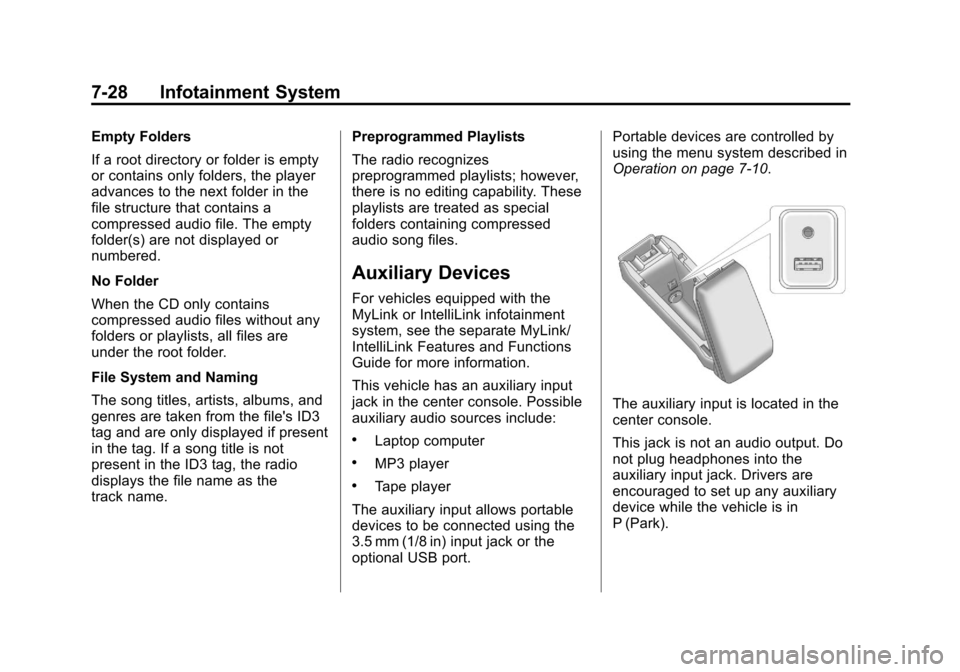
This vehicle has an auxiliary input
jack in the center console. Possible
auxiliary audio sources include:
.Laptop computer
.MP3 player
.Tape player
The auxiliary input allows portable
devices to be connected using the
3.5 mm (1/8 in) input jack or the
optional USB port. Portable devices are controlled by
using the menu system described in
Operation on page 7‑10.
The auxiliary input is located in the
center console.
This jack is not an audio output. Do
not plug headphones into the
auxiliary input jack. Drivers are
encouraged to set up any auxiliary
device while the vehicle is in
P (Park).