2012 CHEVROLET CRUZE remote start
[x] Cancel search: remote startPage 142 of 400
Black plate (34,1)Chevrolet Cruze Owner Manual - 2012
5-34 Instruments and Controls
TRANSMISSION HOT—IDLE
ENGINE
This message displays and a chime
sounds if the transmission fluid in
the vehicle gets hot. Driving with the
transmission fluid temperature high
can cause damage to the vehicle.
Stop the vehicle and let it idle to
allow the transmission to cool. This
message clears when the fluid
temperature reaches a safe level.
Vehicle Reminder
Messages
ICE POSSIBLE DRIVE
WITH CARE
This message displays when ice
conditions are possible.
STEERING COLUMN IS
LOCKED
This message displays when the
steering column is locked.
Vehicle
Personalization
The audio system controls are used
to access the personalization
menus for customizing vehicle
features.
CONFIG (Configuration): Press to
access the Configuration
Settings menu.
MENU or MENU/SEL: Press the
center of this knob to enter the
menus and select menu items. Turn
the knob to scroll through the
menus.
BACK: Press to exit or move
backward in a menu.
Entering the Personalization
Menus
1. Press CONFIG to access the Configuration Settings menu.
2. Turn the MENU or MENU/SEL knob to highlight Vehicle
Settings. Press the CONFIG button until Vehicle is highlighted
on vehicles with a navigation
system only.
3. Press the center of the MENU or MENU/SEL knob to select the
Vehicle Settings menu. The key
must be in the run position.
The following list of menu items may
be available:
.Climate and Air Quality
.Comfort and Convenience
.Collision/Detection Systems
.Languages
.Lighting
.Power Door Locks
.Remote Locking, Unlocking,
Starting
.Return to Factory Settings
Turn the MENU or MENU/SEL knob
to highlight the menu. Press the
knob to select it. Each of the menus
is detailed in the following
information.
Page 143 of 400

Black plate (35,1)Chevrolet Cruze Owner Manual - 2012
Instruments and Controls 5-35
Vehicles with a navigation system
will display a checkmark to indicate
this feature is on.
Climate and Air Quality
If equipped, select the Climate and
Air Quality menu and the following
will be displayed:
.Auto Fan Speed
.Air Quality Sensor
.Remote Start Auto Heat Seats
.Auto Defog
.Auto Rear Defog
Auto Fan Speed
This will allow you to select the
automatic fan speed. This feature
sets the climate control fan speed to
maintain the interior temperature.
Press the MENU or MENU/SEL
knob when Auto Fan Speed is
highlighted to open the menu. Turn
the knob to highlight High, Medium,
or Low. Press the BACK button to
confirm the selection and move
back to the last menu. Air Quality Sensor
This will allow you to select whether
the system will operate at high or
low sensitivity. Only vehicles with
the automatic climate control will
have this option.
Press the MENU or MENU/SEL
knob when Air Quality Sensor is
highlighted to open the menu. Turn
the knob to highlight High Sensitivity
or Low Sensitivity. Press the BACK
button to confirm the selection and
move back to the last menu.
Remote Start Auto Heat Seats
On vehicles with remote start and
heated seats, the heated seats can
be set to on or off.
Press the MENU or MENU/SEL
knob when Remote Start Auto Heat
Seats is highlighted to open the
menu. Turn the knob to highlight
On or Off. Press the BACK button to
confirm the selection and move
back to the last menu.
Auto Defog
When turned on and high humidity
is detected, the climate control
system may adjust to outside air
supply and turn on the air
conditioner or the heater. The fan
speed may slightly increase to help
prevent fogging. When high
humidity is no longer detected, the
system will return to its prior
operation.
Press the MENU or MENU/SEL
knob when Auto Defog is
highlighted to open the menu. Turn
the knob to highlight On or Off.
Press the BACK button to confirm
the selection and move back to the
last menu.
Auto Rear Defog
When on, this feature turns on the
rear defogger at vehicle start when
the interior temperature is cold and
fog is likely. The auto rear defog
function can be disabled by
pressing
1. When off, the feature
can be turned on by pressing
1.
Page 146 of 400
Black plate (38,1)Chevrolet Cruze Owner Manual - 2012
5-38 Instruments and Controls
Remote Locking, Unlocking,
Starting
Select Remote Locking, Unlocking,
Starting and the following will be
displayed (depending on the
system):
.Remote Lock Feedback
.Door Unlock or Remote Door
Unlock
.Remote Unlock Light Feedback
.Remote Start
Remote Lock Feedback
This allows selection of what type of
feedback is given when locking the
vehicle with the RKE transmitter.
Press the MENU or MENU/SEL
knob when Remote Lock Feedback
is highlighted. Turn the knob to
select Lights and Horn, Lights Only,
Horn Only, or Off. Press the knob to
confirm and go back to the
last menu. Door Unlock or Remote Door
Unlock
This allows selection of which doors
will unlock when pressing
Kon the
RKE transmitter.
Press the MENU or MENU/SEL
knob when Door Unlock is
highlighted. Turn the knob to select
All Doors or Driver Door Only. When
set to Driver Door Only, the driver
door will unlock the first time
Kis
pressed and all doors will unlock
when
Kis pressed a second time.
When set to All Doors, all of the
doors will unlock at the first press of
K. Press the knob to confirm and
go back to the last menu.
Remote Unlock Light Feedback
If equipped, this allows selection of
what type of feedback is given when
unlocking the vehicle with the RKE
transmitter.
Press the MENU or MENU/SEL
knob when Remote Unlock Light
Feedback is highlighted. Turn the knob to select On or Off.
Press the knob to confirm and go
back to the last menu.
Remote Start
If equipped, this allows selection to
turn on or off Remote Start.
Press the MENU or MENU/SEL
knob when Remote Start is
highlighted. Turn the knob to select
On or Off. Press the knob to confirm
and go back to the last menu.
Return to Factory Settings
Select Return to Factory Settings to
return all vehicle personalization to
the default settings. Turn the knob
to select Yes or No. Press the knob
to confirm and go back to the
last menu.
Page 196 of 400

Black plate (6,1)Chevrolet Cruze Owner Manual - 2012
8-6 Climate Controls
For vehicles with heated outside
rearview mirrors, they turn on when
the rear window defogger button is
on and help to clear fog or frost from
the surface of the mirrors. See
Heated Mirrors on page 2‑16.
Notice:Do not try to clear frost
or other material from the inside
of the front windshield and rear
window with a razor blade or
anything else that is sharp. This
may damage the rear window
defogger grid and affect your
radio's ability to pick up stations
clearly. The repairs would not be
covered by your warranty.
Heated Seats (If Equipped): Press
to turn the heated seats on or off.
See Heated Front Seats on
page 3‑7.
Remote Start Climate Control
Operation: For vehicles with the
remote vehicle start feature, the
climate control system may run
when the vehicle is started remotely. The system will default to a heating
or cooling mode depending on the
outside temperature and then go
back to the previous settings. See
Remote Vehicle Start on page 2‑9.
The rear window defogger turns on
if it is cold outside.
Sensors
The solar sensor, located on top of
the instrument panel near the
windshield, monitors the solar heat.
The climate control system uses the
sensor information to adjust the
temperature, fan speed,
recirculation, and air delivery mode
for best comfort.
If the sensor is covered, the
automatic climate control system
may not work properly.
Air Vents
Adjustable air vents are in the
center and on the side of the
instrument panel.
Move the slats (A) to change the
direction of the airflow.
Page 216 of 400
Black plate (18,1)Chevrolet Cruze Owner Manual - 2012
9-18 Driving and Operating
Ignition Positions
(Keyless Access)
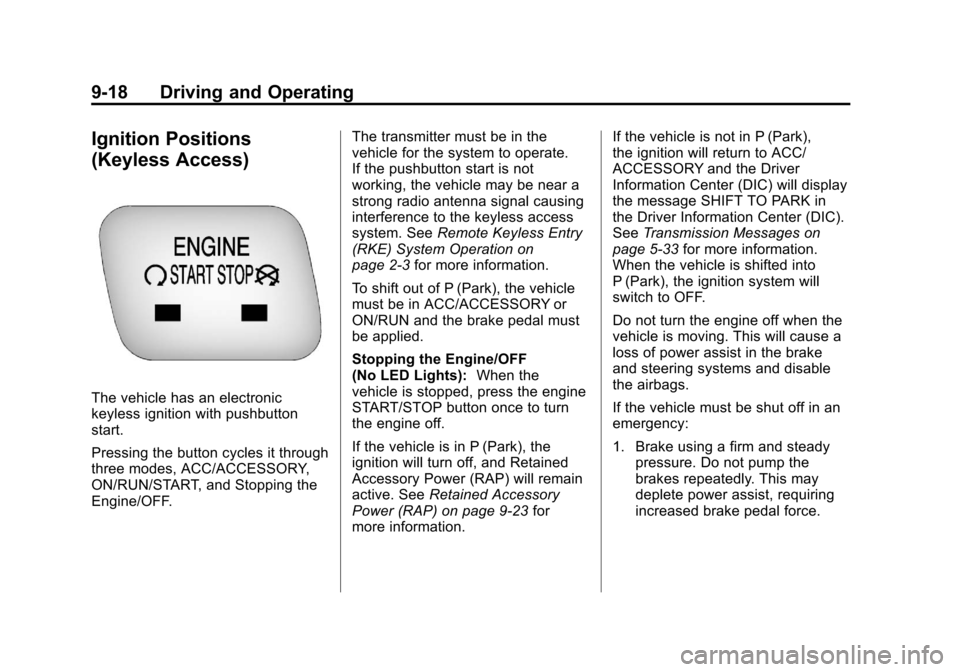
The vehicle has an electronic
keyless ignition with pushbutton
start.
Pressing the button cycles it through
three modes, ACC/ACCESSORY,
ON/RUN/START, and Stopping the
Engine/OFF.The transmitter must be in the
vehicle for the system to operate.
If the pushbutton start is not
working, the vehicle may be near a
strong radio antenna signal causing
interference to the keyless access
system. See
Remote Keyless Entry
(RKE) System Operation on
page 2‑3 for more information.
To shift out of P (Park), the vehicle
must be in ACC/ACCESSORY or
ON/RUN and the brake pedal must
be applied.
Stopping the Engine/OFF
(No LED Lights): When the
vehicle is stopped, press the engine
START/STOP button once to turn
the engine off.
If the vehicle is in P (Park), the
ignition will turn off, and Retained
Accessory Power (RAP) will remain
active. See Retained Accessory
Power (RAP) on page 9‑23 for
more information. If the vehicle is not in P (Park),
the ignition will return to ACC/
ACCESSORY and the Driver
Information Center (DIC) will display
the message SHIFT TO PARK in
the Driver Information Center (DIC).
See
Transmission Messages on
page 5‑33 for more information.
When the vehicle is shifted into
P (Park), the ignition system will
switch to OFF.
Do not turn the engine off when the
vehicle is moving. This will cause a
loss of power assist in the brake
and steering systems and disable
the airbags.
If the vehicle must be shut off in an
emergency:
1. Brake using a firm and steady pressure. Do not pump the
brakes repeatedly. This may
deplete power assist, requiring
increased brake pedal force.
Page 219 of 400
Black plate (21,1)Chevrolet Cruze Owner Manual - 2012
Driving and Operating 9-21
components. If the ignition key is
turned to the START position,
and then released when the
engine begins cranking, the
engine will continue cranking
for a few seconds or until the
vehicle starts. If the engine does
not start and the key is held in
START for many seconds,
cranking stops after 15 seconds
to prevent cranking motor
damage. To prevent gear
damage, this system also
prevents cranking if the engine
is already running. Engine
cranking can be stopped by
turning the ignition switch to
ACC/ACCESSORY or
LOCK/OFF.
Notice: Cranking the engine for
long periods of time, by returning
the key to the START position
immediately after cranking has
ended, can overheat and damage
the cranking motor, and drain the
battery. Wait at least 15 seconds
between each try, to let the
cranking motor cool down. 2. If the engine does not start after
five to 10 seconds, especially
in very cold weather (below 0°F
or−18°C), it could be flooded
with too much gasoline.
Push the accelerator pedal all
the way to the floor and hold it
there as you hold the key in
START for a maximum of
15 seconds. Wait at least
15 seconds between each try, to
allow the cranking motor to cool.
When the engine starts, let go of
the key and accelerator. If the
vehicle starts briefly but then
stops again, repeat the
procedure. This clears the extra
gasoline from the engine. Do not
race the engine immediately
after starting it. Operate the
engine and transmission gently
until the oil warms up and
lubricates all moving parts. Starting Procedure
(Keyless Access)
1. If the vehicle has the keyless
access system, the transmitter
must be in the vehicle. Put your
foot on the brake pedal and
push the START/STOP button.
When the engine begins
cranking, let go of the button.
The idle speed will go down as
your engine gets warm. Do not
race the engine immediately
after starting it. Operate the
engine and transmission gently
to allow the oil to warm up and
lubricate all moving parts.
If the transmitter is not in the
vehicle or something is
interfering with the transmitter,
the Driver Information Center
(DIC) will display NO REMOTE
DETECTED. See Driver
Information Center (DIC) on
page 5‑23 for more information.
Page 220 of 400
Black plate (22,1)Chevrolet Cruze Owner Manual - 2012
9-22 Driving and Operating
If the battery in the keyless
access transmitter needs
replacing, the DIC displays
REPLACE BATTERY IN
REMOTE KEY. The vehicle can
still be driven. See“Starting the
Vehicle with a Low Transmitter
Battery” inRemote Keyless
Entry (RKE) System Operation
on page 2‑3 for more
information.
The vehicle has a
Computer-Controlled Cranking
System. This feature assists in
starting the engine and protects
components. If the START
button is pressed, and then
released when the engine
begins cranking, the engine will
continue cranking for a few
seconds or until the vehicle
starts. If the engine does not
start and the button is pressed
for many seconds, cranking will
be stopped after 15 seconds to
prevent cranking motor damage. To prevent gear damage, this
system also prevents cranking if
the engine is already running.
Engine cranking can be stopped
by pressing the START button a
second time.
Notice: Cranking the engine for
long periods of time, by returning
the key to the START position
immediately after cranking has
ended, can overheat and damage
the cranking motor, and drain the
battery. Wait at least 15 seconds
between each try, to let the
cranking motor cool down.
2. If the engine does not start after five to 10 seconds, especially in
very cold weather (below −18°C
or 0°F), it could be flooded with
too much gasoline. Try pushing
the accelerator pedal all the way
to the floor and holding it there
as you hold the key in START,
or press the START button, for
up to a maximum of 15 seconds. Wait at least 15 seconds
between each try, to allow the
cranking motor to cool down.
When the engine starts, let go of
the key or button, and the
accelerator. If the vehicle starts
briefly but then stops again, do
the same thing. This clears the
extra gasoline from the engine.
Do not race the engine
immediately after starting it.
Operate the engine and
transmission gently until the oil
warms up and lubricates all
moving parts.
Engine Heater
The engine heater, if available, can
help in cold weather conditions at or
below
−18°C (0°F) for easier starting
and better fuel economy during
engine warm-up. Plug in the heater
at least four hours before starting
the vehicle. An internal thermostat
in the plug end of the cord will
prevent engine heater operation at
temperatures above −18°C (0°F).
Page 261 of 400

Black plate (7,1)Chevrolet Cruze Owner Manual - 2012
Vehicle Care 10-7
A.Engine Air Cleaner/Filter on
page 10‑14.
B. Engine Oil Dipstick. See “Checking Engine Oil” under
Engine Oil on page 10‑9.
C. Electric Engine Cooling Fan (Out of View). See Cooling
System on page 10‑16.
D. Engine Oil Fill Cap. See “When
to Add Engine Oil” under
Engine Oil on page 10‑9. E. Remote Negative (-) Terminal.
See Jump Starting on
page 10‑80.
F. Brake/Clutch Fluid Reservoir. See “Brake Fluid” underBrakes
on page 10‑22 andHydraulic
Clutch on page 10‑14.
G. Battery on page 10‑25 (Under
Cover).
H. Engine Coolant Surge Tank and Pressure Cap. See Engine
Coolant on page 10‑16. I. Remote Positive (+) Terminal.
See Jump Starting on
page 10‑80.
J. Engine Compartment Fuse
Block on page 10‑36.
K. Windshield Washer Fluid Reservoir. See “Adding Washer
Fluid” under Washer Fluid on
page 10‑22.