2012 CHEVROLET CORVETTE automatic transmission
[x] Cancel search: automatic transmissionPage 62 of 434
Black plate (30,1)Chevrolet Corvette Owner Manual - 2012
2-30 Keys, Doors, and Windows
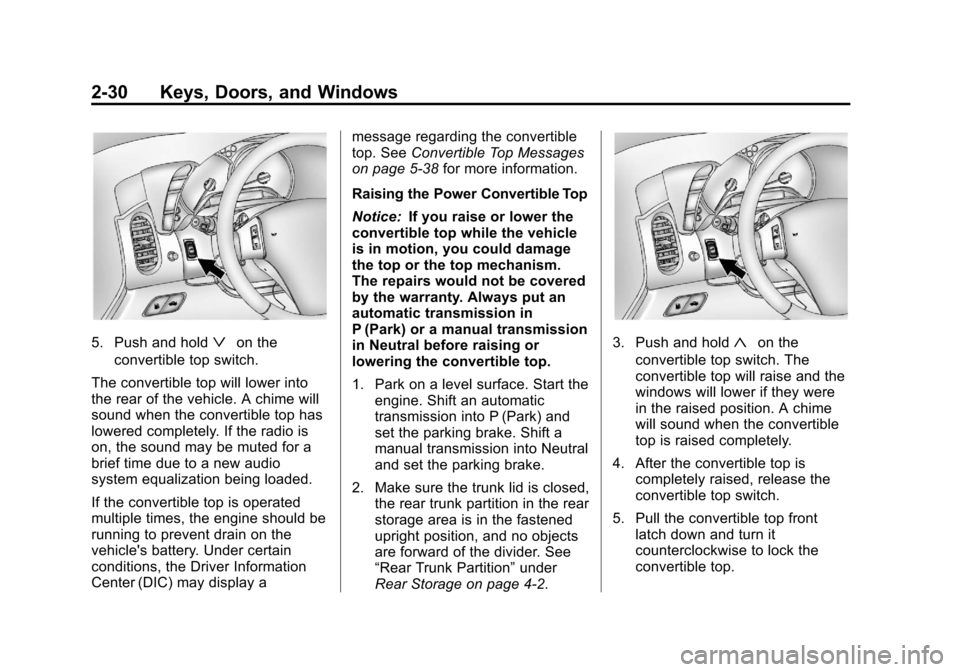
5. Push and holdªon the
convertible top switch.
The convertible top will lower into
the rear of the vehicle. A chime will
sound when the convertible top has
lowered completely. If the radio is
on, the sound may be muted for a
brief time due to a new audio
system equalization being loaded.
If the convertible top is operated
multiple times, the engine should be
running to prevent drain on the
vehicle's battery. Under certain
conditions, the Driver Information
Center (DIC) may display a message regarding the convertible
top. See
Convertible Top Messages
on page 5‑38 for more information.
Raising the Power Convertible Top
Notice: If you raise or lower the
convertible top while the vehicle
is in motion, you could damage
the top or the top mechanism.
The repairs would not be covered
by the warranty. Always put an
automatic transmission in
P (Park) or a manual transmission
in Neutral before raising or
lowering the convertible top.
1. Park on a level surface. Start the engine. Shift an automatic
transmission into P (Park) and
set the parking brake. Shift a
manual transmission into Neutral
and set the parking brake.
2. Make sure the trunk lid is closed, the rear trunk partition in the rear
storage area is in the fastened
upright position, and no objects
are forward of the divider. See
“Rear Trunk Partition” under
Rear Storage on page 4‑2.3. Push and hold«on the
convertible top switch. The
convertible top will raise and the
windows will lower if they were
in the raised position. A chime
will sound when the convertible
top is raised completely.
4. After the convertible top is completely raised, release the
convertible top switch.
5. Pull the convertible top front latch down and turn it
counterclockwise to lock the
convertible top.
Page 69 of 434
Black plate (5,1)Chevrolet Corvette Owner Manual - 2012
Seats and Restraints 3-5
Memory Seats
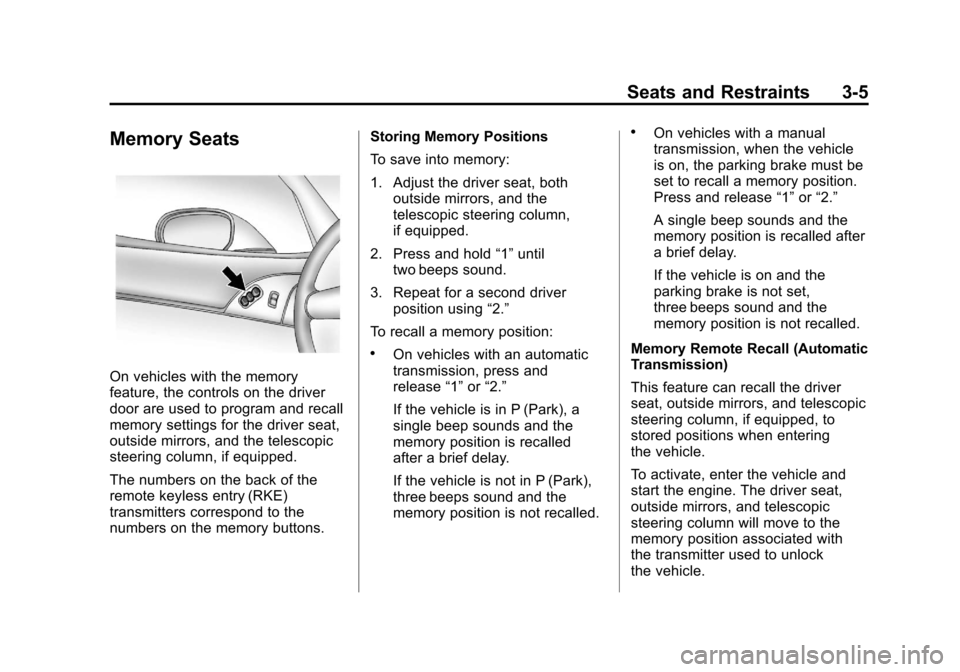
On vehicles with the memory
feature, the controls on the driver
door are used to program and recall
memory settings for the driver seat,
outside mirrors, and the telescopic
steering column, if equipped.
The numbers on the back of the
remote keyless entry (RKE)
transmitters correspond to the
numbers on the memory buttons.Storing Memory Positions
To save into memory:
1. Adjust the driver seat, both
outside mirrors, and the
telescopic steering column,
if equipped.
2. Press and hold “1”until
two beeps sound.
3. Repeat for a second driver position using “2.”
To recall a memory position:
.On vehicles with an automatic
transmission, press and
release “1”or“2.”
If the vehicle is in P (Park), a
single beep sounds and the
memory position is recalled
after a brief delay.
If the vehicle is not in P (Park),
three beeps sound and the
memory position is not recalled.
.On vehicles with a manual
transmission, when the vehicle
is on, the parking brake must be
set to recall a memory position.
Press and release “1”or“2.”
A single beep sounds and the
memory position is recalled after
a brief delay.
If the vehicle is on and the
parking brake is not set,
three beeps sound and the
memory position is not recalled.
Memory Remote Recall (Automatic
Transmission)
This feature can recall the driver
seat, outside mirrors, and telescopic
steering column, if equipped, to
stored positions when entering
the vehicle.
To activate, enter the vehicle and
start the engine. The driver seat,
outside mirrors, and telescopic
steering column will move to the
memory position associated with
the transmitter used to unlock
the vehicle.
Page 70 of 434
Black plate (6,1)Chevrolet Corvette Owner Manual - 2012
3-6 Seats and Restraints
This feature is turned on or off using
the vehicle personalization menu.
See“Auto Memory Recall” under
Vehicle Personalization on
page 5‑55 for more information.
To stop recall movement, press one
of the power seat controls, power
mirror or memory buttons, or the
telescopic steering column switch.
If something has blocked the driver
seat while recalling a memory
position, the recall may stop.
Remove the obstruction; then press
and hold the appropriate manual
control for the memory item that is
not recalling for two seconds. Try
recalling the memory position again
by pressing the appropriate memory
button. If the memory position is still
not recalling, see your dealer for
service.
Easy Exit Driver Seat
This feature can move the seat
rearward and the telescopic steering
column, if equipped, out of the way
to allow extra room to exit the
vehicle.B(Easy Exit Driver Seat):
Press to save and recall the easy
exit seat position.
To save into memory:
1. Recall the desired driving position by pressing “1.”
2. Adjust the seat and the telescopic steering column to
the desired exit position.
3. Press and hold Buntil
two beeps sound.
4. Repeat for a second driver position using “2.”
To recall, press and release B.
The vehicle must be in P (Park) for
an automatic transmission or the
parking brake must be set for a
manual transmission. A single beep
sounds. The seat and telescopic
steering column will move to the
position previously stored for the
identified driver. If the easy exit seat feature is
programmed on in the vehicle
personalization menu, automatic
recall occurs when one of the
following conditions is met:
.The vehicle is turned off, in
Retained Accessory
Power (RAP) or accessory
mode, and the driver door is
opened.
.The vehicle is turned off, or in
RAP, and the unlock button on
the RKE transmitter is pressed.
If something has blocked the driver
seat while recalling the exit position,
the recall may stop. Remove the
obstruction; then press and hold the
power seat control rearward for
two seconds. Try recalling the exit
position again. If the exit position is
still not recalling, see your dealer
for service.
See “Auto Exit Recall” underVehicle
Personalization on page 5‑55 for
more information.
Page 138 of 434
Black plate (28,1)Chevrolet Corvette Owner Manual - 2012
5-28 Instruments and Controls
Information Displays
Driver Information
Center (DIC)
The Driver Information Center (DIC)
display is located on the instrument
panel cluster and shows driver
personalization features and
warning/status messages.
The DIC comes on when the ignition
is turned on. After displaying
CORVETTE BY CHEVROLET, the
DIC shows the information that was
last displayed before the engine
was turned off.
If a problem is detected, a warning
message appears on the DIC
display. SeeVehicle Messages on
page 5‑36 for more information.
DIC Operation and Displays
Depending on the features on the
vehicle, the drive gear may display
on the DIC. See “Manual Paddle
Shift” under Automatic Transmission on page 9‑27
andHead-Up Display
(HUD) on page 5‑32 for more
information.
The Driver Information Center (DIC)
has different modes which can be
accessed by pressing the following
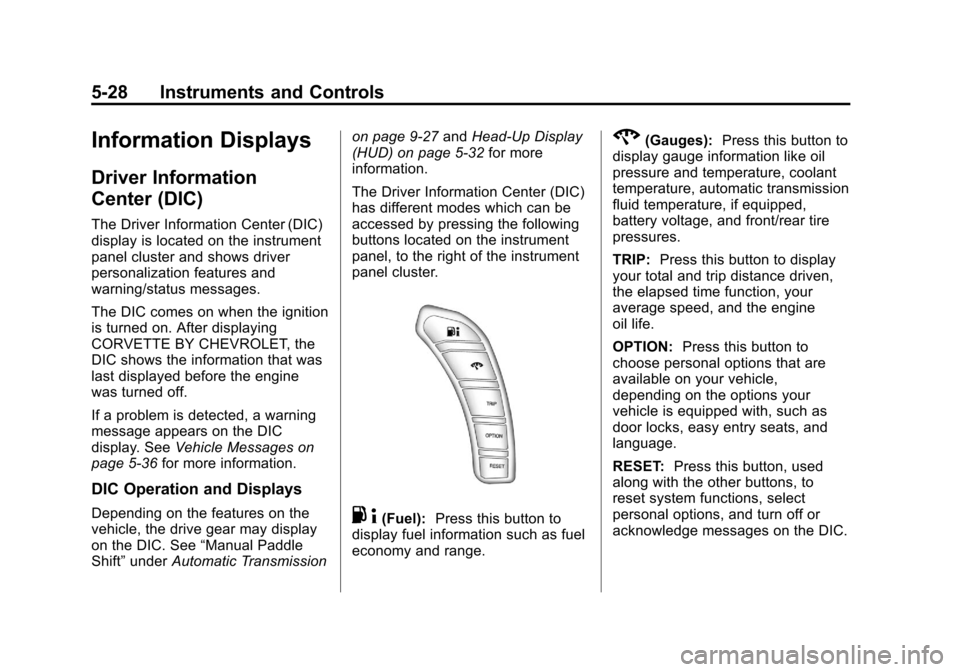
buttons located on the instrument
panel, to the right of the instrument
panel cluster.. 4(Fuel): Press this button to
display fuel information such as fuel
economy and range.
2(Gauges): Press this button to
display gauge information like oil
pressure and temperature, coolant
temperature, automatic transmission
fluid temperature, if equipped,
battery voltage, and front/rear tire
pressures.
TRIP: Press this button to display
your total and trip distance driven,
the elapsed time function, your
average speed, and the engine
oil life.
OPTION: Press this button to
choose personal options that are
available on your vehicle,
depending on the options your
vehicle is equipped with, such as
door locks, easy entry seats, and
language.
RESET: Press this button, used
along with the other buttons, to
reset system functions, select
personal options, and turn off or
acknowledge messages on the DIC.
Page 139 of 434
Black plate (29,1)Chevrolet Corvette Owner Manual - 2012
Instruments and Controls 5-29
Fuel Button
The fuel button displays average
fuel economy and instantaneous
fuel economy, calculated for your
specific driving conditions, and
range information.
Average Fuel Economy:The
average fuel economy is viewed as
a long-term approximation of your
overall driving conditions. You
should reset the average fuel
economy display every time you
refuel. If you press the RESET
button in this mode while you are
driving, the system will reset this
display and begin figuring fuel
economy from that point in time.
Press the fuel button to display
average fuel economy, such as:
.AVERAGE FUEL ECONOMY
11.7 L/100 km or
.AVERAGE FUEL ECONOMY
20.1 MPG Instantaneous Fuel Economy:
Instantaneous fuel economy reflects
only the fuel economy that the
vehicle has right now and will
change frequently as driving
conditions change. Unlike average
fuel economy, this menu item
cannot be reset.
Press the fuel button again to
display instantaneous fuel economy,
such as:
.INSTANT FUEL ECONOMY
11.7 L/100 km or
.INSTANT FUEL ECONOMY
20.1 MPG
Fuel Range: The range calculates
the remaining distance you can
drive without refueling. It is based
on fuel economy and the fuel
remaining in the tank.
Press the fuel button again to
display the range, such as:
.RANGE 48 km or
.RANGE 30 MI If the LOW FUEL warning is
displayed or if RANGE is less than
64 km (40 miles), the display will
read RANGE LOW.
The fuel economy data used to
determine fuel range is an average
of recent driving conditions. As your
driving conditions change, this data
is gradually updated automatically.
If the vehicle has been idling for a
long time, the range displayed on
the DIC could be abnormally low.
The vehicle must be driven
8 to 16 km (5 to 10 miles) to get an
accurate reading.
Gauges Button
The gauges button displays oil
pressure, oil temperature, coolant
temperature, transmission fluid
temperature for automatic
transmission vehicles only,
battery voltage, and tire pressure
information.
Page 140 of 434
Black plate (30,1)Chevrolet Corvette Owner Manual - 2012
5-30 Instruments and Controls
Oil Pressure:This display shows
the oil pressure.
Press the gauges button to display
the oil pressure, such as:
.OIL PRESSURE 276 kPa or
.OIL PRESSURE 40 PSI
Oil Temperature: This display
shows the oil temperature.
Press the gauges button again to
display the oil temperature, such as:
.OIL TEMPERATURE 112°C or
.OIL TEMPERATURE 234°F
If the oil temperature is low,
the display will show OIL
TEMPERATURE LOW. If the oil
temperature is high, the display will
show OIL TEMPERATURE HIGH.
Coolant Temperature:
This display shows the engine
coolant temperature. Press the gauges button again to
display the coolant temperature,
such as:
.COOLANT
TEMPERATURE 51°C or
.COOLANT
TEMPERATURE 123°F
If the coolant temperature is low, the
display will show COOLANT
TEMPERATURE LOW. If the
coolant temperature is high, the
display will show COOLANT
TEMPERATURE HIGH.
Transmission Fluid
Temperature: If you have an
automatic transmission vehicle,
this display shows the automatic
transmission fluid temperature.
Press the gauges button again to
display the automatic transmission
fluid temperature, such as:
.TRANS FLUID TEMP 51°C or
.TRANS FLUID TEMP 123°F If the transmission fluid temperature
is low, the display will show TRANS
FLUID TEMP LOW. If the
transmission fluid temperature is
high, the display will show TRANS
FLUID TEMP HIGH.
Battery Voltage:
This display
shows the current battery voltage.
Press the gauges button again to
display the battery voltage, such as:
.BATTERY VOLTAGE
13.5 VOLTS
Tire Pressure: This display shows
the tire pressure for each tire.
Press the gauges button again to
display the tire pressure for the
front tires, such as:
.FRONT TIRE PRESSURES
L 234 kPa R 228 kPa or
.FRONT TIRE PRESSURES
L 34 PSI R 33 PSI
Page 143 of 434

Black plate (33,1)Chevrolet Corvette Owner Manual - 2012
Instruments and Controls 5-33
The information may be displayed in
English or metric units and appears
as an image focused out toward the
front of the vehicle. The HUD
consists of the following information:
.Speedometer
.Turn Signal Indicators
.High-Beam Indicator Symbol
.Tachometer
.Manual Paddle Shift Gear
Indicator (If Equipped)
These displays on the HUD are
for use when using the manual
paddle shift controls to shift the
transmission. See“Manual
Paddle Shift” inAutomatic
Transmission on page 9‑27.
.Shift Light
This light is used for
performance driving to indicate
that the vehicle's best
performance level has been
reached to shift the transmission
into the next higher gear. An arrow pointing up will light
up on the display just prior to
reaching the engine fuel cut-off
mode. This cut-off is about 6,500
rpm for the LS3 engine, 6,600
rpm for the LS9 & ZR1 engines,
and 7,000 rpm for the
LS7 engine.
.Check Gauges Warning
.Engine Coolant Temperature
Gauge
.Transmission Fluid Temperature
Gauge, (Automatic Transmission
Vehicles Only)
.Engine Oil Temperature Gauge
.Engine Oil Pressure Gauge
.G-Force Gauge
.Boost Gauge (If Equipped)
.Audio Functions, Street
Mode Only
.Navigation, Only with Navigation
Radio, Turn-by-Turn Guidance.
Street Mode Only
There are three HUD modes that
can be viewed in the HUD display.
Press the MODE button to scroll
through these modes in the
following order:
English
Metric
Street Mode supports audio and
navigation functions with your
choice of tachometer settings.
Page 144 of 434
Black plate (34,1)Chevrolet Corvette Owner Manual - 2012
5-34 Instruments and Controls
English
Metric
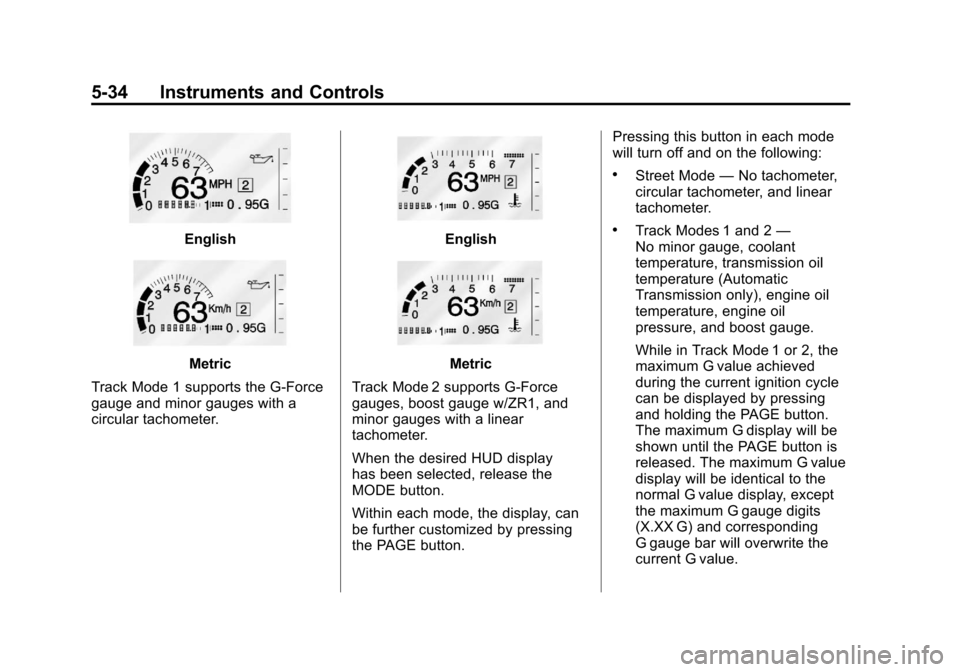
Track Mode 1 supports the G-Force
gauge and minor gauges with a
circular tachometer.
English
Metric
Track Mode 2 supports G-Force
gauges, boost gauge w/ZR1, and
minor gauges with a linear
tachometer.
When the desired HUD display
has been selected, release the
MODE button.
Within each mode, the display, can
be further customized by pressing
the PAGE button. Pressing this button in each mode
will turn off and on the following:
.Street Mode
—No tachometer,
circular tachometer, and linear
tachometer.
.Track Modes 1 and 2 —
No minor gauge, coolant
temperature, transmission oil
temperature (Automatic
Transmission only), engine oil
temperature, engine oil
pressure, and boost gauge.
While in Track Mode 1 or 2, the
maximum G value achieved
during the current ignition cycle
can be displayed by pressing
and holding the PAGE button.
The maximum G display will be
shown until the PAGE button is
released. The maximum G value
display will be identical to the
normal G value display, except
the maximum G gauge digits
(X.XX G) and corresponding
G gauge bar will overwrite the
current G value.