2012 CHEVROLET CORVETTE warning
[x] Cancel search: warningPage 248 of 434

Black plate (28,1)Chevrolet Corvette Owner Manual - 2012
9-28 Driving and Operating
The vehicle has an automatic
transmission shift lock control
system. You have to fully apply the
brakes and then press the shift lever
button before you can shift from
P (Park) when the vehicle is
running. If you cannot shift out of
P (Park), ease pressure on the shift
lever and push the shift lever all the
way into P (Park) as you maintain
brake application. Then press the
shift lever button and move the shift
lever into another gear. SeeShifting
out of Park on page 9‑25.
R (Reverse): Use this gear to
back up.
Notice: Shifting to R (Reverse)
while the vehicle is moving
forward could damage the
transmission. The repairs would
not be covered by the vehicle
warranty. Shift to R (Reverse) only
after the vehicle is stopped.
To rock the vehicle back and forth to
get out of snow, ice, or sand without
damaging the transmission, see If
the Vehicle Is Stuck on page 9‑13. N (Neutral):
In this position, the
engine does not connect with the
wheels. To restart the engine when
the vehicle is already moving, use
N (Neutral) only. If the vehicle needs
towing, see Towing the Vehicle on
page 10‑86.
{WARNING
Shifting into a drive gear while the
engine is running at high speed is
dangerous. Unless your foot is
firmly on the brake pedal, the
vehicle could move very rapidly.
You could lose control and hit
people or objects. Do not shift
into a drive gear while the engine
is running at high speed.
Notice: Shifting out of P (Park) or
N (Neutral) with the engine
running at high speed may
damage the transmission. The
repairs would not be covered by
the vehicle warranty. Be sure the
engine is not running at high
speed when shifting the vehicle. D (Drive):
This position is for
normal driving. It provides the best
fuel economy. If you need more
power for passing, push the pedal
down to achieve the desired level of
acceleration.
Downshifting the transmission in
slippery road conditions could result
in skidding. See “Skidding”under
Loss of Control on page 9‑5.
S (Sport Mode): When in
S (Sport Mode), the transmission will
work as an automatic until you use
the Manual Paddle Shift Controls,
which activates driver manual gear
selection. See Manual Mode on
page 9‑29. While in S (Sport Mode),
the transmission will have more
noticeable upshifts for sportier
vehicle performance.
Page 253 of 434
Black plate (33,1)Chevrolet Corvette Owner Manual - 2012
Driving and Operating 9-33
Shift Speeds
(Manual Transmission)
{WARNING
If you skip a gear when you
downshift, you could lose control
of the vehicle. You could injure
yourself or others. Do not shift
down more than one gear at a
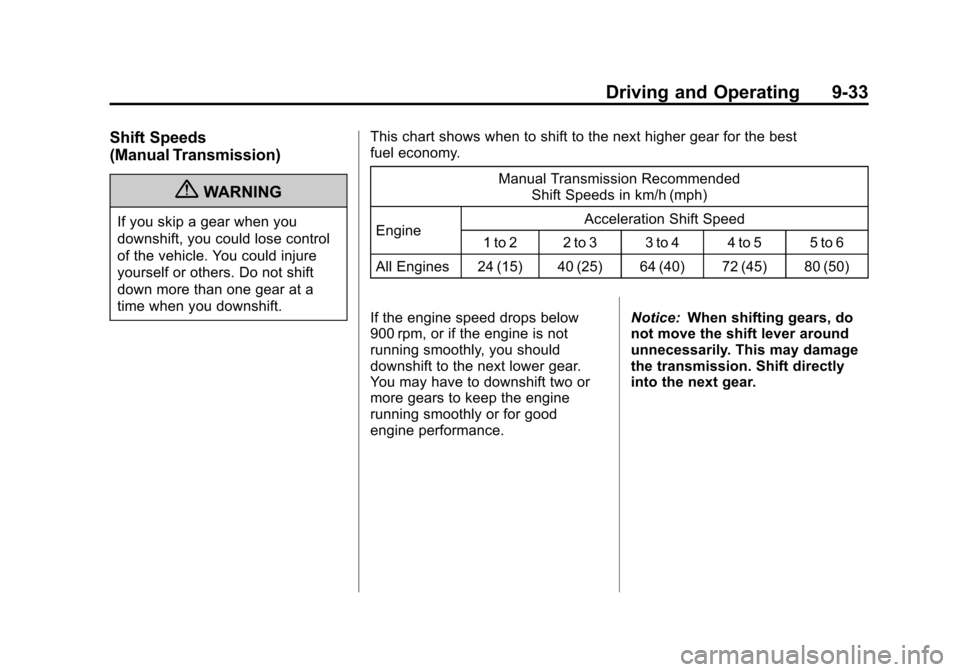
time when you downshift.This chart shows when to shift to the next higher gear for the best
fuel economy.
Manual Transmission RecommendedShift Speeds in km/h (mph)
Engine Acceleration Shift Speed
1 to 2 2 to 3 3 to 4 4 to 5 5 to 6
All Engines 24 (15) 40 (25) 64 (40) 72 (45) 80 (50)
If the engine speed drops below
900 rpm, or if the engine is not
running smoothly, you should
downshift to the next lower gear.
You may have to downshift two or
more gears to keep the engine
running smoothly or for good
engine performance. Notice:
When shifting gears, do
not move the shift lever around
unnecessarily. This may damage
the transmission. Shift directly
into the next gear.
Page 255 of 434

Black plate (35,1)Chevrolet Corvette Owner Manual - 2012
Driving and Operating 9-35
Brakes
Antilock Brake
System (ABS)
This vehicle has the Antilock Brake
System (ABS), an advanced
electronic braking system that helps
prevent a braking skid.
When the engine is started and the
vehicle begins to drive away, ABS
checks itself. A momentary motor or
clicking noise might be heard while
this test is going on, and it might
even be noticed that the brake
pedal moves a little. This is normal.
If there is a problem with ABS, this
warning light stays on. SeeAntilock
Brake System (ABS) Warning Light
on page 5‑22. If driving safely on a wet road and it
becomes necessary to slam on the
brakes and continue braking to
avoid a sudden obstacle, a
computer senses that the wheels
are slowing down. If one of the
wheels is about to stop rolling, the
computer will separately work the
brakes at each wheel.
ABS can change the brake pressure
to each wheel, as required, faster
than any driver could. This can help
the driver steer around the obstacle
while braking hard.
As the brakes are applied, the
computer keeps receiving updates
on wheel speed and controls
braking pressure accordingly.
Remember: ABS does not change
the time needed to get a foot up to
the brake pedal or always decrease
stopping distance. If you get too
close to the vehicle in front of you,
there will not be enough time to
apply the brakes if that vehicle
suddenly slows or stops. Always
leave enough room up ahead to
stop, even with ABS.
Using ABS
Do not pump the brakes. Just hold
the brake pedal down firmly and let
ABS work. You might hear the ABS
pump or motor operating and feel
the brake pedal pulsate, but this is
normal.
Braking in Emergencies
ABS allows the driver to steer and
brake at the same time. In many
emergencies, steering can help
more than even the very best
braking.
Page 256 of 434
Black plate (36,1)Chevrolet Corvette Owner Manual - 2012
9-36 Driving and Operating
Parking Brake
The parking brake lever is located to
the right of the center console.
To set the parking brake, hold the
brake pedal down. Pull the parking
brake lever up. If the ignition is on,
the brake system warning light will
come on.
To release the parking brake, hold
the brake pedal down. Then push
the release button in as you move
the parking brake lever all the
way down.
Notice:Driving with the parking
brake on can overheat the brake
system and cause premature
wear or damage to brake system
parts. Make sure that the parking
brake is fully released and the
brake warning light is off before
driving.
Brake Assist
This vehicle has a brake assist
feature designed to assist the driver
in stopping or decreasing vehicle
speed in emergency driving
conditions. This feature uses the
stability system hydraulic brake
control module to supplement
the power brake system under
conditions where the driver has
quickly and forcefully applied the
brake pedal in an attempt to quickly
stop or slow down the vehicle.
The stability system hydraulic brake
control module increases brake
pressure at each corner of the
vehicle until the ABS activates.
Minor brake pedal pulsation or
pedal movement during this time
is normal and the driver should
continue to apply the brake pedal
as the driving situation dictates.
The brake assist feature will
automatically disengage when the
brake pedal is released or brake
pedal pressure is quickly
decreased.
Ride Control Systems
Traction Control
System (TCS)
The vehicle has a Traction Control
System (TCS) that limits wheel spin.
This is especially useful in slippery
road conditions. The system
operates only if it senses that the
rear wheels are spinning too much
or are beginning to lose traction.
When this happens, the system
works the rear brakes and reduces
engine power (by closing the throttle
and managing engine spark) to limit
wheel spin.
The TRACTION SYSTEM ACTIVE
message displays on the Driver
Information Center (DIC) when TCS
is limiting wheel spin. See Ride
Control System Messages on
page 5‑45. The system may be
heard or felt while it is working, but
this is normal.
Page 265 of 434
Black plate (45,1)Chevrolet Corvette Owner Manual - 2012
Driving and Operating 9-45
Cruise Control
With cruise control, a speed of
about 40 km/h (25 mph) or more can
be maintained without keeping your
foot on the accelerator. Cruise
control does not work at speeds
below about 40 km/h (25 mph).
Cruise control will not work if the
parking brake is set, or if the master
cylinder brake fluid level is low.
{WARNING
Cruise control can be dangerous
where you cannot drive safely at
a steady speed. So, do not use
the cruise control on winding
roads or in heavy traffic.
Cruise control can be dangerous
on slippery roads. On such roads,
fast changes in tire traction can
cause excessive wheel slip, and
you could lose control. Do not use
cruise control on slippery roads.If the vehicle is in cruise control,
and has the Traction Control
System (TCS), and it begins to limit
wheel spin, the cruise control
automatically disengages. See
Traction Control System (TCS) on
page 9‑36. When road conditions
allow the cruise control to be safely
used again, it can be turned
back on.
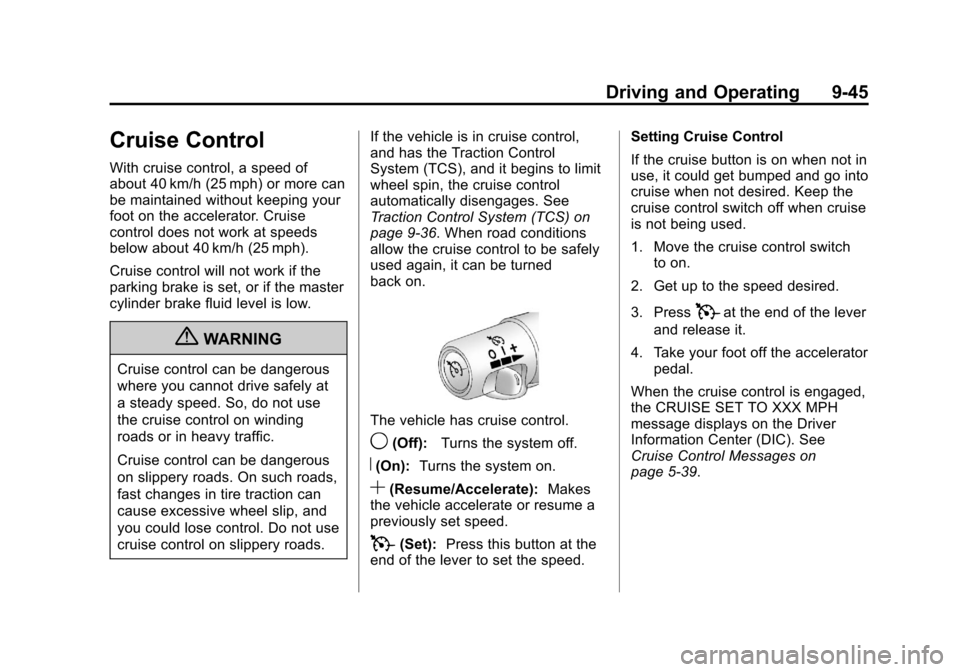
The vehicle has cruise control.
9(Off):
Turns the system off.
R(On):Turns the system on.
S(Resume/Accelerate): Makes
the vehicle accelerate or resume a
previously set speed.
T(Set): Press this button at the
end of the lever to set the speed. Setting Cruise Control
If the cruise button is on when not in
use, it could get bumped and go into
cruise when not desired. Keep the
cruise control switch off when cruise
is not being used.
1. Move the cruise control switch
to on.
2. Get up to the speed desired.
3. Press
Tat the end of the lever
and release it.
4. Take your foot off the accelerator pedal.
When the cruise control is engaged,
the CRUISE SET TO XXX MPH
message displays on the Driver
Information Center (DIC). See
Cruise Control Messages on
page 5‑39.
Page 271 of 434
Black plate (51,1)Chevrolet Corvette Owner Manual - 2012
Driving and Operating 9-51
Filling the Tank
{WARNING
Fuel vapor burns violently and a
fuel fire can cause bad injuries.
To help avoid injuries to you and
others, read and follow all the
instructions on the fuel pump
island. Turn off the engine when
refueling. Do not smoke near fuel
or when refueling the vehicle.
Do not use cellular phones.
Keep sparks, flames, and
smoking materials away from fuel.
Do not leave the fuel pump
unattended when refueling the
vehicle. This is against the law in
some places. Do not re-enter the
vehicle while pumping fuel. Keep
children away from the fuel pump;
never let children pump fuel.
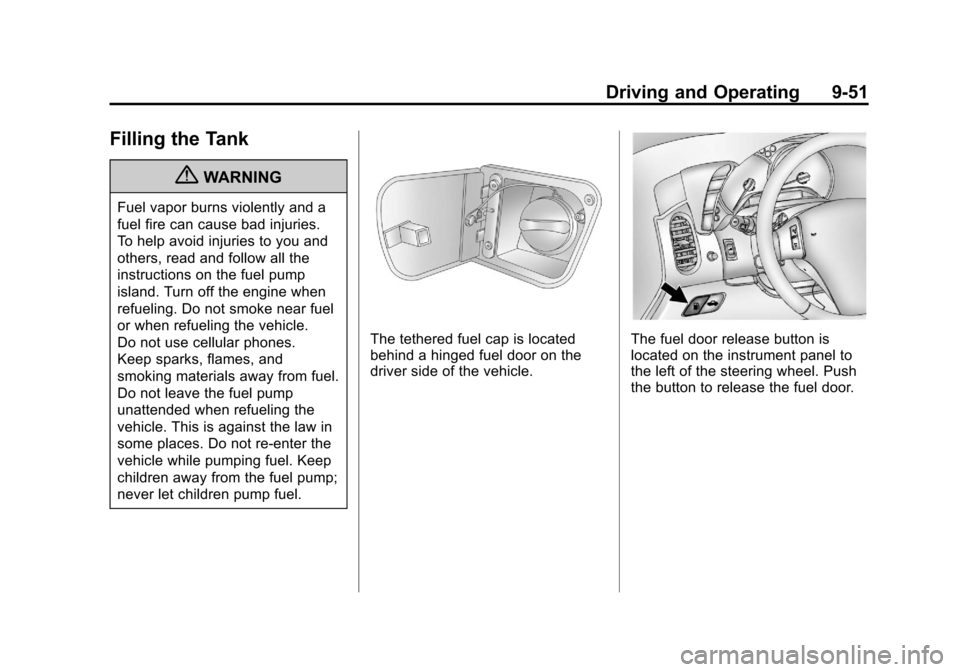
The tethered fuel cap is located
behind a hinged fuel door on the
driver side of the vehicle.The fuel door release button is
located on the instrument panel to
the left of the steering wheel. Push
the button to release the fuel door.
Page 272 of 434
Black plate (52,1)Chevrolet Corvette Owner Manual - 2012
9-52 Driving and Operating
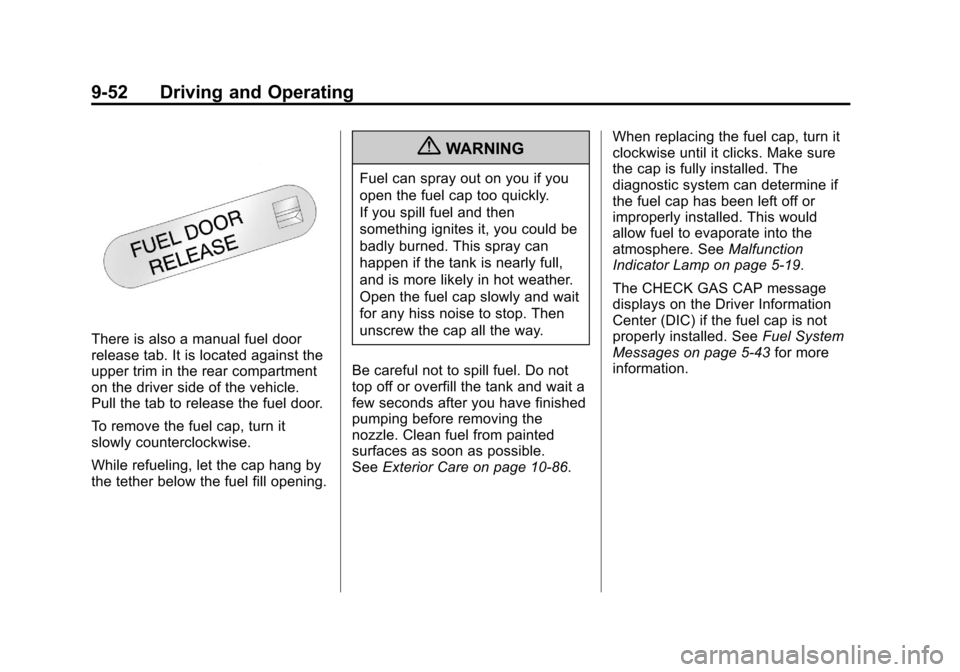
There is also a manual fuel door
release tab. It is located against the
upper trim in the rear compartment
on the driver side of the vehicle.
Pull the tab to release the fuel door.
To remove the fuel cap, turn it
slowly counterclockwise.
While refueling, let the cap hang by
the tether below the fuel fill opening.
{WARNING
Fuel can spray out on you if you
open the fuel cap too quickly.
If you spill fuel and then
something ignites it, you could be
badly burned. This spray can
happen if the tank is nearly full,
and is more likely in hot weather.
Open the fuel cap slowly and wait
for any hiss noise to stop. Then
unscrew the cap all the way.
Be careful not to spill fuel. Do not
top off or overfill the tank and wait a
few seconds after you have finished
pumping before removing the
nozzle. Clean fuel from painted
surfaces as soon as possible.
See Exterior Care on page 10‑86. When replacing the fuel cap, turn it
clockwise until it clicks. Make sure
the cap is fully installed. The
diagnostic system can determine if
the fuel cap has been left off or
improperly installed. This would
allow fuel to evaporate into the
atmosphere. See
Malfunction
Indicator Lamp on page 5‑19.
The CHECK GAS CAP message
displays on the Driver Information
Center (DIC) if the fuel cap is not
properly installed. See Fuel System
Messages on page 5‑43 for more
information.
Page 273 of 434
Black plate (53,1)Chevrolet Corvette Owner Manual - 2012
Driving and Operating 9-53
{WARNING
If a fire starts while you are
refueling, do not remove the
nozzle. Shut off the flow of fuel by
shutting off the pump or by
notifying the station attendant.
Leave the area immediately.
Notice: If you need a new fuel
cap, be sure to get the right type.
Your dealer can get one for you.
If you get the wrong type, it may
not fit properly. This may cause
the malfunction indicator lamp to
light and may damage the fuel
tank and emissions system. See
Malfunction Indicator Lamp on
page 5‑19.
Filling a Portable Fuel
Container
{WARNING
Never fill a portable fuel container
while it is in the vehicle. Static
electricity discharge from the
container can ignite the fuel
vapor. You can be badly burned
and the vehicle damaged if this
occurs. To help avoid injury to
you and others:
.Dispense fuel only into
approved containers.
.Do not fill a container while it
is inside a vehicle, in a
vehicle's trunk, pickup bed,
or on any surface other than
the ground.
(Continued)
WARNING (Continued)
.Bring the fill nozzle in contact
with the inside of the fill
opening before operating the
nozzle. Contact should be
maintained until the filling is
complete.
.Do not smoke while
pumping fuel.
.Do not use a cellular phone
while pumping fuel.