2012 CADILLAC SRX CD changer
[x] Cancel search: CD changerPage 5 of 502

Black plate (5,1)Cadillac SRX Owner Manual (Include Mex) - 2012
Introduction v
Vehicle Symbol Chart
Here are some additional symbols
that may be found on the vehicle
and what they mean. For more
information on the symbol, refer to
the Index.
0:Adjustable Pedals
9:Airbag Readiness Light
#:Air Conditioning
!:Antilock Brake System (ABS)
%:Audio Steering Wheel
Controls or OnStar®
$: Brake System Warning Light
":Charging System
I:Cruise Control
B: Engine Coolant Temperature
O:Exterior Lamps
#:Fog Lamps
.: Fuel Gauge
+:Fuses
3: Headlamp High/Low-Beam
Changer
(: Heated Steering Wheel
j:LATCH System Child
Restraints
*: Malfunction Indicator Lamp
::Oil Pressure
g:Outside Power Foldaway
Mirrors
}: Power
/:Remote Vehicle Start
>:Safety Belt Reminders
7:Tire Pressure Monitor
d:Traction Control/StabiliTrak
M:Windshield Washer Fluid
Page 23 of 502

Black plate (17,1)Cadillac SRX Owner Manual (Include Mex) - 2012
In Brief 1-17
Setting the 12/24 Hour Format
1. Press the CONFIG button.
2. Select Time and Date Settings.
3. Highlight 12/24 Hour Format.
4. Press the MENU/SELECTbutton to select the 12 hour or
24 hour display format.
Setting the Month & Day Format
1. Press the CONFIG button.
2. Select Time and Date Settings.
3. Highlight Month & Day Format.
4. Press the MENU/SELECT knob to select MM/DD (month/day) or
DD/MM (day/month).
Setting the Auto Time Adjust
(If Equipped)
1. Press the CONFIG button.
2. Select Time and Date Settings.
3. Highlight Auto Time Adjust.
4. Press the MENU/SELECT knob to turn Auto Time Adjust on
or off.Satellite Radio
Vehicles with an XM™ satellite radio
tuner and a valid XM satellite radio
subscription can receive XM
programming.
XM Satellite Radio Service
XM is a satellite radio service based
in the 48 contiguous United States
and 10 Canadian provinces. XM
satellite radio has a wide variety of
programming and commercial-free
music, coast to coast, and in
digital-quality sound. A fee is
required to receive the XM service.
For more information refer to:
.www.xmradio.com or call
1-800-929-2100 (U.S.).
.www.xmradio.ca or call
1-877-438-9677 (Canada).
For more information, see Satellite
Radio on page 7‑14.
Portable Audio Devices
Some vehicles have a 3.5 mm
(1/8 in) auxiliary input and a USB
port located in the center console.
External devices such as iPods
®,
laptop computers, MP3 players, CD
changers, and USB storage devices
may be connected, depending on
the audio system.
For more information, see Auxiliary
Devices (Radio with CD) on
page 7‑28 orAuxiliary Devices
(Radio with CD/DVD and MEM) on
page 7‑33.
Page 156 of 502

Black plate (26,1)Cadillac SRX Owner Manual (Include Mex) - 2012
5-26 Instruments and Controls
Low Fuel Warning Light
This light is located near the fuel
gauge and comes on briefly when
the ignition is turned on as a check
to show it is working.
It also comes on when the fuel tank
is low on fuel. The light turns off
when fuel is added. If it does not,
have the vehicle serviced.
Security Light
The immobilizer light should come
on briefly as the engine is started.
If it does not come on, have the
vehicle serviced by your dealer.
If the system is working normally,
the indicator light turns off.
If the light stays on and the engine
does not start, there could be a
problem with the theft-deterrent
system. SeeImmobilizer Operation
on page 2‑19 for more information.
High-Beam On Light
This light comes on when the
high-beam headlamps are in use.
SeeHeadlamp High/Low-Beam
Changer on page 6‑2 for more
information.
Page 181 of 502
Black plate (1,1)Cadillac SRX Owner Manual (Include Mex) - 2012
Lighting 6-1
Lighting
Exterior Lighting
Exterior Lamp Controls . . . . . . . . 6-1
Headlamp High/Low-BeamChanger . . . . . . . . . . . . . . . . . . . . . 6-2
Flash-to-Pass . . . . . . . . . . . . . . . . . 6-2
Daytime Running Lamps (DRL) . . . . . . . . . . . . . . . . 6-3
Adaptive Forward Lighting (AFL) . . . . . . . . . . . . . . . 6-3
Twilight Sentinel . . . . . . . . . . . . . . 6-4
Hazard Warning Flashers . . . . . 6-5
Turn and Lane-Change Signals . . . . . . . . . . . . . . . . . . . . . . 6-6
Front Fog Lamps . . . . . . . . . . . . . . 6-6
Interior Lighting
Instrument Panel Illumination Control . . . . . . . . . . . . . . . . . . . . . . 6-7
Cargo Lamp . . . . . . . . . . . . . . . . . . 6-7
Courtesy Lamps . . . . . . . . . . . . . . 6-7
Dome Lamps . . . . . . . . . . . . . . . . . 6-7
Reading Lamps . . . . . . . . . . . . . . . 6-7
Lighting Features
Entry Lighting . . . . . . . . . . . . . . . . . 6-8
Exit Lighting . . . . . . . . . . . . . . . . . . . 6-8
Battery Load Management . . . . 6-8
Exterior Lighting
Exterior Lamp Controls
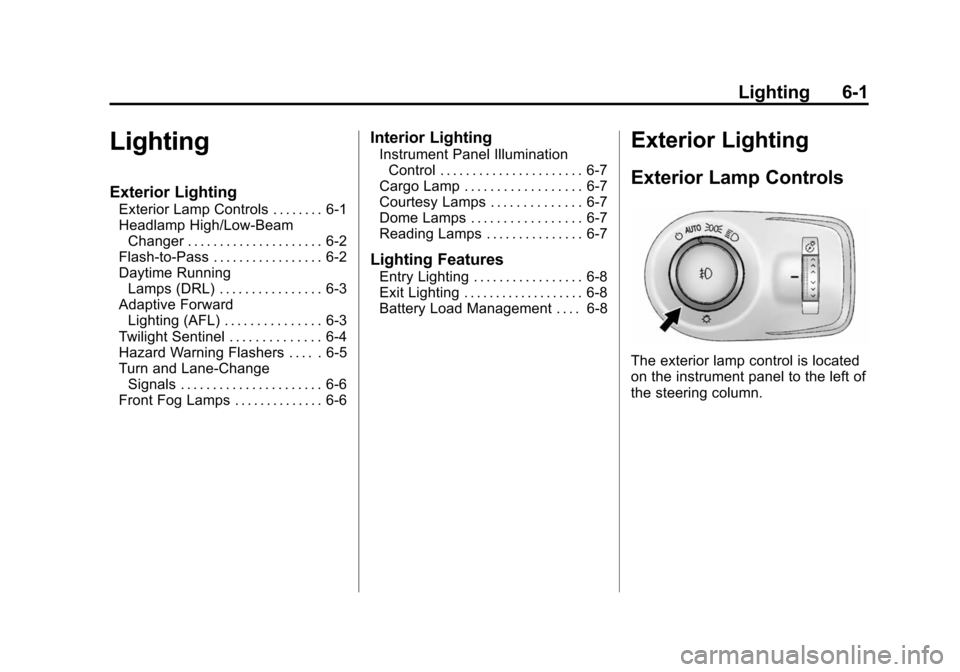
The exterior lamp control is located
on the instrument panel to the left of
the steering column.
Page 182 of 502

Black plate (2,1)Cadillac SRX Owner Manual (Include Mex) - 2012
6-2 Lighting
It controls the following systems:
.Headlamps
.Taillamps
.Parking Lamps
.License Plate Lamps
.Instrument Panel Lights
.Fog Lamps
The exterior lamps control has
four positions:
O(Off): Briefly turn to this position
to turn the automatic light control off
or on again.
AUTO (Automatic): Turns the
headlamps on automatically at
normal brightness, together with
the following:
.Parking Lamps
.Taillamps
.License Plate Lamps
.Instrument Panel Lights
;(Parking Lamps): Turns the
parking lamps on together with
the following:
.Taillamps
.License Plate Lamps
.Instrument Panel Lights
2(Headlamps): Turns the
headlamps on together with the
lamps listed below. A warning chime
sounds if the driver door is opened
when the ignition switch is off and
the headlamps are on.
.Parking Lamps
.Taillamps
.License Plate Lamps
.Instrument Panel Lights
#(Front Fog Lamps): For
vehicles with fog lamps, press to
turn the lamps on or off.
See Front Fog Lamps on page 6‑6.
Headlamp High/
Low-Beam Changer
Push the turn signal/lane change
lever away from you and release, to
turn the high beams on. To return to
low beams, push the lever again or
pull it toward you and release.
This indicator light turns on in the
instrument panel cluster when the
high‐beam headlamps are on.
Flash-to-Pass
The flash‐to‐pass feature works with
the low beams or Daytime Running
Lamps (DRL) on or off.
To flash the high beams, pull the
turn signal/lane change lever all the
way toward you, then release it.
Page 236 of 502

Black plate (46,1)Cadillac SRX Owner Manual (Include Mex) - 2012
7-46 Infotainment System
P(Power):Press to turn the
RSA on or off.
SRCE (Source): Press to select
between the radio, CD, and if these
features are available: DVD, front or
rear auxiliary, HDD, USB. The front
radio may override the rear
selection as required.
© ¨(Seek): While listening to the
radio, press to go to the previous or
to the next station and stay there.
If the front seat passengers are
listening to the radio, this function
may be inactive on some radios.
Press and hold
©or¨until “Tune”
displays. Continue to press
©or¨to
tune to an individual station. Tune
stays active until
©or¨has not
been pressed for several seconds.
If the front seat passengers are
listening to the radio, this function
may be inactive on some radios. While listening to a disc, press
¨to
go to the next track or chapter on
the disc. Press
©to go back to the
start of the current track or chapter if
more than 10 seconds have played.
If the front seat passengers are
listening to a disc, this function may
be inactive on some radios. Press
and hold
©or¨to fast reverse or
fast forward.
When a DVD video menu is being
displayed, press
©or¨to cursor up
or down on the menu. Hold
©or¨to
cursor left or right on the menu.
PROG (Program): Press to go to
the next preset radio station or
channel set on the main radio. If the
front seat passengers are listening
to the radio, this function may be
inactive on some radios. When a CD or DVD audio disc is
playing, press PROG to go to the
beginning of the disc or display disc
info. If the front seat passengers are
listening to a disc, this function may
be inactive on some radios.
When a disc is playing in the CD or
DVD changer, press and hold
PROG to select the next disc,
if multiple discs are loaded. If the
front seat passengers are listening
to a disc, this function may be
inactive on some radios.
The PROG button may be used
to access the menu of an MP3.
Once in the menu, use
©or¨to
make selections.
When a DVD video menu is
displayed, press PROG, or press
and hold PROG to perform the
menu function, then press ENTER.
Page 494 of 502

Black plate (6,1)Cadillac SRX Owner Manual (Include Mex) - 2012
i-6 INDEX
General InformationService and Maintenance . . . . . 11-1
Towing . . . . . . . . . . . . . . . . . . . . . . . . 9-52
Vehicle Care . . . . . . . . . . . . . . . . . . 10-2
Glove Box . . . . . . . . . . . . . . . . . . . . . . 4-1
GM Mobility Reimbursement Program . . . . . . . . . . . . . . . . . . . . . . 13-7
H
Halogen Bulbs . . . . . . . . . . . . . . . . 10-31
Hazard Warning Flashers . . . . . . . 6-5
Head Restraints . . . . . . . . . . . . . . . . 3-2
Headlamps . . . . . . . . . . . . . . . . . . . 10-32
Adaptive ForwardLighting (AFL) . . . . . . . . . . . . . . . . 6-3
Aiming . . . . . . . . . . . . . . . . . . . . . . 10-28
Bulb Replacement . . . . . . . . . . 10-31
Daytime Running Lamps (DRL) . . . . . . . . . . . . . . . . . 6-3
Flash-to-Pass . . . . . . . . . . . . . . . . . . 6-2
High Intensity Discharge (HID) Lighting . . . . . . . . . . . . . 10-31 Headlamps (cont.)
High-Beam On Light . . . . . . . . . . 5-26
High/Low Beam Changer . . . . . . 6-2
Lamps On Reminder . . . . . . . . . 5-27
Turn Signal Lamps . . . . . . . . . 10-37
Twilight Sentinel . . . . . . . . . . . . . . . 6-4
Washer . . . . . . . . . . . . . . . . . . . . . . . . 5-6
Heated Rear Seats . . . . . . . . . . . . . . . . . . . 3-13
Steering Wheel . . . . . . . . . . . . . . . . 5-3
Heated and Ventilated Front Seats . . . . . . . . . . . . . . . . . . . . . . . . 3-10
Heated Mirrors . . . . . . . . . . . . . . . . . 2-21
Heater Engine . . . . . . . . . . . . . . . . . . . . . . . . 9-22
High-Beam On Light . . . . . . . . . . . 5-26
High-Speed Operation . . . . . . . . 10-57
Highway Hypnosis . . . . . . . . . . . . . . 9-8
Hill and Mountain Roads . . . . . . . . 9-8
Hill Start Assist (HSA) . . . . . . . . . 9-33
Hood . . . . . . . . . . . . . . . . . . . . . . . . . . 10-5
Horn . . . . . . . . . . . . . . . . . . . . . . . . . . . . 5-3
How to Wear Safety Belts Properly . . . . . . . . . . . . . . . . . . . . . . 3-15
I
Ignition Positions . . . . . . . . . . . . . . 9-18
Immobilizer . . . . . . . . . . . . . . . . . . . . 2-19
Infants and Young Children,Restraints . . . . . . . . . . . . . . . . . . . . 3-38
Infotainment . . . . . . . . . . . . . . . . . . . . 7-1
Instrument Cluster . . . . . . . . . . . . . 5-11
Introduction . . . . . . . . . . . . . . . . . . . . . . . iii
J
Jump Starting . . . . . . . . . . . . . . . . . 10-88
K
Key and Lock Messages . . . . . . . 5-36
Keyless Entry Remote (RKE) System . . . . . . . . 2-3
Keys . . . . . . . . . . . . . . . . . . . . . . . . . . . . 2-2
Page 495 of 502

Black plate (7,1)Cadillac SRX Owner Manual (Include Mex) - 2012
INDEX i-7
L
Labeling, Tire Sidewall . . . . . . . . 10-50
Lamp Messages . . . . . . . . . . . . . . . 5-36
LampsCargo . . . . . . . . . . . . . . . . . . . . . . . . . . 6-7
Courtesy . . . . . . . . . . . . . . . . . . . . . . . 6-7
Daytime Running (DRL) . . . . . . . 6-3
Dome . . . . . . . . . . . . . . . . . . . . . . . . . . 6-7
Exterior Controls . . . . . . . . . . . . . . . 6-1
Front Fog . . . . . . . . . . . . . . . . . . . . . . 6-6
License Plate . . . . . . . . . . . . . . . 10-40
Malfunction Indicator . . . . . . . . . 5-18
On Reminder . . . . . . . . . . . . . . . . . 5-27
Reading . . . . . . . . . . . . . . . . . . . . . . . 6-7
Lap-Shoulder Belt . . . . . . . . . . . . . 3-16
LATCH System Replacing Parts after aCrash . . . . . . . . . . . . . . . . . . . . . . . 3-53
LATCH, Lower Anchors and Tethers for Children . . . . . . . . . . 3-45
Liftgate Carbon Monoxide . . . . . . . . . . . . . 2-14 Light
Adaptive Forward Lighting
(AFL) Light . . . . . . . . . . . . . . . . . . 5-27
StabiliTrak
®OFF . . . . . . . . . . . . . 5-23
Lighter, Cigarette . . . . . . . . . . . . . . . 5-9
Lighting Adaptive Forward . . . . . . . . . . . . . . 6-3
Entry . . . . . . . . . . . . . . . . . . . . . . . . . . 6-8
Exit . . . . . . . . . . . . . . . . . . . . . . . . . . . . 6-8
Illumination Control . . . . . . . . . . . . 6-7
Lights
Airbag Readiness . . . . . . . . . . . . . 5-16
Antilock Brake System(ABS) Warning . . . . . . . . . . . . . . 5-22
Brake System Warning . . . . . . . 5-21
Charging System . . . . . . . . . . . . . 5-18
Cruise Control . . . . . . . . . . . . . . . . 5-28
Electric Parking Brake . . . . . . . . 5-21
Engine Oil Pressure . . . . . . . . . . 5-25
Flash-to-Pass . . . . . . . . . . . . . . . . . . 6-2
Front Fog Lamp . . . . . . . . . . . . . . 5-27
Fuel Economy . . . . . . . . . . . . . . . . 5-25
High-Beam On . . . . . . . . . . . . . . . . 5-26 Lights (cont.)
High/Low Beam Changer . . . . . . 6-2
Low Fuel Warning . . . . . . . . . . . . 5-26
Safety Belt Reminders . . . . . . . . 5-15
Security . . . . . . . . . . . . . . . . . . . . . . 5-26
Tire Pressure . . . . . . . . . . . . . . . . . 5-24
Traction Control System
(TCS)/StabiliTrak
®. . . . . . . . . . 5-24
Traction Off . . . . . . . . . . . . . . . . . . . 5-23
Limited-Slip Rear Axle . . . . . . . . . 9-37
Locks Door . . . . . . . . . . . . . . . . . . . . . . . . . . 2-11
Power Door . . . . . . . . . . . . . . . . . . . 2-12
Safety . . . . . . . . . . . . . . . . . . . . . . . . 2-13
Loss of Control . . . . . . . . . . . . . . . . . 9-5
Low Fuel Warning Light . . . . . . . . 5-26
Lower Anchors and Tethers for Children (LATCH
System) . . . . . . . . . . . . . . . . . . . . . . 3-45
Lumbar Adjustment . . . . . . . . . . . . . 3-5 Front Seats . . . . . . . . . . . . . . . . . . . . 3-5