Page 370 of 502
Black plate (38,1)Cadillac SRX Owner Manual (Include Mex) - 2012
10-38 Vehicle Care
A. Turn Signal Lamp
B. Back-Up Bulb/Socket
6. Turn the turn signal lamp (A) bulb socket counterclockwise to
remove it from the taillamp
assembly.
7. Pull the bulb straight out from the socket. 8. Press a new bulb into the
socket, insert it into the taillamp
assembly and turn the bulb
socket clockwise until it clicks.
9. Reinstall the taillamp assembly and tighten the screws.
10. Reinstall the taillamp cover by snapping it into place.
11. Push the push pin to secure the taillamp cover.
Back-Up Lamps
To replace one of these bulbs:
1. Open the liftgate. See Liftgate
on page 2‑14.
A. Push Pin
B. Taillamp Cover
2. Pull on push pin (A) to release the taillamp cover (B).
3. Remove the taillamp cover from the lamp assembly by pulling
rearward from the top to
unfasten from snap tabs.
Page 371 of 502
Black plate (39,1)Cadillac SRX Owner Manual (Include Mex) - 2012
Vehicle Care 10-39
4. Remove the two screws from thetaillamp assembly.
5. Pull the taillamp assembly straight back to remove.A. Turn Signal Lamp
B. Back-Up Bulb/Socket
6. Disconnect the wire harness from the back-up
bulb/socket (B).
7. Turn the back-up bulb socket counterclockwise to remove it
from the taillamp assembly. 8. Press a new bulb/socket into the
taillamp assembly and turn the
bulb/socket clockwise until it
clicks.
9. Reinstall the taillamp assembly and tighten the screws.
10. Reinstall the taillamp cover by snapping it into place.
11. Push the push pin to secure the taillamp cover.
Page 379 of 502
Black plate (47,1)Cadillac SRX Owner Manual (Include Mex) - 2012
Vehicle Care 10-47
Rear Compartment Fuse BlockFuses Usage
SPARE
FUSES Spare Fuses
AOS MDL Automatic Occupant
Sensing Module
SPARE Not Used
SPARE Not Used
SPARE Not Used
PASS DR
WDO SW Passenger Door
Window Switch
DRV
PWR SEAT Driver Power Seat
PASS DR
PWR SEAT Passenger/Driver
Power Seats
MDL TRLR Trailer Module
RPA MDL Rear Parking Assist
Module
RDM Rear Drive Module
PRK LPS TRLR Trailer Park Lamps Fuses Usage
FUEL
PUMP Fuel Pump
* SEC Security
INFOTMNT Infotainment
* TRLR EXP Trailer Export
WPR REAR Rear Wiper MIR
WDO MDL Mirror Window
Module
VICS Vehicle Information
Communications
System (Export)
CNSTR VENT Canister Vent
LGM
LOGIC Lift Gate Module
Logic
CAMERA Rear Vision Camera
FRT
VENT SEAT Front Ventilated
Seats
TRLR MDL Trailer Module
Page 425 of 502
Black plate (93,1)Cadillac SRX Owner Manual (Include Mex) - 2012
Vehicle Care 10-93
Dinghy Towing
Front-wheel‐drive and
all-wheel-drive vehicles may be
dinghy towed from the front.
These vehicles can also be towed
by placing them on a platform trailer
with all four wheels off of the
ground. For other towing options,
see“Dolly Towing” following in this
section.
Notice: If 105 km/h (65 mph) is
exceeded while towing the
vehicle, it could be damaged.
Never exceed 105 km/h (65 mph)
while towing the vehicle.
For vehicles being dinghy towed,
the vehicle should be run at the
beginning of each day and at each
RV fuel stop for about five minutes.
This will ensure proper lubrication of
transmission components.
To tow the vehicle from the front
with all four wheels on the ground:
1. Position the vehicle that will be towed and secure it to the
towing vehicle.2. Remove the shift lever boot bypulling up on the rear of the trim
plate.
Page 427 of 502
Black plate (95,1)Cadillac SRX Owner Manual (Include Mex) - 2012
Vehicle Care 10-95
Dolly Towing
(Front-Wheel‐Drive Vehicles)
To tow the vehicle from the front
with the rear wheels on the ground,
do the following:
1. Put the front wheels on a dolly.
2. Move the shift lever to P (Park).
See Shifting Into Park on
page 9‑22.
3. Set the parking brake. 4. Secure the vehicle to the dolly.
5. Follow the dolly manufacturer's
instructions for preparing the
vehicle and dolly for towing.
6. Release the parking brake.
Towing the Vehicle From
the Rear
Notice: Towing the vehicle from
the rear could damage it. Also,
repairs would not be covered by
the vehicle warranty. Never have
the vehicle towed from the rear.
Page 435 of 502
Black plate (103,1)Cadillac SRX Owner Manual (Include Mex) - 2012
Vehicle Care 10-103
Use the following guidelines for
proper floor mat usage.
.The original equipment floor
mats were designed for your
vehicle. If the floor mats need
replacing, it is recommended
that certified floor mats be
purchased. Non-certified floor
mats may not fit properly and
may interfere with the
accelerator or brake pedal.
Always check that the floor mats
do not interfere with the pedals.
.Use the floor mat with the
correct side up. Do not turn
it over.
.Do not place anything on top of
the driver side floor mat.
.Use only a single floor mat on
the driver side.
.Do not place one floor mat on
top of another.
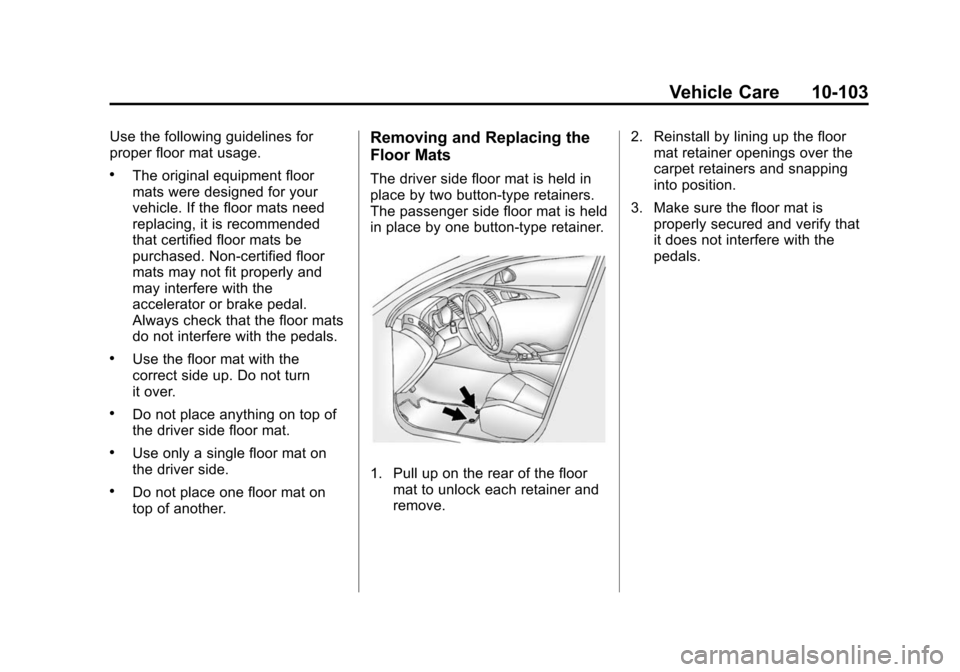
Removing and Replacing the
Floor Mats
The driver side floor mat is held in
place by two button-type retainers.
The passenger side floor mat is held
in place by one button-type retainer.
1. Pull up on the rear of the floormat to unlock each retainer and
remove. 2. Reinstall by lining up the floor
mat retainer openings over the
carpet retainers and snapping
into position.
3. Make sure the floor mat is properly secured and verify that
it does not interfere with the
pedals.
Page 466 of 502

Black plate (8,1)Cadillac SRX Owner Manual (Include Mex) - 2012
13-8 Customer Information
Cadillac Owner Privileges™
.Emergency Fuel Delivery:
Delivery of enough fuel for the
vehicle to get to the nearest
service station.
.Lock‐Out Service:Service to
unlock the vehicle if you are
locked out. A remote unlock may
be available if you have OnStar.
For security reasons, the driver
must present identification
before this service is given.
.Emergency Tow From a Public
Road or Highway: Tow to the
nearest Cadillac dealer for
warranty service, or if the vehicle
was in a crash and cannot be
driven. Assistance is also given
when the vehicle is stuck in the
sand, mud, or snow.
.Flat Tire Change: Service to
change a flat tire with spare tire.
The spare tire, if equipped,
must be in good condition and properly inflated. It is your
responsibility for the repair or
replacement of the tire if it is not
covered by the warranty.
.Battery Jump Start:
Service to
jump start a dead battery.
.Trip Routing Service: Detailed
maps of North America are
provided when requested either
with the most direct route or the
most scenic route. Additional
travel information is also
available. Allow three weeks
for delivery.
.Trip Interruption Benefits
and Service: If your trip is
interrupted due to a warranty
failure, incidental expenses
may be reimbursed during the
5 years/160 000 km (100,000 mi)
Powertrain warranty period.
Items considered are hotel,
meals, and rental car.
Cadillac Technician Roadside
Service (U.S. only)
Cadillac's exceptional Roadside
Service is more than an auto club or
towing service. It provides every
Cadillac owner in the United States
with the advantage of contacting
a Cadillac advisor and, where
available, a Cadillac trained dealer
technician who can provide on-site
service.
A dealer technician will travel to
your location within a 30 mile
radius of a participating Cadillac
dealership. If beyond this radius,
we will arrange to have your car
towed to the nearest Cadillac
dealership. Each technician travels
with a specially equipped service
vehicle complete with the necessary
Cadillac parts and tools required to
handle most roadside repairs.
Page 479 of 502

Black plate (21,1)Cadillac SRX Owner Manual (Include Mex) - 2012
Customer Information 13-21
if the vehicle is leased, with the
consent of the lessee; in response
to an official request by police or
similar government office; as part of
GM's defense of litigation through
the discovery process; or, as
required by law. Data that GM
collects or receives may also be
used for GM research needs or may
be made available to others for
research purposes, where a need is
shown and the data is not tied to a
specific vehicle or vehicle owner.
OnStar®
If the vehicle is equipped with an
active OnStar system, that system
may also record data in crash or
near crash‐like situations. The
OnStar Terms and Conditions
provides information on data
collection and use and is available
at www.onstar.com (U.S.) or
www.onstar.ca (Canada), or by
pressing the
Qbutton and
speaking to an advisor. See OnStar
Overview on page 14‑1 for more
information.
Navigation System
If the vehicle has a navigation
system, use of the system may
result in the storage of destinations,
addresses, telephone numbers, and
other trip information. Refer to the
navigation manual for information
on stored data and for deletion
instructions.
Radio Frequency
Identification (RFID)
RFID technology is used in some
vehicles for functions such as tire
pressure monitoring and ignition
system security, as well as in
connection with conveniences
such as key fobs for remote door
locking/unlocking and starting, and
in-vehicle transmitters for garage
door openers. RFID technology in
GM vehicles does not use or record
personal information or link with
any other GM system containing
personal information.
Radio Frequency
Statement
This vehicle has systems that
operate on a radio frequency that
comply with Part 15 of the Federal
Communications Commission (FCC)
rules and with Industry Canada
Standards RSS‐GEN/210/220/310.
Operation is subject to the following
two conditions:
1. The device may not cause harmful interference.
2. The device must accept any interference received, including
interference that may cause
undesired operation of the
device.
Changes or modifications to any of
these systems by other than an
authorized service facility could void
authorization to use this equipment.


